iOS(UIKit)
Download
Focus Mode
Font Size
Overview
The TUIChat emoji panel is built with emojis, and you can also add custom emojis as needed. This document describes how to add custom emojis.
Built-in emoji panel | Custom emoji panel |
 | 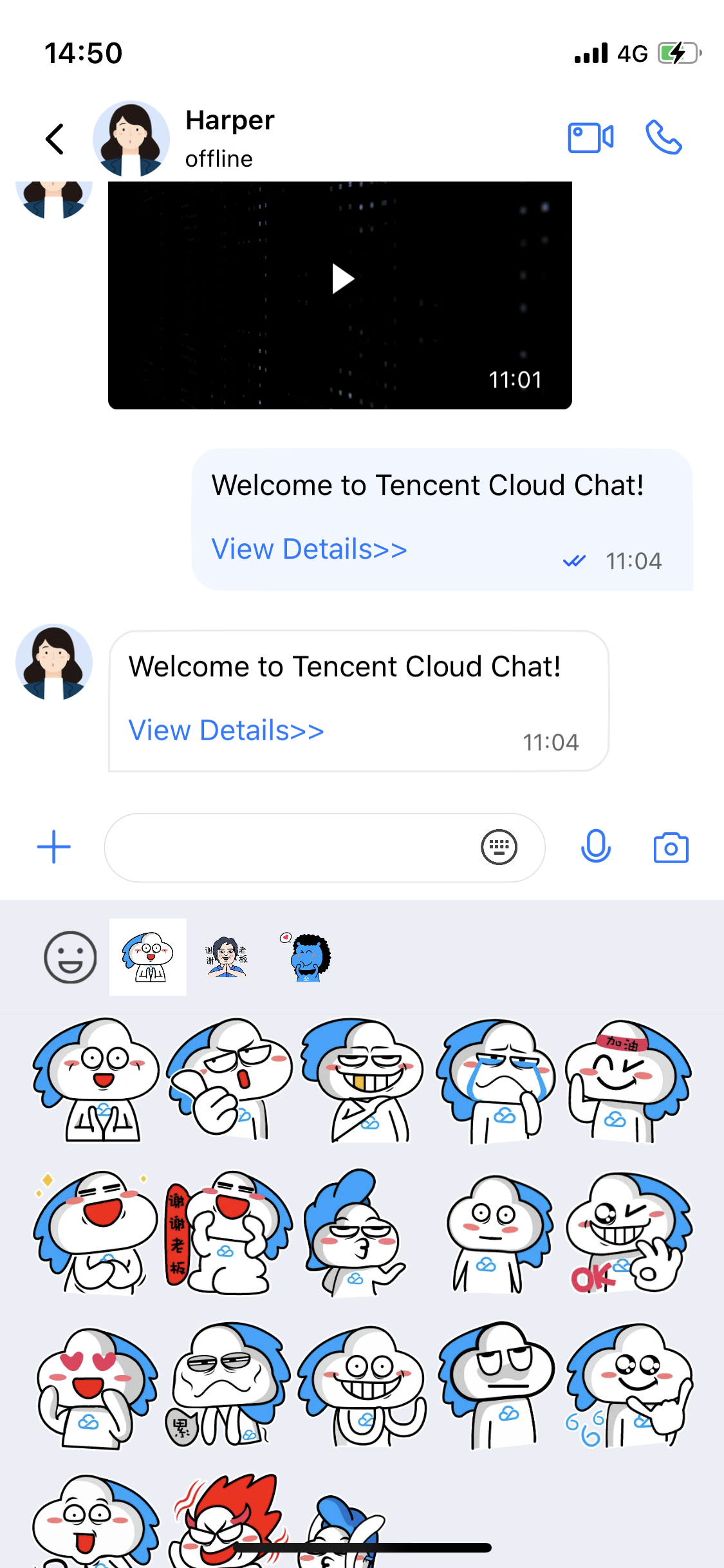 |
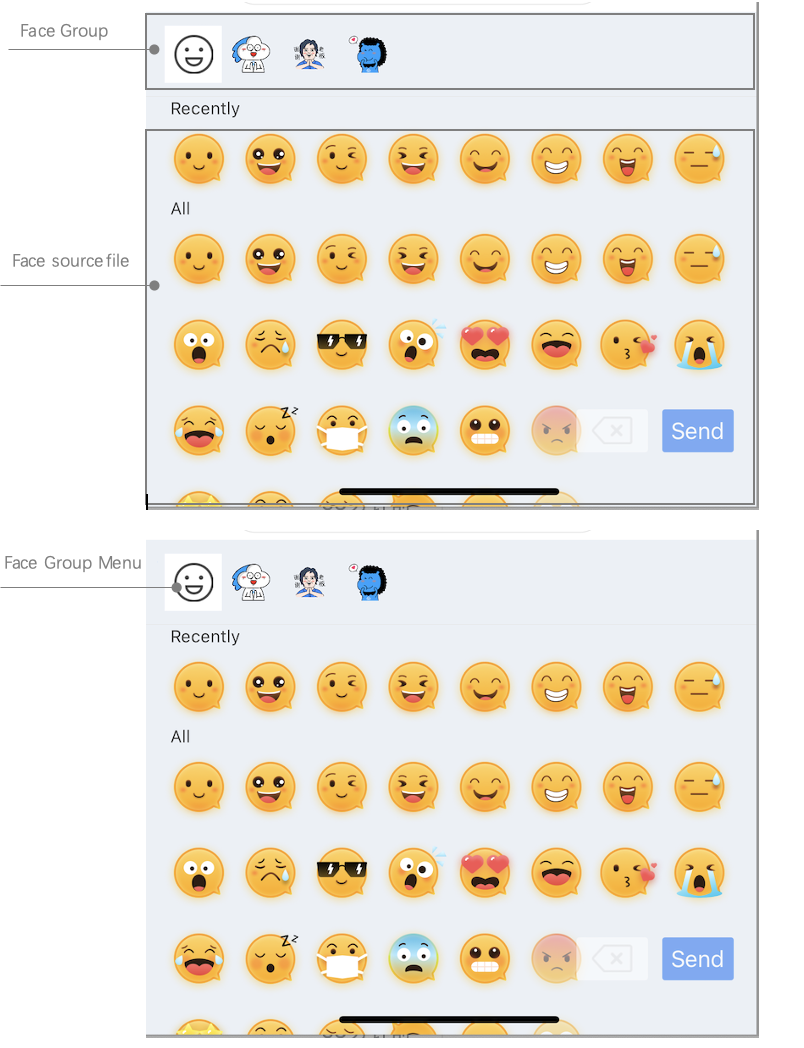
The emoji panel consists of two parts as shown below:
The management of emoji resource images, including the display of emoji images.
The management of emoji groups, including thumbnails of emoji groups and the send button.
Adding a Custom Sticker
Add a custom sticker in just two steps:
1. Prepare the emoji resources.
2. Load the sticker when starting the app.
Note that TUIChat is built with the logic for sending and parsing stickers so that you can easily use custom stickers on multiple terminals.
The following describes how to add the
programer custom sticker as shown below: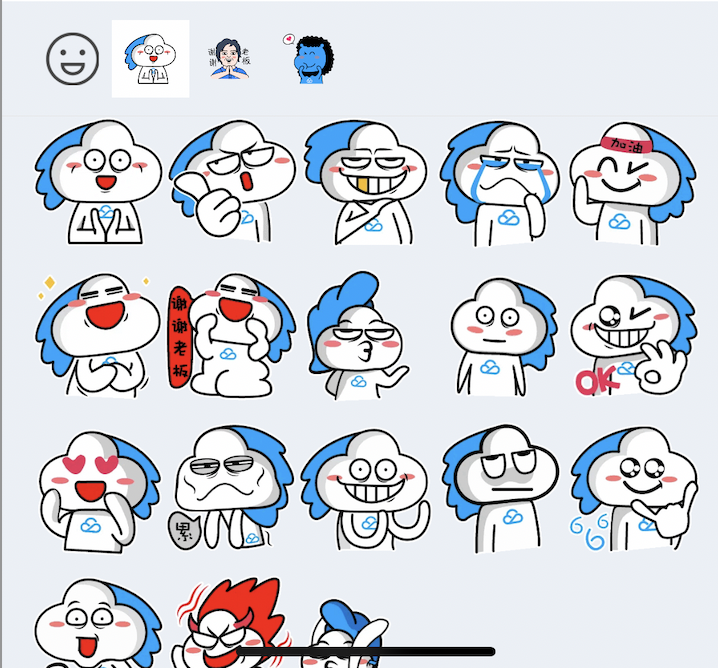
Preparing emoji resources
Before adding a sticker, prepare a set of copyrighted emoji resources. Then, package your emoji images into a bundle file as shown below:
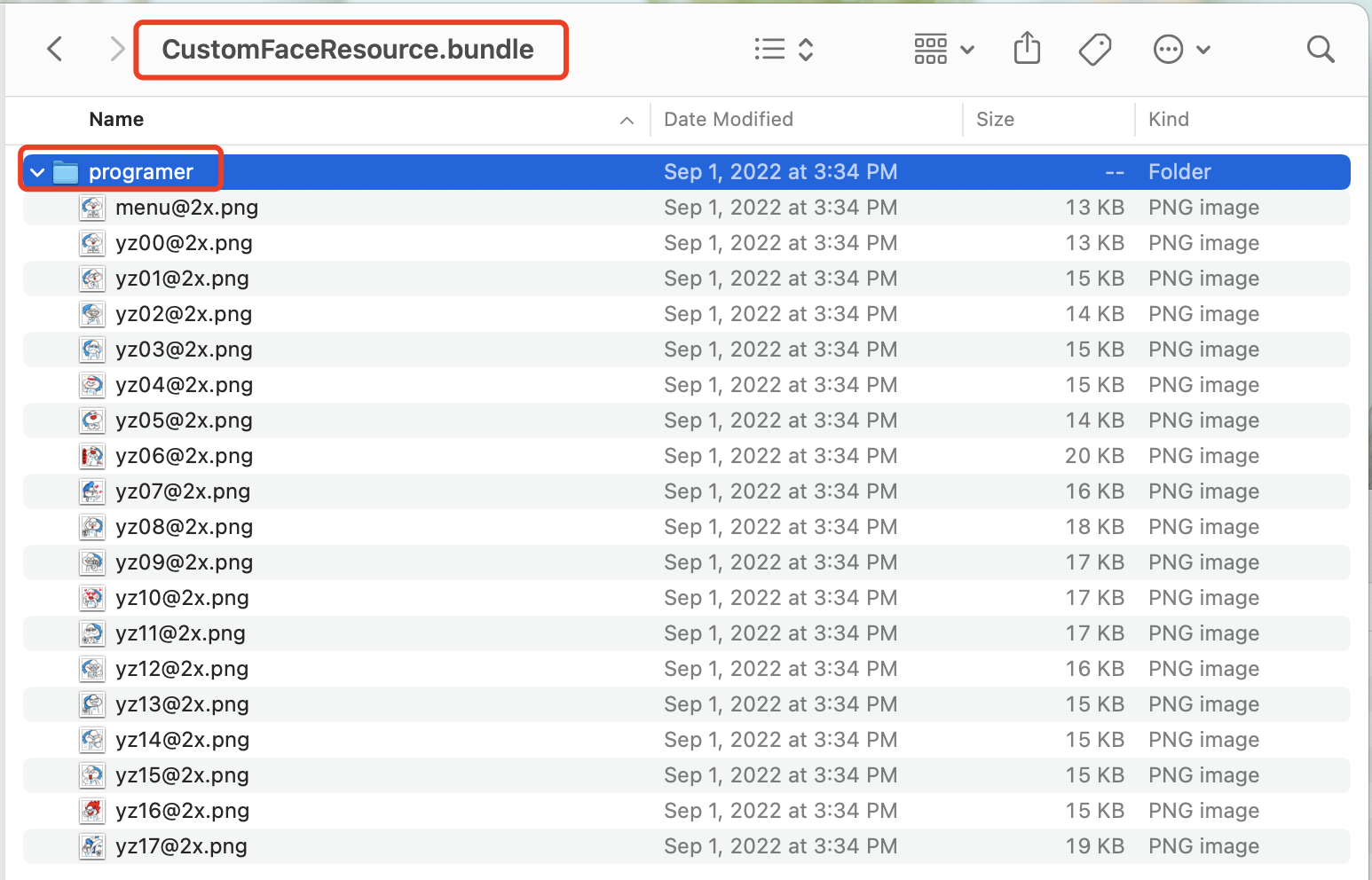
Loading the sticker
Drag the
CustomFaceResource.bundle custom sticker containing programer emoji resources to your Xcode project. Then, load it when starting the app.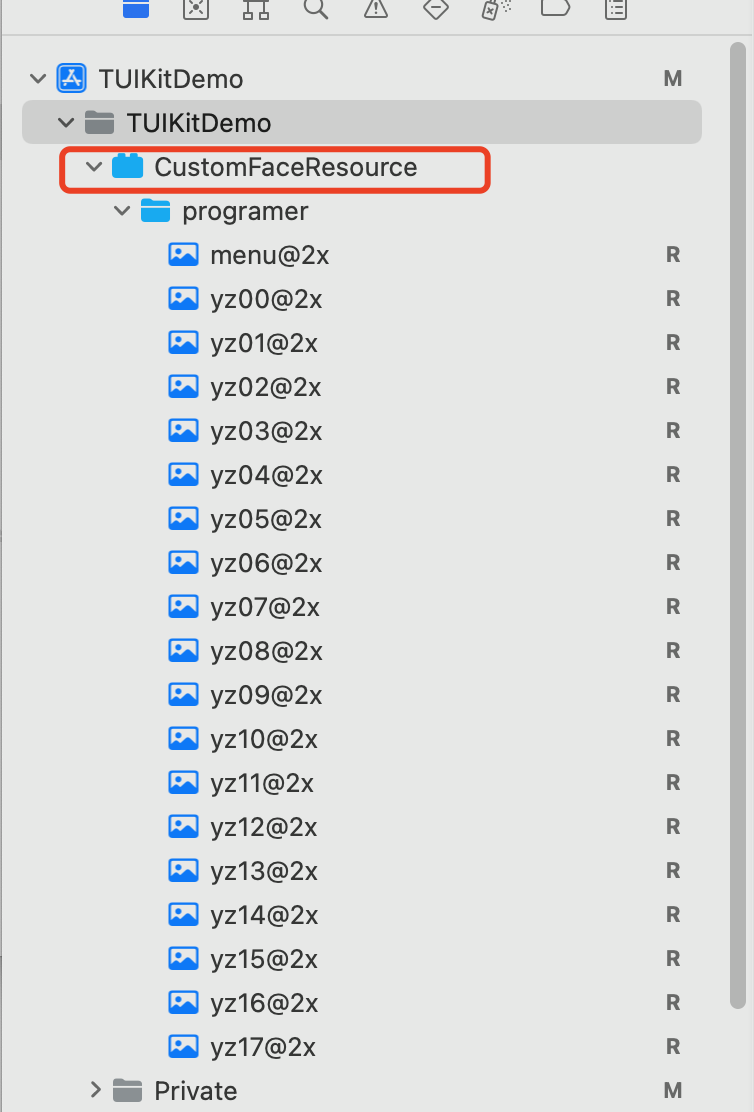
func application(_ application: UIApplication, didFinishLaunchingWithOptions launchOptions: [UIApplication.LaunchOptionsKey: Any]?) -> Bool {// ...self.setupCustomSticker()return YES}func setupCustomSticker() {guard let service = TIMCommonMediator.shared.getObject(for: TUIEmojiMeditorProtocol.self) else {assertionFailure("There's not any object implement TUIEmojiMeditorProtocol")return}let bundlePath = TUISwift.tuiBundlePath("CustomFaceResource", key: "TIMAppKit.TUIKit")// 4350 groupvar faces4350 = [TUIFaceCellData]()for i in 0...17 {let data = TUIFaceCellData()let name = String(format: "yz%02d", i)let path = "4350/\\(name)"data.name = namedata.path = bundlePath + "/" + pathfaces4350.append(data)}if faces4350.count > 0 {let group4350 = TUIFaceGroup()group4350.groupIndex = 1group4350.groupPath = bundlePath + "/4350/"group4350.faces = faces4350group4350.rowCount = 2group4350.itemCountPerRow = 5group4350.menuPath = bundlePath + "/4350/menu"service.appendFaceGroup(group4350)}// 4351 groupvar faces4351 = [TUIFaceCellData]()for i in 0...15 {let data = TUIFaceCellData()let name = String(format: "ys%02d", i)let path = "4351/\\(name)"data.name = namedata.path = bundlePath + "/" + pathfaces4351.append(data)}if faces4351.count > 0 {let group4351 = TUIFaceGroup()group4351.groupIndex = 2group4351.groupPath = bundlePath + "/4351/"group4351.faces = faces4351group4351.rowCount = 2group4351.itemCountPerRow = 5group4351.menuPath = bundlePath + "/4351/menu"service.appendFaceGroup(group4351)}// 4352 groupvar faces4352 = [TUIFaceCellData]()for i in 0...16 {let data = TUIFaceCellData()let name = String(format: "gcs%02d", i)let path = "4352/\\(name)"data.name = namedata.path = bundlePath + "/" + pathfaces4352.append(data)}if faces4352.count > 0 {let group4352 = TUIFaceGroup()group4352.groupIndex = 3group4352.groupPath = bundlePath + "/4352/"group4352.faces = faces4352group4352.rowCount = 2group4352.itemCountPerRow = 5group4352.menuPath = bundlePath + "/4352/menu"service.appendFaceGroup(group4352)}}
- (BOOL)application:(UIApplication *)application didFinishLaunchingWithOptions:(NSDictionary *)launchOptions {app = self;// Load the emoji resources when starting the app[self setupCustomSticker];return YES;}- (void)setupCustomSticker {// 1. Get the path of the bundle file of the custom sticker.NSString *customFaceBundlePath = [[NSBundle mainBundle] pathForResource:@"CustomFaceResource" ofType:@"bundle"];// 2. Load the custom emoji group// 2.1 Load the `programer` emoji resource images and parse them into `TUIFaceCellData`NSMutableArray<TUIFaceCellData *> *faceItems = [NSMutableArray array];for (int i = 0; i <= 17; i++) {TUIFaceCellData *data = [[TUIFaceCellData alloc] init];// The filename of the emoji resource images (the extension can be saved) for multi-terminal connection (which requires that filenames are consistent)data.name = [NSString stringWithFormat:@"yz%02d", i];// The path of the emoji resource images for local displaydata.path = [customFaceBundlePath stringByAppendingPathComponent:[NSString stringWithFormat:@"programer/%@", data.name]];[faceItems addObject:data];}// 2.2 Create the `programer` emoji group and parse it into `TUIFaceGroup`TUIFaceGroup *programGroup = [[TUIFaceGroup alloc] init];// Indicate the serial number of the current emoji group on the emoji panel for multi-terminal connection (which can be used together with the emoji name to find an image on the receiver's device)// Note that `groupIndex` starts from `0` and indicates the actual position of the current sticker on the emoji panel (`0` is the default value for the built-in `emoji` emoji group)programGroup.groupIndex = 1;// The root path of the current sticker in the bundle file of the custom emojisprogramGroup.groupPath = [customFaceBundlePath stringByAppendingPathComponent:@"programer/"];// The emoji resources in the current stickerprogramGroup.faces = faceItems;// The layout of the current stickerprogramGroup.rowCount = 2;programGroup.itemCountPerRow = 5;// The path of the thumbnail of the current sticker (without the extension)programGroup.menuPath = [customFaceBundlePath stringByAppendingPathComponent:@"programer/menu"];// 3. Add the `programer` emoji group to the emoji panelid<TUIEmojiMeditorProtocol> service = [[TIMCommonMediator share] getObject:@protocol(TUIEmojiMeditorProtocol)];[service appendFaceGroup:programGroup];}
Multi-terminal connection
TUIChat is built with the logic for sending and parsing stickers, and you only need to make sure that the following two attributes are consistent on different platforms:
The filenames of images in the sticker are consistent; that is, the values of the
name field in TUIFaceCellData are consistent on multiple terminals when the stickers are loaded during app startup.The order of stickers on the emoji panel is consistent; that is, the values of the
groupIndex field in TUIFaceGroup are consistent on multiple terminals when the stickers are loaded during app startup.If the above two values are consistent, TUIChat's built-in logic for sending stickers will send the emoji filename and the index information of the sticker to other terminals for multi-terminal connection.
Note that
groupIndex starts from 0 and indicates the actual position of the current sticker on the emoji panel (0 is the default value for the built-in emoji emoji group).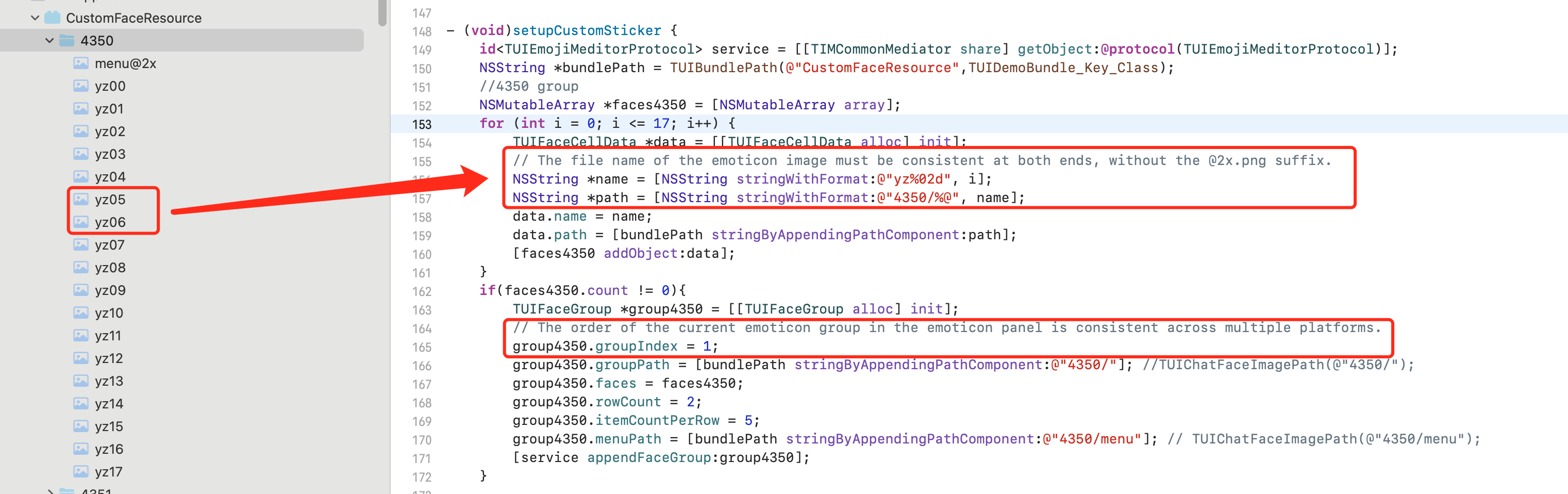
Advanced Configuration of the Emoji Panel
Re-sorting emoji groups on the emoji panel
You can re-sort emoji groups on the emoji panel of TUIChat. Specifically, you only need to call the
- appendFaceGroup: method of TUIConfig as needed.To place the built-in
emoji emoji group after custom emojis, perform the following steps:Get the built-in
TUIConfig.defaultConfig.faceGroups emoji groups on the current emoji panel.Re-sort the emoji groups.
Assign the value of the list of re-sorted emoji groups to the emoji panel.
func setupCustomSticker() {guard let service = TIMCommonMediator.shared.getObject(for: TUIEmojiMeditorProtocol.self) else {assertionFailure("There's not any object implement TUIEmojiMeditorProtocol")return}let bundlePath = TUISwift.tuiBundlePath("CustomFaceResource", key: "TIMAppKit.TUIKit")// 4350 groupvar faces4350 = [TUIFaceCellData]()for i in 0...17 {let data = TUIFaceCellData()let name = String(format: "yz%02d", i)let path = "4350/\\(name)"data.name = namedata.path = bundlePath + "/" + pathfaces4350.append(data)}if faces4350.count > 0 {let group4350 = TUIFaceGroup()group4350.groupIndex = 1group4350.groupPath = bundlePath + "/4350/"group4350.faces = faces4350group4350.rowCount = 2group4350.itemCountPerRow = 5group4350.menuPath = bundlePath + "/4350/menu"service.appendFaceGroup(group4350)}// 4351 groupvar faces4351 = [TUIFaceCellData]()for i in 0...15 {let data = TUIFaceCellData()let name = String(format: "ys%02d", i)let path = "4351/\\(name)"data.name = namedata.path = bundlePath + "/" + pathfaces4351.append(data)}if faces4351.count > 0 {let group4351 = TUIFaceGroup()group4351.groupIndex = 2group4351.groupPath = bundlePath + "/4351/"group4351.faces = faces4351group4351.rowCount = 2group4351.itemCountPerRow = 5group4351.menuPath = bundlePath + "/4351/menu"service.appendFaceGroup(group4351)}// 4352 groupvar faces4352 = [TUIFaceCellData]()for i in 0...16 {let data = TUIFaceCellData()let name = String(format: "gcs%02d", i)let path = "4352/\\(name)"data.name = namedata.path = bundlePath + "/" + pathfaces4352.append(data)}if faces4352.count > 0 {let group4352 = TUIFaceGroup()group4352.groupIndex = 3group4352.groupPath = bundlePath + "/4352/"group4352.faces = faces4352group4352.rowCount = 2group4352.itemCountPerRow = 5group4352.menuPath = bundlePath + "/4352/menu"service.appendFaceGroup(group4352)}}
- (void)setupCustomSticker {// 1. Get the path of the bundle file of the custom sticker.NSString *customFaceBundlePath = [[NSBundle mainBundle] pathForResource:@"CustomFaceResource" ofType:@"bundle"];// 2. Load the custom emoji group// 2.1 Load the `programer` emoji resource images and parse them into `TUIFaceCellData`NSMutableArray<TUIFaceCellData *> *faceItems = [NSMutableArray array];for (int i = 0; i <= 17; i++) {TUIFaceCellData *data = [[TUIFaceCellData alloc] init];// The filename of the emoji resource images (the extension can be saved) for multi-terminal connection (which requires that filenames are consistent)data.name = [NSString stringWithFormat:@"yz%02d", i];// The path of the emoji resource images for local displaydata.path = [customFaceBundlePath stringByAppendingPathComponent:[NSString stringWithFormat:@"programer/%@", data.name]];[faceItems addObject:data];}// 2.2 Create the `programer` emoji group and parse it into `TUIFaceGroup`TUIFaceGroup *programGroup = [[TUIFaceGroup alloc] init];// Indicate the serial number of the current emoji group on the emoji panel for multi-terminal connection (which can be used together with the emoji name to find an image on the receiver's device)// Note that `groupIndex` starts from `0` and indicates the actual position of the current sticker on the emoji panel (`0` is the default value for the built-in `emoji` emoji group)programGroup.groupIndex = 0;// The root path of the current sticker in the bundle file of the custom emojisprogramGroup.groupPath = [customFaceBundlePath stringByAppendingPathComponent:@"programer/"];// The emoji resources in the current stickerprogramGroup.faces = faceItems;// The layout of the current stickerprogramGroup.rowCount = 2;programGroup.itemCountPerRow = 5;// The path of the thumbnail of the current sticker (without the extension)programGroup.menuPath = [customFaceBundlePath stringByAppendingPathComponent:@"programer/menu"];// 3. Add the `programer` emoji group to the front of the emoji panelid<TUIEmojiMeditorProtocol> service = [[TIMCommonMediator share] getObject:@protocol(TUIEmojiMeditorProtocol)];[service appendFaceGroup:programGroup];}
Note
The multi-terminal connection of stickers relies on the emoji names and the order of the emoji groups on the panel. Therefore, after adjusting the local order, you need to make sure that the
groupIndex is consistent with the actual order.Changing the thumbnail of an emoji group
When loading a custom emoji group, you can set the
menuPath attribute of the TUIFaceGroup as the path of the thumbnail (the @2x.png extension is not required) to customize the thumbnail of the emoji group.For example, set the
menu@2x.png image in the programer emoji group as the thumbnail.func setupCustomSticker() {// ...// 4350 groupvar faces4350 = [TUIFaceCellData]()for i in 0...17 {let data = TUIFaceCellData()let name = String(format: "yz%02d", i)let path = "4350/\\(name)"data.name = namedata.path = bundlePath + "/" + pathfaces4350.append(data)}if faces4350.count > 0 {let group4350 = TUIFaceGroup()group4350.groupIndex = 1group4350.groupPath = bundlePath + "/4350/"group4350.faces = faces4350group4350.rowCount = 2group4350.itemCountPerRow = 5group4350.menuPath = bundlePath + "/4350/menu"service.appendFaceGroup(group4350)}// ...}
- (void)setupCustomSticker {....// 2.2 Create the `programer` emoji group and parse it into `TUIFaceGroup`TUIFaceGroup *programGroup = [[TUIFaceGroup alloc] init];....// The path of the thumbnail of the current sticker (without the extension)programGroup.menuPath = [customFaceBundlePath stringByAppendingPathComponent:@"programer/menu"];........}
Adjusting the layout of emoji images
Currently, the TUIChat emoji panel supports the following two layouts:
rowCount, which indicates the number of rows of images displayed in the current emoji group.itemCountPerRow, which indicates the number of emoji images displayed per row.For example, you can set to display the emoji images in the
programer emoji group as two rows per page, with up to five images per row.func setupCustomSticker() {// ...// 4350 groupvar faces4350 = [TUIFaceCellData]()for i in 0...17 {let data = TUIFaceCellData()let name = String(format: "yz%02d", i)let path = "4350/\\(name)"data.name = namedata.path = bundlePath + "/" + pathfaces4350.append(data)}if faces4350.count > 0 {let group4350 = TUIFaceGroup()group4350.groupIndex = 1group4350.groupPath = bundlePath + "/4350/"group4350.faces = faces4350group4350.rowCount = 2group4350.itemCountPerRow = 5group4350.menuPath = bundlePath + "/4350/menu"service.appendFaceGroup(group4350)}// ...}
- (void)setupCustomSticker {...// 2.2 Create the `programer` emoji group and parse it into `TUIFaceGroup`TUIFaceGroup *programGroup = [[TUIFaceGroup alloc] init];// The layout of the current stickerprogramGroup.rowCount = 2;programGroup.itemCountPerRow = 5;...}
How Sticker Rendering Works
TUIChat is built with the mechanism for sending and rendering stickers, so you can ignore this section.
This section describes how to modify the source code or encode and pass through the content of a custom emoji.
Sending an emoji
The TUIChat emoji panel contains a
UICollectionView. When you click an emoji image, the - faceView:didSelectItemAtIndexPath: method of the TUIInputController will be triggered and send you the name of the selected emoji and the index information of the emoji group on the emoji panel.You can send an emoji in the callback in two steps:
Create an emoji message with the emoji name and emoji group index.
Call the
TUIChat method to send the emoji message.public func faceVerticalView(_ faceView: TUIFaceVerticalView, didSelectItemAtIndexPath indexPath: IndexPath) {let group = faceView.faceGroups[indexPath.section]if let face = group.faces?[indexPath.row] as? TUIFaceCellData {if group.isNeedAddInInputBar {inputBar?.addEmoji(face)updateRecentMenuQueue(face.name ?? "")} else {let message = V2TIMManager.sharedInstance().createFaceMessage(index: Int32(group.groupIndex), data: face.name?.data(using: .utf8) ?? Data())!delegate?.inputController(self, didSendMessage: message)}}}
- (void)faceView:(TUIFaceView *)faceView didSelectItemAtIndexPath:(NSIndexPath *)indexPath{TUIFaceGroup *group = [TUIConfig defaultConfig].faceGroups[indexPath.section];TUIFaceCellData *face = group.faces[indexPath.row];if(indexPath.section == 0){// Built-in emojis need to be displayed in the input box.[_inputBar addEmoji:face];}else{// Custom emojis are directly sent to the receiver.if (face.name) {// Create an emoji messageV2TIMMessage *message = [[V2TIMManager sharedInstance] createFaceMessage:group.groupIndex data:[face.name dataUsingEncoding:NSUTF8StringEncoding]];// Send the message to receiverif(_delegate && [_delegate respondsToSelector:@selector(inputController:didSendMessage:)]){[_delegate inputController:self didSendMessage:message];}}}}
Parsing and rendering an emoji message
After receiving the emoji message from the sender, TUIChat will trigger the
- getCellData: method of the TUIFaceMessageCellData and parse the emoji message into the TUIFaceMessageCellData for display.TUIChat will assign the value of the
TUIMessageCellData to TUIFaceMessageCell for rendering.override class func getCellData(message: V2TIMMessage) -> TUIMessageCellData {guard let elem = message.faceElem else { return TUIFaceMessageCellData(direction: .incoming) }let faceData = TUIFaceMessageCellData(direction: message.isSelf ? .outgoing : .incoming)faceData.groupIndex = elem.indexif let data = elem.data {faceData.faceName = String(data: data, encoding: .utf8)}if let groups = TIMConfig.shared.faceGroups {for group in groups {if group.groupIndex == faceData.groupIndex {if let url = URL(string: group.groupPath ?? "") {let path = url.appendingPathComponent(faceData.faceName ?? "").pathfaceData.path = path}break}}}faceData.reuseId = "TFaceMessageCell"return faceData}
+ (TUIMessageCellData *)getCellData:(V2TIMMessage *)message{// Parse the emoji information after receiving the messageV2TIMFaceElem *elem = message.faceElem;// Create the `TUIFaceMessageCellData` for emoji displayTUIFaceMessageCellData *faceData = [[TUIFaceMessageCellData alloc] initWithDirection:(message.isSelf ? MsgDirectionOutgoing : MsgDirectionIncoming)];// Get the order information of the current emoji group on the emoji panelfaceData.groupIndex = elem.index;// Get the filename of the emoji imagefaceData.faceName = [[NSString alloc] initWithData:elem.data encoding:NSUTF8StringEncoding];// Get the specific path of the local sticker of the emoji image based on the name of the emoji image and the emoji groupfor (TUIFaceGroup *group in [TUIConfig defaultConfig].faceGroups) {if(group.groupIndex == faceData.groupIndex){NSString *path = [group.groupPath stringByAppendingPathComponent:faceData.faceName];faceData.path = path;break;}}faceData.reuseId = TFaceMessageCell_ReuseId;return faceData;}
Help and Support
Was this page helpful?
You can also Contact sales or Submit a Ticket for help.
Help us improve! Rate your documentation experience in 5 mins.
Feedback