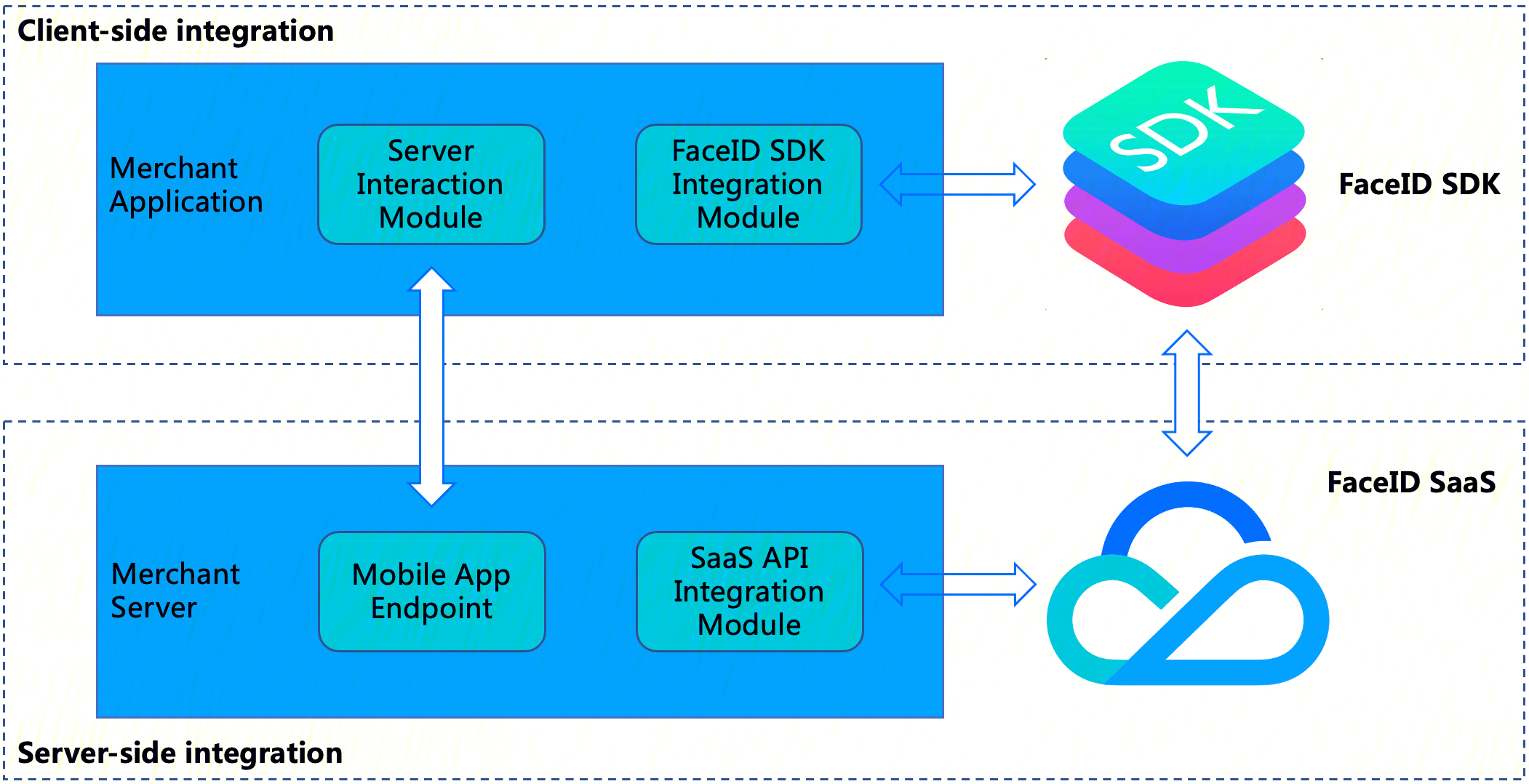
The following diagram illustrates the architecture for integrating the selfie SDK:
eKYC SDK integration consists of two parts:
Client-side Integration: Integrate the eKYC SDK into your client-side business application.
Server-side Integration: Expose endpoints of your (merchant) application on your (merchant) server. This enables the merchant application to interact with the merchant server, then access the FaceId SaaS API to obtain the SdkToken for the linked selfie verification process and to pull the final verification result using the SdkToken.
Overall Interaction Flow
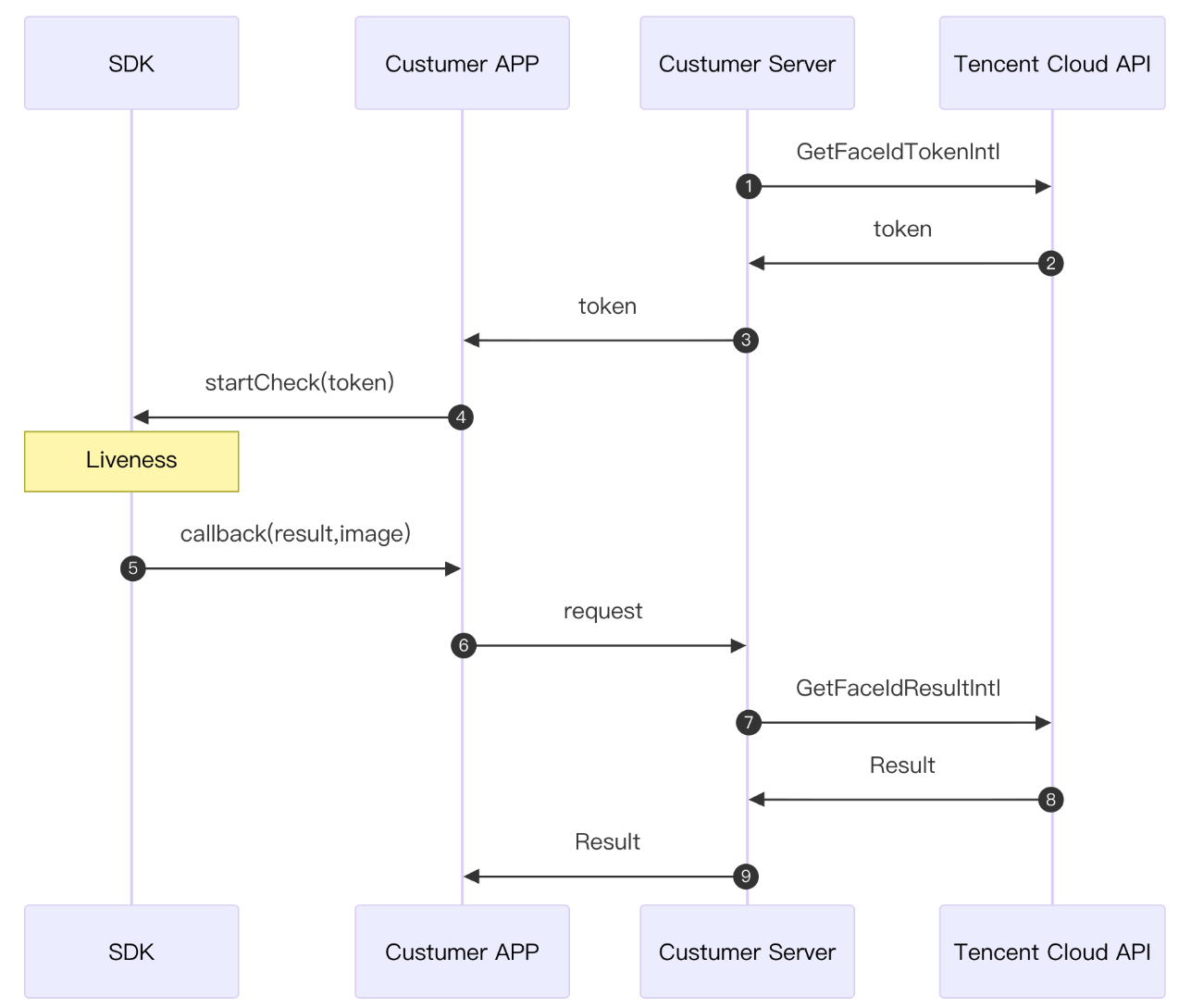
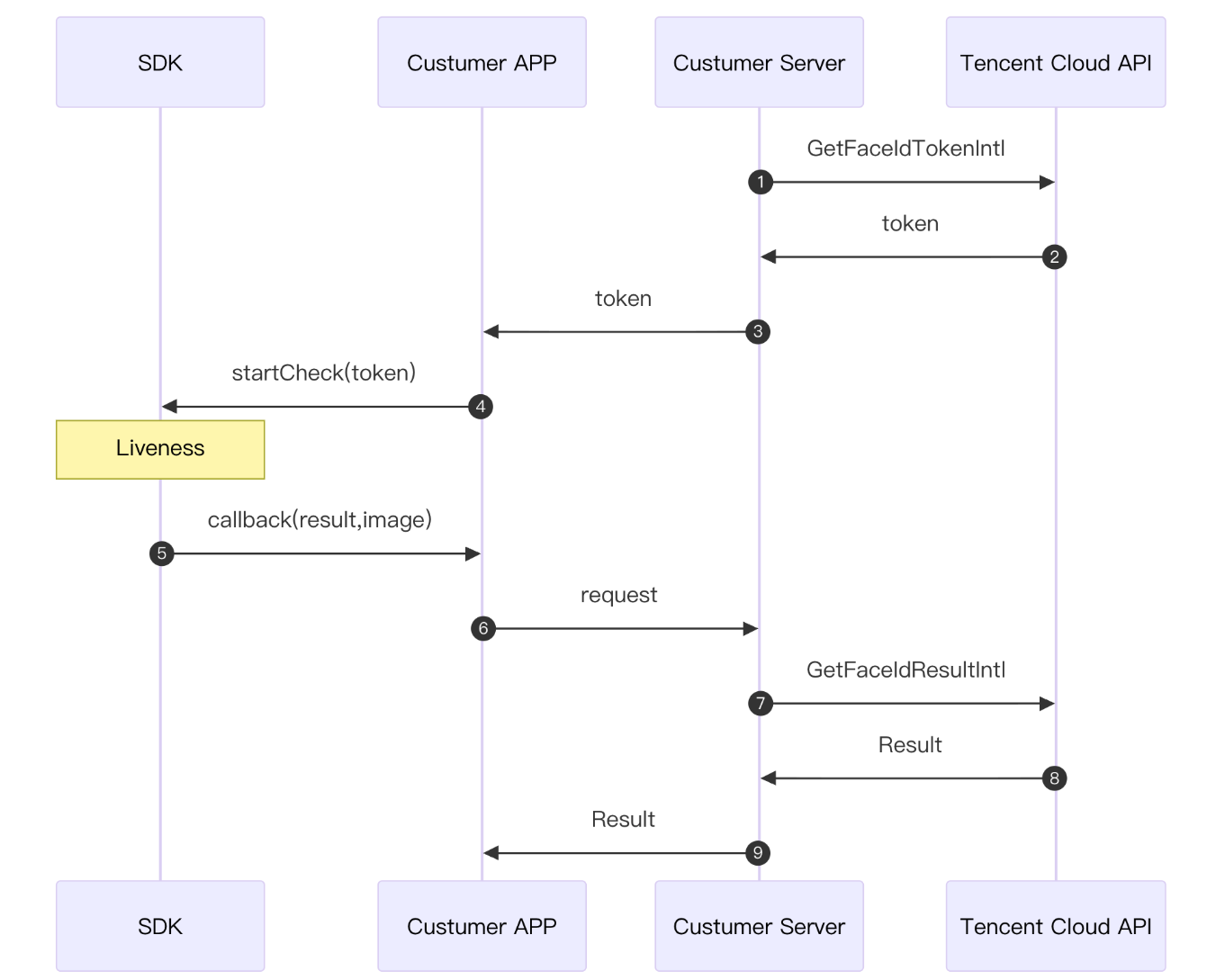
The integrator only needs to pass in the Token and invoke the corresponding eKYC SDK's liveness detection method. This completes the liveness detection and returns the liveness result.
1. To obtain a Token, refer to the TencentCloud API: GetFaceIdTokenIntl.
2. The TencentCloud API for users to actively pull liveness results: GetFaceIdResultIntl
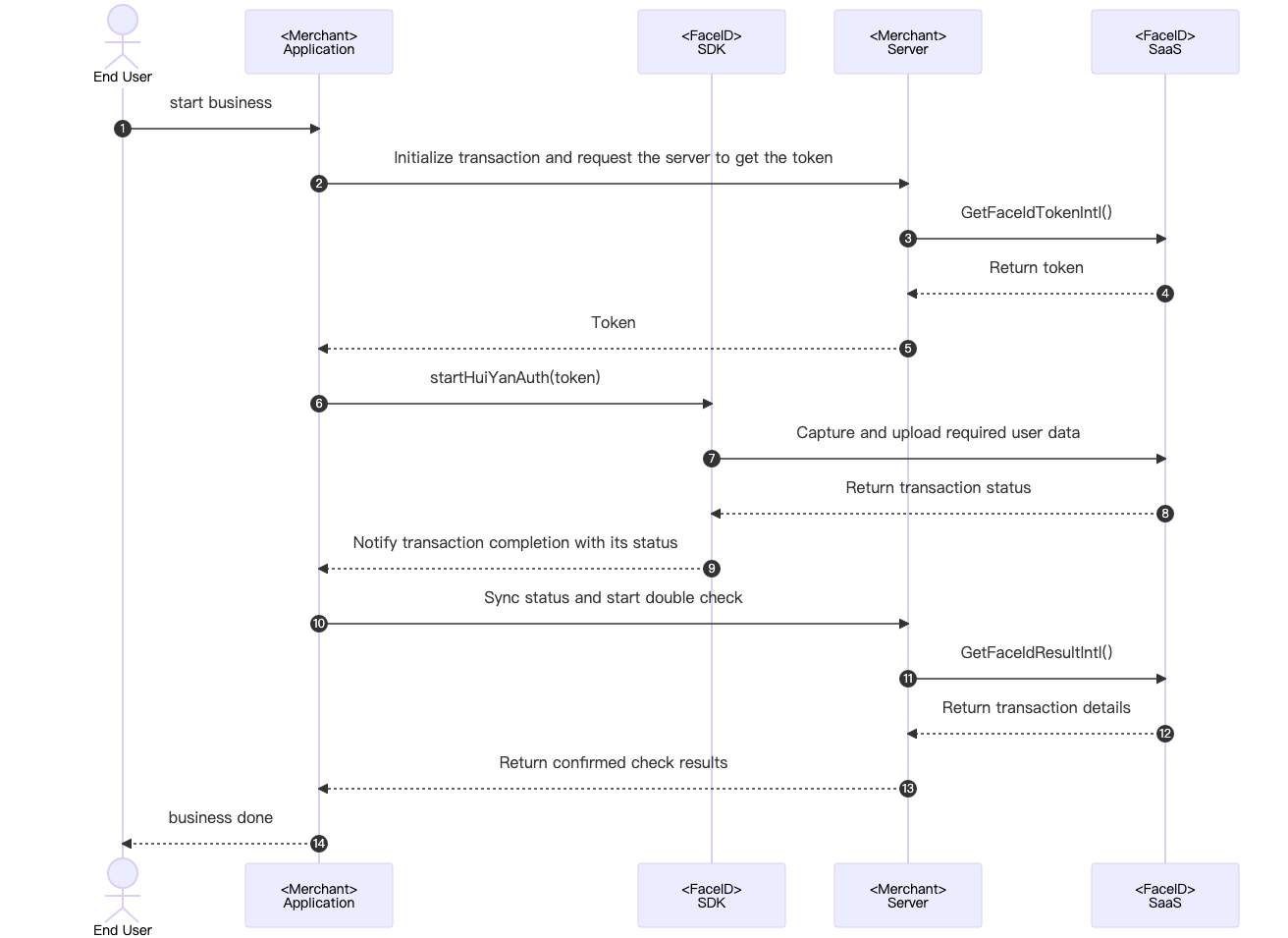
The following diagram illustrates the overall interaction logic between the SDK client and the server. The modules responsible for each part in the diagram are explained below:
The specific recommended interaction flow is as follows:
1. The user triggers the terminal Merchant Application to prepare for invoking the selfie verification business scenario.
2. The Merchant Application sends a request to the Merchant Server, notifying it that initiating an selfie verification session requires a liveness service Token.
3. The Merchant Server calls the TencentCloud API GetFaceIdTokenIntl by passing in the relevant parameters.
4. Upon receiving the GetFaceIdTokenIntl call, FaceID SaaS issues the token for this session to the Merchant Server.
5. The Merchant Server can deliver the obtained service Token to the customer's Merchant Application.
6. The Merchant Application calls the eKYC SDK's startup interface startHuiYanAuth by passing in the token and configuration information, thereby initiating the selfie verification process.
7. The FaceID SDK captures and uploads the required user data, including liveness data, to FaceID SaaS.
8. After completing the selfie verification process (including liveness and comparison), FaceID SaaS returns the result to the FaceID SDK.
9. The FaceID SDK actively triggers a callback to the Merchant Application to notify it of the verification completion and status.
10. After receiving the callback, the Merchant Application can send a request to notify the Merchant Server to proactively obtain the result of this selfie verification session for confirmation.
11. The Merchant Server proactively calls the FaceID SaaS API GetFaceIdResultIntl by passing in the relevant parameters and the Token for this session to obtain the result of this selfie verification.
12. Upon receiving the GetFaceIdResultIntl call, FaceID SaaS returns the result of this selfie verification to the Merchant Server.
13. After the result of this selfie verification is received, the Merchant Server can deliver the required information to the Merchant Application.
14. The Merchant Application displays the final result on the UI page, informing the user of the selfie verification outcome.
Access Process
Server-Side Integration
1. Integration Preparation
Before integrating on the server side, you need to follow the instructions in Obtain API Key Guide to activate Tencent Cloud eKYC service and obtain the TencentCloud API access keys SecretId and SecretKey. Additionally, you need to follow the procedure in Connect to TencentCloud API to import the SDK package for your preferred programming language into your server-side module, ensuring successful calls to TencentCloud API and proper handling of API requests and responses.
2. Starting the Integration
To ensure your (merchant) client application can interact properly with your (merchant) server, the merchant server needs to call the API GetFaceIdTokenIntl provided by eKYC to obtain the SDKToken for orchestrating the entire selfie verification process, and call the GetFaceIdResultIntl API to obtain the selfie verification result. The merchant server also needs to provide corresponding endpoints for the merchant client to call. The following sample code uses the Go language as an example to demonstrate how to call TencentCloud API on the server side and obtain the correct response.
Note:
This example only demonstrates the processing logic required for the merchant server to interact with TencentCloud API. If needed, you must implement your own business logic, such as:
After you obtain the selfie verification SDKToken via the GetFaceIdTokenIntl API, you can return the other responses required by the client application together with the SDKToken to the client.
After you obtain the liveness verification result via the GetFaceIdResultIntl API, you can save the returned best-frame photo for use in subsequent business logic.
var FaceIdClient *faceid.Client
funcinit(){
// When initializing the client configuration, you can specify the timeout and other configuration items.
prof := profile.NewClientProfile()
prof.HttpProfile.ReqTimeout =60
// TODO: Replace with the SecretId and SecretKey of your calling account.
After completing the integration, you can test whether the integration is correct using postman or curl commands. Access the API(http://ip:port/api/v1/get-token) to check whether the SdkToken is returned normally. Access the http://ip:port/api/v1/get-result API to check whether the response of the Result field is 0, thereby determining whether the server-side integration is successful. For detailed response results, refer to the API section.
Android-Side Integration
1. Prerequisites
The current Android eKYC SDK is compatible with API 19 (Android 4.4) and later versions.
2. SDK Integration Steps
1. Add huiyansdk_android_overseas_1.0.9.6_release.aar (the specific version is subject to the official website download), tencent-ai-sdk-youtu-base-1.0.1.39-release.aar , tencent-ai-sdk-common-1.1.36-release.aar, and tencent-ai-sdk-aicamera-1.0.22-release.aar (the specific versions are subject to the final provision) to the libs directory of your project.
For applications that need to be compatible with Android 6.0 and above, in addition to declaring the permissions in the AndroidManifest.xml file, you must also request them dynamically in code.
3. SDK API Usage Instructions
Initialize the API.
Call this during your app's initialization. It is recommended to call it within the Application class, primarily to perform some SDK initialization operations.
@Override
publicvoidonCreate(){
super.onCreate();
instance =this;
// The SDK must be initialized when the Application initializes.
HuiYanOsApi.init(getApp());
}
Main SDK Workflow
The integrator only needs to pass in the Token and invoke the corresponding liveness detection method. This completes the liveness detection and returns the liveness result.
HuiYanOsAuthResult is the return result for successful selfie verification.
Note:
The "YTFaceSDK.license" and "turing.lic" files require your active application. For now, you can contact customer service to apply for the license. Place the obtained license file under the assets directory.
├── codedemo
│ ├── build.gradle
│ ├── libs
│ ├── proguard-rules.pro
│ └── src
│ └── main
│ └── assets
│ ├── turing.lic
│ └── YTFaceSDK.license
SDK Resource Release
You can call the SDK resource release API when your APP exits.
@Override
protectedvoidonDestroy(){
super.onDestroy();
// Release resources upon exit
HuiYanOsApi.release();
}
Obfuscation Rule Configuration
If your application has the obfuscation feature enabled, add the following section to your obfuscation file to ensure the SDK functions properly.
#SDK ObfuscationIncludes
-keep class com.tencent.could.huiyansdk.**{*;}
-keep class com.tencent.could.aicamare.**{*;}
-keep class com.tencent.could.component.**{*;}
-keep class com.tencent.youtu.**{*;}
-keep classcom.tenpay.utils.SMUtils{*;}
-keep class com.tencent.turingface.**{*;}
-keep class com.turingface.sdk.**{*;}
-keep class com.tencent.cloud.ai.network.**{*;}
iOS-Side Integration
1. Prerequisites
1. Development Environment: Xcode 11.0 or later
2. The eKYC iOS SDK is compatible with iOS 9.0 and later versions on mobile devices.
2. SDK Integration Steps
Manual Integration Method
1. Import the relevant libraries and files.
In the Link Binary With Libraries section, import the relevant frameworks.
2. The libraries that the SDK depends on are as follows:
└──HuiYanOverseasSDK.xcframework
3. In the Copy Bundle Resources section, import the authorization file and model resource files.
├── YTFaceSDK.license
├── turing.license
└── face-tracker-v003.bundle
4. Import resource files in the Copy Bundle Resources section.
└── HuiYanSDKUI.bundle
Integrating Using Pods
1. Create a CloudHuiYanSDK_FW folder in the project's root directory. Within this folder, create Frameworks and Resources subfolders, and then move the SDK package into the CloudHuiYanSDK_FW directory. The structure is as follows:
├──YourProject.xcodeproj
├──Podfile
├──CloudHuiYanSDK_FW
├───────CloudHuiYanSDK_FW.podspec
├───────Frameworks
├────────────HuiYanOverseasSDK.xcframework
├───────Resources
├────────────HuiYanSDKUI.bundle
└────────────face-tracker-v003.bundle
2. Create a podspec file in the CloudHuiYanSDK_FW directory:
Pod::Spec.newdo|s|
s.name ="CloudHuiYanSDK_FW"
s.version ="1.0.0"
s.platform =:ios,"9.0"
s.summary ='frameworks and bundle resources for youtu mobile hdr'
Build Settings -> Other Linker Flags add $(inherited)
5. Run `pod install` to update.
Permission Settings
The SDK requires permissions for mobile network and camera access. Add the corresponding permission declarations. In the main project's info.plist configuration, add the following key-value pairs.
<key>Privacy - Camera Usage Description</key>
<string>Face Identity Verification requires enabling your camera permission for Face Recognition.</string>
3. 1 SDK API Usage Instructions
Main SDK Workflow
The integrator only needs to pass in the Token and invoke the corresponding liveness detection method. This completes the liveness detection and returns the liveness result.
The "YTFaceSDK.license" file requires your active application. For now, you can contact customer service to apply for the license. Place the obtained license file under the current project directory and add it to the resource files (copy Bundle Resources).
Start Enhanced Mode / Plus Mode.
The liveness face comparison feature provides two advanced security levels: Enhanced Mode and Plus Mode, which further improve the security of liveness detection by incorporating device risk control technology. To enable these modes, you must configure the SDK and obtain the Token accordingly.
1. SDK Configuration Requirements
Whether you enable Enhanced Mode or Plus Mode, you must enable the device risk control capability in the SDK and configure the corresponding risk control license file:
The "turing.license" file requires your active application. For now, you can contact customer service to apply for the license. Place the obtained license file under the current project directory and add it to the resource files (copy Bundle Resources).
2. Token Acquisition Configuration
When calling the GetFaceIdTokenIntl or ApplySdkVerificationToken API to obtain a business Token, you must specify Enhanced Mode or Plus Mode by setting the SdkVersion parameter:
Enhanced Mode: Set the corresponding SdkVersion value.
Plus Mode: Set the corresponding SdkVersion value.
1) Set the corresponding SdkVersion parameter when the Token is obtained.
2) Enable the device risk control capability in the SDK configuration.
3) Pass the configured Token when calling the startHuiYaneKYC method.
4) The SDK automatically enables the corresponding security level based on the mode information in the Token.
Warning:
Important: Ensure that the settings in both the SDK configuration and Token acquisition steps are completely consistent. Otherwise, mode enablement may fail.