The database proxy feature supports configuration adjustments. You can adjust the proxy specifications, availability zones (AZs), and the number of nodes of the database proxy in the console.
Prerequisite
Notes
The database proxy will be automatically upgraded to the latest version during configuration adjustment if its version is old.
If the selected database proxy does not reside in the same availability zone with the primary instance, a potential decline in write performance may be observed during the connection via the database proxy.
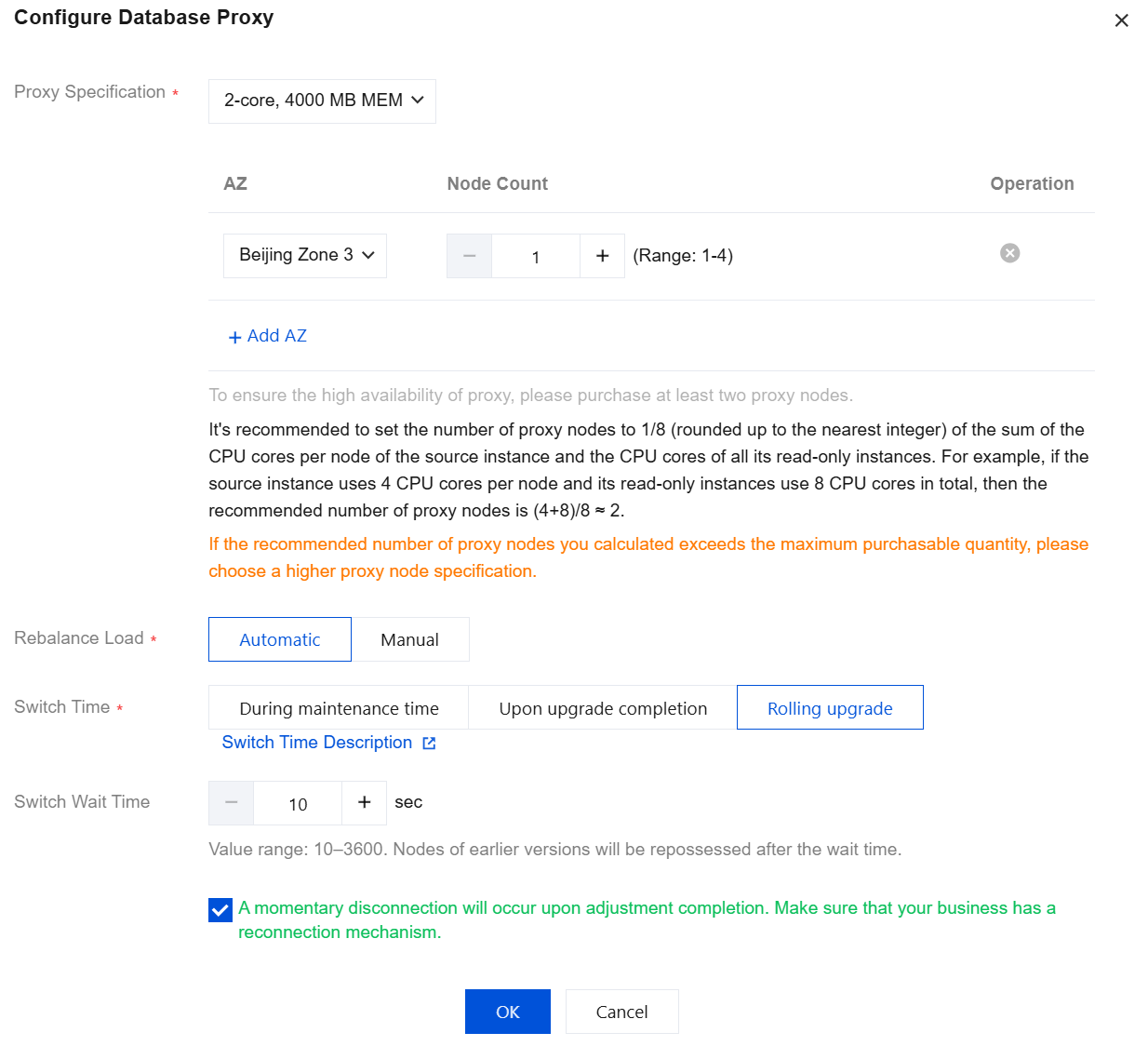
If the required number of proxy nodes exceed the purchase limit upon calculation, it is advisable to choose a higher specification proxy.
When the proxy specification is 2 cores and 4000MB of memory, the recommended number of proxies is 1/8th (rounded up) of the sum of the CPU core numbers of the main instance and the read-only instance.
When the proxy specification is 4 cores and 8000MB of memory, the recommended number of proxies is 1/16th (rounded up) of the sum of the CPU core numbers of the main instance and the read-only instance.
When the proxy specification is 8 cores and 16000MB of memory, the recommended number of proxies is 1/32 (rounded up) of the sum of the CPU core numbers of the main instance and the read-only instance.
Configuration Adjustment Switch Time Description
You can select the switch time for the configuration adjustment according to the actual business situation to achieve a smoother adjustment.
Within maintenance time: If this option is selected, the switch will be started within the maintenance time period you set after the configuration adjustment is completed. For details about setting the instance maintenance time, see Modifying the Instance Maintenance Time. Upon upgrade completion: If this option is selected, the system will automatically and immediately switch to the new configuration after the configuration adjustment is completed.
Rolling upgrade: If this option is selected, you can customize the switch waiting time. The default value is 10 seconds, and the value range is 10 to 3600 seconds. The old version nodes are reclaimed after the waiting time is reached.
Impact Description
Changing different configuration items has different impacts, certain modifications will not result in connection interruptions, while others may cause such disruptions. The specific changeable items and their corresponding impacts are detailed in the following table.
Scenario One: Changed Proxy Specification and Unchanged Availability Zone and Node Count
|
Upgrade or downgrade | Unchanged | Unchanged | During the maintenance period | There may be momentary interruptions. Please ensure your operations are equipped with a reconnection mechanism. |
|
|
|
| Upon completion of the upgrade |
|
|
| Rolling upgrade |
|
Scenario Two: Changed Node Count and Unchanged Proxy Specification and Availability Zone
|
Unchanged | Unchanged | Raised | Automatic | During the maintenance period | There may be momentary interruptions. Please ensure your operations are equipped with a reconnection mechanism. |
|
|
|
|
| Upon completion of the upgrade |
|
|
|
| Rolling upgrade |
|
|
|
| Manual | During the maintenance period | It will not result in intermittent interruptions. |
|
|
|
|
| Upon completion of the upgrade |
|
|
|
| Rolling upgrade |
|
|
| Reduced | Automatic | During the maintenance period | Momentary interruptions may occur. Please ensure your operations are equipped with a reconnection mechanism. |
|
|
|
|
| Upon completion of the upgrade |
|
|
|
| Rolling upgrade |
|
|
|
|
| Manual | During the maintenance period |
|
|
|
| Upon completion of the upgrade |
|
|
|
|
|
| Rolling upgrade |
Scenario Three: Unchanged Proxy Specification and Availability Zone and Node Count Combination Changed
|
Unchanged | Raised | Raised | Automatic | During the maintenance period | There may be momentary interruptions. Please ensure your operations are equipped with a reconnection mechanism. |
|
|
|
|
| Upon completion of the upgrade |
|
|
|
| Rolling upgrade |
|
|
|
| Manual | During the maintenance period | It will not result in intermittent interruptions. |
|
|
|
|
| Upon completion of the upgrade |
|
|
|
| Rolling upgrade |
|
|
| Reduced | Automatic | During the maintenance period | Momentary interruptions may occur. Please ensure your business is equipped with a reconnection mechanism. |
|
|
|
|
| Upon completion of the upgrade |
|
|
|
| Rolling upgrade |
|
|
|
|
| Manual | During the maintenance period |
|
|
|
| Upon completion of the upgrade |
|
|
|
|
|
| Rolling upgrade |
|
| Reduced | Raised | Automatic | During the maintenance period |
|
|
|
| Upon completion of the upgrade |
|
|
|
|
|
| Rolling upgrade |
|
|
|
| Manual | During the maintenance period |
|
|
|
| Upon completion of the upgrade |
|
|
|
|
|
| Rolling upgrade |
|
|
| Reduced | Automatic | During the maintenance period |
|
|
|
| Upon completion of the upgrade |
|
|
|
|
|
| Rolling upgrade |
|
|
|
| Manual | During the maintenance period |
|
|
|
| Upon completion of the upgrade |
|
|
|
|
|
| Rolling upgrade |
|
| Changed | Raised | Automatic | During the maintenance period |
|
|
|
| Upon completion of the upgrade |
|
|
|
|
|
| Rolling upgrade |
|
|
|
| Manual | During the maintenance period |
|
|
|
| Upon completion of the upgrade |
|
|
|
|
|
| Rolling upgrade |
|
|
| Reduced | Automatic | During the maintenance period |
|
|
|
| Upon completion of the upgrade |
|
|
|
|
|
| Rolling upgrade |
|
|
|
| Manual | During the maintenance period |
|
|
|
| Upon completion of the upgrade |
|
|
|
|
|
| Rolling upgrade |
Directions
1. Log in to the TDSQL-C for MySQL console. In the cluster list, select the cluster with the proxy enabled, click on the cluster ID, and proceed to the cluster management page. 2. Open the topology in Cluster Management > Cluster Details, hover over the database proxy area, and click Details to go to the database proxy management page. Alternatively, click the Database Proxy tab on the cluster management page to go to the database proxy management page.
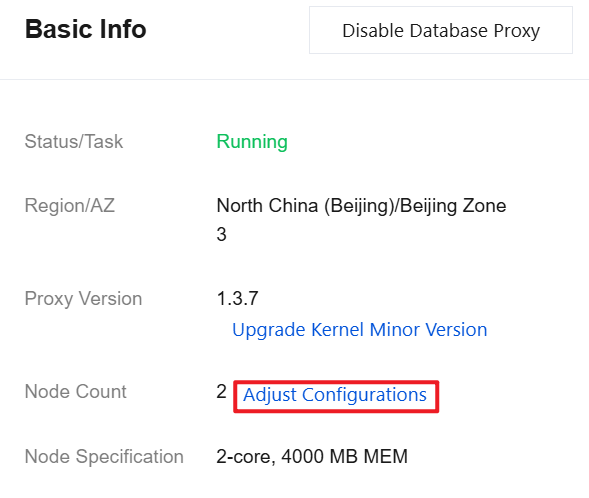
3. On the Overview tab on the Database Proxy tab, Click Adjust Configurations after Basic Info > Node Count. The output content is in markdown format.
4. In the pop-up window, modify the relevant configurations of the database proxy (proxy specification, availability zone, and number of nodes) as needed, then click OK.
5. In Basic Info on the Database Proxy tab, after the task status changes from Upgrading to Running/Waiting to upgrade, the configuration adjustment is completed.
Note:
If you select During maintenance time but need to switch the configuration earlier due to your business requirements, after the configuration is adjusted, you can go to Database Proxy > Overview > Basic Info > Status/Task and click Execute now next to Running/Waiting to upgrade.
If the CLB resettings are performed manually after configuration adjustment, once the configuration adjustment is complete, one can manually perform CLB resettings under the corresponding Overview > Connection Address on the database proxy page.
Related APIs
|
| This API (UpgradeProxy) is used to upgrade database proxy configuration. |