Release Notes
Product Announcements


Parameter | Description |
Read/Write Attribute | Choose the read/write attribute for this proxy address: Read/Write Separation or Read-Only. If you select Read/Write Separation, the feature will be enabled automatically. |
Access Mode | There are two access modes available to manage the connection between the client application and the database: Balanced Distribution and Nearby Access. For details, see Access Mode. |
Consistency Settings | Under the Read-Write Separation Attribute, three consistency levels are provided: Eventual Consistency, Session Consistency, and Global Consistency, to meet your consistency requirements in different scenarios. For more information, see Consistency Level. The read-only analysis engine supports only eventual consistency. Note: Changes to the consistency level take effect only for new connections. If you need the parameter to take effect immediately through resetting the connection, you can use the load rebalancing feature or restart the instance. |
Connection Pool Status | Connection pooling shares connections across different user requests to reduce the instance load caused by frequent creation of new connections. Enabling this feature allows you to choose a supported connection pool type, with Session-Level Connection Pool as the default. |
Connection Pool Threshold | Configure the Connection Pool Threshold. The valid range is between 0 to 300 seconds. |
Transaction Split | You can enable this feature to separate reads and writes in a transaction, directing them to different instances for execution. Read requests will be forwarded to read-only instances, effectively reducing the load on the read-write instance. |
Failover (For instances with read/write separation) | You can enable this feature to ensure that in the event of a failure in the database proxy, the address will be routed to the read/write separation instance. |
Forwarding Upon Analysis Engine Faults | This switch can be set only when the database proxy version is 1.4.5. When it is enabled, SQL statements that should be forwarded to the read-only analysis engine will be forwarded to read-only instances or read-write instances for execution if the read-only analysis engine is faulty. |
Apply to Newly Added RO Instances | You can enable this feature to automatically add newly purchased read-only instances to the database proxy.If Assign Read Weight is set to Assigned by system, newly purchased read-only instances will be assigned with the default weight based on their specification.If Assign Read Weight is set to Custom, when newly purchased read-only instances are added to the RO group, their weights will be 0 by default. You can change the weight on the Configure Weight page. |
Parameter | Description |
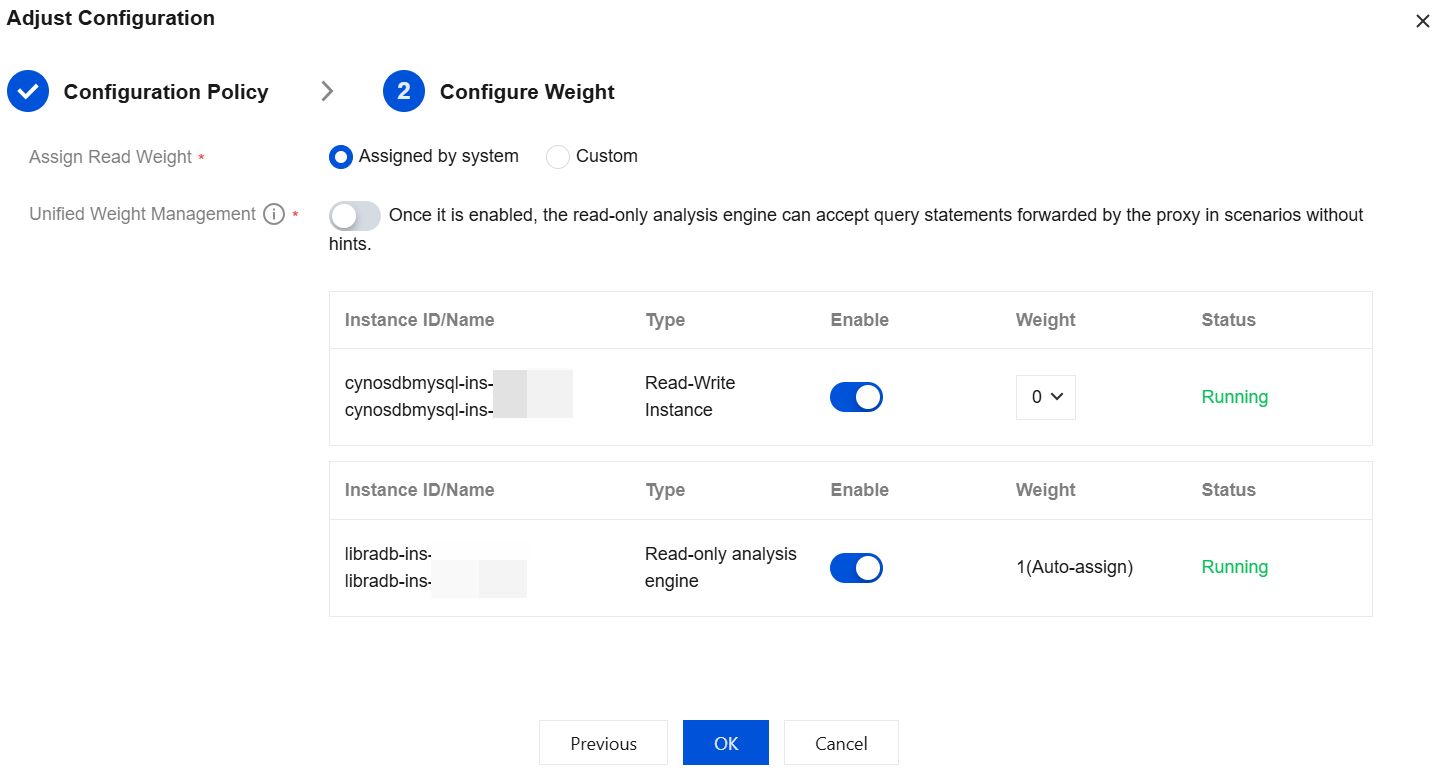
Assign Read Weight | The database proxy needs to distribute read requests to different instances. By assigning different read weights to each instance, the database proxy can decide to which instance to route the requests based on the weight values of the instances. The system supports either automatic assignment or custom assignment. If the custom assignment is selected, it supports configuring the weight for each instance’s access to the database. Below is the description related to enabling and configuring weights during the read weight assignment: Enabling Status: If the status is Enabled, the corresponding instance will be assigned a weight for connection. If the status is Disabled, no weight will be assigned to the corresponding instance for connection. Weight: The weight value range is from 0 to 100. Setting the weight to 0 means the selected instance will be assigned connections, but with the smallest weight. The larger the value, the higher the weight, allowing the instance to receive more read requests. After the read weight assignment is configured, read requests will be routed to the corresponding instances in proportion. For example, if instances 1, 2, and 3 are assigned read weights of 3, 2, and 1, respectively, it means that read requests from the database proxy connection address will be routed to instances 1, 2, and 3 respectively in a 3:2:1 ratio. Note: The weight here is for read requests (non-transactional). The operation of setting the weight will not cause a momentary disconnection. Setting it to disable may cause a small number of connections to be affected. To avoid this impact, it is recommended to first adjust the read weight of the corresponding instance/node to 0 before it is set to disable. The weight setting takes effect only for new connections. It does not take effect for existing data connections. Note: The weight setting for the read-only analysis engine is supported only when the database proxy version is 1.4.5. |
Unified Weight Management | Choose whether to enable unified weight management. When it is enabled, SQL statements without forwarding rules (Hint) will be automatically assigned to the read-only analysis engine based on the weight. In this case, the read-only analysis engine and common read-only instances perform SQL forwarding in the same Cloud Load Balancer (CLB) group. Note: This item is displayed only when the database proxy version is 1.4.5. |
API | Description |
This API (ModifyProxyRwSplit) is used to configure database proxy read-write splitting. |
Was this page helpful?
You can also Contact sales or Submit a Ticket for help.
Help us improve! Rate your documentation experience in 5 mins.
Feedback