Device Shadow Data Flow
Download
Mode fokus
Ukuran font
Device Shadow Topic
A device shadow acts as an intermediary, allowing the device and your application to view and update the device status. Communication between the device, application, and device shadow is implemented through two special topics:
$shadow/operation/${productId}/${deviceName} is used to publish (upstream) messages, through which GET/UPDATE operations can be implemented on device shadow data.$shadow/operation/result/${productId}/${deviceName} is used to subscribe to (downstream) messages, through which the shadow server sends responses and push messages.Note:
The above topics are created by the system by default when the device is created and will be automatically subscribed to within the device SDK.
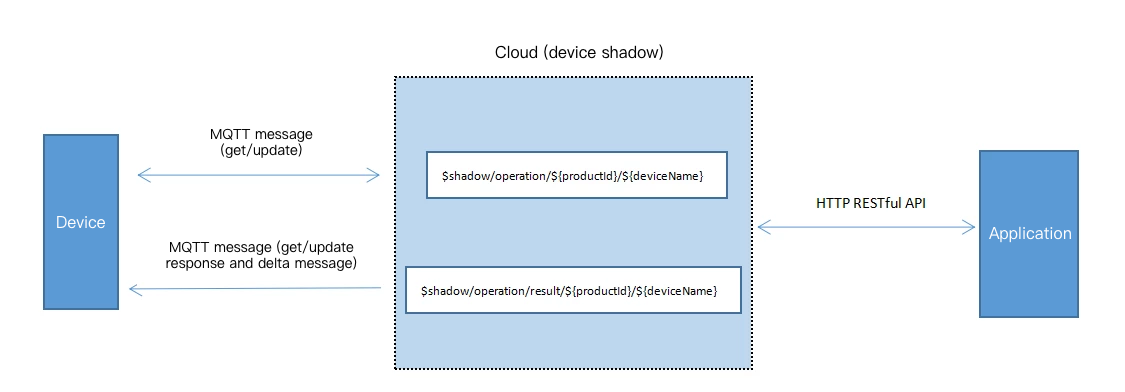
Getting Shadow Status by Device
If the device wants to get the latest status of the device shadow, it needs to publish a GET message to the
$shadow/operation/${productId}/${deviceName} topic. The SDK provides an API that sends the GET message in a specific JSON string format:{"type": "get","clientToken": "clientToken"}
Note:
clientToken is the token used to uniquely identify the session, which is generated by the requester and returned as is by the responder.For example, an air conditioner device can send a GET message to
$shadow/operation/ABC1234567/AirConditioner through the API provided by the SDK to get the latest device parameters.The device shadow server responds by sending a message to the
$shadow/operation/result/${productId}/${deviceName} topic to return all data content of the device shadow through the JSON data, and the SDK will notify the business layer through the corresponding callback function.The shadow server responds to the air conditioner device's GET request by sending the following data to
$shadow/operation/result/ABC1234567/AirConditioner . Below is the sample code:{"type": "get","result": 0,"timestamp": 1514967088,"clientToken": "clientToken","payload": {"state": {"reported": {"temperature": 27},"desired": {"temperature": 25},"delta": {"temperature": 25}},"metadata": {"reported": {"temperature": {"timestamp": 1514967066}},"desired": {"temperature": {"timestamp": 1514967076}},"delta": {"temperature": {"timestamp": 1514967076}}},"version": 1,"timestamp": 1514967076}}
If there is a
desired part in the device shadow document, the device shadow service will automatically generate the corresponding delta part; otherwise, no content will be present in the desired and delta parts.Note:
The device shadow service does not store the
delta messages.Updating Shadow by Device
The device tells the device shadow server its current status by sending an UPDATE message to the
$shadow/operation/${productId}/${deviceName} topic. The SDK provides a corresponding API to send UPDATE messages, and the business layer only needs to specify the content of the reported field. The message content is in a specific JSON string format.The air conditioner device sends an UPDATE message to
$shadow/operation/ABC1234567/AirConditioner to report its current device status. Below is the sample code:{"type": "update","state": {"reported": {"temperature": 27}},"version": 1,"clientToken": "clientToken"}
When the device shadow server receives this message, it first determines whether the version in the message matches the version stored on it, and if so, it will perform the device shadow update process.
The shadow server responds to the air conditioner device with a message. Below is the sample code:
{"type": "update","result": 0,"timestamp": 1514967066,"clientToken": "clientToken","payload": {"state": {"reported": {"temperature": 27}},"metadata": {"reported": {"temperature": {"timestamp": 1514967066}}},"version": 2,"timestamp": 1514967066}}
If the version in the message does not match the version stored on the device shadow server, the device shadow service will respond by sending the following message to
$shadow/operation/result/ABC1234567/AirConditioner :{"type": "update","result": 5005,"timestamp": 1514967066,"clientToken": "clientToken","payload": {"state": {"reported": {"temperature": 27,"mode": "cool"}},"metadata": {"reported": {"temperature": {"timestamp": 1514967066},"mode": {"timestamp": 1514967050}}},"version": 2,"timestamp": 1514967066}}
At this point, the full content of the device shadow document will be returned in the payload.
Updating Shadow by Application
The application modifies the device shadow's
desired field through the HTTP RESTful API.The application modifies the air conditioner's operating parameters through the HTTP RESTful API. Below is the sample code:
{"type": "update","state": {"desired": {"temperature": 25}},"version": 2,"clientToken": "clientToken"}
When the device shadow server receives this message, it first determines whether the version in the message matches the version stored on it, and if so, it will perform the device shadow update process and respond to the application with a JSON message through the HTTP RESTful API.
{"type": "update","result": 0,"timestamp": 1514967076,"clientToken": "clientToken","payload": {"state": {"desired": {"temperature": 25}},"metadata": {"desired": {"temperature": {"timestamp": 1514967076}}},"version": 3,"timestamp": 1514967076}}
In addition, the shadow server sends a
delta message to $shadow/operation/result/ABC1234567/AirConditioner.{"type": "delta","timestamp": 1514967076,"payload": {"state": {"temperature": 25},"metadata": {"temperature": {"timestamp": 1514967076}},"version": 3,"timestamp": 1514967076}}
The SDK notifies the business layer that the message has been received through the corresponding callback function.
Responding to delta Message by Device
After the device receives the
delta message, the business layer can empty the content of the desired field and send it to the device shadow server by sending the message to the $shadow/operation/${productId}/${deviceName} topic, indicating that the device has responded to this delta message.For example, after the air conditioner adjusts the temperature, it will send a message to
$shadow/operation/ABC1234567/AirConditioner :{"type": "update","state": {"desired": null},"version": 3,"clientToken": "clientToken"}
The SDK provides a corresponding API to send the above message. When the device shadow server receives this message, it clears the content of the
desired field to prevent repeated sending due to the differences between the parameter value in the reported field and that in the desired field.After receiving the message, the shadow server sends a response message to
$shadow/operation/result/${productId}/${deviceName} .For example, after receiving the
"desired":null message from the air conditioner, the shadow server will send a device shadow update success message to $shadow/operation/result/ABC1234567/AirConditioner .{"type": "update","result": 0,"timestamp": 1514967086,"clientToken": "clientToken","payload": {"state": {"reported": {"temperature": 25},"desired": null},"metadata": {"reported": {"temperature": {"timestamp": 1514967086}},"desired": {"temperature": {"timestamp": 1514967086}}},"version": 4,"timestamp": 1514967086}}
If some fields reported by the device are null, the corresponding fields in the device shadow will be deleted. After the update succeeds, the fields in the returned payload will contain only the content related to the updated fields.
If the version value carried during the device update is below that stored on the server, the data on the device is old. At this time, the server will send a failure message, where the error code (the
result field) will clearly tell the SDK that the update failed and the reason is that the version is too low. In addition, the server will also send the latest content in the payload to the device.Bantuan dan Dukungan
Apakah halaman ini membantu?
Anda juga dapat Menghubungi Penjualan atau Mengirimkan Tiket untuk meminta bantuan.
masukan