tencent cloud

TDMQ for RocketMQ

Release Notes and Announcements
Release Notes
Announcements
Product Introduction
Introduction and Selection of the TDMQ Product Series
What Is TDMQ for RocketMQ
Strengths
Scenarios
Product Series
Comparison with Open-Source RocketMQ
High Availability
Quotas and Limits
Supported Regions
Basic Concepts
Billing
Billing Overview
Pricing
Billing Examples
Pay-as-you-go Switch to Monthly Subscription (5.x)
Renewal
Viewing Consumption Details
Refund
Overdue Payments
Getting Started
Getting Started Guide
Preparations
Step 1: Creating TDMQ for RocketMQ Resources
Step 2: Using the SDK to Send and Receive Messages (Recommended)
Step 2: Running the TDMQ for RocketMQ Client (Optional)
Step 3: Querying Messages
Step 4: Deleting Resources
User Guide
Usage Process Guide
Configuring Account Permissions
Creating the Cluster
Configuring the Namespace
Configuring the Topic
Configuring the Group
Connecting to the Cluster
Managing Messages
Managing the Cluster
Viewing Monitoring Data and Configuring Alarms
Cross-Cluster Message Replication
Use Cases
Naming Conventions for Common Concepts of TDMQ for RocketMQ
RocketMQ Client Use Cases
RocketMQ Performance Load Testing and Capacity Assessment
Access over HTTP
Client Risk Descriptions and Update Guide
Migration Guide for TencentCloud API Operations Related to RocketMQ 4.x Cluster Roles
Migration Guide
Disruptive Migration
Seamless Migration
Developer Guide
Message Types
Message Filtering
Message Retries
POP Consumption Mode (5.x)
Clustering Consumption and Broadcasting Consumption
Subscription Relationship Consistency
Traffic Throttling
​​API Reference(5.x)
History
API Category
Making API Requests
Topic APIs
Consumer Group APIs
Message APIs
Role Authentication APIs
Hitless Migration APIs
Cloud Migration APIs
Cluster APIs
Data Types
Error Codes
​​API Reference(4.x)
SDK Reference
SDK Overview
5.x SDK
4.x SDK
Security and Compliance
Permission Management
CloudAudit
Deletion Protection
FAQs
4.x Instance FAQs
Agreements
TDMQ for RocketMQ Service Level Agreement
Contact Us

Message Filtering

PDF
Focus Mode
Font Size
Last updated: 2026-01-23 17:52:23
This document mainly introduces the message filtering feature of TDMQ for RocketMQ, including its application scenarios and usage methods.

Feature Introduction

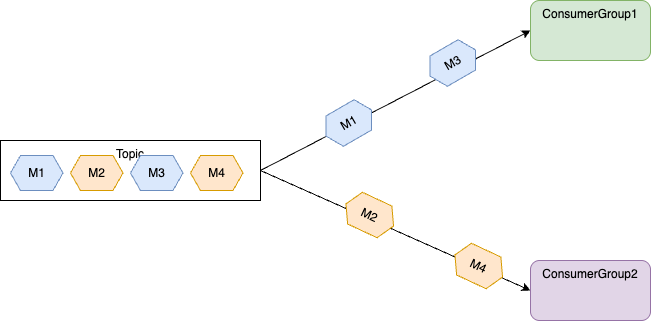
Message filtering allows message producers to classify messages by setting message properties when sending messages to a topic. Consumers can then set filter conditions based on these properties when subscribing to the topic. Only messages that meet the filter conditions will be delivered to the consumers for consumption.
If a consumer does not set any filter conditions when subscribing to a topic, all messages in the topic will be delivered for consumption, regardless of whether filtering properties were set when the messages were sent.

Scenarios

Typically, a topic contains messages sharing the same business properties. For example, a transaction flow topic may include order placement, payment, and shipment flow messages, all sent to the same topic. If a business process only needs to consume one specific type of message, filtering can be applied on the client side.
Billing system: Only need to subscribe to payment messages.
Logistics system: Only need to subscribe to logistics messages.
Inventory system: Only need to subscribe to order placement messages.


Usage Methods

Message filtering primarily supports two methods: SQL-based filtering and tag-based filtering. The core logic for both is the same: Set custom fields when sending messages, then specify corresponding filtering expressions when the consumer group subscribes. Messages are filtered on the server before being delivered to the consumer group for consumption.
Tag-based Filtering
SQL Filtering

Sending Messages

Note:
When you send messages, a tag must be specified for each message.
String tag = "yourMessageTagA";
final Message message = provider.newMessageBuilder()
// Set topic for the current message.
.setTopic(topic)
// Message secondary classifier of message besides topic.
.setTag(tag)
// Key(s) of the message, another way to mark message besides message id.
.setKeys("yourMessageKey-1c151062f96e")
.setBody(body)
.build();

Subscribing to Messages

Subscribe to all tags: If a consumer wants to subscribe to all types of messages under a topic, use an asterisk (*) to represent all tags.
String consumerGroup = "yourConsumerGroup";
String topic = "yourTopic";
String tag = "*";
FilterExpression filterExpression = new FilterExpression(tag, FilterExpressionType.TAG);
// In most case, you don't need to create too many consumers, singleton pattern is recommended.
PushConsumer pushConsumer = provider.newPushConsumerBuilder()
.setClientConfiguration(clientConfiguration)
// Set the consumer group name.
.setConsumerGroup(consumerGroup)
// Set the subscription for the consumer.
.setSubscriptionExpressions(Collections.singletonMap(topic, filterExpression))
.setMessageListener(messageView -> {
// Handle the received message and return consume result.
log.info("Consume message={}", messageView);
return ConsumeResult.SUCCESS;
})
.build();
Subscribe to a single tag: If a consumer wants to subscribe to a certain type of message under a topic, explicitly specify the tag.
String consumerGroup = "yourConsumerGroup";
String topic = "yourTopic";
String tag = "TAGA";
FilterExpression filterExpression = new FilterExpression(tag, FilterExpressionType.TAG);
// In most case, you don't need to create too many consumers, singleton pattern is recommended.
PushConsumer pushConsumer = provider.newPushConsumerBuilder()
.setClientConfiguration(clientConfiguration)
// Set the consumer group name.
.setConsumerGroup(consumerGroup)
// Set the subscription for the consumer.
.setSubscriptionExpressions(Collections.singletonMap(topic, filterExpression))
.setMessageListener(messageView -> {
// Handle the received message and return consume result.
log.info("Consume message={}", messageView);
return ConsumeResult.SUCCESS;
})
.build();
Subscribe to multiple tags: If a consumer wants to subscribe to multiple types of messages under a topic, use two vertical bars (||) to separate the tags.
String consumerGroup = "yourConsumerGroup";
String topic = "yourTopic";
String tag = "TAGA || TAGB";
FilterExpression filterExpression = new FilterExpression(tag, FilterExpressionType.TAG);
// In most case, you don't need to create too many consumers, singleton pattern is recommended.
PushConsumer pushConsumer = provider.newPushConsumerBuilder()
.setClientConfiguration(clientConfiguration)
// Set the consumer group name.
.setConsumerGroup(consumerGroup)
// Set the subscription for the consumer.
.setSubscriptionExpressions(Collections.singletonMap(topic, filterExpression))
.setMessageListener(messageView -> {
// Handle the received message and return consume result.
log.info("Consume message={}", messageView);
return ConsumeResult.SUCCESS;
})
.build();

Use Limits

A message can have only one tag set when sent.
Multiple tags in a filter expression have an OR relationship and must be separated by two vertical bars (||). For example, Tag1||Tag2||Tag3 indicates that messages with Tag1, Tag2, or Tag3 all satisfy the condition and will be delivered to consumers for consumption.
The order of multiple tags must be consistent. Otherwise, it leads to inconsistent subscription relationships. For example, Tag1||Tag2 and Tag2||Tag1 are considered different.

Sending Messages

There is no difference between sending a code and a simple message. The main difference is that when you construct the message body, you need to include the custom properties, and multiple properties are allowed.
final Message message = provider.newMessageBuilder()
// Set topic for the current message.
.setTopic(topic)
// Message secondary classifier of message besides topic.
// Key(s) of the message, another way to mark message besides message id.
.setKeys("yourMessageKey-1c151062f96e")
.setBody(body)
// Information for SQL filtering.
.addProperty("key1", "value1")
.build();

Subscribing to Messages

For message consumption, the corresponding SQL expression must be included during subscription. The rest of the process is no different from normal message consumption.
String consumerGroup = "yourConsumerGroup";
String topic = "yourTopic";
String sql = "key1 IS NOT NULL AND key1='value1'";
// SQL expression.
FilterExpression filterExpression = new FilterExpression(sql, FilterExpressionType.SQL92);
// To subscribe to all messages:
//FilterExpression filterExpression = FilterExpression.SUB_ALL;
// In most case, you don't need to create too many consumers, singleton pattern is recommended.
PushConsumer pushConsumer = provider.newPushConsumerBuilder()
.setClientConfiguration(clientConfiguration)
// Set the consumer group name.
.setConsumerGroup(consumerGroup)
// Set the subscription for the consumer.
.setSubscriptionExpressions(Collections.singletonMap(topic, filterExpression))
.setMessageListener(messageView -> {
// Handle the received message and return consume result.
log.info("Consume message={}", messageView);
return ConsumeResult.SUCCESS;
})
.build();
Note
The above is a brief introduction to the publishing and subscription of messages. For more information, see GitHub Demo or RocketMQ Official Documentation.

Use Limits

Since SQL property filtering involves producers defining message properties and consumers setting the conditions for SQL-based filtering, the calculation result may vary. The server handles this as follows:
Exception handling: If the calculation of the filter condition expression throws an exception, messages are filtered out by default and are not delivered to consumers. For example, compare numeric and non-numeric values.
Handling of null values: If the calculation value of the filter condition expression is null or not a Boolean type (true or false), messages are filtered out by default and are not delivered to consumers. For example, if a property does not exist when a message is sent, but it is directly used in the filter condition at subscription, the calculation result of the filter condition expression is null.
Handling of inconsistent types: If a custom property of a message is of a floating-point type but is used as an integer for calculation in the filter condition, the message is filtered out by default and is not delivered to consumers.
Although this approach is flexible, it is not recommended to set too many values in the message header because the total size of message header properties is limited (32 KB), and built-in properties already occupy a significant portion. Exceeding this limit may cause exceptions during message sending or consumption.

Usage Recommendations

Properly categorize topics and tags.
As evident from the message filtering mechanism and topic principles, business messages can be filtered either by topics or by tags and properties within topics. When choosing between these filtering approaches, the following considerations should be noted:
Consistency of message types: Different types of messages, such as ordered messages and normal messages, should be segregated using different topics. They cannot be categorized by tags alone.
Consistency of business domains: Messages from different business domains or departments should be assigned to different topics. For example, logistics messages and payment messages should use two different topics. For logistics messages within the same topic, normal logistics messages and expedited logistics messages can be distinguished using different tags.
Consistency of message volume and importance: If there is a significant difference in message volume or if the importance of message linkages varies, different topics should be used for isolation and segregation.


Help and Support

Was this page helpful?

Help us improve! Rate your documentation experience in 5 mins.

Feedback