
Transactional Message

Last updated: 2025-07-15 17:46:17
This document describes the concept, technical principle, use cases, and application scenarios of transactional messages in TDMQ for RocketMQ.
Concepts
Transactional message is an advanced feature message provided by RocketMQ. It guarantees final transaction consistency in distributed scenarios by binding two-phase submission with local transaction operations. Compared with regular messages, it mainly extends the mechanism of secondary confirmation and compensatory status check for local transactions.
1. half message
After the producer sends a transactional message to the RocketMQ server, the message will be persisted and marked with a "temporary not deliverable" status until the local transaction is completed and confirmed. Only then will it determine whether the message is visible to the consumer. Messages in this status are called half messages.
2. Two-phase submission
The key mechanism to achieve final consistency of transactions involves two phases. In the first phase, a half message is sent. In the second phase, the producer executes the local transaction and submits a confirmation result (commit for delivery or rollback to discard the message) to the RocketMQ server based on the execution result, determining the fate of the half message.
3. OP message:
Used to tag message status. If a half message has no corresponding OP message, it indicates the two-phase confirmation status is unknown, and the RocketMQ server must proactively check the local transaction status. The OP message content corresponds to the stored Offset of the half message.
4. Related topic:
real topic: the actual business topic specified by the producer when sending messages.
half topic: a system topic named RMQ_SYS_TRANS_HALF_TOPIC, used to store half messages.
op topic: a system topic named MQ_SYS_TRANS_OP_HALF_TOPIC, used to store OP messages. After the second status confirmation of a half message, whether commit or rollback, a corresponding OP message is written to this topic.
Use Cases
For example, in a typical distributed scenario like interbank transfer, it is strictly required to ensure final consistency between the deduction from the transferring party's account and the credit to the transferee's account. We can use TDMQ for RocketMQ's transactional message feature to achieve this, divided into the following three stages:

1. Stage 1: Send a transaction message (prepare fund transfer)
After user 1 triggers A fund transfer, the banking system where it resides sends A transactional message to the corresponding business topic on the RocketMQ server. The message contains "User 1 transfers 1,000 CNY to user 2's account." At this point, the message is invisible to the transferee's system to avoid executing the posting operation in advance before the transferring party confirms the transaction locally, ensuring capital flow security.
2. Phase 2: Execute local transaction (deduct transfer account)
The message is sent successfully. System A proceeds to execute the local transaction, deducting the account balance of User1. If the deduction succeeds, it submits a secondary confirmation (commit) to the RocketMQ server, and the message continues delivery downstream. Conversely, if it submits a rollback, the transaction ends, and both parties' account balances remain unchanged.
3. Phase 3: Downstream service consumption (transfer to bank balance addition)
The transferee's banking system B subscribes to the fund transfer topic in advance. Upon message reception, it performs the operation of adding to User2's account balance. If the consumption process fails due to network issues or account status problems, RocketMQ will automatically trigger the retry mechanism. If multiple retries still fail, the message will be transferred to the DLQ for follow-up manual intervention and verification. The compensatory process ensures the fund is accurately credited eventually.
Through these three phases, RocketMQ's transactional message mechanism successfully implements final transaction consistency in cross-line transfer scenarios. Similarly, in other scenarios such as e-commerce order payment and inventory deduction, financial transaction reconciliation, and corporate multi-system data synchronization, RocketMQ transactional messages can guarantee final consistency in cross-service operations based on their reliable mechanism.
Implementation Process
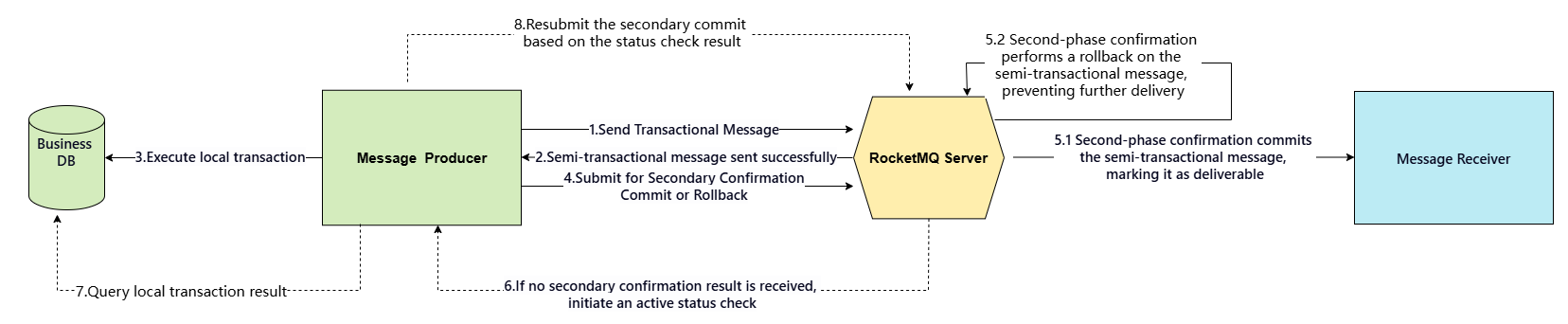
1. The producer sends a transactional message to the RocketMQ server.
2. The server stores this message and returns a sent successfully response. At this point, the message is invisible to downstream consumers and is in half message status.
3. The producer receives the half message response successfully and proceeds to execute the local transaction (such as updating the business database).
4. Based on the outcome of the local transaction, the producer submits the final status to the RocketMQ server, that is, the secondary confirmation.
5. When the confirmation result is commit, the server will deliver the transaction message to consumers. When the confirmation result is rollback, the server will discard the message and no longer deliver it.
6. If the confirmation result is unknown or fails to receive confirmation within a specified period, the transaction status will be proactively checked.
7. When the producer fails to submit the final status or the secondary confirmation result is unknown, the RocketMQ server will actively initiate a transaction result query request to the producer service.
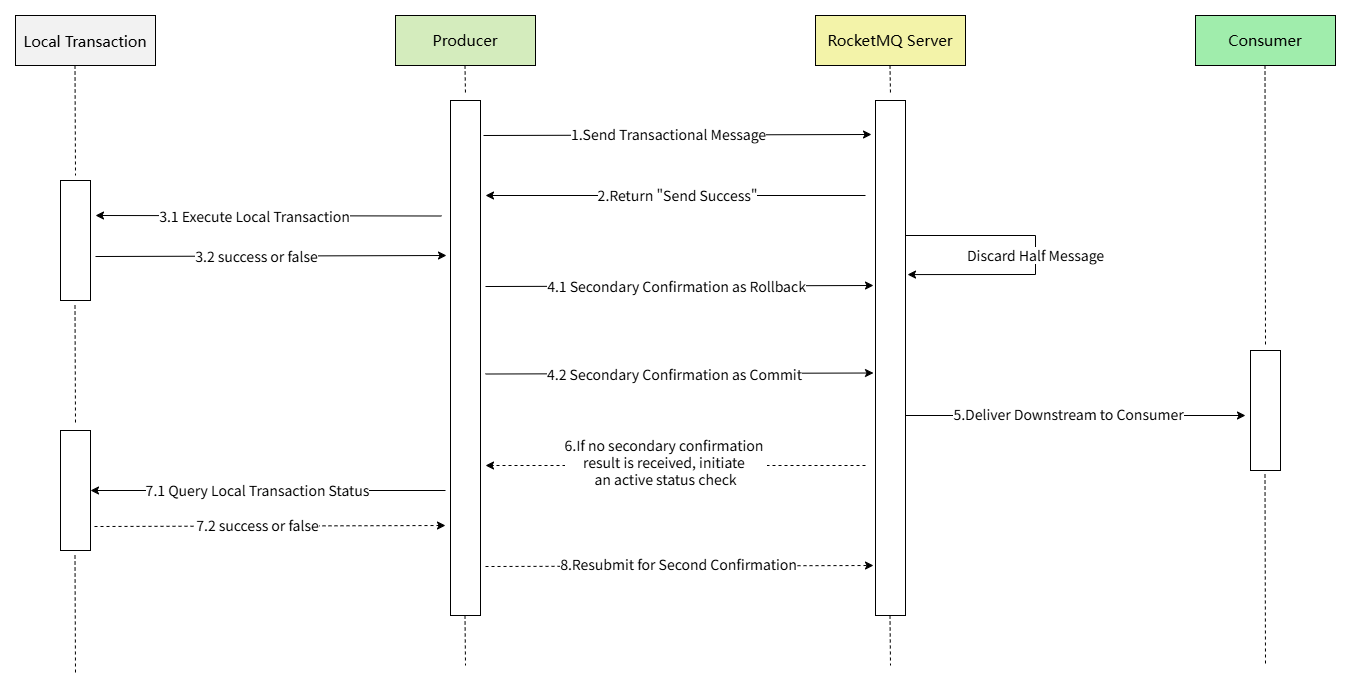
8. After receiving the request, the producer submits the secondary confirmation result, and the logic returns to step 5. At this point, if the producer service is temporarily unavailable, the RocketMQ server will continue to actively initiate a query request after a specified interval until exceeding the maximum number of retries, then roll back the message.
Thus, regardless of the execution success of local transaction operations, final consistency of the transaction status can be achieved. The above procedure can be intuitively represented by a time sequence diagram:
Usage Examples
Here we take the TDMQ version of RocketMQ 5.x Version Cluster as an example to demonstrate the usage method and effect of transaction message.
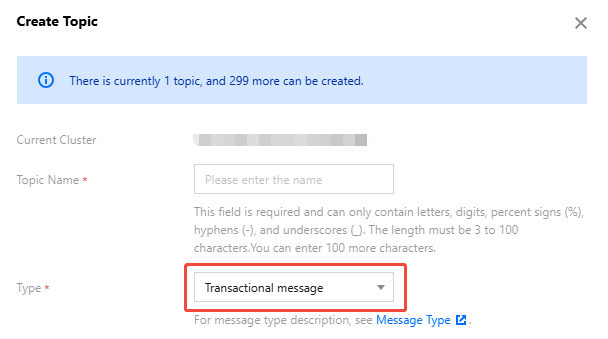
1. First, log in to the RocketMQ console and create a new topic with the message type set as transaction message.
2. Taking Java language as an example, introduce the dependency for the corresponding 5.x version.
<dependency><groupId>org.apache.rocketmq</groupId><artifactId>rocketmq-client-java</artifactId><version>5.0.6</version></dependency>
3. Start the producer.
public class ProducerTransactionMessageDemo {private static final Logger log = LoggerFactory.getLogger(ProducerTransactionMessageDemo.class);private static boolean executeLocalTransaction() {// Simulate a local transaction (such as a database insert operation), assume execution successful herereturn true;}private static boolean checkTransactionStatus(String orderId) {// Simulate local query of transaction execution result, for example, query whether the order ID has been stored, return true if foundreturn true;}public static void main(String[] args) throws ClientException {final ClientServiceProvider provider = ClientServiceProvider.loadService();// Get ak and sk in the console permission management pageString accessKey = "your-ak";String secretKey = "your-sk";SessionCredentialsProvider sessionCredentialsProvider =new StaticSessionCredentialsProvider(accessKey, secretKey);// Get the access address provided by Tencent Cloud from console and fill inString endpoints = "https://your-endpoints";ClientConfiguration clientConfiguration = ClientConfiguration.newBuilder().setEndpoints(endpoints).enableSsl(false).setCredentialProvider(sessionCredentialsProvider).build();String topic = "tran_topic";TransactionChecker checker = messageView -> {log.info("Receive transactional result check request, message={}", messageView);// Server proactively checks local transaction statusString orderId = messageView.getProperties().get("orderId");boolean isSuccess = checkTransactionStatus(orderId);return isSuccess ? TransactionResolution.COMMIT : TransactionResolution.ROLLBACK;};Create a producer and set the checker objectProducer producer = provider.newProducerBuilder().setClientConfiguration(clientConfiguration).setTopics(topic).setTransactionChecker(checker).build();execute a transaction enabling statementfinal Transaction transaction = producer.beginTransaction();byte[] body = "This is a transaction message for Apache RocketMQ".getBytes(StandardCharsets.UTF_8);String tag = "tagA";final Message message = provider.newMessageBuilder().setTopic(topic).setTag(tag).setKeys("your-key-565ef26f5727")//Transactional messages usually set a unique ID associated with the local transaction, used to validate local transaction operations..addProperty("orderId", "0001").setBody(body).build();// Send half messagetry {final SendReceipt sendReceipt = producer.send(message, transaction);log.info("Send transaction message successfully, messageId={}", sendReceipt.getMessageId());} catch (Throwable t) {log.error("Failed to send message", t);return;}// Execute local transactionboolean localTxSuccess = executeLocalTransaction();if (localTxSuccess) {// Local transaction is successfully executed, secondary confirmation is Committransaction.commit();} else {// Local transaction execution failed, secondary confirmation is Rollbacktransaction.rollback();}// producer.close();}}
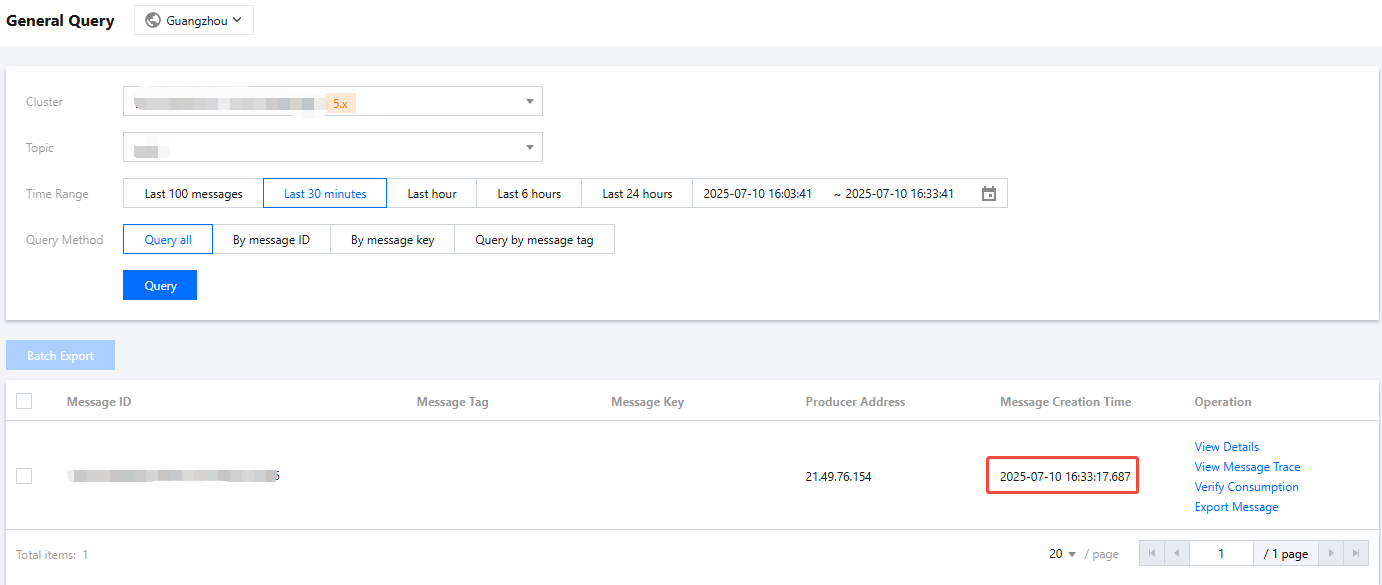
4. After running the code, on the console's message query page, you can see a delivered message pending consumption.
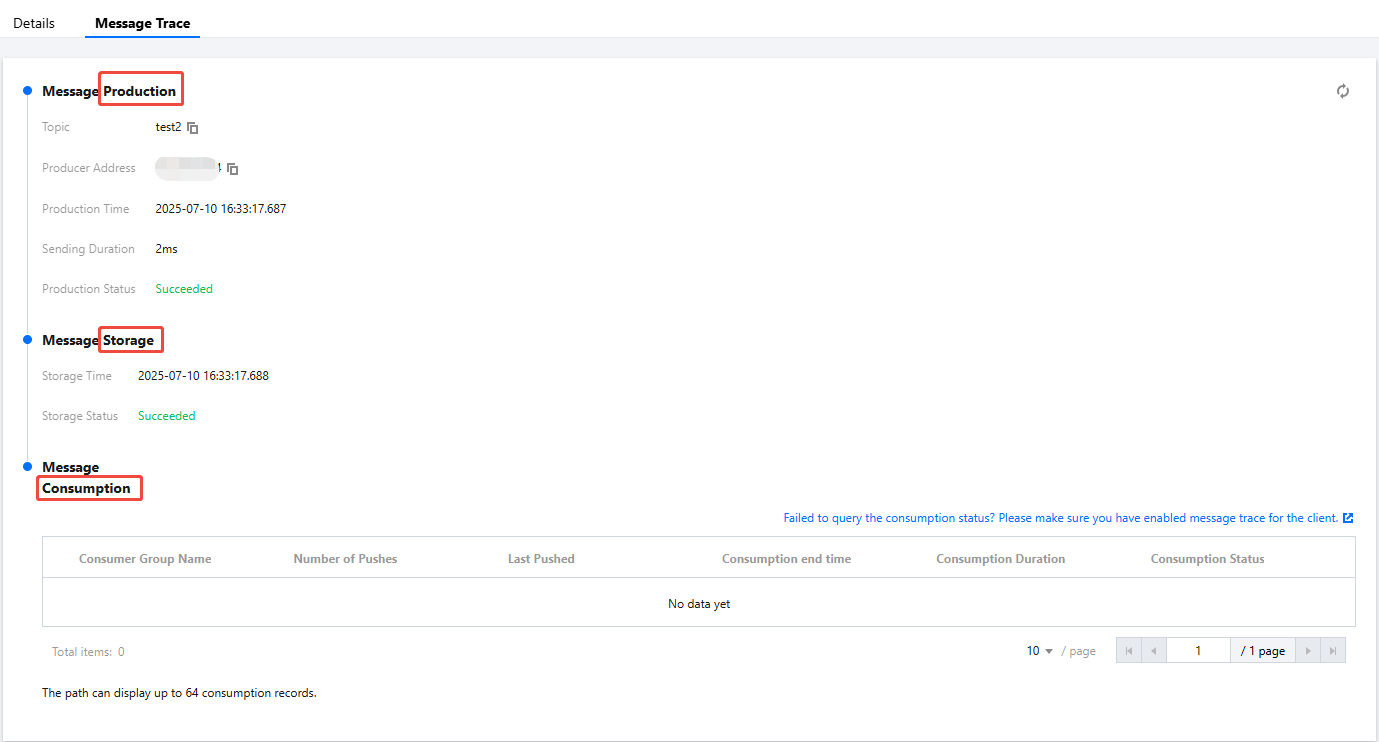
5. Start the consumer, subscribe to this topic, and after successfully consuming the message, view the message trace in the Tencent Cloud console.
6. Modify the code, assume the local transaction fails to execute, and roll back the transaction message in half message state.
private static boolean executeLocalTransaction() {// Local transaction execution failedreturn false;}private static boolean checkTransactionStatus(String orderId) {// The result is also rollback, return falsereturn false;}
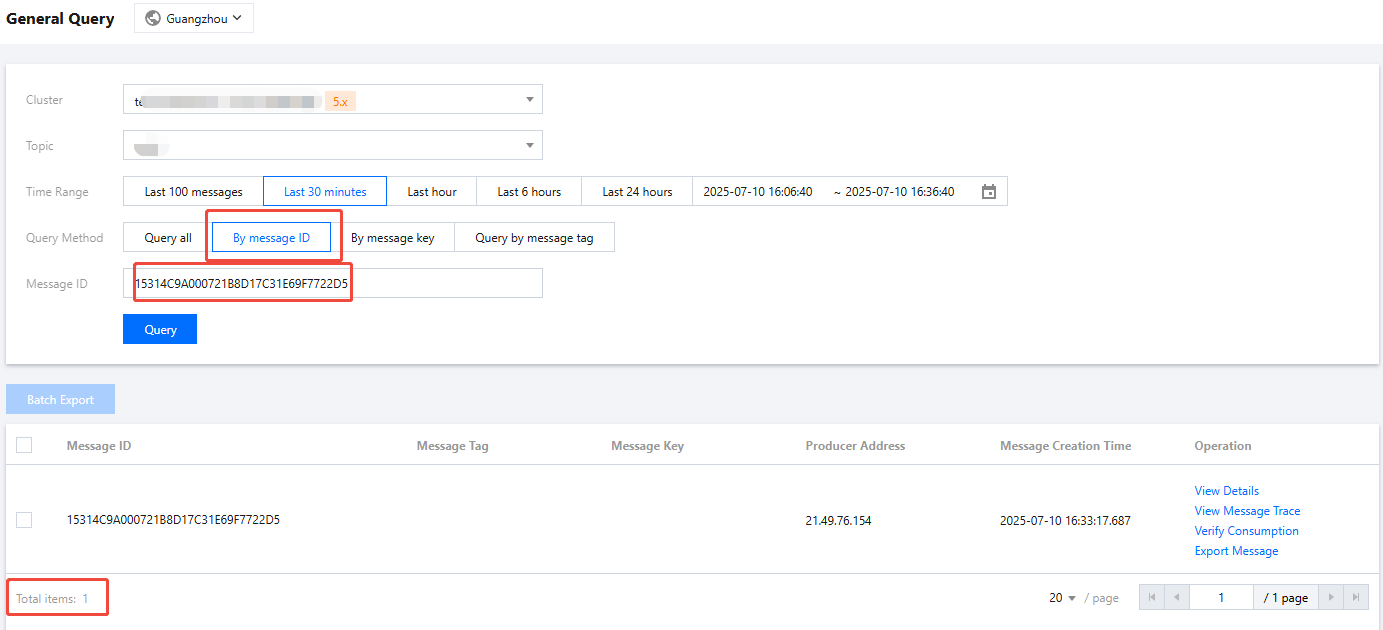
7. At this point, you can see that the message was sent successfully, but it is invisible on the console's message query page, and starting the consumer cannot consume this message.

Precautions
When using transactional messages, note the following points:
1. The topic type must be TRANSACTION, otherwise producing messages will report an error. Critical error information: current message type does not match with topic accept message types.
2. Transactional messages do not support delay. If a delay property is set up, it will be cleared before sending messages.
3. If the local transaction execution is slow, the server should return unknown during transaction check. If the local transaction execution time is confirmed to be long, modify the first transaction check time to avoid a large number of transactions with unknown results.
Was this page helpful?
You can also Contact Sales or Submit a Ticket for help.
Yes
No
Feedback