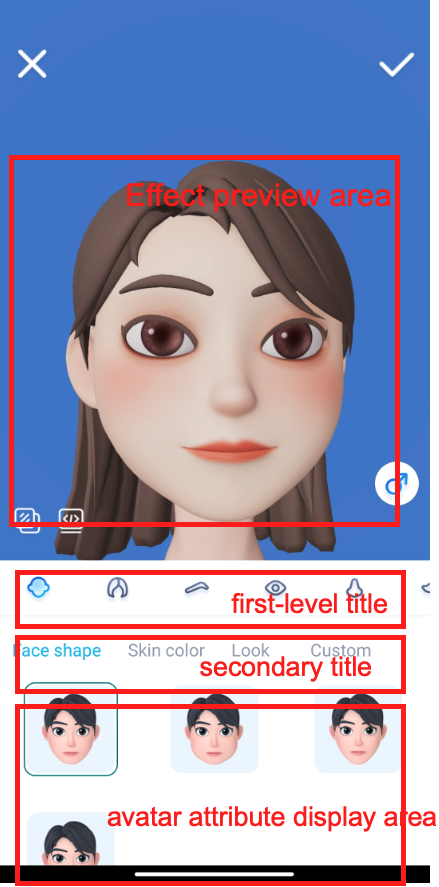
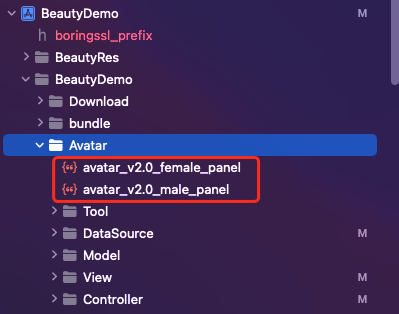
BeautyDemo/bundle/avatarMotionRes.bundle in the demo to your project.BeautyDemo/Avatar folder of the demo to your project and add the following code:AvatarViewController *avatarVC = [[AvatarViewController alloc] init];avatarVC.modalPresentationStyle = UIModalPresentationFullScreen;avatarVC.currentDebugProcessType = AvatarPixelData; // Image or texture ID[self presentViewController:avatarVC animated:YES completion:nil];

BeautyDemo/Avatar/ directory of the demo.
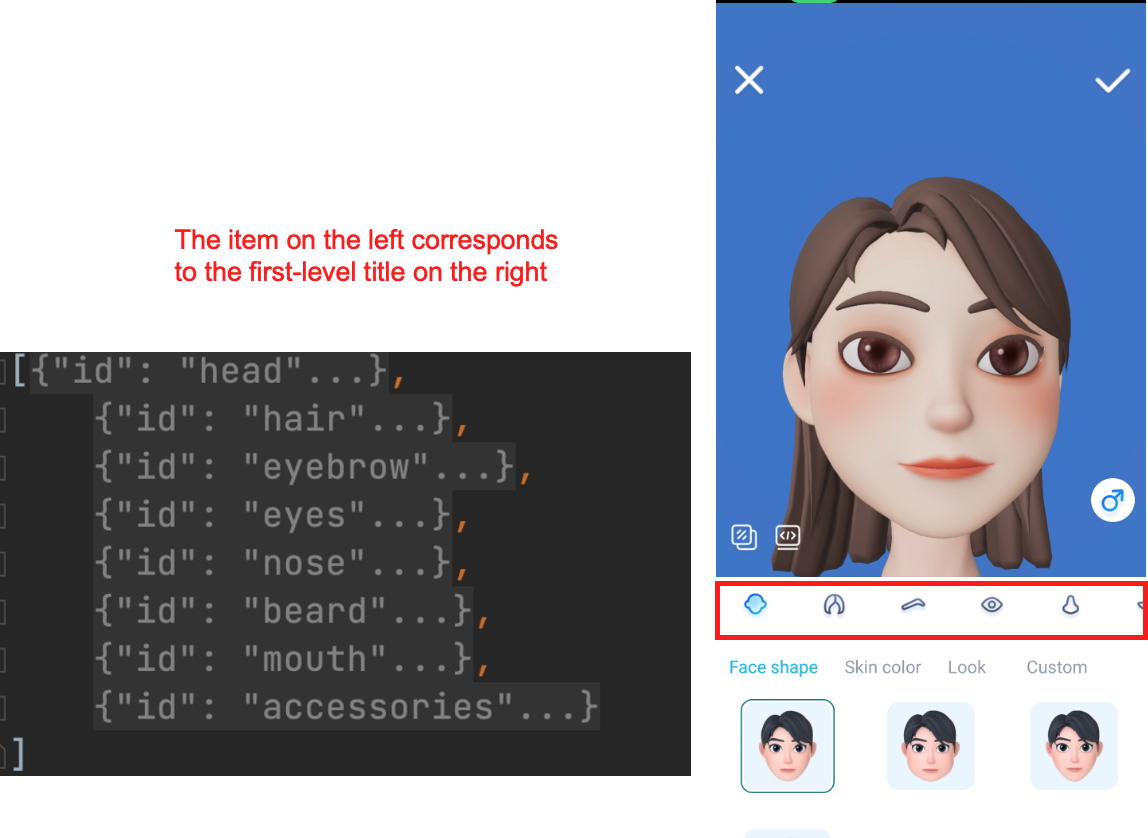
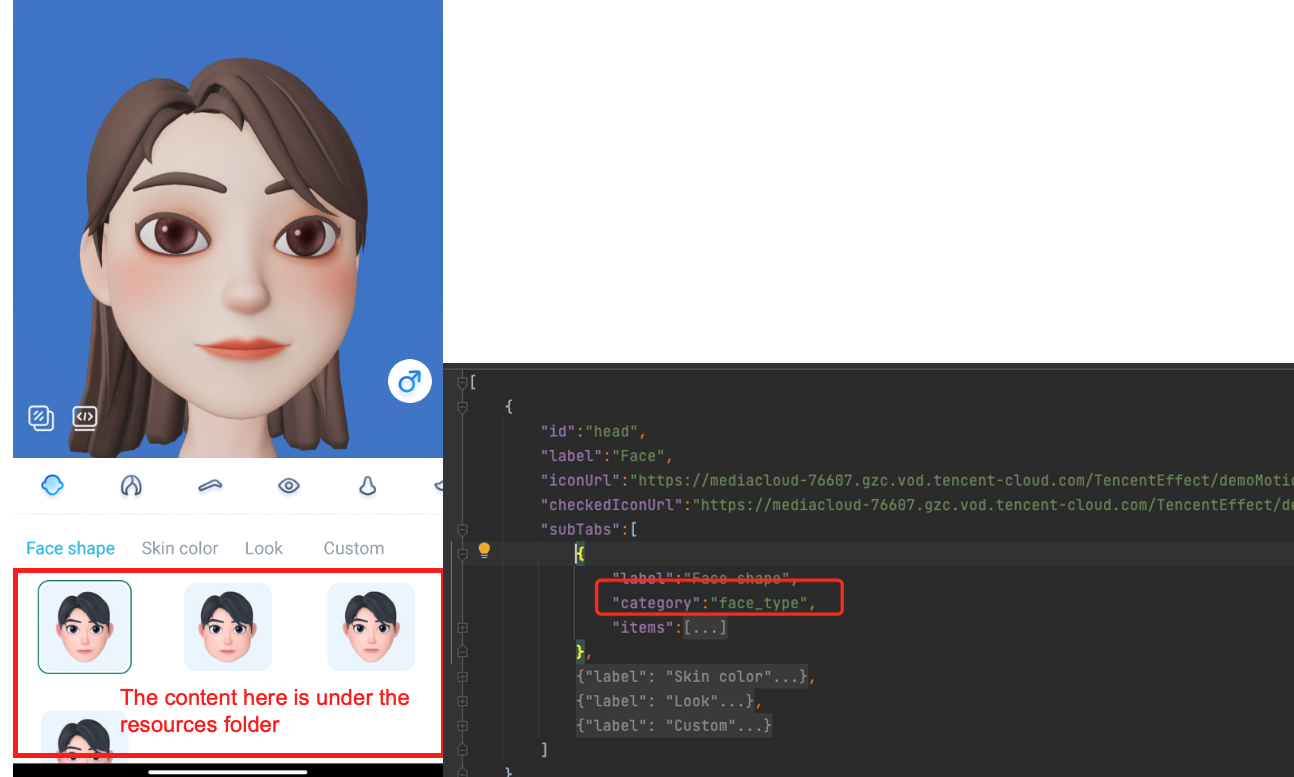
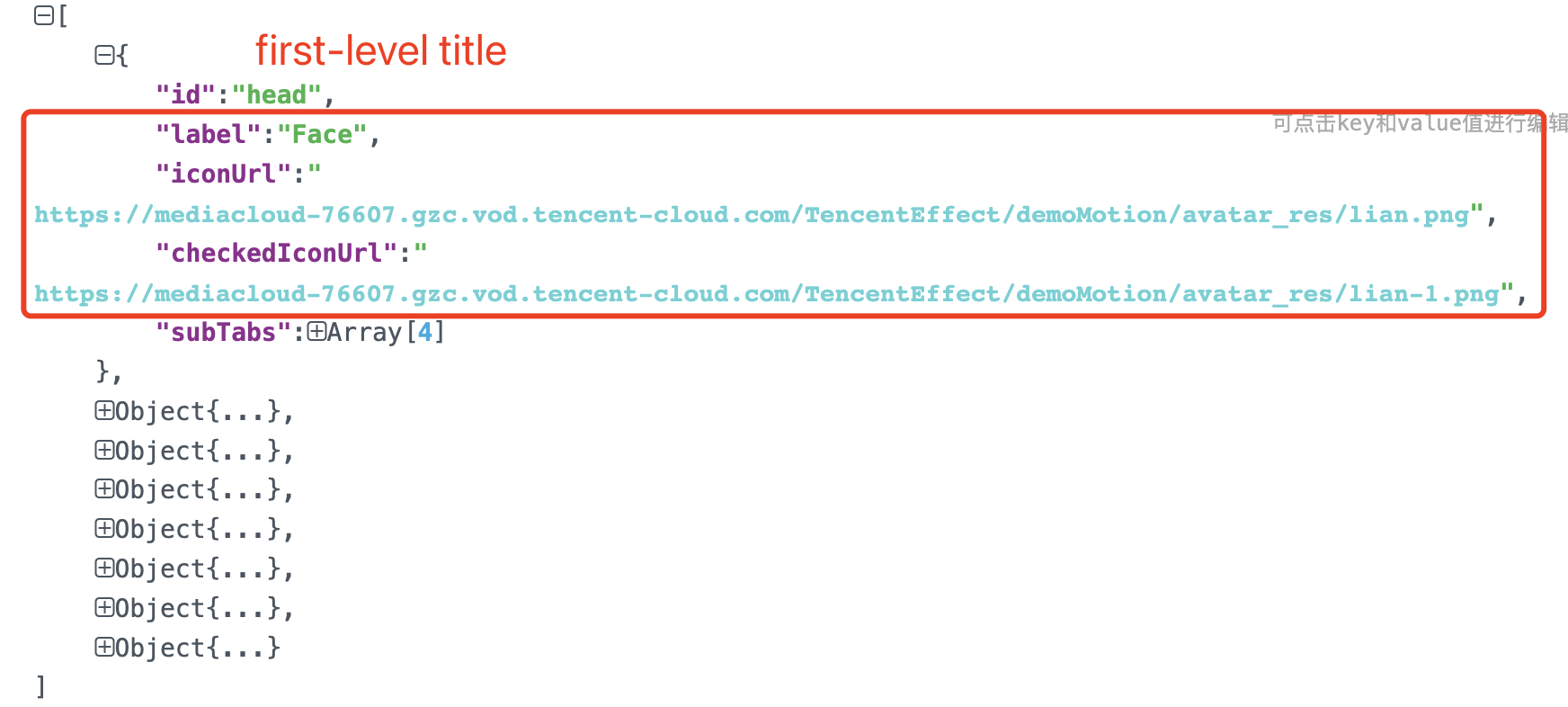
head corresponds to the first icon of the top-level menu:
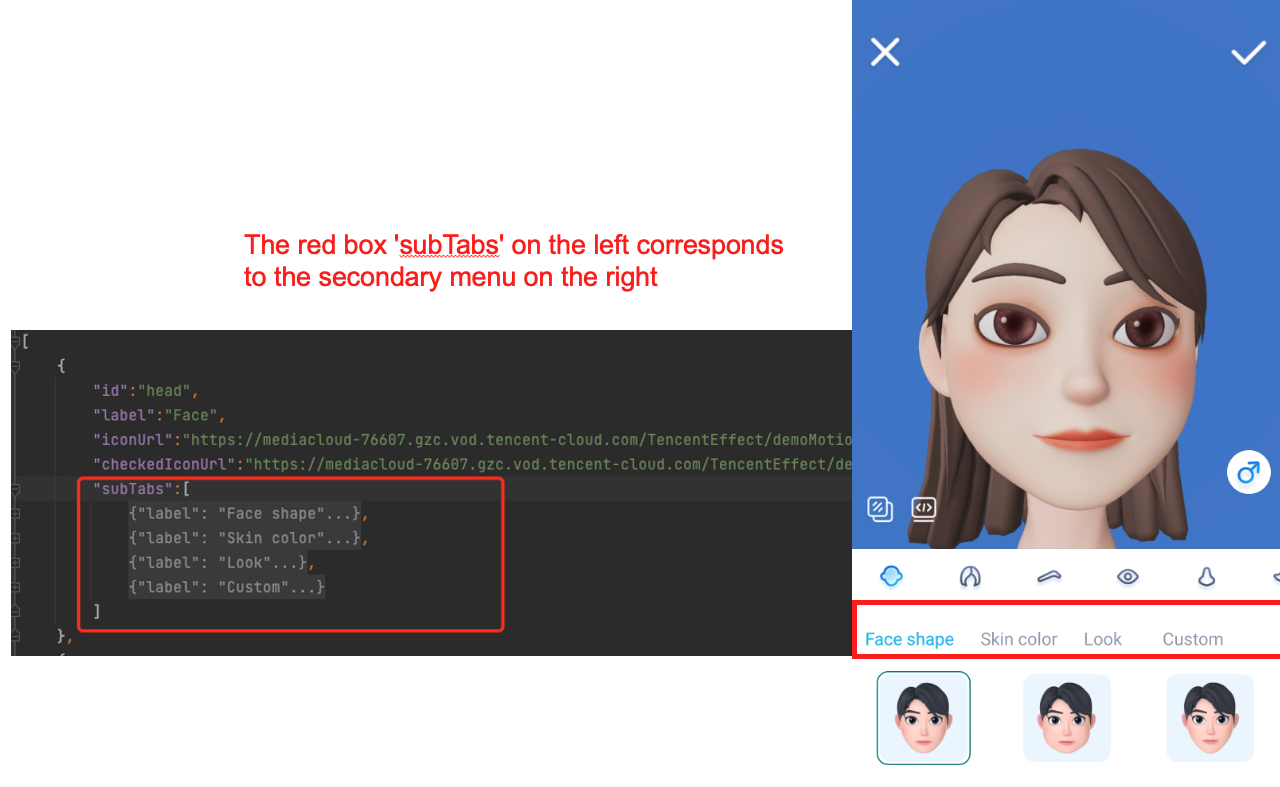
subTabs corresponds to the second-level menu:
items corresponds to the third-level menu:
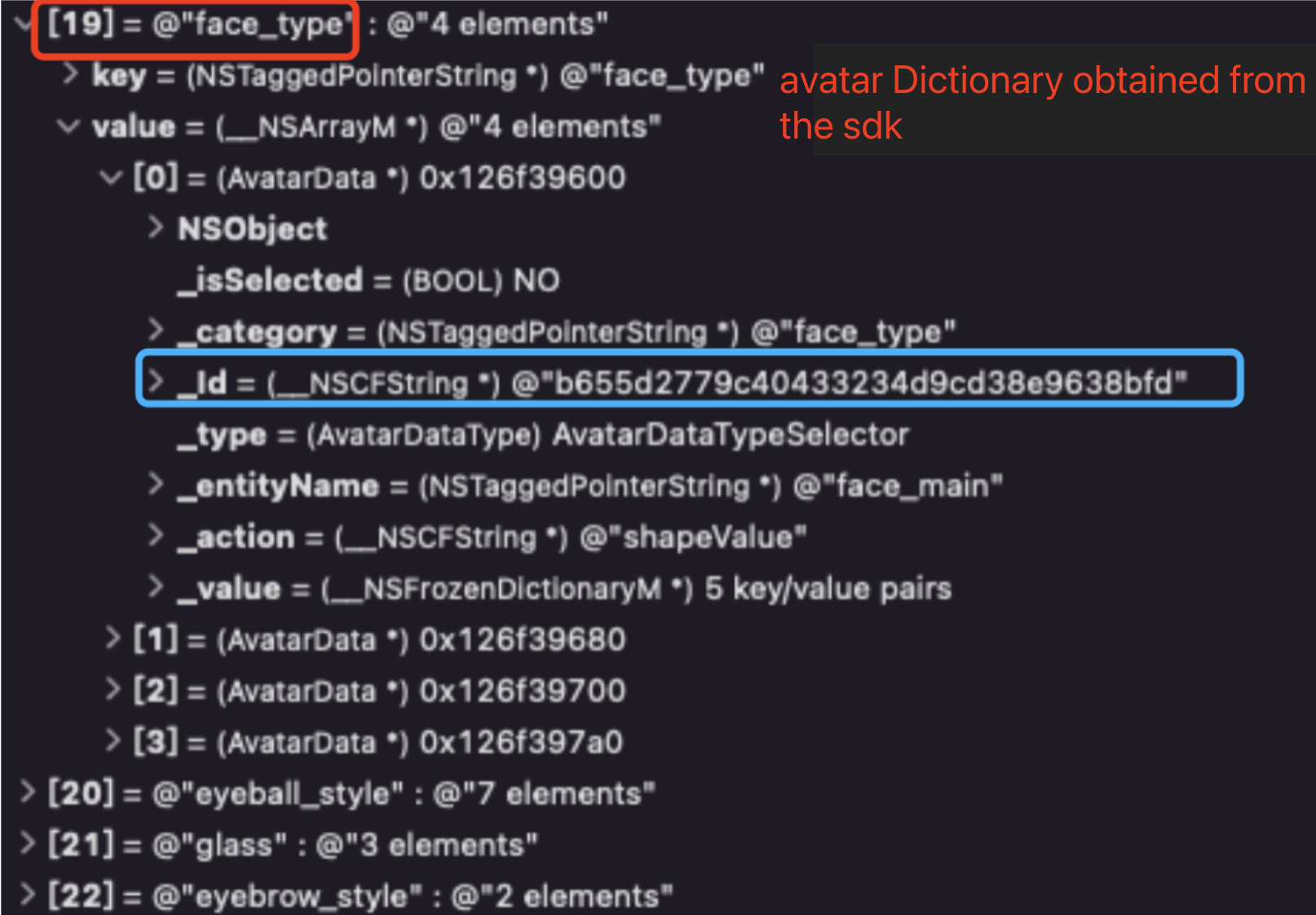
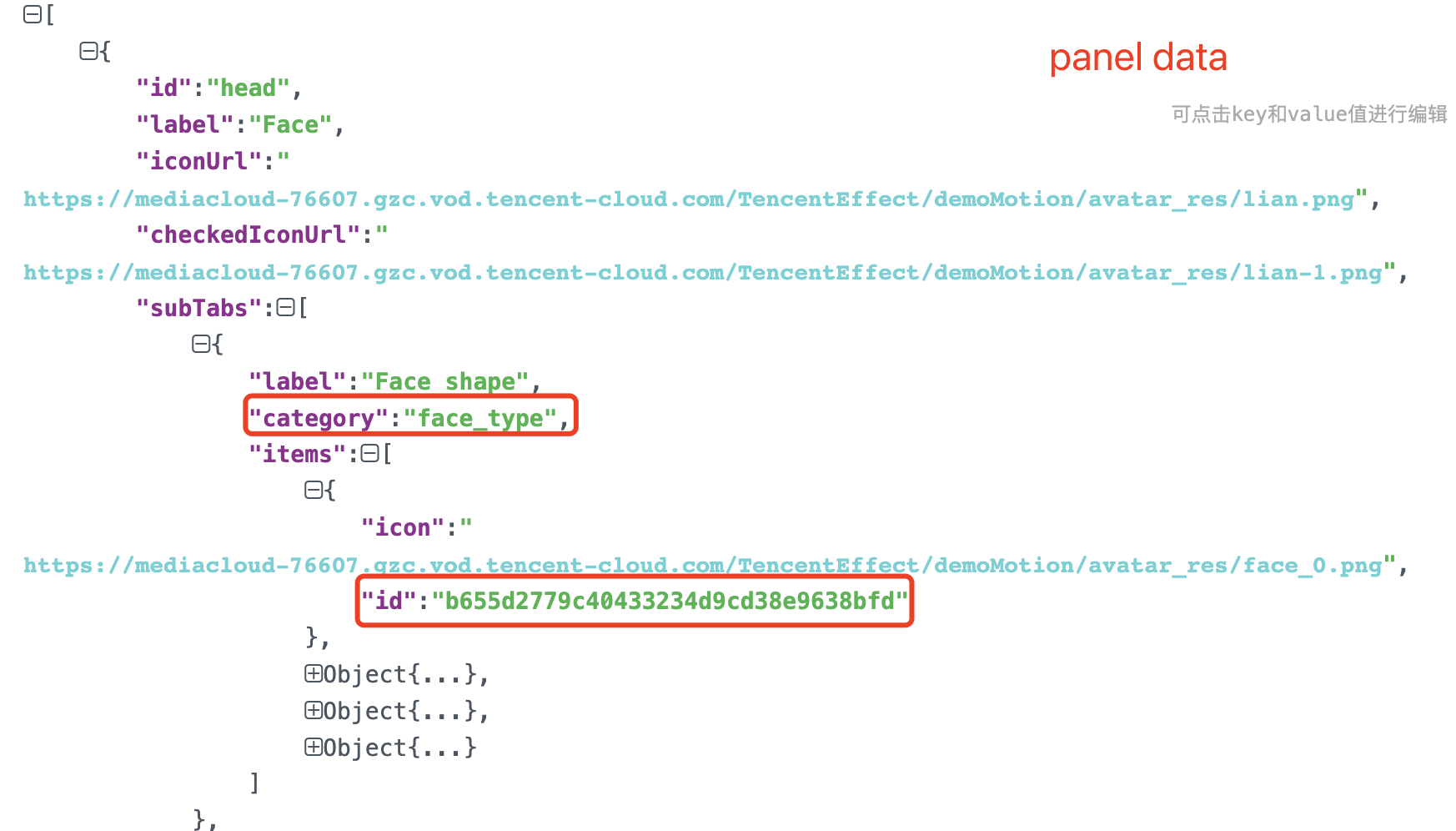
key indicates the category and value is an avatar data array). The second screenshot is the panel data. When the user taps an icon on the panel, get the category from the second-level heading (red box), and in the avatar dictionary returned by the SDK, get the avatar data array of the category. Get the ID from the third-level heading (blue box), and then find the avatar object in the avatar data array of the category. Pass the object to the updateAvatar API of the SDK to edit the avatar.

iconUrl or checkedIconUrl.
BeautyDemo/Avatar/Controller.xmagic object and configure the default avatar template.- (void)buildBeautySDK {CGSize previewSize = CGSizeMake(kPreviewWidth, kPreviewHeight);NSString *beautyConfigPath = [NSSearchPathForDirectoriesInDomains(NSDocumentDirectory, NSUserDomainMask, YES) lastObject];beautyConfigPath = [beautyConfigPath stringByAppendingPathComponent:@"beauty_config.json"];NSFileManager *localFileManager=[[NSFileManager alloc] init];BOOL isDir = YES;NSDictionary * beautyConfigJson = @{};if ([localFileManager fileExistsAtPath:beautyConfigPath isDirectory:&isDir] && !isDir) {NSString *beautyConfigJsonStr = [NSString stringWithContentsOfFile:beautyConfigPath encoding:NSUTF8StringEncoding error:nil];NSError *jsonError;NSData *objectData = [beautyConfigJsonStr dataUsingEncoding:NSUTF8StringEncoding];beautyConfigJson = [NSJSONSerialization JSONObjectWithData:objectData options:NSJSONReadingMutableContainerserror:&jsonError];}NSDictionary *assetsDict = @{@"core_name":@"LightCore.bundle",@"root_path":[[NSBundle mainBundle] bundlePath],@"tnn_"@"beauty_config":beautyConfigJson};// Init beauty kitself.beautyKit = [[XMagic alloc] initWithRenderSize:previewSize assetsDict:assetsDict];// Register log[self.beautyKit registerSDKEventListener:self];[self.beautyKit registerLoggerListener:self withDefaultLevel:YT_SDK_ERROR_LEVEL];// Pass in the path of the avatar materials to load the default avatarAvatarGender gender = self.genderBtn.isSelected ? AvatarGenderFemale : AvatarGenderMale;NSString *bundlePath = [self.resManager avatarResPath:gender];[self.beautyKit loadAvatar:bundlePath exportedAvatar:nil];}
@implementation AvatarViewController_resManager = [[AvatarResManager alloc] init];NSDictionary *avatarDict = self.resManager.getMaleAvatarData;@end@implementation AvatarResManager- (NSDictionary *)getMaleAvatarData{if (!_maleAvatarDict) {NSString *resDir = [self avatarResPath:AvatarGenderFemale];NSString *savedConfig = [self getSavedAvatarConfigs:AvatarGenderMale];// Call an API of the SDK to parse the source data_maleAvatarDict = [XMagic getAvatarConfig:resDir exportedAvatar:savedConfig];}return _maleAvatarDict;}@end
// Get the desired avatar object from the material source data parsed by the SDK API and pass it in to the SDK.NSMutableArray *avatars = [NSMutableArray array];// `avatarConfig` is an avatar object obtained by the `getAvatarConfig:exportedAvatar:` API.[avatars addObject:avatarConfig];// Call the following API to edit the avatar (face editing, dress up) in real time[self.beautyKit updateAvatar:avatars];
- (BOOL)saveSelectedAvatarConfigs:(AvatarGender)gender{NSMutableArray *avatarArr = [NSMutableArray array];NSDictionary *avatarDict = gender == AvatarGenderMale ? _maleAvatarDict : _femaleAvatarDict;// 1. Traverse to find the selected avatar object.for (NSArray *arr in avatarDict.allValues) {for (AvatarData *config in arr) {if (config.type == AvatarDataTypeSelector) {if (config.isSelected) {[avatarArr addObject:config];}} else {[avatarArr addObject:config];}}}// 2. Call an SDK API to export the selected avatar object as a string.NSString *savedConfig = [XMagic exportAvatar:avatarArr.copy];if (savedConfig.length <= 0) {return NO;}NSError *error;NSString *fileName = [self getSaveNameWithGender:gender];NSString *savePath = [_saveDir stringByAppendingPathComponent:fileName];// Check whether the directory exists; if not, create one.BOOL isDir;if (![[NSFileManager defaultManager] fileExistsAtPath:_saveDir isDirectory:&isDir]) {[[NSFileManager defaultManager] createDirectoryAtPath:_saveDir withIntermediateDirectories:YES attributes:nil error:nil];}// 3. Write the exported string to the sandbox for subsequent use.[savedConfig writeToFile:savePath atomically:YES encoding:NSUTF8StringEncoding error:&error];if (error){return NO;}return YES;}
- (void)bgExchangeClick:(UIButton *)btn{btn.selected = !btn.isSelected;NSDictionary *avatarDict = self.resManager.getFemaleAvatarData;NSArray *array = avatarDict[@"background_plane"];AvatarData *selConfig;// A background is also an avatar object (its category is `background_plane`). Changing the background is essentially using a different avatar object.for (AvatarData *config in array) {if ([config.Id isEqual:@"none"]) {if (btn.selected) {selConfig = config;break;}} else {selConfig = config;}}[self.beautyKit updateAvatar:@[selConfig]];}
Feedback