tencent cloud

Tencent Effect SDK

Release Notes and Announcements
Release Notes
Tencent Effect SDK V3.5 Version Released
Tencent Effects SDK V3.0 Version Related API and Material Changes
Product Introduction
Overview
Features
Basic Concepts
Strengths
Use Cases
Purchase Guide
Pricing Overview
Purchase Guide
Payment Overdue and Refund
Tutorial
Demos
Free Trial License
Licenses
Adding and Renewing a License (Mobile)
Adding and Renewing a License (Desktop)
Adding and Renewing a License (Web)
FAQs
SDK Download
Features
SDK Download
Version History
SDK Integration Guide(No UI)
General Integration of Tencent Effect
Integrating Capabilities
SDK Integration Guide(Including UI)
General Integration of Tencent Effect
Integrating Tencent Effect into MLVB SDK
Integrating Tencent Effect into TRTC SDK
Integrating Tencent Effect into UGSV SDK
Virtual Avatars
API Documentation
iOS
Android
Flutter
Web
Feature Guide
Reducing SDK Size
SDK Integration Issue Troubleshooting
Performance Fine-Tuning
Effect Fine-Tuning
Material Usage
Effect Parameters
Recommended Parameters in Beautification Scenarios
UGSV Enterprise Edition Migration Guide
Integrating Tencent Effect for Third-Party Publishers (Flutter)
Integrating Beauty AR Web into Mini Programs
Tencent Effect Studio Usage
Beauty AR Web
Overview
Quick Start
SDK Integration
Parameters and APIs
Console Guide
Demos
Preset Effect List
Practical Tutorial
FAQs
FAQs
General
Technical
License
Legacy Documentation
Recommended Parameters in Beautification Scenarios
Beauty Parameters Table
One-Minute Integration of TRTC
One-Minute Integration of Live Streaming
TE SDK Policy
Privacy Policy
Data Processing And Security Agreement
Contact Us
DocumentationTencent Effect SDK

Beauty AR Studio Introduction

Focus Mode
Font Size
Last updated: 2025-03-26 16:06:21

Product Introduction

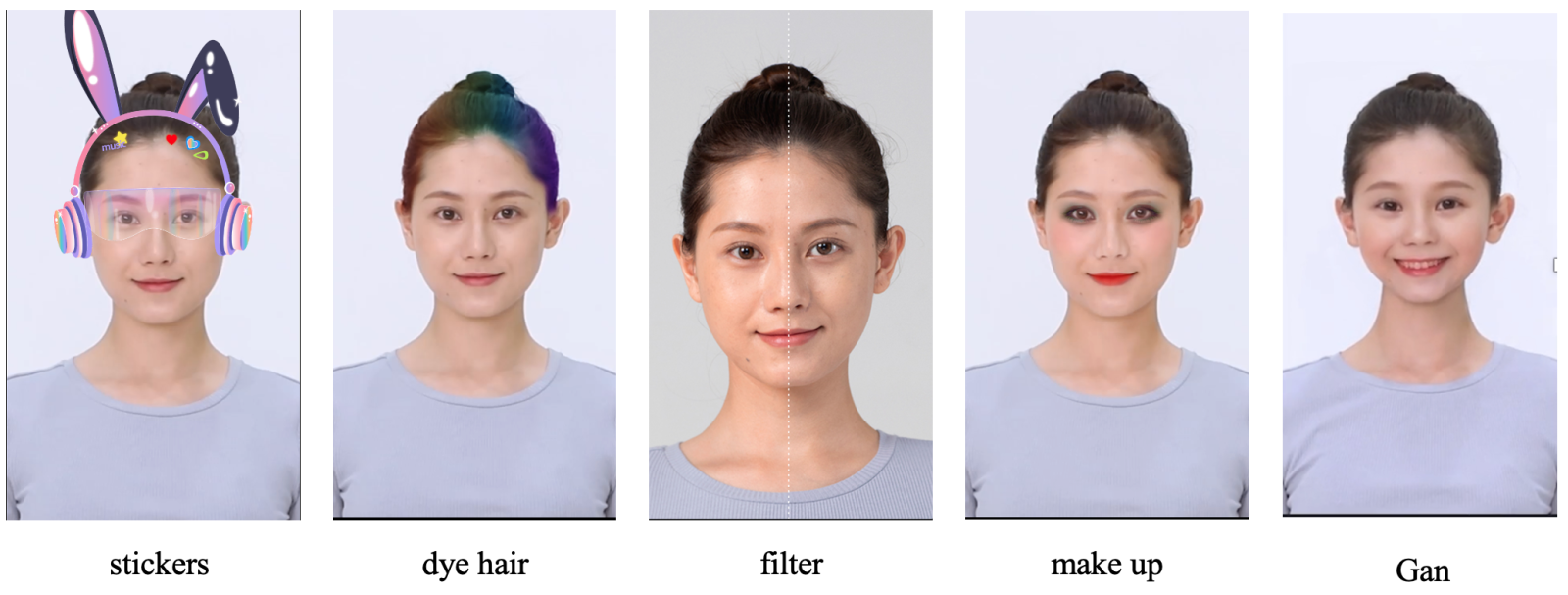
Beauty AR Studio is a material creation tool that supports customers to customize 2D and 3D stickers for personalized material production. After completing the production, the materials can be imported into the SDK for use.

Tool features

AI Configuration: AI capability modular editing
3D Editing: Design 3D model materials
Process Control: Rich process control options for creating various complex dynamic effects
Dynamic Effect Import: Support importing local dynamic materials to preview effects
Tool Download

Windows
Mac
DOWNLOAD
DOWNLOAD
Note:
The corresponding key is required to log in to the material production tool, please contact us to obtain it.

Product Capability Introduction

1、2D stickers & Beauty Special Effects Design

Code environment panel visualization, even novice designers can easily get started.


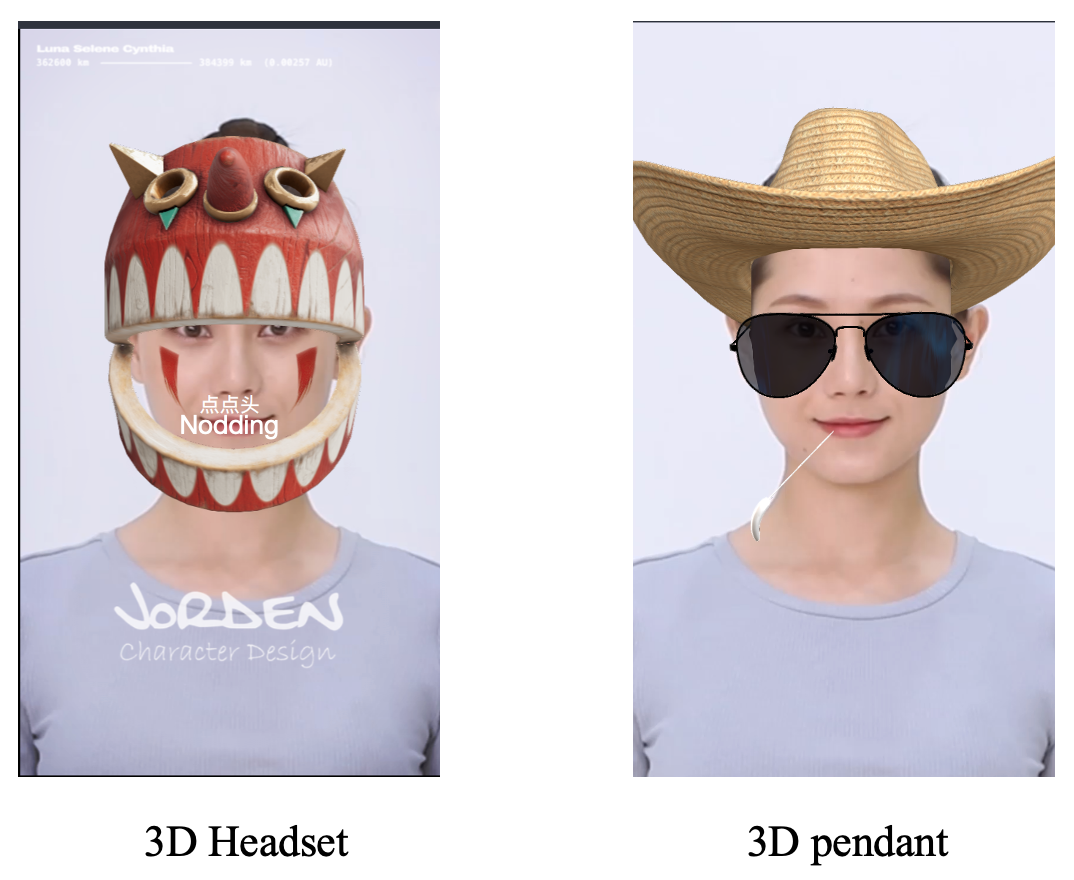
2、3D Interactive Special Effects

Supports rendering of various materials, achieving rich special effects production effects.


3、List of Material Production Capabilities

Type
Items
Type
Items
General
Filter
Music
Workflow
Script
AI
Segmentataion
Facial features
Head
AI face change
Face merging
Expression migration
Stickers
Foreground sticker
Face-tracking sticker
Hand-tracking sticker
Body-tracking sticker
Cat face-tracking sticker
Special effects
Capture one frame
Frame capture
Face customization
Liquify
Post-processing
Avatar2D
Make up
Full-face makeup
Eyebrow makeup
Eye makeup
Eye color
Lipstick
3D
Camera
Light source
3D head
Beautify
Face beautification
Body beautification
Hair color
3D module
Cube
Sphere
Cylinder
Plane


Help and Support

Was this page helpful?

Help us improve! Rate your documentation experience in 5 mins.

Feedback