Release Notes
Tencent Effect SDK V3.5 Version Released
Tencent Effects SDK V3.0 Version Related API and Material Changes
test.webar.com as an example. Click Confirm to complete the creation.test.webar.com is filled in above, you can still use localhost:xxxx as the development address to run the Demo locally without issues.License Token for Beauty AR Web and the License key for the test project. you also can get the App ID.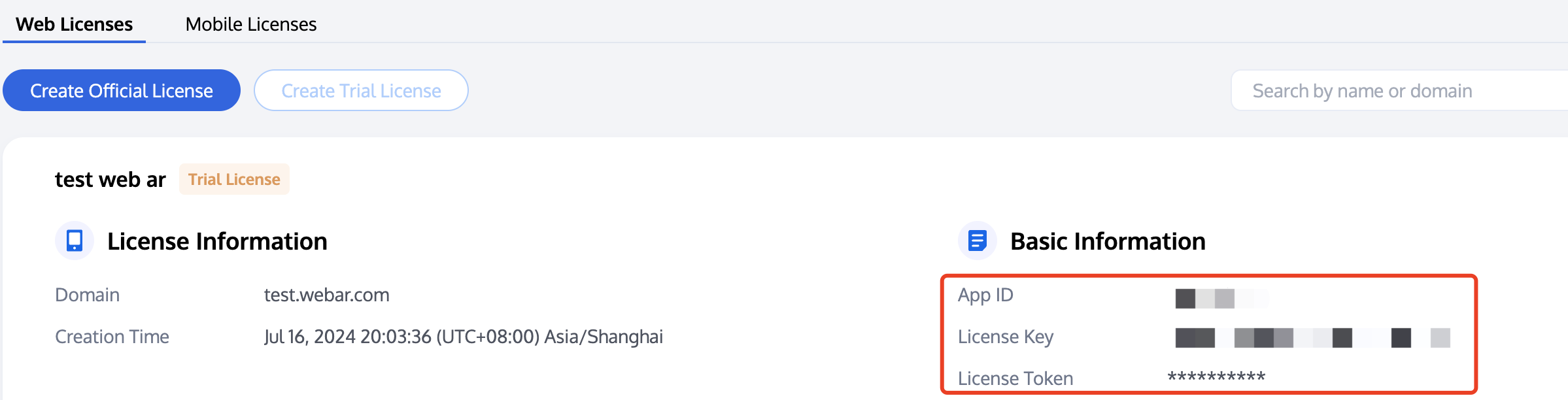
cd quick-start
index.js with the license key, token, and APPID obtained in step 1 as shown below:/** ----- Authentication configuration ----- *//*** Tencent Cloud account's APPID** You can also view your APPID in the [Account Center](https://console.tencentcloud.com/developer).*/const APPID = ''; // Set it to your Tencent Cloud account APPID./*** Web LicenseKey** obtained from Before You Start*/const LICENSE_KEY = ''; // Set it to your license key./*** The token used to calculate the signature.** Note: This method is only suitable for debugging. In a production environment, you should store the token and calculate the signature on your server. The front end can get the signature by calling an API. For details, see* https://trtc.io/document/50099?platform=web&product=beautyar#e4ce3483-41f7-4391-83ae-f4b61e221ea0*/const token = ''; // Set it to your token./** ----------------------- */
nodejs environment is already installed on the device.localhost:8090 in the browser to try out the capabilities of Beauty AR Web.# Install dependenciesnpm i# Compile and run the codenpm run dev
Was this page helpful?
You can also Contact sales or Submit a Ticket for help.
Help us improve! Rate your documentation experience in 5 mins.
Feedback