tencent cloud

DocumentationBastion HostTroubleshootingWindows Resource Login Prompting Wait Active

Windows Resource Login Prompting Wait Active

PDF
Focus Mode
Font Size
Last updated: 2025-04-18 11:17:41

Phenomenon Description

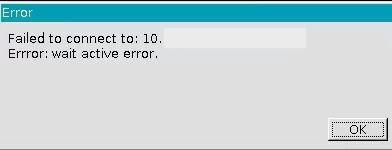
Accessing Windows resources fails with a prompt indicating wait active error, as shown below:


Possible Causes

Remote Desktop licensing is not activated and the user is not added to the Remote Desktop Users group.

Solutions

Activate the Remote Desktop Services and add the user to the Remote Desktop Users group.

Directions

1. See the documentation setting up Windows CVM for multi-user remote login for detailed configuration instructions.
2. On the operating system interface, click

, enter gpedit.msc, and press Enter to open the Local Group Policy Editor.
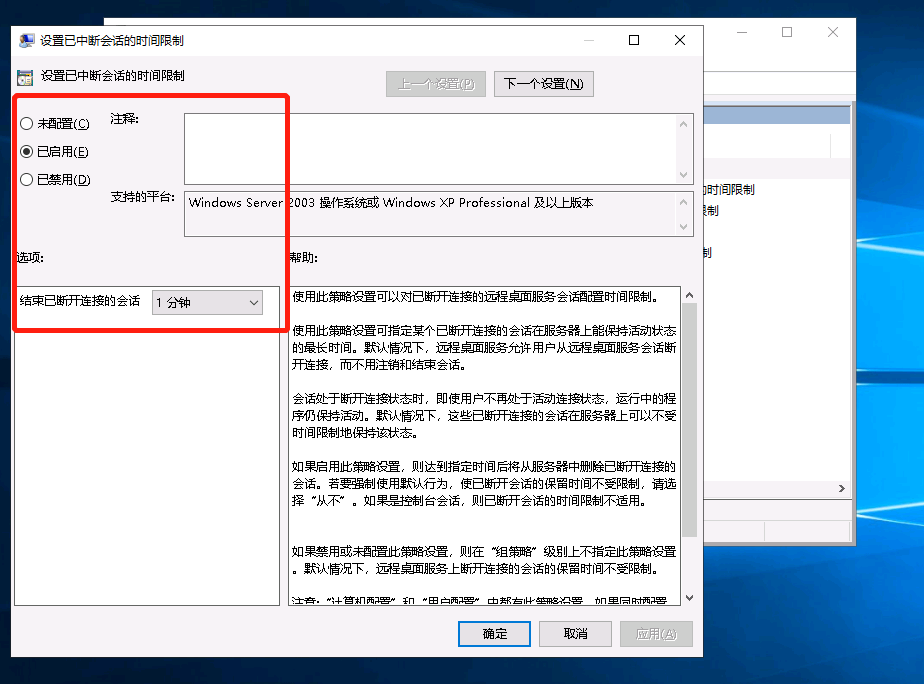
3. Go to Run > gpedit.msc > Computer Configuration > Administrative Templates > Windows Components > Remote Desktop Services > Remote Desktop Session Host > Session Time Limit, locate "Set the time limit for interrupted sessions," enable it, and set End disconnected sessions to 1 minute.

4. Add the user to the Remote Desktop Users group.
Help and Support

Was this page helpful?

Help us improve! Rate your documentation experience in 5 mins.

Feedback