DataInLong offers single table read and write capabilities for Dameng DM. This document introduces the pre-environment configuration for real-time data synchronization using Dameng DM, as well as the current capability support.
Supported Editions
Currently, DataInLong supports real-time single table read and write for Dameng DM. To use real-time synchronization, adhere to the following version limitations:
Type
Edition
Dameng DM
7,8
Use Limits
Currently only supports real-time single table read and write, and does not support full database tasks.
Only At-least-once semantics are supported. Target-side deduplication capability is required to ensure data uniqueness.
DM as the target end does not support one-click creation of DM target-end table structures based on source table structures. The target table needs to be created in the DM database in advance.
Preparing the Database Environment
Enable Archive mode
1. Use the following statements to verify if the ARCH_INI and RLOG_APPEND_LOGIC parameters are correctly set to ensure that the database has Archive mode enabled:
select para_name, para_value
from v$dm_ini
where para_name in('ARCH_INI','RLOG_APPEND_LOGIC');
2. If the parameters show 0, follow these steps to set Archive mode and modify the parameters.
2.1 Modify the parameters in dm.ini as follows:
ARCH_INI = 1
RLOG_APPEND_LOGIC = 1
2.2 dmarch.ini needs to configure local archiving. Here is an example:
[ARCHIVE_LOCAL1]
ARCH_TYPE = LOCAL
ARCH_DEST = d:\\dmdbms\\arch
ARCH_FILE_SIZE = 128 #Unit: MB
ARCH_SPACE_LIMIT = 0 #Unit: MB, 0 means unlimited, range 1024~4294967294M
ARCH_INI and RLOG_APPEND_LOGIC
Enable Autocommit
Most DMC tools have autocommit enabled by default. That is, after executing a Select, Insert, Delete, or Update statement, it will automatically perform a commit operation. However, Dameng DMC tools do not; whether it's TCCLI disql or visual management tools, they do not autocommit by default and require a manual commit operation.
Method 1: Select Window > Options from the management tools menu, click Query Analyzer, and check Autocommit.
Method 2: Use SQL commands.
Temporary modifications can be configured as follows, as described in the official documentation:
1. Set whether the current session automatically commits changes to the data.
ON: Enable autocommit. The transaction for any executed SQL statement will be automatically committed.
OFF: Disable autocommit. The transaction for any executed SQL statement will need to be committed explicitly by the user, which is the default setting.
SET AUTO[COMMIT]<ON|OFF>
Permission granting
grantcreatesessionto my_user;
grantselecton all_users to my_user ;
grantselecton all_objects to my_user ;
grantselecton all_tab_cols to my_user ;
grantselecton all_indexes to my_user ;
grantselecton dba_objects to my_user ;
grantselecton V$LOGMNR_CONTENTS to my_user ;
grantselecton V$ARCHIVED_LOGS to my_user ;
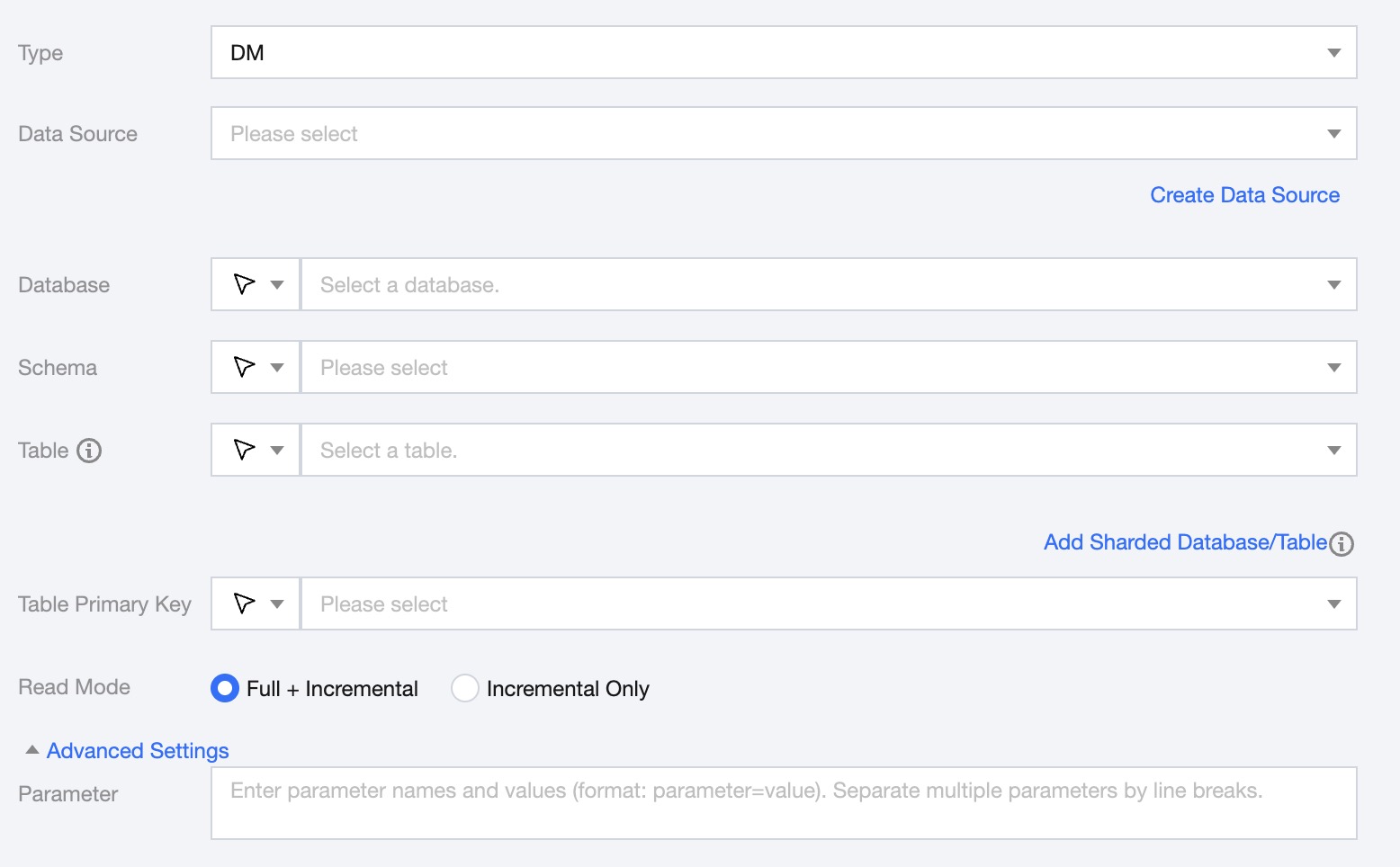
Single Table Read Node Configuration
Parameters
Description
Data Source
Select Dameng DM Data Source.
Database
Support selecting or manually entering the name of the required database.
By default, the database bound to the data source is used as the default database. Other databases need to be manually entered.
If the data source network is not connected and the database information cannot be fetched directly, you can manually enter the database name. Data synchronization can still be performed when the DataInLong network is connected.
Schema
Support selecting or manually entering the available schema under the data source.
Table
Support selecting or manually entering the table name to be read.
In the case of sharding, multiple table names can be selected or entered in the Dameng DM source, and multiple tables must have the same structure.
In the case of partitioned tables, you can configure the table index range. For example, 'table_[0-99]' indicates reading 'table_0','table_1','table_2' up to 'table_99'. If your table number suffix length is consistent, such as 'table_000','table_001','table_002' up to 'table_999', you can configure it as '"table": ["table_00[0-9]", "table_0[10-99]", "table_[100-999]"]'.
If the data source network is not connected and the table information cannot be fetched directly, you can manually enter the table name. Data synchronization can still be performed when the DataInLong network is connected.
Add Sharded Database/Table
Applicable to sharding scenarios. Click to configure multiple data sources, databases, and table information. In sharding scenarios, ensure all table structures are consistent. The task configuration will default to displaying and using the structure of the first table to obtain data.
Table Primary Key
Select a field as the primary key for the target table.
Read Mode
Full + Increment: Data synchronization is divided into full and increment phases. After the full phase is completed, the task enters the increment phase. The full phase will synchronize historical data in the database, and the incremental phase starts synchronizing from the binlog cdc location after the task starts.
Increment Only: Only synchronize data from the binlog cdc position after the task starts.
Parameter (optional)
You can configure parameters according to business needs.
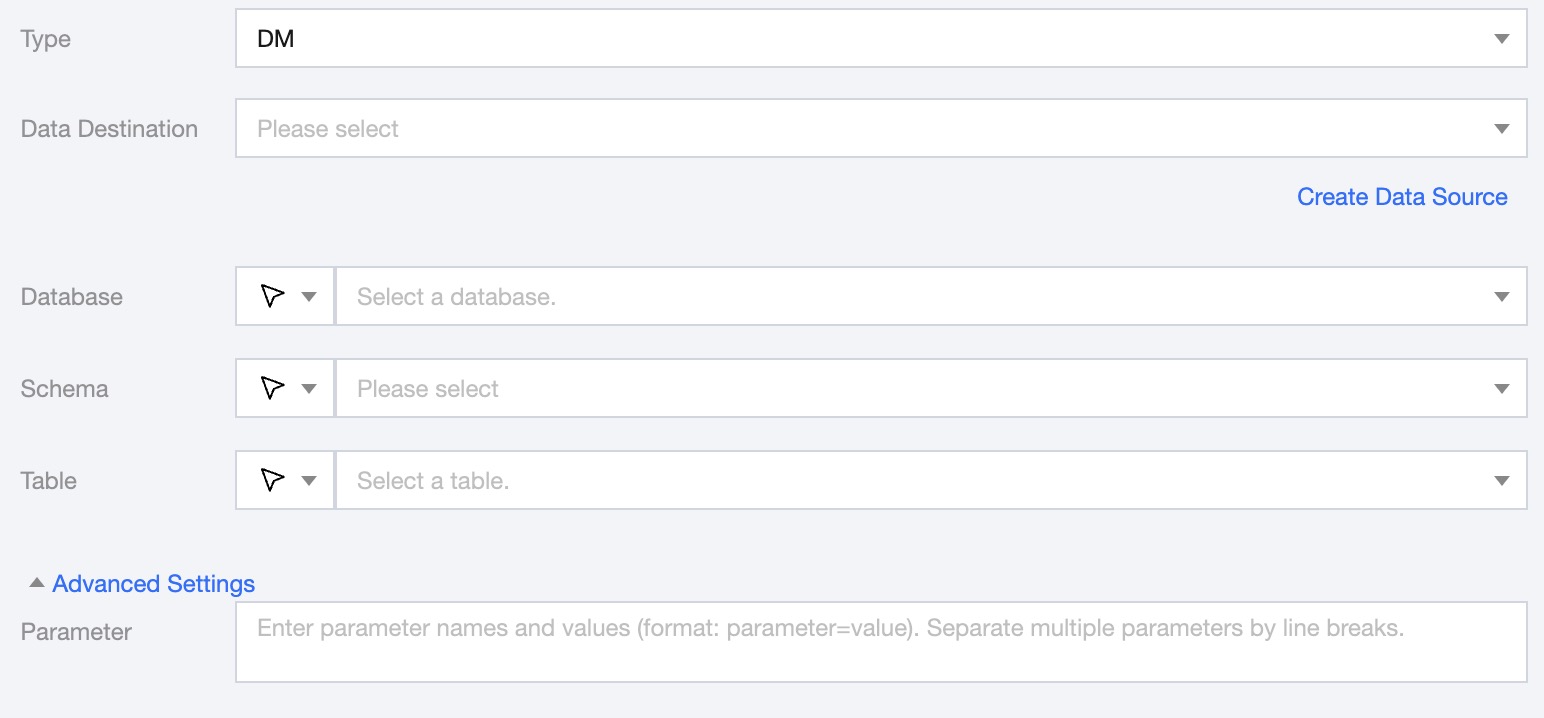
Real-time Single Table Write Node Configuration
Parameters
Description
Data Destination
Dameng DM Data Source to be written to.
Database
Supports selection or manual input of the database name to write to
By default, the database bound to the data source is used as the default database. Other databases need to be manually entered.
If the data source network is not connected and the database information cannot be fetched directly, you can manually enter the database name. Data synchronization can still be performed when the DataInLong network is connected.
Schema
Support selection or manual entry of the Dameng DM Data Mode to be written to.
If the data source network is not connected and the Schema information cannot be fetched directly, you can manually enter the Schema name. Data synchronization can still be performed when the DataInLong network is connected.
Table
Support selection or manual entry of the table name to be written to.
If the data source network is not connected and the table information cannot be fetched directly, you can manually enter the table name. Data synchronization can still be performed when the DataInLong network is connected.
Advanced Settings (Optional)
You can configure parameters according to business needs.
Supported Data Types
Read
The supported data types for Dameng DM reading and their conversion relationships are as follows (when processing Dameng DM, the data types of the Dameng DM data source and the data processing engine will be mapped first):
DM Types
Internal Types
Remarks
INT
INT
TINYINT
TINYINT
TINYINT(1) maps to BOOLEAN
Add an option to support mapping TINYINT(1) to either bool or tinyint
SMALLINT
SMALLINT
BIGINT
Long
REAL
DOUBLE
FLOAT
FLOAT
DOUBLE
DOUBLE
DECIMAL
DECIMAL
Using the actual precision of the user database p<=38 maps to DECIMAL, 38 < p <= 65 maps to String
CHAR
STRING
VARCHAR
STRING
TEXT
STRING
DATE
DATE
TIMESTAMP
TIMESTAMP
Write
The supported data types for Dameng DM writing and their conversion relationships are as follows: