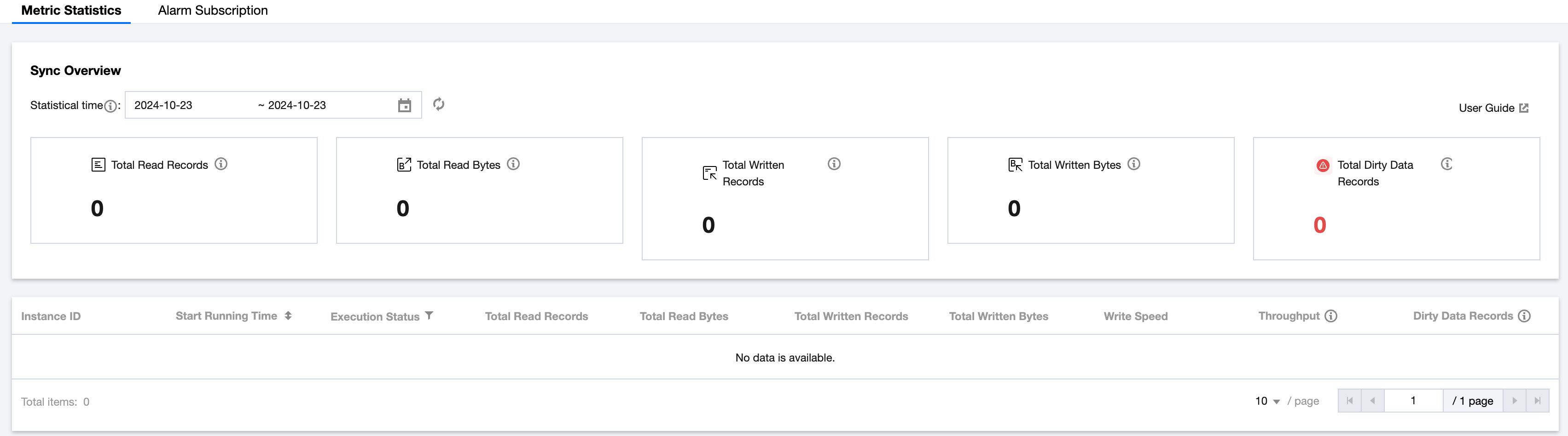
Offline synchronization operational data metrics can be viewed from both task and instance dimensions to examine the synchronization status. In the offline maintenance interface, after recording from tasks or instances, click Operations > Operation Details to enter the metric statistics interface.
Note:
HDFS/SFTP/FTP transfer binary files in File Transfer Mode, and currently do not support statistical data metrics.
Overview Module Parameter Description:
Metric Parameters
Description
Total Read Records
Number of records read by all instances of the task within the current statistical time range
Total Read Bytes
Total size of records read by all instances of the task within the current statistical time range
Total Written Records
Number of records successfully written by all instances of the task within the current statistical time range
Total Written Bytes
Total size of records successfully written by all instances of the task within the current statistical time range
Total Dirty Data Records
Number of records failed to write by all instances of the task within the current statistical time range
Instance List Metric Parameter Description:
Metric Parameters
Description
Instance ID
Shows the current instance ID and data timestamp
Start Running Time
Actual start time of the current instance
Execution Status
Actual running status of the current instance; only successful/failed instances have specific statistics
Success: The instance has run successfully
Failed: The instance run has failed
In Progress: The instance is running
Wait for Execution: Includes wait time, waiting for self-dependence, waiting for scheduling resources, waiting for computing resources, etc
Terminating: Instance just clicked Terminate operation
Failed Retry: The instance failed on the previous run and is preparing to retry
Total Read Records
Total number of records read during the running period of the current instance
Total Read Bytes
Total number of bytes read during the running period of the current instance
Total Written Records
Number of records successfully written during the running period of the current instance
Total Written Bytes
Number of bytes successfully written during the running period of the current instance
Write Speed
Write rate of the current instance, in Messages/Second
Throughput
Byte throughput of the current instance during writing, in KB/s
Dirty Data Records
Number of records failed to write during the running period of the current instance