com.github.shyiko.mysql.binlog.network.ServerException:A slave withthe same server_uuid/server_id as this slave has connected tothe master.
Solution: We have optimized the generation of server IDs to be random. For previous tasks, if a server ID is explicitly set in the MySQL advanced parameters, it is recommended to delete it to avoid conflicts caused by multiple tasks using the same data source with the same server ID.
2. Error: Binlog file not found:
Error message:
Caused by:org.apache.kafka.connect.errors.ConnectException:The connector is trying toread binlog starting at GTIDs xxx and binlog file 'binlog.xxx', pos=xxx, skipping 4 events plus 1 rows, but this is no longer available on the server. Reconfigure the connector touse a snapshot when needed.
Reason:
An error occurs when the binlog file being read by the job has been cleared on the MySQL server. There are many reasons for binlog cleanup; it may be due to a short binlog retention time setting, or the job processing speed cannot keep up with the binlog generation speed, exceeding the maximum retention time of MySQL binlog files, resulting in the binlog file on the MySQL server being cleaned, causing the reading binlog location to become invalid.
Solution: If the job processing speed cannot keep up with the binlog generation speed, you can consider increasing the binlog retention time or optimizing the job to reduce back pressure and speed up source consumption. If the job status is normal, other operations on the database may have caused the binlog to be cleaned, making it inaccessible. You need to check the MySQL database information to determine the reason for the binlog cleanup.
3. MySQL reports a connection reset
Error message:
EventDataDeserializationException:Failedtodeserialize data of EventHeaderV4....Caused by:java.net.SocketException:Connection reset.
Reason:
1. Network issues.
2. The job has back pressure, causing the source to be unable to read data, making the binlog client idle. If the binlog connection is still idle after a timeout, the MySQL server will disconnect the idle connection.
Solution:
1. If it is a network issue, you can increase the MySQL network parameter set global slave_net_timeout = 120; (default is 30s) set global thread_pool_idle_timeout = 120.
2. If it is caused by job back pressure, you can reduce back pressure by adjusting the job, such as increasing parallelism, improving write speed, and increasing taskmanager memory to reduce GC.
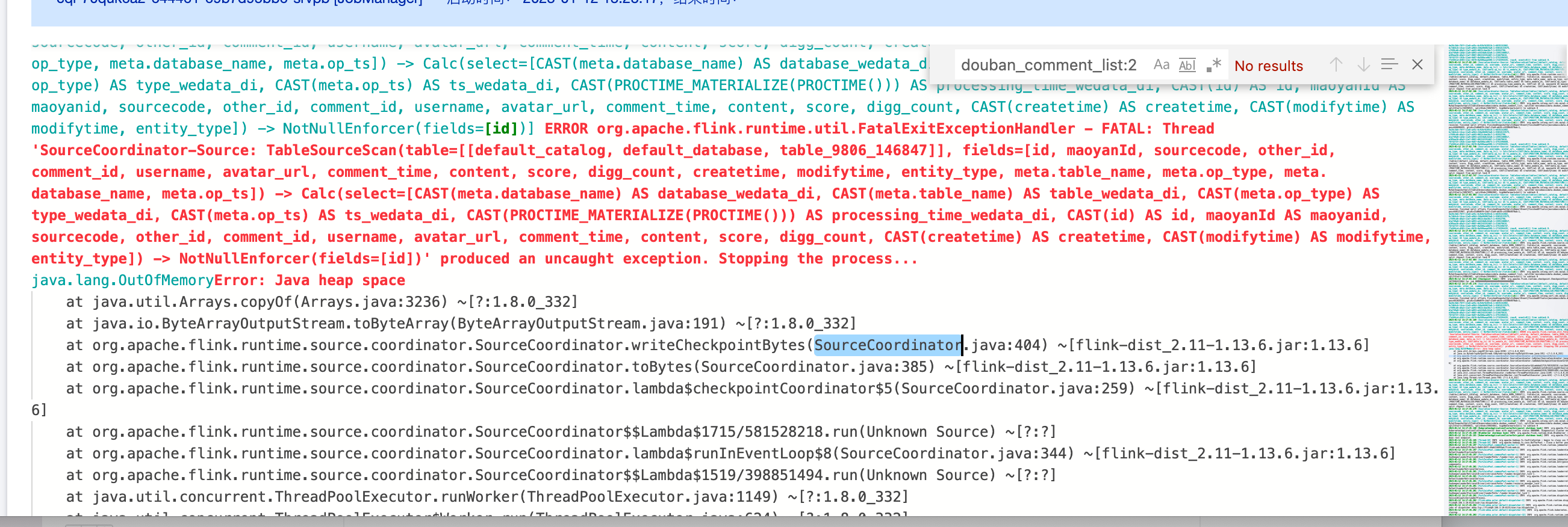
4. Mysql2dlc task JobManager OOM
Error message:
Reason and solution:
1. If the user's data volume is large, you can increase the jobmanager CU count, and use MySQL advanced parameter scan.incremental.snapshot.chunk.size to increase the chunk size, the default is 8096.
2. If the user data is not large, but the difference between the maximum and minimum primary key values is significant, leading to many chunks when using the equal chunk strategy, modify the distribution factor to apply a non-uniform data split logic: split-key.even-distribution.factor.upper-bound=5.0d. The default distribution factor has already been changed to 10.0d.
5. The user's binlog data format is incorrect, causing Debezium parsing exceptions
Error message:
ERROR io.debezium.connector.mysql.MySqlStreamingChangeEventSource[]-Error during binlog processing. Last offset stored =null, binlog reader near position = mysql-bin.000044/211839464.
After setting binlog_row_image=full, restart the database.
6. Is gh-ost supported?
Yes, it does not migrate temporary table data generated by Online DDL changes, only the original DDL data executed using gh-ost from the source database. You can also use the default or configure your own regular expressions for gh-ost shadow tables and unused tables.
DLC Category
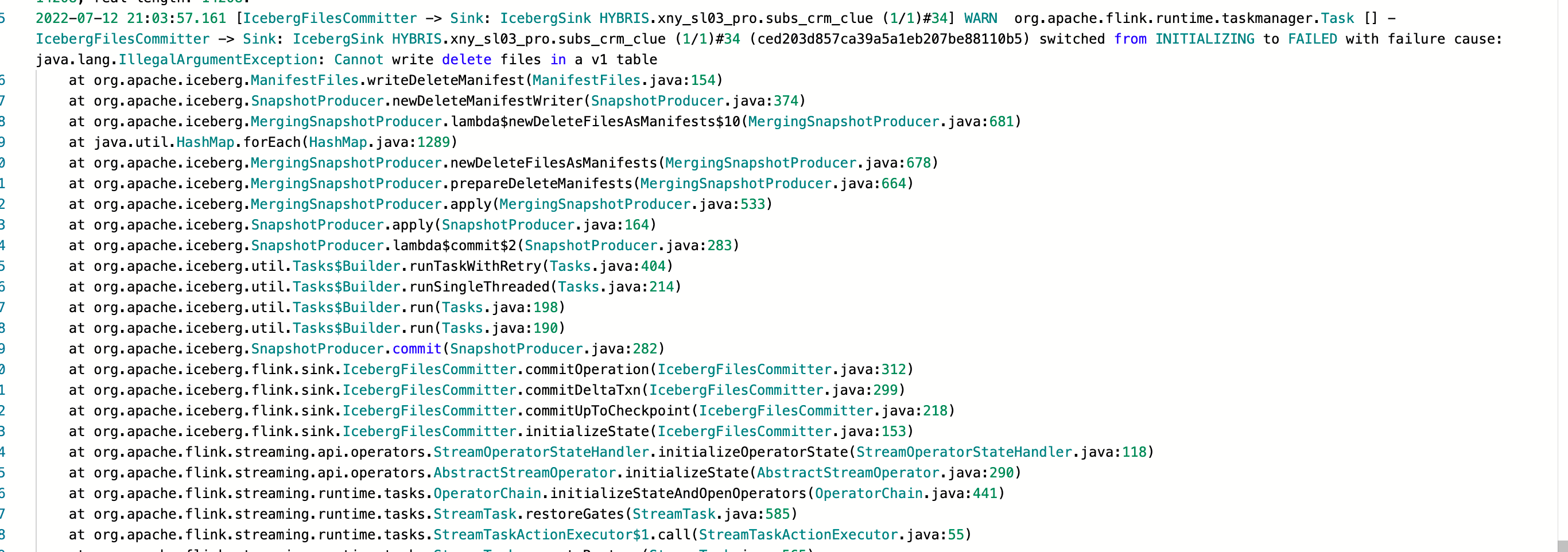
1. An error occurred when synchronizing incremental data (changelog data) to DLC
Error message:
Cause:
dlc Table with v1 Table does not support changelog data.
Solution:
1. Modify dlc Table to v2 Table and enable upsert support.
2. Enable upsert support for the Table: ALTER TABLE tblname SET TBLPROPERTIES ('write.upsert.enabled'='true').
3. Change Table to v2 Table: ALTER TABLE tblname SET TBLPROPERTIES ('format-version'='2').
Check if the table properties were set successfully: show tblproperties tblname.
2. Cannot write incompatible dataset to table with schema
at org.apache.iceberg.types.TypeUtil.checkSchemaCompatibility(TypeUtil.java:364)
at org.apache.iceberg.types.TypeUtil.validateWriteSchema(TypeUtil.java:323)
Reason:
User set a NOT NULL constraint when creating the dlc Table.
Solution:
Do not set the NOT NULL constraint when creating the table.
3. Synchronizing mysql to dlc, Array Out of Bounds error
Issue details:
java.lang.ArrayIndexOutOfBoundsException:1
at org.apache.flink.table.data.binary.BinarySegmentUtils.getLongMultiSegments(BinarySegmentUtils.java:736)~[flink-table-blink_2.11-1.13.6.jar:1.13.6]
at org.apache.flink.table.data.binary.BinarySegmentUtils.getLong(BinarySegmentUtils.java:726)~[flink-table-blink_2.11-1.13.6.jar:1.13.6]
at org.apache.flink.table.data.binary.BinarySegmentUtils.readTimestampData(BinarySegmentUtils.java:1022)~[flink-table-blink_2.11-1.13.6.jar:1.13.6]
at org.apache.flink.table.data.binary.BinaryRowData.getTimestamp(BinaryRowData.java:356)~[flink-table-blink_2.11-1.13.6.jar:1.13.6]
at org.apache.flink.table.data.RowData.lambda$createFieldGetter$39385f9c$1(RowData.java:260)~[flink-table-blink_2.11-1.13.6.jar:1.13.6]
Reason:
The issue is caused by using the Time Field as the primary key.
Solution:
1. Do not use the Time Field as the primary key.
2. The user still needs the Time Field to ensure uniqueness. It is recommended to add a Redundant String Field in dlc, map the upstream Time Field to the Redundant Field using a function.
4. DLC task reports it is not an Iceberg Table
Error message:
Reason:
1. Users can execute statements in DLC to check the table type.
2. Statement: desc formatted table_name.
3. You can see the table type.
Solution:
Choose the correct engine to create an Iceberg table.
5. Flink SQL field order does not match the target table field order in DLC, causing an error
Solution:
Do not modify the task table field order.
Doris type
1. How to select and optimize Doris specifications?
2. Too many import tasks, new import task submission error "current running txns on db xxx is xx, larger than limit xx"?
Adjust fe parameter: max_running_txn_num_per_db, default is 100. You can increase it appropriately, but it is recommended to keep it within 500.
3. High import frequency causing err=[E-235] error?
Parameter tuning suggestion: Temporarily increase the max_tablet_version_num parameter. The default is 200, and it is recommended to keep it within 2000.
Business optimization suggestion: Reducing the import frequency is the fundamental solution to this problem.
4. Import file is too large, limited by parameters. Error message: "The size of this batch exceeds the max size"?
Adjust BE parameter: streaming_load_max_mb, suggested to be larger than the size of the file to be imported.
5. Import data error: "[-238]"?
Reason: -238 error usually occurs when the amount of data imported in one batch is too large, resulting in excessive Segment files for a single tablet.
Parameter tuning suggestion: Increase the BE parameter max_segment_num_per_rowset. The default value is 200, and it can be increased by multiples (e.g., 400, 800). It is recommended to keep it within 2000
Business optimization suggestion: Reduce the amount of data imported in a single batch.
6. Import failed, error: "too many filtered rows xxx, "ErrorURL":" or Insert has filtered data in strict mode, tracking url=xxxx."?
Reason: The schema, partition, etc., of the table do not match the imported data. You can use TCHouse-P Studio or the client to execute the doris command to check the specific reason: show load warnings on `<tracking url>`. `<tracking url>` is the error URL returned in the error message.