Dynamic Release Record (2026)
Asset Catalog
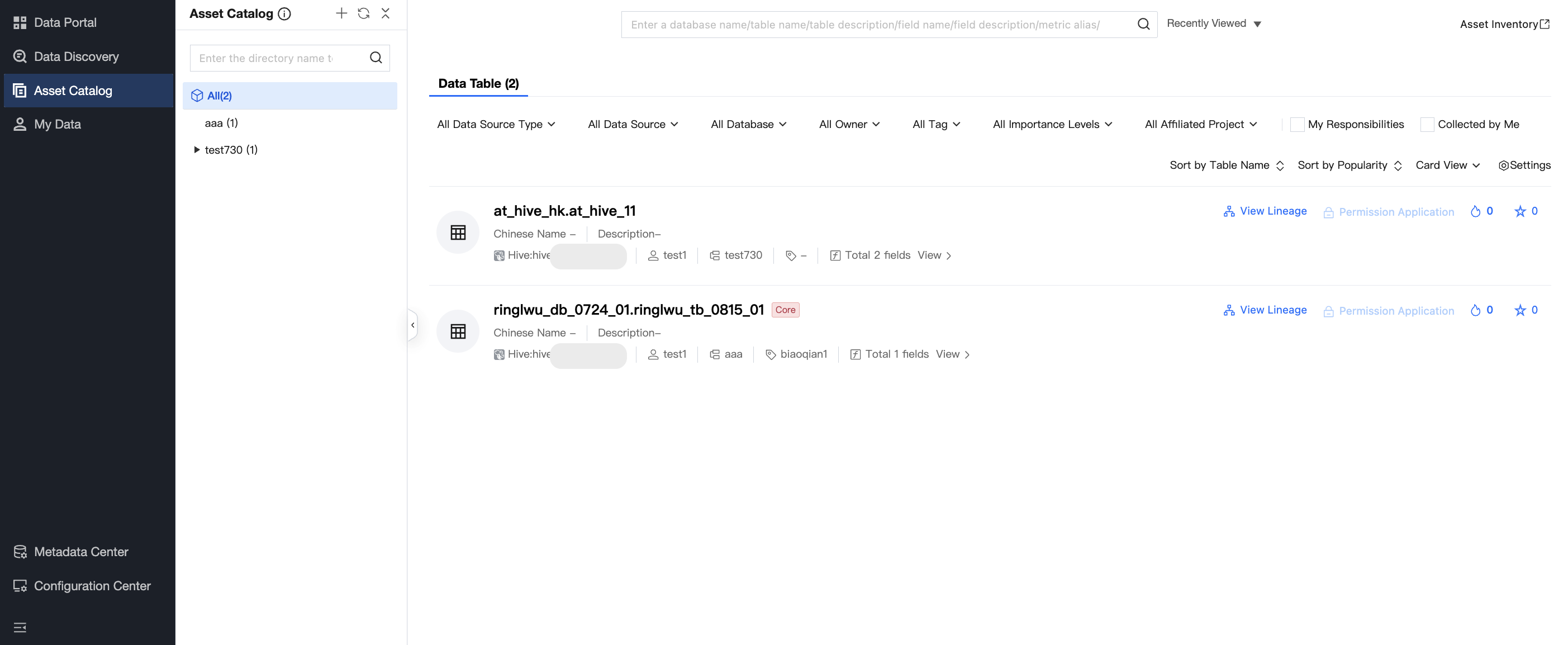
The asset catalog displays information about all database table assets listed in Asset Inventory under the root account, supporting viewing data table details from different perspectives. This page includes Global Search, Data Table List divided by data source type, data source, database, and owner, as well as the Asset Catalog to help you organize and categorize data.
Global search bar: Provides a quick search entry to help you locate target data tables within the account range.
Data table list: Includes types of data sources, owner, asset catalog, tag source, field, etc., and provides features such as view lineage, request permissions, and add/remove favorites.
View lineage can show the lineage of the selected table.
Request permissions to apply for the table owner's permission for the selected table.
Favorite can add the selected table to my favorites for viewing.
Metric list (to be launched): Display all available metrics, showing metric name, description, metric type, owner, asset catalog, etc.
Asset Directory: Helps you search data classified by directory, providing a clear directory structure. For creating or modifying directory nodes, please refer to Asset Catalog Inventory Check for directory organization.
To view table details, click the table name to enter the table details page.
Data asset information is periodically updated through collection tasks in data acquisition. For more details, see Metadata Management.
Help and Support
Was this page helpful?
You can also Contact sales or Submit a Ticket for help.
Help us improve! Rate your documentation experience in 5 mins.
Feedback