Perjanjian Pemrosesan dan Keamanan Data
Common Runtime Issues
Mode fokus
Ukuran font
SDK initialization check
From version 1.5.1.1 of the mini_core, you can check if the SDK initialized successfully by filtering logs with MINI_SHARK. A successful initialization will log: 'shark init ok!'
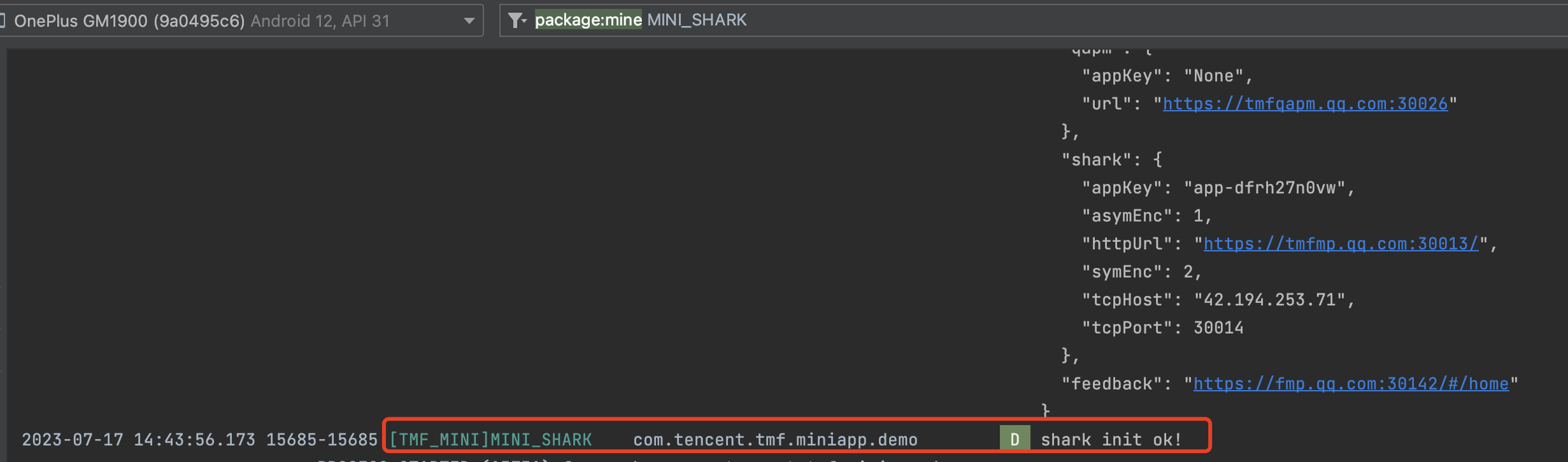
If the initialization fails, an exception log will be displayed.

Supported devices for debugging
Supported: ARM architecture emulators and real devices. Not supported: x86 emulators.
Taro framework support
Uncaught DOMException: Failed to read the 'sessionStorage' property from 'Window': Access is denied for this document.at <anonymous>:1207:96250at Array.forEach (<anonymous>)at Module.<anonymous> (<anonymous>:1207:96164)at Module.9 (<anonymous>:1207:113782)at l (<anonymous>:1203:566)at Module.204 (<anonymous>:1215:87806)at l (<anonymous>:1203:566)at t (<anonymous>:1203:435)at Array.r [as push] (<anonymous>:1203:298)at <anonymous>:1215:125
Add the following dependency if using the Taro framework:
implementation 'com.tencent.tcmpp.android:mini_extra_v8:${version}'
Troubleshooting mini program request errors
Errors during mini program operations like scanning, launching, or searching will be shown via Toast messages, including error codes and TraceId. These details are also logged for further investigation.
For 5-digit error codes, these are general client-side errors. For specific details, refer to Android Error Codes. Common error codes include:
-11001: Shark network error. Check the network link and gateway between the client and server.
-11002: Server-side business logic error. Investigate the service based on the accessed API, and search the specific business error codes in the logs.
-11006: The mini program does not exist in the current configuration environment. Check if the mini program is released and the environment matches the superapp's configuration.
-12001: Shark network instance creation failed, usually due to missing, incorrect, or mismatched configuration files.
-12012: Mini program download failed. Ensure the download service is operational.
-12013: Mini program package parsing error. The package may be corrupted. Check for non-ASCII characters in resource file paths if using an older backend version.
For errors with different digit counts, they indicate specific business errors similar to -11002.
Use the TraceId to correlate and find the request details in backend logs for troubleshooting.
Bantuan dan Dukungan
Apakah halaman ini membantu?
Anda juga dapat Menghubungi Penjualan atau Mengirimkan Tiket untuk meminta bantuan.
masukan