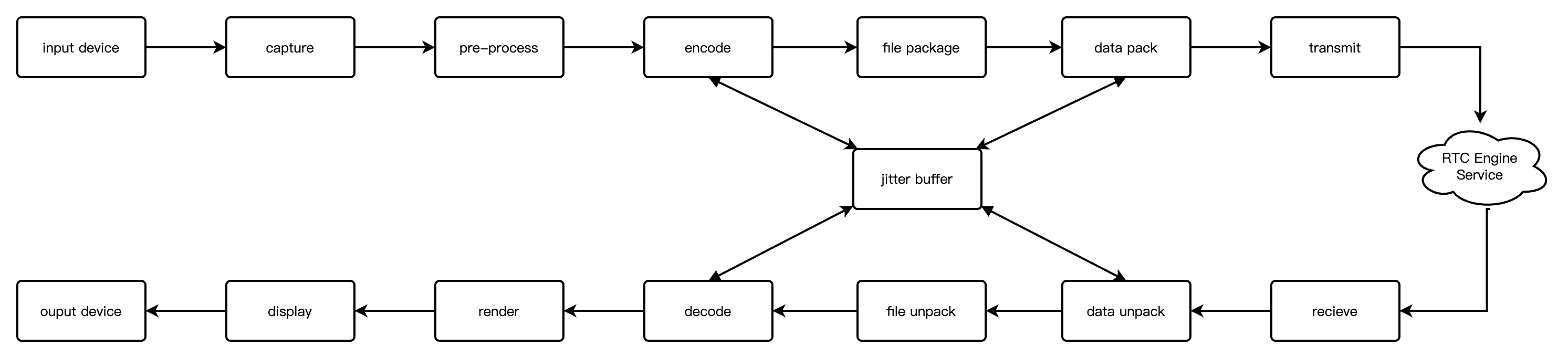
The online claw machine leverages video streaming and remote control technology, enabling users to remotely control the claw of a physical machine in real time through smartphones, tablets, or computers to grab toys or other prizes. It delivers an experience comparable to in-person claw machines while attracting online audiences for interaction and engagement. Tencent Cloud RTC Engine ensures end-to-end audio and video latency below 300ms and supports cross-platform compatibility, allowing users to play anytime, anywhere on WeChat Mini Programs, iOS, Android, or Web. The on-cloud recording feature captures exciting gameplay moments for marketing and boosting application influence.
Implementation Scheme
To implement a comprehensive online claw machine scenario, multiple functional modules are typically involved, including Media Service and Signaling Service. The key actions and features under each module are shown in the table below:
Functional Module
Key Actions and Feature Points
Media service
Audio and video streaming and pulling
Signaling service
Remote control
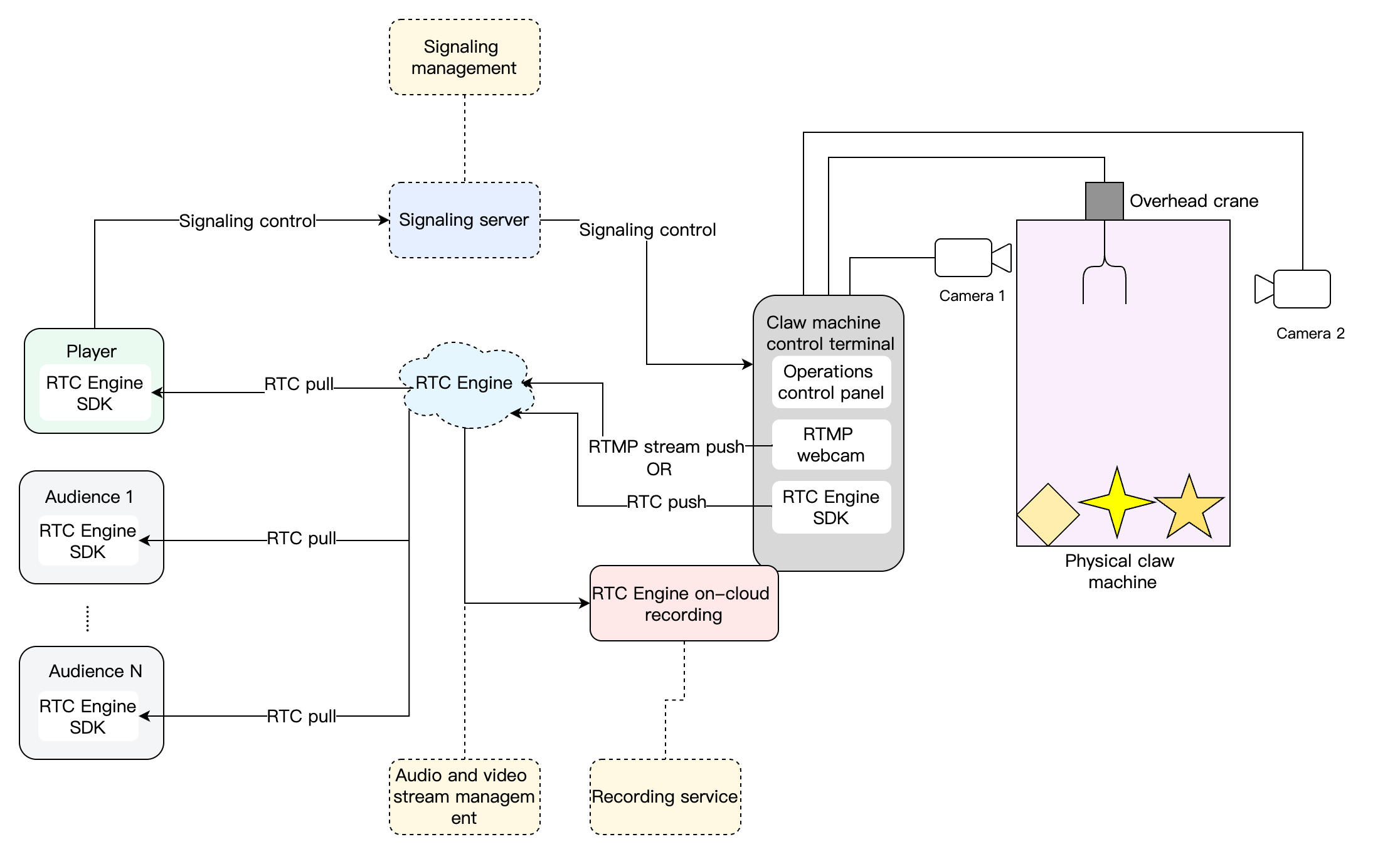
The overall business architecture of the online claw machine is as follows. The control end of the claw machine is equipped with two camera positions for video capture and streaming. When players enter the game interface, they join the corresponding RTC Engine room linked to the claw machine, allowing them to view the video stream captured by the claw machine’s cameras. After inserting coins or topping up, players can start controlling the claw machine’s claw to grab toys. The audience can also join the game to watch the player’s claw-catching process.
Media Service
Audio and Video Push Streaming
RTMP (Real Time Message Protocol) Streaming Upstream
Most network cameras or streaming boxes on the market support RTMP streaming. By using the RTMP streaming into the room feature of Tencent Cloud RTC Engine, you can directly push video streams from network cameras or streaming boxes to RTC Engine rooms.
The specific process is as follows:
1. Use Tencent Cloud TRTC’s RTMP generation rules to generate the corresponding RTMP streaming address.
2. Manually configure the RTMP streaming address on the network camera or streaming box of your claw machine.
3. Start the RTMP network camera or streaming box to push the video stream to the RTC Engine room.
Note:
The related fees are as follows:
Feature unlock: To unlock the RTMP streaming into the room feature, subscribing to the Standard Edition or Professional Edition of RTC-Engine Monthly Packages is required.
Audio duration fees will be charged for streaming chatbots in the room (Note: Fees for chatbots in the room generated by the input online media stream feature will be waived until August 15, 2024, and will be charged starting from August 16, 2024).
Audio and video call fees will be incurred when the audience in the room subscribe to the audio and video content streamed into the room. For details, see Audio and Video Duration Billing Instructions.
RTC Engine Streaming Upstream
Some hardware vendors collaborate with Tencent Cloud RTC Engine to integrate the Tencent Cloud RTC Engine SDK into network cameras or streaming boxes, enabling these devices to directly capture video and push streams to RTC Engine rooms.
The general process is as follows:
1. Manually configure the SDKAppID, UserId, RoomId, and UserSig on the RTC Engine network camera or streaming box of your claw machine.
2. Start the RTC Engine network camera or streaming box to push the video stream to the RTC Engine room.
Audio and Video Pull Streaming
Once the claw machine successfully pushes the audio and video stream to the Tencent Cloud RTC Engine room, users, whether as players or audience members, can enter the corresponding RTC Engine room to watch the feed of the claw machine in real time.
The general process is as follows:
1. The business app integrates Tencent Cloud TRTC SDK.
2. The business server is responsible for delivering the necessary SDK parameters, including SDKAppID, UserId, RoomId, and UserSig, to the business application.
3. Users access the RTC Engine room corresponding to the claw machine through the business application and call the pull-stream API provided by the RTC Engine SDK to receive and watch the real-time audio and video stream.
Signaling Service
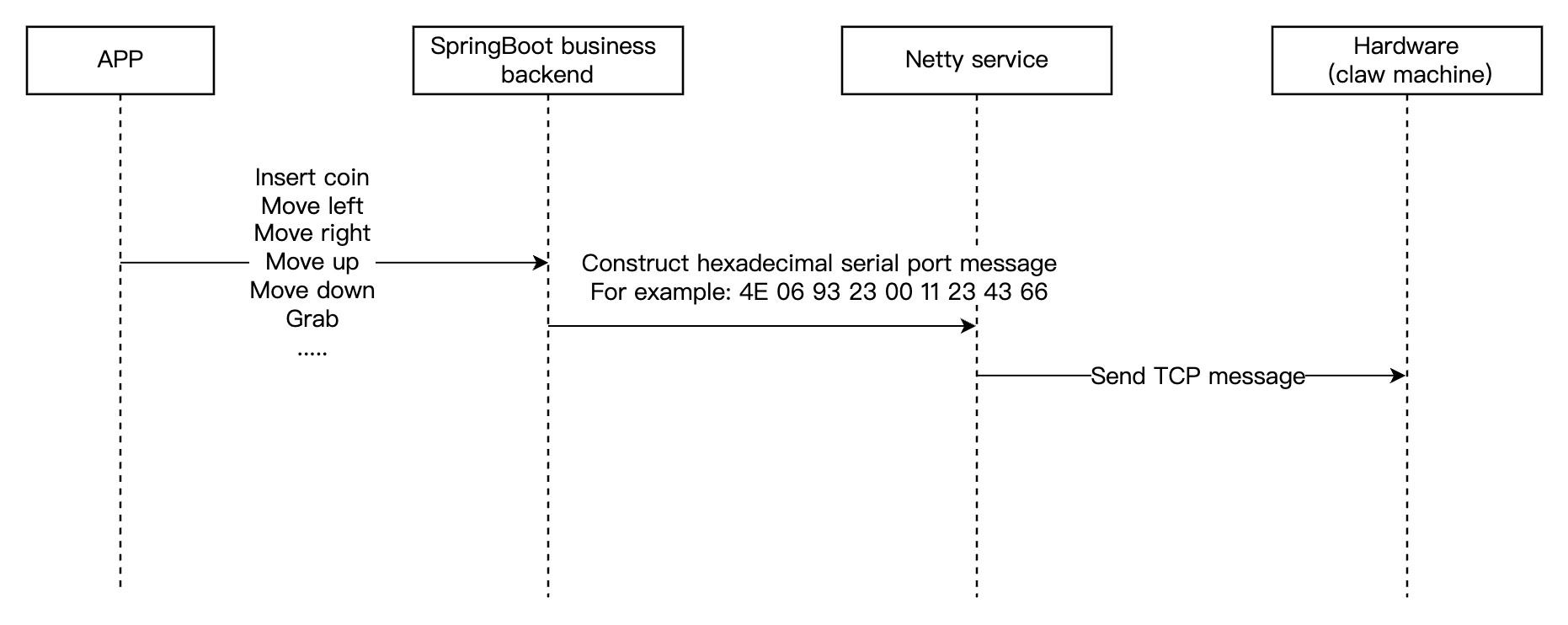
The signaling service is responsible for synchronizing control signals. Typically, ready-made hardware control modules are available on the market, equipped with various network communication modes. These modules require no additional development effort, only configuration and debugging.
The communication process of the signaling service is as follows:
1. The application app calls the instruction API of the business backend.
2. The business backend constructs a hexadecimal serial port message and then sends it to the hardware network module through the Netty service.
3. The hardware network module processes the serial port message and controls the claw machine by operating the hardware’s serial port.
Recording Service
The highlight replay feature can significantly enhance user viewing experience and interaction. Users can rewatch exciting moments from their claw machine sessions at any time, especially successful catches. This not only allows users to relive the joy of success but also helps them analyze and improve their clawing skills. With the on-cloud recording capabilities of Tencent Cloud RTC Engine, replay recording can be easily implemented.
RTC Engine On-Cloud Recording
The on-cloud recording feature of RTC Engine does not rely on Cloud Streaming Services (CSS). It uses the internal real-time recording backend of RTC Engine to record audio and video, offering a more complete and unified recording experience.
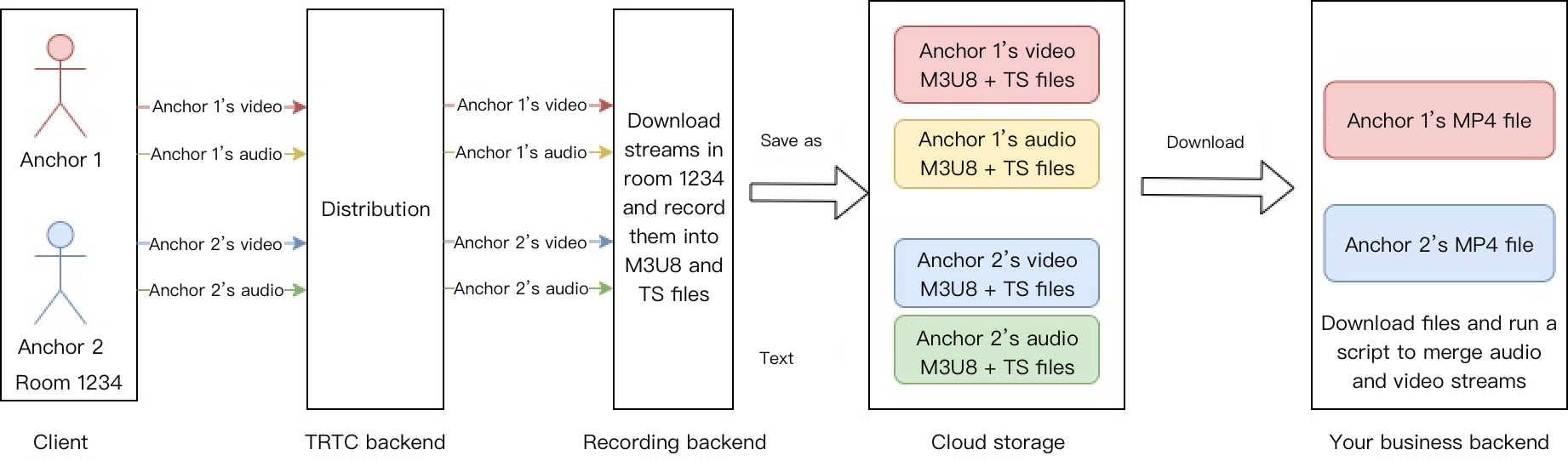
With the on-cloud recording feature of RTC Engine, you can record the audio and video stream of each user in the room as separate individual files (single-stream recording):
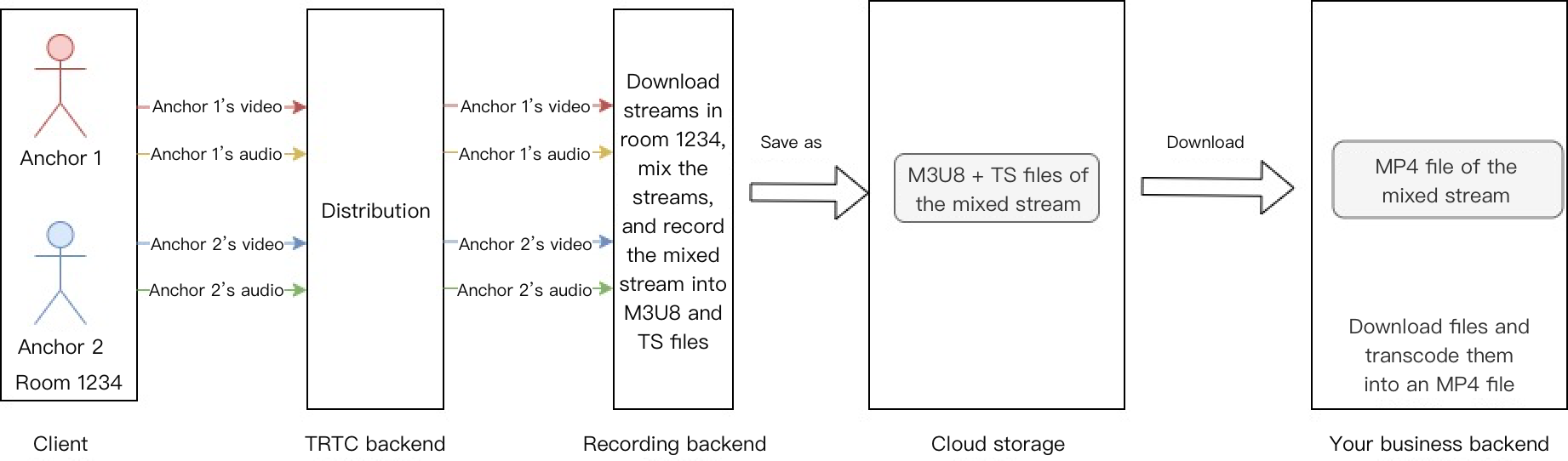
Alternatively, you can merge the audio and video streams of the same room into a single file (mix-stream recording):
Key Business Logic
Low Latency Optimization Scheme
In the online claw machine solution, the tolerance for latency is very low because synchronization with signaling is required to control the remote machine, and the signaling transmission time is also relatively short. However, in general scenarios, the RTC Engine latency ranges from 300 ms to 500 ms, which fails to meet business requirements. Therefore, the RTC Engine latency should be reduced to 100 ms–300 ms or even lower. The following will optimize the latency at every point in the entire transmission link.
Capturing and Streaming with the RTC Engine SDK
1. Use the RTC Engine SDK to capture and push streams.
Network cameras or streaming boxes integrated with the Tencent Cloud RTC Engine SDK can capture and push streams directly to RTC Engine rooms. This eliminates the intermediate step of using standard network cameras and distributing streams to RTC Engine rooms via the RTMP transfer protocol. Consequently, end-to-end latency can be further reduced from 300–500 ms to 100–300 ms.
2. Set low-latency stream pulling.
To configure low-latency stream pulling, you need to set the Buffer size to 80–100 and enable software decoding. The specific code is as follows:
Android
iOS
Web
JSONObject jsonObject =newJSONObject();
try{
jsonObject.put("api","SetAudioCacheParams");
JSONObject params =newJSONObject();
params.put("min_cache_time",80);// Minimum duration of the local audio cache.
params.put("max_cache_time",100);// Maximum duration of the local audio cache.
playoutDelay:{min:0,max:0}// Modify the local latency.
});
console.log('Room entry successful. ');
}catch(error){
console.error('Room entry failed. '+ error);
}
Note:
To configure a low-latency API on the client (Android or iOS), you need to use RTC Engine 12.4 or later. Using a version earlier than 12.4 will cause the local configurations to override the Qos configurations.
To configure a low-latency API on the Web, you need to use RTC Engine Web 5.10.0 or later. Using a version earlier than 5.10.0 will not take effect.
The above latency configurations are only for the testing phase. For the official launch, please contact us to perform Qos configurations.
If the latency still does not meet your requirements, contact us for further optimization.
3. Upgrade the latest camera firmware.
The firmware of network cameras or streaming boxes integrated with the Tencent Cloud RTC Engine SDK is continuously being optimized and upgraded. In terms of reducing latency, hardware vendors are collaborating with the RTC Engine SDK team to implement optimizations. Therefore, when a latency issue is detected, the issue can be optimized by upgrading the camera firmware to the latest version.
4. Set video capture and encoding parameters.
# Video encoding settings.
Encoding format: H264
Resolution:1080P/720P/540P/360P# Set the resolution based on the clarity.
Bitrate:2000kbps/1200kbps/850kbps/550kbps # Bitrate. A higher bitrate results in higher clarity.
Frame rate:30# Framerate. Valid values:20–60FPS.
BaseProfile: enable# DisablingB-frames in BaseProfile can further reduce latency.
5. Enable Qos for optimization.
Enable the QoS low-latency stream pulling policy, reduce jitter buffer cache, and significantly lower push/pull stream latency. You can contact us to enable it.
Optimization Scheme for First Frame Time
In the online claw machine or coin pusher scenarios, the first frame loading speed directly affects users' experience of entering the live streaming room. First frame time refers to the total duration from when a user clicks the live streaming room to when the visual is first rendered. The bottleneck may exist in the response of business APIs (including the authentication and room information obtaining) or in the competition between the business component loading and stream-pulling network resources. Therefore, it is necessary to perform instrumentation analysis on the key link to locate the bottleneck and perform targeted optimization accordingly, as shown below.
Targeted optimization:
1. API preloading: Requests the authentication and room information asynchronously in advance to reduce dependencies on the critical path.
2. RTC preferential stream pulling: Prioritizes ensuring the room entry stream pulling of RTC Engine. Upon successful RTC Engine stream pulling, load other services.
3. Dynamic downgrade: Disables optional features (including gift animation) in weak network conditions.
Android Camera Video Quality Optimization Solution
Some cameras are not integrated with the RTC Engine SDK by default and require specific Android system motherboards to implement streaming. To improve the utilization of older devices, you can refer to the following optimization solution when using RTC Engine. This allows you to fully leverage the motherboard's hardware encoding performance to enhance video stream resolution and smoothness, ultimately optimizing user experience.
1. Custom video capture: Call the system API directly to capture the camera feed. Camera parameters can be adjusted flexibly, making it easier for code debugging.
For the complete code for custom video pre-processing, see Demo.
2. Video hardware encoding: Use the experimental API callExperimentalAPI, and set both the width and height to multiples of 16 to adapt to the hardware encoding parameters of Android devices. The following two groups of video parameters are provided for reference:
High-resolution encoding parameters: 768x1024, 20fps, and 1500kbps.
Medium-resolution encoding parameters: 480x640, 20fps, and 900kbps.
3. Speech audio capture: Due to the need for low latency, the audio feature is required. However, the audio performance of Android devices may be insufficient. This means that the default audio performance may not meet requirements. Therefore, it is recommended to call the startLocalAudio API and set the TRTC_AUDIO_QUALITY_SPEECH parameter.
4. Use the latest Android SDK: The Android SDK will be continuously optimized in new versions. Therefore, it is recommended to use the latest Android SDK for debugging.
Provides low-latency, high-quality real-time audio and video interaction solutions, which are the basic infrastructure capabilities for audio/video call scenarios.
Oriented to audio-video media, it offers an integrated high-quality media service that includes production and upload, storage, transcoding, media processing, media AI, accelerated distribution and playback, and copyright protection.