Configuring Data Plane Authorization
Basic Concepts
Authorization controls permissions for MQTT client operations including CONNECT, PUBLISH, and SUBSCRIBE. When an MQTT client performs connection, publish, or subscription, the MQTT server queries the authorization data source, matches the queried access control rules with the operation to be performed, and confirms whether to allow or deny this operation based on the matching result.
Access control statements logically consist of four parts: Access, Actions, Topics, and Condition.
Domain | Field Name | Example Value | Required |
Decision | effect | allow/deny | Yes |
Operation | actions | ["connect", "pub", "sub"] | Yes |
Resource | topics | ["home/room1/*", "sensor/temperature/0"] | No |
Condition | clientId | "sensor*" | No |
| username | "user*" | No |
| qos | [0, 1, 2] | No |
| retain | true/false | No |
| ip | client IP address: 10.0.0.1 or CIDR 10.0.0.0/16 | No |
MQTT instances provide database-based policy storage sources by default. You can define, update, sort, and delete policies via the console or TencentCloud API. Policy modifications take effect after regular synchronization to MQTT nodes.
How It Works
Authorization Chain
In addition to the built-in database-based access control source, ACL based on JWT claim is also supported. Multiple authorizers jointly compose an authorization chain. When a client performs an operation, it is matched sequentially according to the authorization chain until a decision result is obtained.

Each authorizer can define zero or more authorization policies. The authorizer sequentially matches the current client operation (Actions), operation resource (Topics), and client information (Client ID, Username, certificate information) with the policy rules in the defined sequence.
When a policy rule of the authorizer is matched, the client operation is allowed or denied based on the rule's decision, and the authorization chain matching ends.
When a policy rule is not matched, attempt to match the next rule defined in the authorizer.
When all rules of the authorizer are not matched, pass to the next authorizer for matching.
When all authorizers finish matching and no rule is matched, the client request is denied by default.
Policy Variable
Topic, ClientId, and Username support the following policy variables. When the authorizer performs a matching operation, it will replace
${PolicyVariable} with the actual value and then proceed with the match.Variable Name/Policy Variable | Semantics |
Username | MQTT client connection username. |
ClientId | MQTT client ID. |
Certificate.Subject.Country | Certificate's country information in the one-device-one-certificate scenario. For details, see RFC4519. |
Certificate.Subject.Organization | Certificate's organization information in the one-device-one-certificate scenario. For details, see RFC4519. |
Certificate.Subject.OrganizationalUnit | Certificate's organizational unit information in the one-device-one-certificate scenario. For details, see RFC4519. |
Certificate.Subject.State | Certificate's province and municipality information in the one-device-one-certificate scenario. For details, see RFC4519. |
Certificate.Subject.CommonName | |
Certificate.Subject.SerialNumber |
Dynamic Expression
In addition to basic policy variable substitution, data plane authorization also supports using Spring Expression Language (Spring EL) expressions to perform function processing on client variables (ClientId/Username) and dynamically populate them into the Topic, ClientId, or Username fields of ACL policies.
Through method-level evaluation, you can extract key information from complex client identifiers to achieve more fine-grained permission control. For example, if your vehicle ClientId format is
CAR-123 ("CAR" being a fixed prefix), and you want it to only subscribe to the vehicle number-related Topic /123/status, simply configure the policy Topic as: /${clientId.substring(4)}/statusNote:
The expressions are executed before authorization matching, and the execution results replace the original placeholders before the expressions participate in ACL matching. If expression parsing fails, the corresponding ACL condition is considered unmatched.
For more complex logic handling, in addition to native functions, custom functions are also supported.
Client Variables
Variable Name | Expression Writing Format | Description |
Client ID | ${clientId} | Unique identifier used in client connections |
Username | ${username} | Username used in client connections |
Common String Methods
Common Method | Description | Example (Input: "WA123456") |
substring(int beginIndex) | Extracts a substring starting from the specified index to the end of the string. | ${clientId.substring(2)} Output result: "123456" |
substring(int beginIndex, int endIndex) | Extracts consecutive characters starting from begin to end (exclusive of end). | ${clientId.substring(0, 2)} Output result: "WA" |
startsWith(prefix) | Determines whether it starts with the specified prefix. | ${clientId.startsWith('WA')} Output result: true |
Policy Wildcards
Topics Field
The Topics field supports the following wildcards:
Wildcard | Semantics |
+ | Consistent with MQTT protocol Topic Filter Wildcard |
# | Consistent with MQTT protocol Topic Filter Wildcard |
? | Any single character |
* | Any number of characters |
ClientId and Username Fields
Wildcard | Semantics |
? | Any single character |
* | Any number of characters |
Policy Cache
Based on the characteristics of the authorizer, the MQTT server may cache policy rules to speed up policy retrieval. Therefore, changes made via the console or TencentCloud API require a cache update for the changes to take effect.
Policy Sequence
The policy sequence impacts the final result of the authorizer chain. When multiple policy rules are defined, you need to ensure the authorization sequence meets business requirements.
Prerequisites
The Pro Edition supports configuring up to 20 authorization policies, and the Platinum Edition supports configuring up to 30 authorization policies.
When the authorization policy is not enabled, the data plane resources have no permission restrictions. You can use any username and password pair to connect, produce, and consume.
Configuring an Authorization Policy
Creating a Policy
1. Log in to the MQTT Console.
2. In the left sidebar, click Resource > Cluster, select a region, and click the ID of the target cluster, to go to the cluster basic information page.
3. On the cluster details page, select the Authorization Policy Management tab. The system default policy
default_allow_all indicates no policy control by default (allowing all data plane actions). If authorization policies need to be enabled, you may add new policies or modify the current default_allow_all policy.4. Click Create Policy in the top-left corner and enter the policy information.
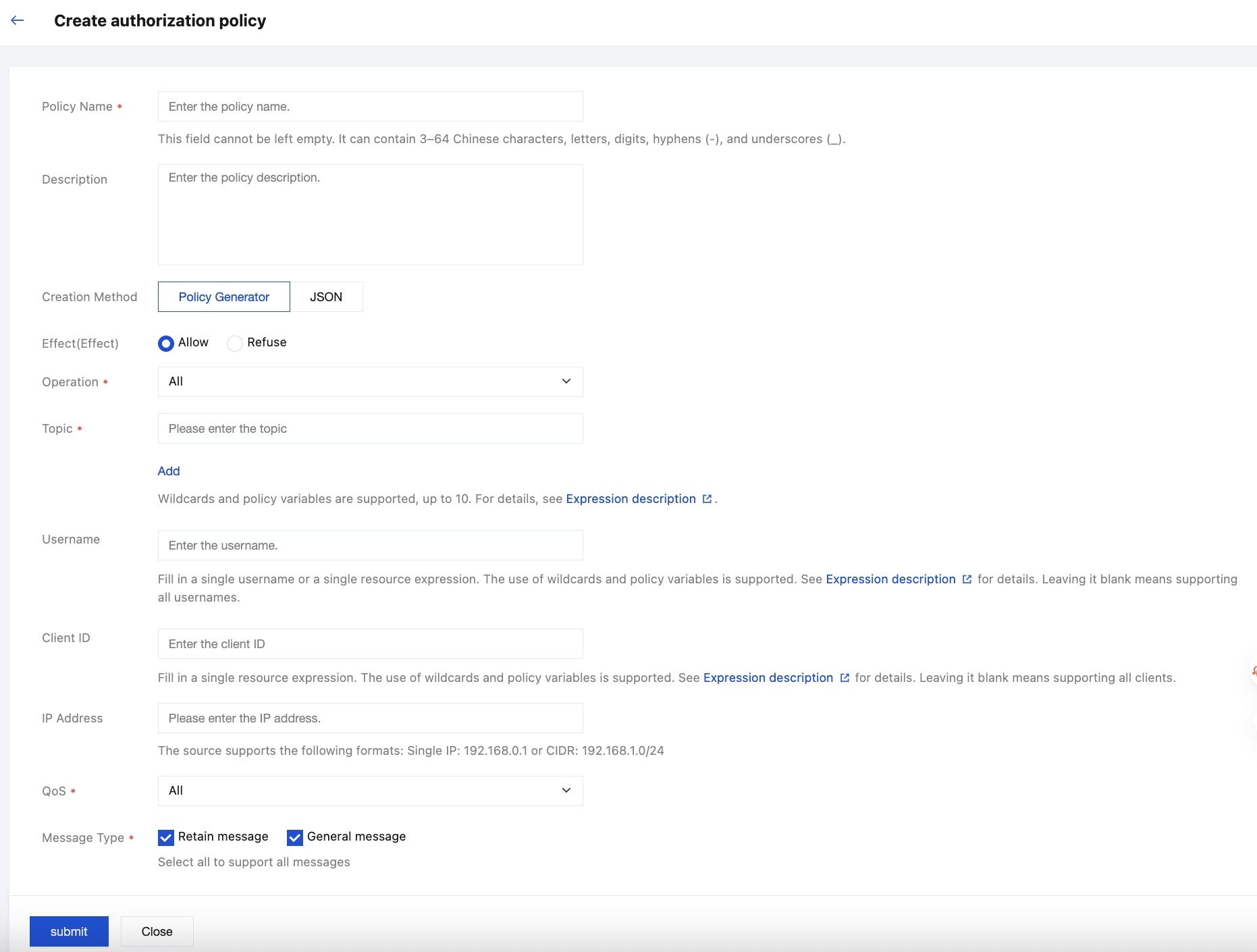
Configuration Item | Description |
Policy name | Sets the policy name. It must comply with the naming rules: 3-64 characters, supporting Chinese characters, letters, numbers, hyphens (-), and underscores (_). |
Description | Optional. It must not exceed 128 characters. |
Creation method | Supports visual policy configuration and JSON file configuration. |
Effect | "Allow" or "Deny". If selected "Allow", it means that the client operation can be used when the configured conditions are met. If selected "Deny", the client operation will be rejected when the configured conditions are met. |
Operation | The authorization policy supports multiple selections for different requests, including Connect, Publish, and Subscribe. |
Topic | |
Username | Optional. Enter a single username or resource expression. Wildcards and policy variables are supported. For details, see Expression Description. Leave blank to support all usernames. |
Client ID | Optional. Enter a single resource expression. Wildcards and policy variables are supported. For details, see Expression Description. Leave blank or enter * to support all clients. |
IP address | Optional. Only supports entering a single IP (e.g., 192.168.0.1) or CIDR format (e.g., 192.168.1.0/24). Note: Client IP addresses have a dynamic nature. If IP address-based ACL policies are configured, security risks such as authorization failure or unauthorized access may occur. Exercise caution when configuring based on your business scenarios. |
QoS | Select a QoS level supported by authorization policies. |
Message type | Select a message type supported by authorization policies: retain message and normal message. Selecting all options indicates support for all message types. |
5. Click Submit, then confirm OK in the pop-up to complete the creation and return to the authorization policy list page.
6. On the policy list page, you can manually adjust the policy sequence. The server authenticates according to the current policy sequence. If policy settings conflict, the higher sorting sequence takes precedence.
Copying a Policy
When a large number of similar policy tasks need to be created, you can click Copy Policy in the operation column of the created policy. You can simply adjust the points of difference to complete policy creation, effectively improving configuration efficiency for similar policies.
Policy Examples
Allowing All Client Operations
{"effect":"allow","actions":["connect","pub","sub"],"topics":["*"],"condition":{"ip":"0.0.0.0/0","clientId":"","username":"","qos":[0,1,2],"retain":["true","false"]}}
Denying All Client Operations
{"effect": "deny","actions": ["connect","pub","sub"],"topics": ["*"],"condition": {"ip": "0.0.0.0/0","clientId": "","username": "","qos": [0,1,2],"retain": ["true","false"]}}
Allowing All Clients to Publish Messages to a Topic
{"effect":"allow","actions":["connect","pub"],"topics":["topicA/test"],"condition":{"ip":"0.0.0.0/0","clientId":"","username":"","qos":[0,1,2],"retain":["true","false"]}}
Allowing All Clients to Publish Messages to Multiple Topics
{"effect": "allow","actions": ["connect","pub"],"topics": ["home/sensor", "device/1"],"condition": {"ip": "0.0.0.0/0","clientId": "","username": "","qos": [0,1,2],"retain": ["true","false"]}}
Allowing Clients to Send to Any Sub-topic
{"effect": "allow","actions": ["connect","pub"],"topics": ["home/#", "device/+"],"condition": {"ip": "0.0.0.0/0","clientId": "","username": "","qos": [0,1,2],"retain": ["true","false"]}}
Allowing Clients to Send to a Specified Prefix or Suffix Topic
{"effect": "allow","actions": ["connect","pub"],"topics": ["prefix*", "*suffix"],"condition": {"ip": "0.0.0.0/0","clientId": "","username": "","qos": [0,1,2],"retain": ["true","false"]}}
Allowing Client Connection with Username in Client-Id
{"effect": "allow","actions": ["connect"],"topics": ["*"],"condition": {"ip": "0.0.0.0/0","clientId": "*${Username}*","username": "","qos": [0,1,2],"retain": ["true","false"]}}
Denying Client Connection with Root in Username
{"effect": "deny","actions": ["connect"],"topics": ["*"],"condition": {"ip": "0.0.0.0/0","clientId": "*","username": "*root*","qos": [0,1,2],"retain": ["true","false"]}}
Only Allowing Client IP in Specified IP Range to Subscribe to Messages
{"effect": "allow","actions": ["connect", "sub"],"topics": ["*"],"condition": {"ip": "192.168.0.0/16","clientId": "*","username": "*","qos": [0,1,2],"retain": ["true","false"]}}
Allowing Clients with ClientId Matching BYOC Cert CommonName to Send Subscribe Specific Message
{"effect": "allow","actions": ["connect", "pub", "sub"],"topics": ["home/${Username}/+", "sensor/${ClientId}/#"],"condition": {"ip": "192.168.0.0/16","clientId": "*${Certificate.Subject.CommonName}*","username": "*","qos": [0,1,2],"retain": ["true","false"]}}
Allowing Extracting Substrings from ClientId to Identify and Match the Topics Requested for Subscription
{"effect":"allow","actions":["sub"],"topics":["/device/${clientId.substring(4)}/+"],"condition": {"ip": "0.0.0.0/0","clientId": "","username": "","qos": [0,1,2],"retain": ["true","false"]}}
Help and Support
Was this page helpful?
You can also Contact sales or Submit a Ticket for help.
Help us improve! Rate your documentation experience in 5 mins.
Feedback