Adjusting the Priorities of Security Groups
Overview
You can bind one or more security groups to a CVM. If you have bound multiple security groups, these security groups are executed based on their priorities. You can adjust the priorities as follows.
Prerequisites
The CVM instance is bound to two or more security groups.
Directions
1. Log in to the CVM console.
2. On the instance management page, click the ID of the CVM instance to go to the details page.
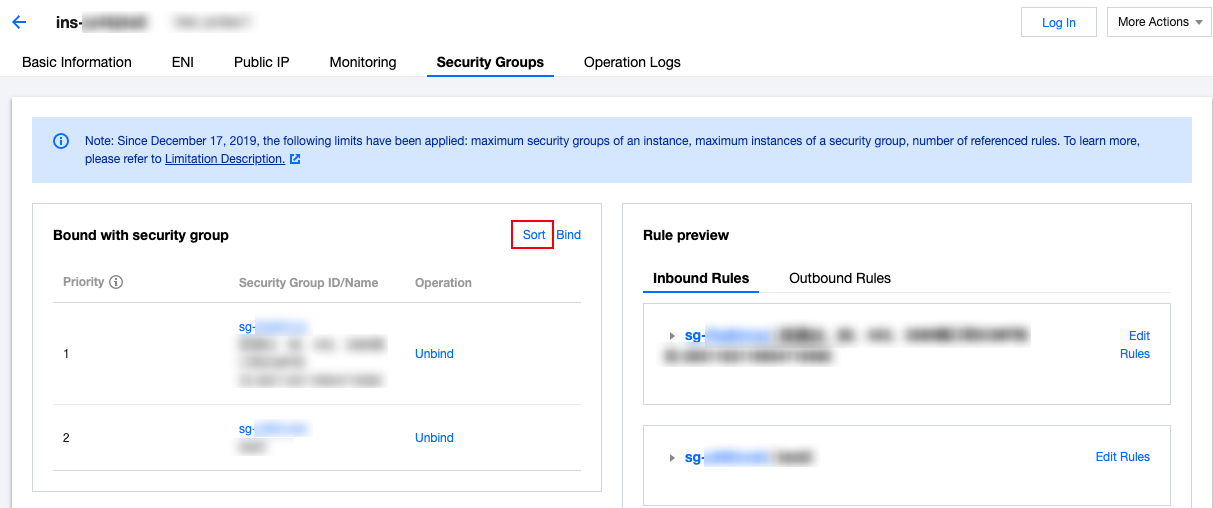
3. Click the Security Groups tab to go to the security group management page.
4. In the Bound Security Groups module, click Sort.
5. Click the following icon and drag it up/down to adjust the priority of the security group. The higher the position, the higher the priority of the security group.
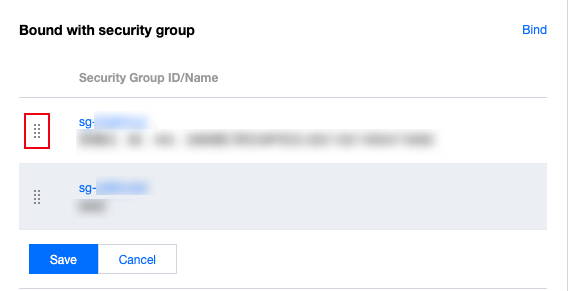
6. After completing the adjustment, click Save.
文档反馈