Release Notes
Data Extraction Response
Overview
If you want to dynamically extract data from the response of a request, PTS not only supports simple string matching (equal to or containing), but also supports Jsonpath extractor and regular expression extractor, so that you can achieve more flexible extraction logic.
Basic Usage
When you orchestrate or debug requests in the PTS stress test scenario, if you need to dynamically extract data values from the response to set checkpoints for the current request, inject parameters for subsequent requests, or debug specific response fields in debug mode, you can use the data extractor to parse and extract specific fields from the response data.
Response data extraction should be used during the orchestration or debugging scenario. For details on how to orchestrate or debug a scenario, please refer to Performance Testing in Simple Mode, Performance Testing in Script Mode, and Debugging Scenario.
Use Cases
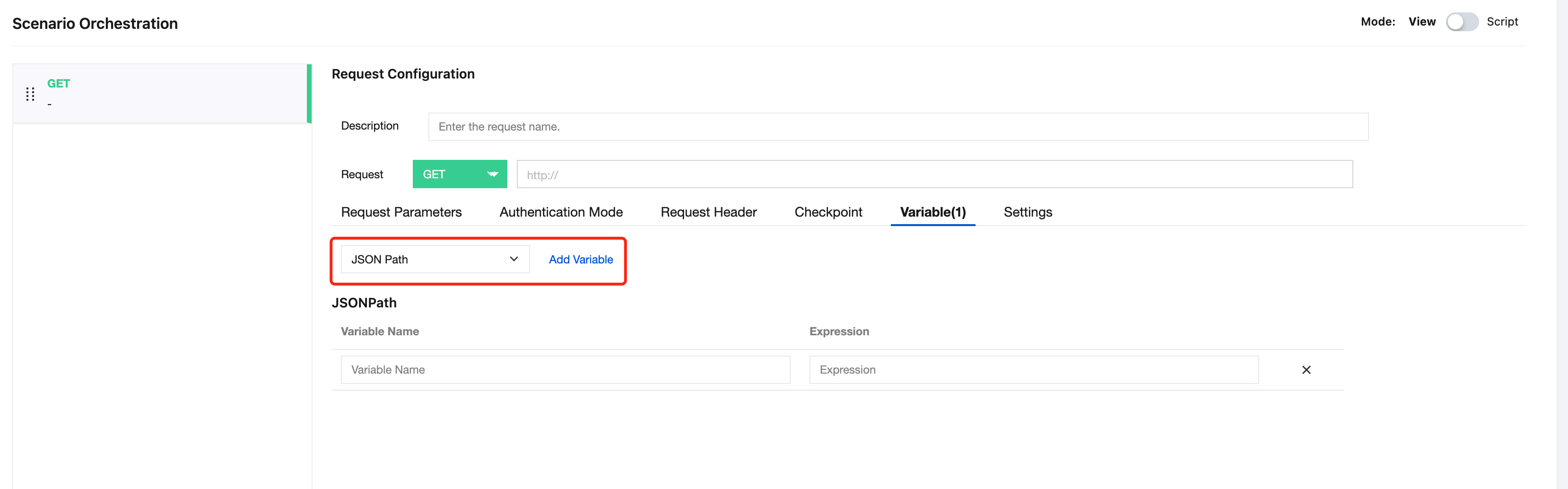
In Simple Mode, you can select a specific extraction method from the list and then enter an expression that conforms to the extractor syntax in the text box. For example, using the JSONPath extractor:
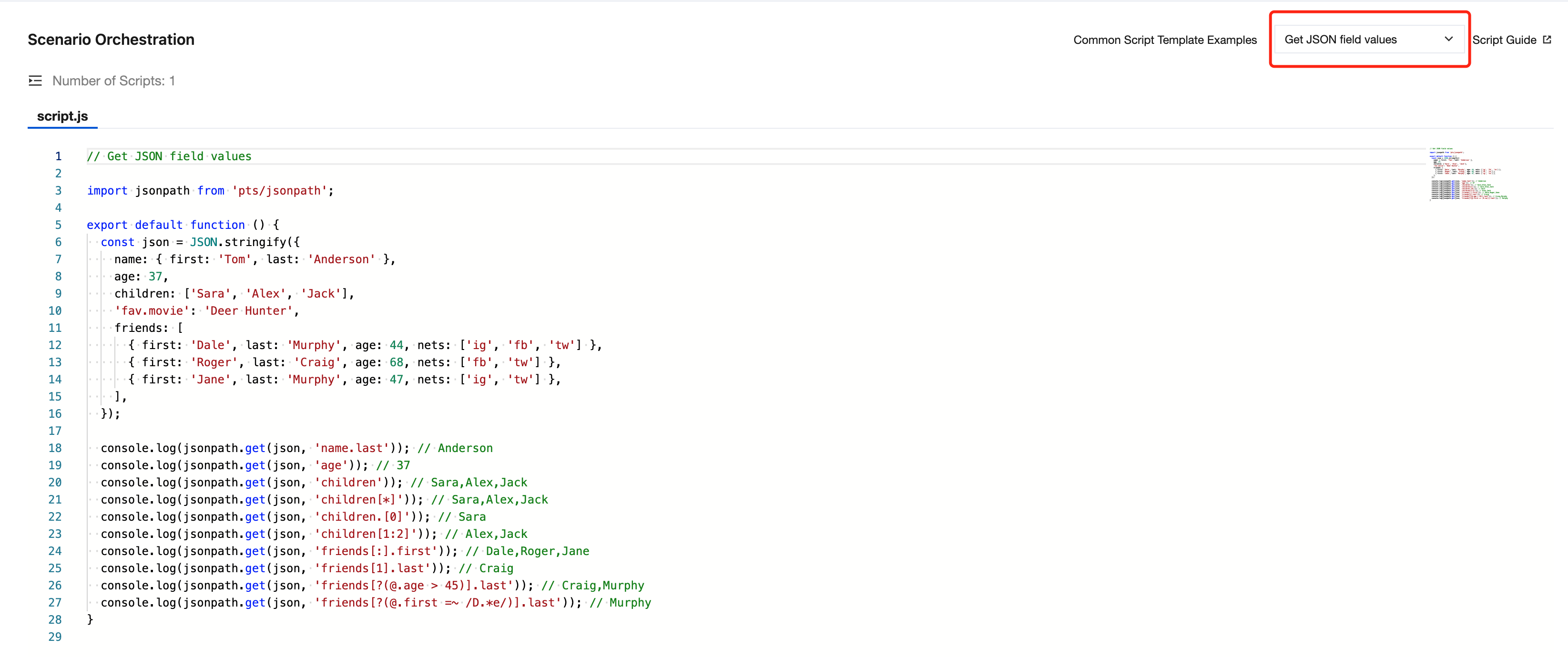
In Script Mode, you can use Get JSON field values to implement the logic for extracting data in the script. For example, using the JSONPath extractor:
Extractor Type
JSONPath Extractor
The JSONPath extractor is suitable for extracting data from JSON-type response bodies. Common syntax of JSONPath expressions:
Operator | Description |
@ | The current node. |
* | Wildcard, which can match any node name or index value. |
.<name> | Use "." to match child nodes. |
[<number> (, <number>)] | Retrieve one or more elements in an array using []. |
[start:end] | Array slicing |
[?(<expression>)] | Filter data with a Boolean expression. |
In script mode, the usage of Jsonpath and its result examples are as follows:
import jsonpath from 'pts/jsonpath';export default function () {const json = JSON.stringify({"name": {"first": "Tom", "last": "Anderson"},"age": 37,"children": ["Sara", "Alex", "Jack"],"fav.movie": "Deer Hunter","friends": [{"first": "Dale", "last": "Murphy", "age": 44, "nets": ["ig", "fb", "tw"]},{"first": "Roger", "last": "Craig", "age": 68, "nets": ["fb", "tw"]},{"first": "Jane", "last": "Murphy", "age": 47, "nets": ["ig", "tw"]}]});console.log(jsonpath.get(json, 'name.last')); // Andersonconsole.log(jsonpath.get(json, 'age')); // 37console.log(jsonpath.get(json, 'children')); // Sara,Alex,Jackconsole.log(jsonpath.get(json, 'children[*]')); // Sara,Alex,Jackconsole.log(jsonpath.get(json, 'children.[0]')); // Saraconsole.log(jsonpath.get(json, 'children[1:2]')); // Alex,Jackconsole.log(jsonpath.get(json, 'children[1, 2]')); // Alex,Jackconsole.log(jsonpath.get(json, 'friends[:].first')); // Dale,Roger,Janeconsole.log(jsonpath.get(json, 'friends[1].last')); // Craigconsole.log(jsonpath.get(json, 'friends[?(@.age > 45)].last')); // Craig,Murphyconsole.log(jsonpath.get(json, 'friends[?(@.first =~ /D.*e/)].last')); // Murphy};
Regular Expression Extractor
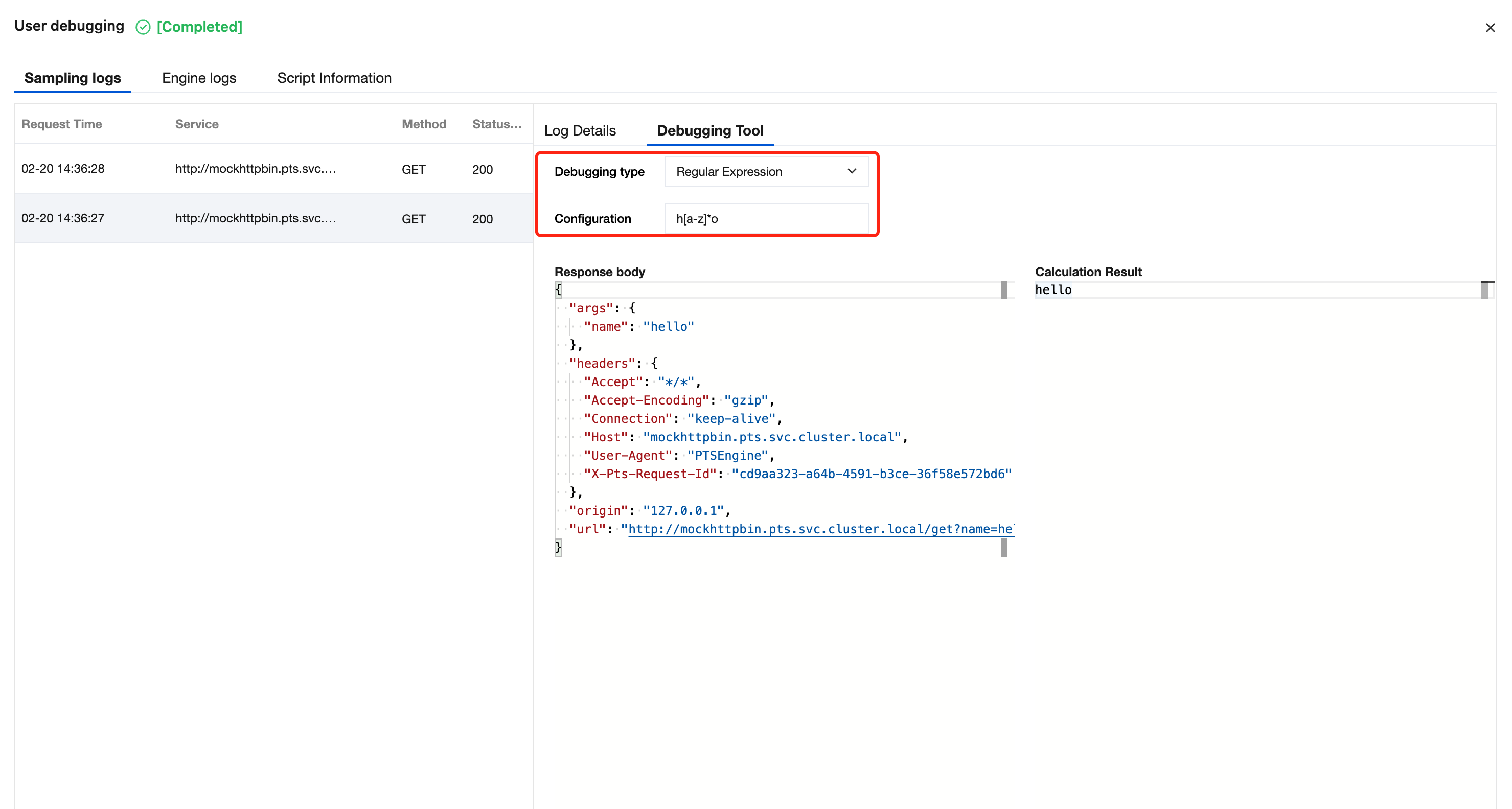
The Regular Expression Extractor is suitable for extracting data from text-based responses. PTS Regular Expressions comply with JavaScript native syntax. For details, see Regular Expression.
Taking PTS scenario debugging as an example, the usage of the Regular Expression Extractor is as follows:
Taking the script mode scenario to set a checkpoint as an example, the usage of the regular expression extractor is as follows:

import { sleep, check } from "pts";import http from "pts/http";export default function main() {let response;response = http.get("http://mockhttpbin.pts.svc.cluster.local/get?name=hello");check("body matches /h[a-z]*o/", () => {const expr = new RegExp("h[a-z]*o");return expr.test(response.body);});}
Bantuan dan Dukungan
Apakah halaman ini membantu?
Anda juga dapat Menghubungi Penjualan atau Mengirimkan Tiket untuk meminta bantuan.
masukan