tencent cloud

Cloud Block Storage

User Guide
Announcements
Announcement of the Commercial Charges of Tencent Cloud CBS Snapshot
Announcement of the Commercial Charges of Tencent Cloud CBS Snapshot Cross-Region Replication
Product Introduction
Overview
Strengths
Scenarios
Regions and AZs
Cloud Disk Instances
Cloud Disk Snapshots
Access Management
Related Products
Predecessor
Service Regions and Service Providers
Billing
Billing Overview
Price Overview
Purchase Instructions
Renewal Guide
Overdue Payment
Getting Started
Step 1. Creating Cloud Disks
Step 2. Attaching Cloud Disks
Step 3. Initializing Cloud Disks
User Guide
Operation Overview
Usage Limits
Creating Cloud Disks
Attaching Cloud Disks
Initializing Cloud Disks
Expanding Cloud Disks
Detaching Cloud Disks
Terminating Cloud Disks
Viewing Cloud Disk Information
Adjusting Cloud Disk Types
Adjusting Cloud Disk Performance
Cloud Disk Data Protection Configuration
Cloud Disk Data Backup Point
Managing Snapshots
Monitoring and Alarms
Use Cases
Measuring Cloud Disk Performance
Building LVM Logic Volumes with Multiple Elastic Cloud Disks
Expanding MBR Cloud Disks to Greater Than 2 TB
Troubleshooting
Failed to Unmount Cloud Disks from Windows CVM Instances
Disk Not Mount upon Linux CVM Restart
API Documentation
History
Introduction
API Category
Making API Requests
Snapshot APIs
Cloud Disk APIs
Data Types
Error Codes
FAQs
Features
Billing
Performance FAQs
Snapshot
Usage
Cross-region Replication
CBS Service Level Agreement
Contact Us
Glossary

Snapshot Principles

PDF
Focus Mode
Font Size
Last updated: 2023-12-21 18:56:36

Snapshot and Source Disk

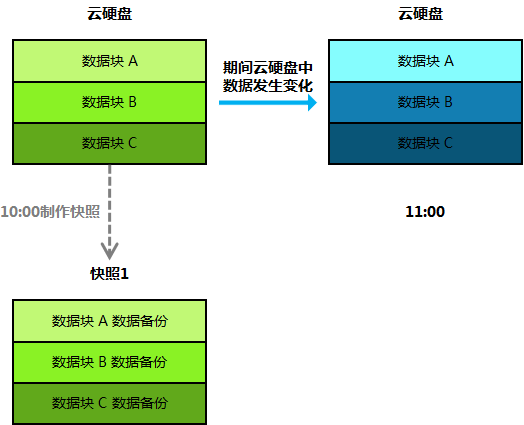
A snapshot is the data backup of a cloud disk at a certain point in time. Data writing and modification to the cloud disk do not affect snapshots that are already created. Users can use snapshots to back up cloud disk data at different points in time, which can be used for system recovery, disaster recovery, and cloud disk replication. As shown in the following figure, Snapshot 1 retains data block information of the cloud disk at 10:00 (the snapshot creation time), regardless of any changes to the disk that occur after the snapshot is created.


Snapshot Size

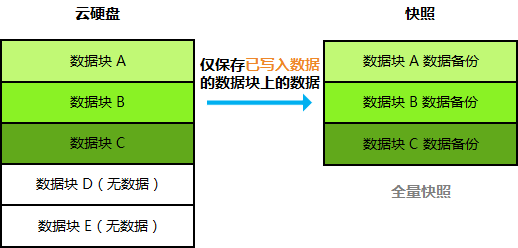
A snapshot only saves data blocks in the cloud disk that have been written to or modified. Therefore, the size of the snapshot is smaller than the source cloud disk. See below for more details:


Creaing Incremental Snapshots

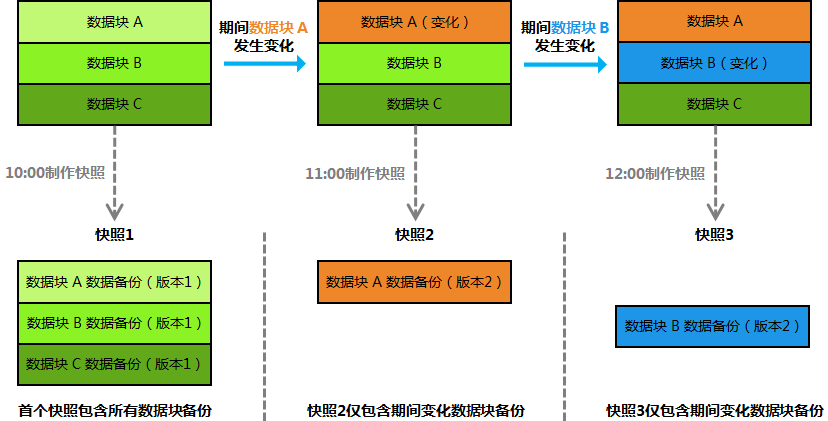
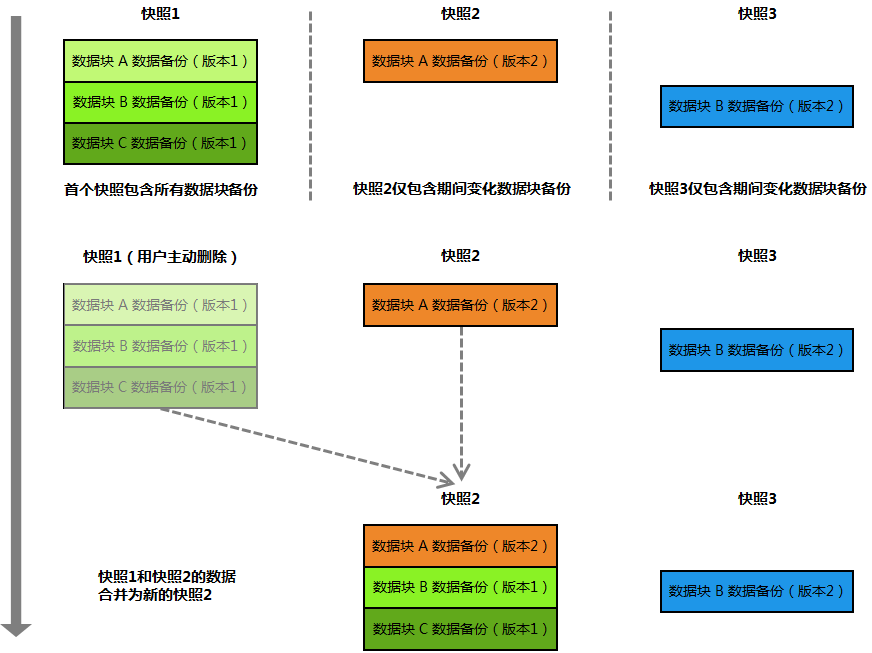
Tencent Cloud snapshots use an incremental snapshot mechanism. When you continuously create multiple snapshots of the same cloud disk, only the first snapshot is a full snapshot, and subsequent snapshots only contain data that has been modified relative to the previous snapshot (incremental snapshot). This can minimize the total storage capacity occupied when users continuously create snapshots, reducing user costs. For example: Assume a cloud disk has three data blocks, A, B, and C. You make snapshots at 10:00, 11:00, and 12:00 respectively. Changes of data blocks on the disk between these points in time are shown in the following figure, and each snapshot should save the following data:
Snapshot 1 (initial snapshot): Contains data backups of all data blocks on the cloud disk at that time.
Snapshot 2: During the period, data block A on the cloud disk changes. Snapshot 2 only contains a backup of block A’s newest data (usually called an incremental snapshot).
Snapshot 3: During the period, data block B on the cloud disk changes. Snapshot 2 only contains a backup of block B’s newest data (usually called an incremental snapshot).


Rolling Back with Incremental Snapshots

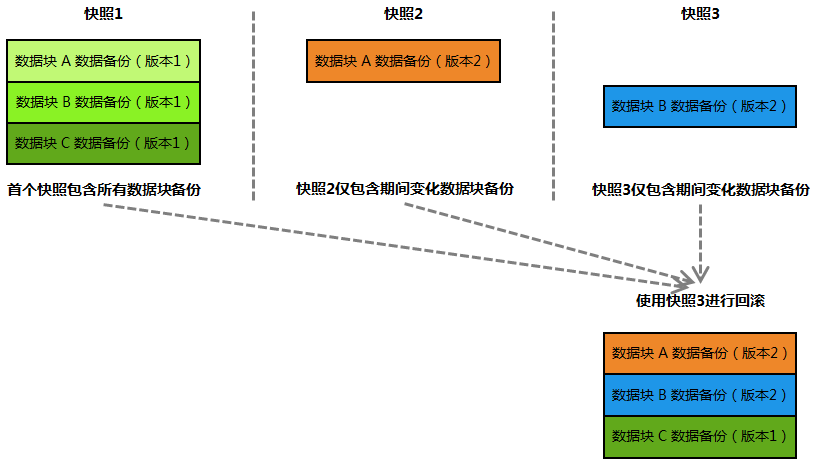
Based on the previous example, when you use Snapshot 3 to perform data rollback, the system will merge the data in Snapshot 1, Snapshot 2, and Snapshot 3. If there is a data block in the same location, data in the newest snapshot will be taken. During final rollback, the merged data will be written to the cloud disk to be rolled back. Incremental snapshot rollback process is as shown in the following figure:


Deleting and Merging Incremental Snapshots

When a full snapshot (that is, the first snapshot) is being deleted, the system automatically merges the full snapshot with the next incremental snapshot.
When an incremental snapshot is being deleted, the system automatically merges the incremental snapshot with the next incremental snapshot. If there is no next incremental snapshot, it is directly deleted.
Based on the previous example, if you delete Snapshot 1, the system will merge Snapshot 1 and Snapshot 2, and will use Snapshot 2’s data to overwrite Snapshot 1’s data in the same location. After merging, Snapshot 2 is the new full snapshot. Incremental snapshot deletion process is as shown in the following figure:


Help and Support

Was this page helpful?

Help us improve! Rate your documentation experience in 5 mins.

Feedback