Scheduled Task Execution Time Description
Download
Focus Mode
Font Size
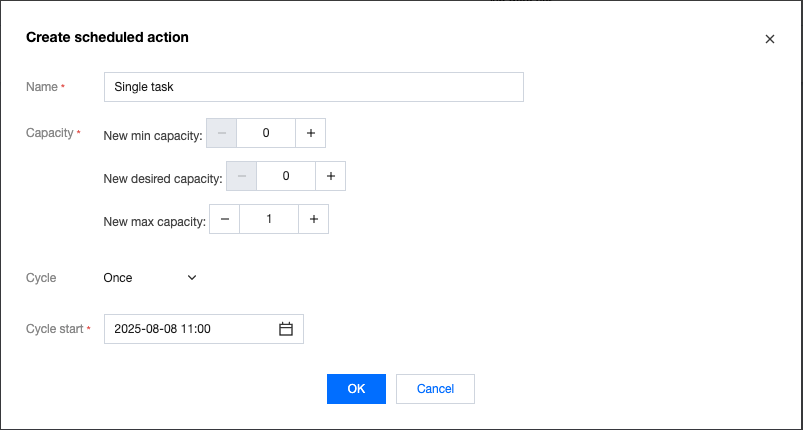
One-Time Task
A one-time task is executed only once at the execution start time. Therefore, there is no need to set the execution end time and recurring mode.
Recurring Task
A recurring task requires the execution start time, execution end time, and recurring mode (
Recurrence parameter). A recurring task is executed for the first time at the execution start time and recurs based on the Recurrence parameter until the execution end time. The value of the Recurrence parameter is a Cron expression string.Introduction to the Cron Expression
Cron is a standard expression widely used to describe time and date information, normally consisting of 5–7 fields. The
Recurrence parameter in scheduled tasks is limited to 5 fields, which are separated by spaces. The structure is minute, hour, date, month, week.Field Description
Field | Valid Values | Special Characters Allowed |
Minutes | An integer ranging from 0 to 59 | , - * / |
Hours | An integer ranging from 0 to 23 | , - * / |
DayofMonth | An integer ranging from 1 to 31 (The number of days in a month should be considered.) | ,- * / |
Month | An integer ranging from 1 to 12 (JAN, FEB, MAR, APR, MAY, JUN, JUL, AUG, SEP, OCT, NOV, and DEC) | , - * / |
DayofWeek | An integer ranging from 1 to 7 or SUN, MON, TUES, WED, THUR, FRI, and SAT (1 = MON, and 7 = SUN) | , - * / |
Special Character Description
Each field uses digits and may contain the following special characters, which mean:
*: matches any value. If * is used for the Minutes field, a task is executed once every minute.–: indicates the match range. If 5–20 is used for the Minutes field, a task is executed once every minute in the range of 5 to 20 minutes./: indicates executed from the start time and recurring at a fixed interval. If 5/20 is used for the Minutes field, a task is executed starting at 5 minutes and recurs every 20 minutes, that is, executed at 25 and 45 minutes.,: lists enumeration values. If 5,20 is used for the Minutes field, a task is executed at 5 and 20 minutes, respectively.Cron Expression Example
Expression | Description |
15 10 * * * | A task is executed once at 10:15 AM every day. |
0/5 14,18 * * * | A task is executed every 5 minutes between 14:00 and 14:55 and between 18:00 and 18:55 every day. |
15 10 ? * MON-FRI | A task is executed once at 10:15 AM from Monday to Friday. |
0 12 1/5 * * | A task is executed once at 12:00 every 5 days starting from the 1st of each month. |
Recurring Scheduled Task Example 1: Recurring by Day
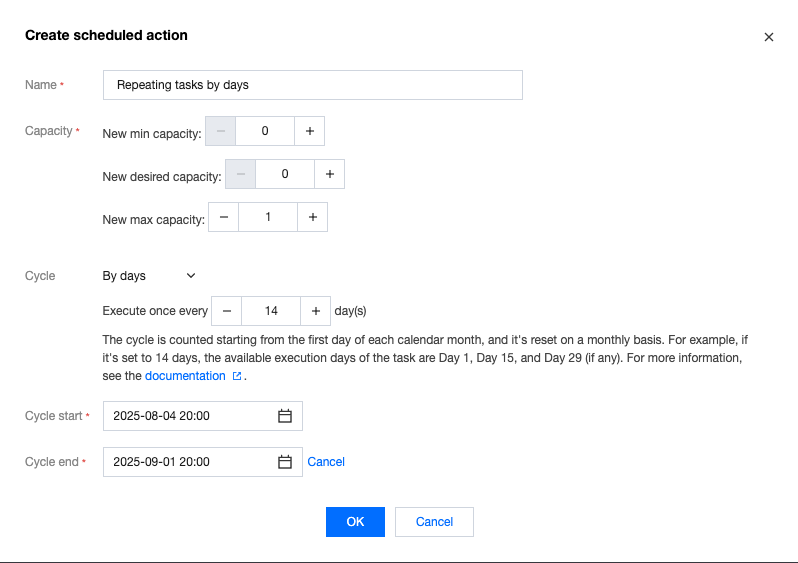
Set the execution start time to 20:00 on August 4 and the end time to 20:00 on September 1 of the same year, and set the task to be executed every 14 days.
Note:
Executed once every 14 days is used to describe the Cron expression. The calculation starts from the 1st of each month, and the task is executed once on the 1st, 15th, and 29th (if any) of each month. August 4 is the execution start time, but it is not used as the start time of the recurring cycle.
The Cron expression for the recurring mode is 0 20 */14 * *, which means that the task is started on the 1st of each month and executed at 20:00 once every 14 days. The subsequent execution dates are August 4, August 15, August 29, and September 1. The execution time is always 20:00. August 4 is the execution start time, and the task is executed for the first time. Subsequent dates are calculated based on the Cron expression.
Recurring Scheduled Task Example 2: Recurring by Month
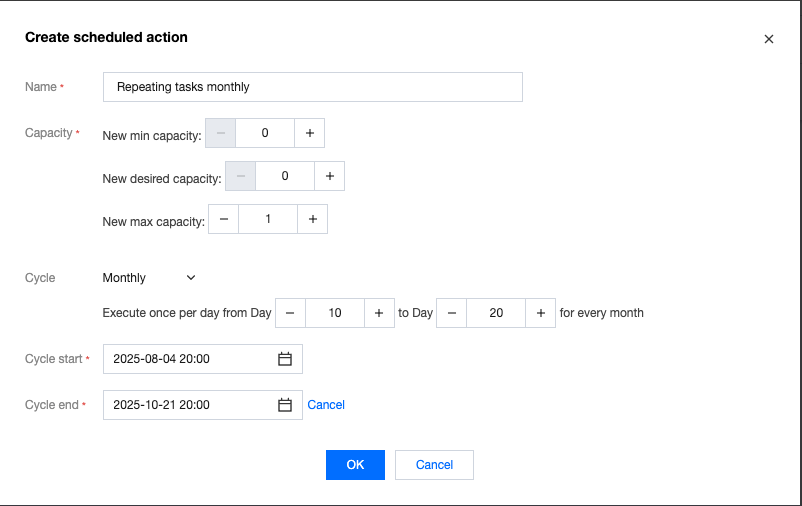
Set the execution start time to 20:00 on August 4 and the end time to 20:00 on October 21 of the same year. Set the task to be executed once every day from the 10th to the 20th of each month.
The Cron expression for the recurring mode is 0 20 10-20 * *, which means that the task is executed once at 20:00 from the 10th to the 20th of each month. The subsequent execution dates are August 4, August 10 to 20, September 10 to 20, and October 10 to 20. The execution time is always 20:00. August 4 is the execution start time, and the task is executed for the first time. Subsequent dates are calculated based on the Cron expression.
Recurring Scheduled Task Example 3: Recurring by Week
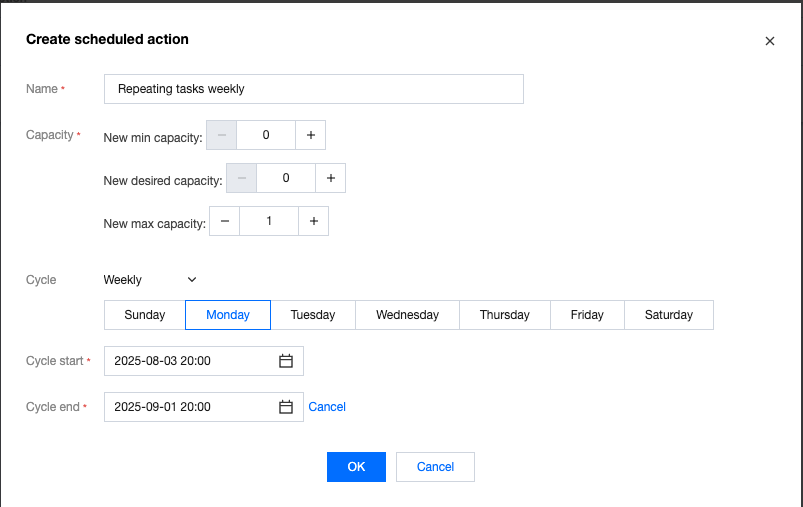
Set the execution start time to 20:00 on August 3 and the end time to 20:00 on September 1 of the same year, and set the task to be executed once every Monday.
The Cron expression for the recurring mode is 0 20 * * 1, which means that the task is executed once at 20:00 every Monday. The subsequent execution dates are August 3, August 4, August 11, August 18, August 25, and September 1. The execution time is always 20:00. August 3 (not a Monday) is the execution start time, and the task is executed for the first time. The subsequent dates are Mondays calculated based on the Cron expression.
Help and Support
Was this page helpful?
You can also Contact sales or Submit a Ticket for help.
Help us improve! Rate your documentation experience in 5 mins.
Feedback