Release Notes
Announcements
Platform | Supported Browsers |
iOS | Safari, QQ built-in browser, QQ Mini Program, WeChat built-in browser, and WeChat Mini Program |
Android | QQ built-in browser, QQ Mini Program, WeChat built-in browser, and WeChat Mini Program |
Windows | Chrome, QQ Browser (non-compatibility mode), Edge, Firefox, and Internet Explorer 11 |
macOS | Chrome, Safari, QQ Browser, Edge, and Firefox |
${version} indicates the version number and should be replaced with the actual version number of your downloaded package.<script src="sdk-${version}.js"></script>
var url = await COSDocPreviewSDK.getPreviewUrl( {objectUrl: 'https://examplebucket-1250000000.cos.ap-shanghai.myqcloud.com/test.pptx',credentials: { // If the preview file is private, the request needs to carry the access credential.secretId: '',secretKey: '',authorization: 'q-sign-algorithmxxxxxxxxxxxxxxx',},copyable: 0, // Whether the file content can be copiedhtmlwaterword: '' // Watermark content})console.log(url)
Configuration Item | Description | Required |
objectUrl | The URL of the object that needs to be previewed, such as https://examplebucket-1250000000.cos.ap-shanghai.myqcloud.com/test.pptx. | Yes |
credentials | If the object to be previewed is private, you need to pass in credentials as the access credential. You can pass in the calculated request signature (authorization) or your secretId and secretKey (not recommended as placing a permanent key on the frontend has security risks). | No |
credentials.authorization | No | |
credentials.secretId | No | |
credentials.secretKey | No | |
copyable | Whether the file content is copyable. Valid values: 1 (yes), 0 (no). | No |
htmlwaterword | No | |
htmlfillstyle | Watermark RGBA (color and transparency), which must be URL-safe Base64-encoded as described in FAQs and is rgba(192,192,192,0.6) by default. | No |
htmlfront | Watermark text style, which must be URL-safe Base64-encoded as described in FAQs and is bold 20px Serif by default. | No |
htmlrotate | Rotation angle in degrees. Value range: 0–360. Default value: 315. | No |
htmlhorizontal | Horizontal spacing of the watermark text in px. Default value: 50. | No |
htmlvertical | Vertical spacing of the watermark text in px. Default value: 100. | No |
GET /<ObjectKey>?ci-process=doc-preview&dstType=html&weboffice_url=1&sign=AuthString HTTP/1.1 HTTP/1.1Host: <BucketName-APPID>.cos.<Region>.myqcloud.comDate: GMT Date
Parameter | Description | Required |
ci-process | Preview parameter, which is fixed at doc-preview. | Yes |
dstType | Preview type. To generate HTML files for preview, enter html. | Yes |
weboffice_url | Whether to get the preview URL. Valid values: 1 (return the preview URL and token information); 2 (return the token information only). If this parameter is not specified, the file will be directly previewed. | No |
tokenuid | Whether to get the token. A token will be generated and returned along with its validity period based on the information passed in such as tokenuid and file information. If this parameter is not specified, the token information won't be returned. | No |
sign | Object download signature, which must be URL-encoded. If the previewed object is privately readable, the signature needs to be passed in. | No |
copyable | Whether the file content is copyable. Valid values: 1 (yes), 0 (no). | No |
htmlwaterword | No | |
htmlfillstyle | Watermark RGBA (color and transparency), which must be URL-safe Base64-encoded as described in FAQs and is rgba(192,192,192,0.6) by default. | No |
htmlfront | Watermark text style, which must be URL-safe Base64-encoded as described in FAQs and is bold 20px Serif by default. | No |
htmlrotate | Rotation angle in degrees. Value range: 0–360. Default value: 315. | No |
htmlhorizontal | Horizontal spacing of the watermark text in px. Default value: 50. | No |
htmlvertical | Vertical spacing of the watermark text in px. Default value: 100. | No |
HTTP/1.1 200 OKContent-Type: text/htmlContent-Length: 478Date: Thu, 25 Feb 2021 07:44:37 GMTStatus: 200 OKx-cos-request-id: NjAzNzU1NjVfY2MxZTIzMDlfNzc5NF8yMDQ5****{"PreviewUrl": "https://prvsh.myqcloud.com/office/p/xxxx?_w_provider=XXX"}
var demo = COSDocPreviewSDK.config({url: 'Online file preview URL', // The online preview URL of the file obtained in step 3})// If special processing needs to be performed on the iframe, you can get the DOM object of the iframe as follows:console.log(demo.iframe)// File open resultdemo.on('fileOpen', function(data) {console.log(data.success)})
<div class="custom-mount"></div>
var demo = COSDocPreviewSDK.config({url: 'Online file preview URL', // The online preview URL of the file obtained in step 3mount: document.querySelector('.custom-mount') // Mount node. By default, the `body` node will be mounted to. You can customize the mount node as needed.})
<div class="custom-mount"><iframe src="..."></iframe></div>
GET /<ObjectKey>?ci-process=doc-preview&dstType=html&weboffice_url=2&tokenuid=test&sign=AuthString HTTP/1.1 HTTP/1.1Host: <BucketName-APPID>.cos.<Region>.myqcloud.comDate: GMT Date
HTTP/1.1 200 OKContent-Type: text/htmlContent-Length: 108Date: Tue, 21 Jun 2022 10:41:10 GMTStatus: 200 OKx-cos-request-id: NjJiMWEwNDZfMTgyMjYyNjRfYmRlYl9iNTAw****{Token: "ChAJj2vNRiHTc8reToMmJ7T2EJ7FxpUGGhS1mPJanpN03u8PSB17/YKBA/Vo****"TokenExpireTime: "1655808670"}
timeout to over 10 minutes. To prevent the refresh request from timing out, the JS-SDK will refresh the token several minutes in advance.var demo = COSDocPreviewSDK.config({url: 'Online file preview URL', // The online preview URL of the file obtained in step 3})// Set the tokendemo.setToken({token: 'yourToken', // Enter the obtained tokentimeout: 10 * 60 * 1000, // Timeout period of the token in milliseconds. To avoid frequent refresh, we recommend you set it to over 10 minutes. The JS-SDK will call the token refresh method `refreshToken` before timeout.});
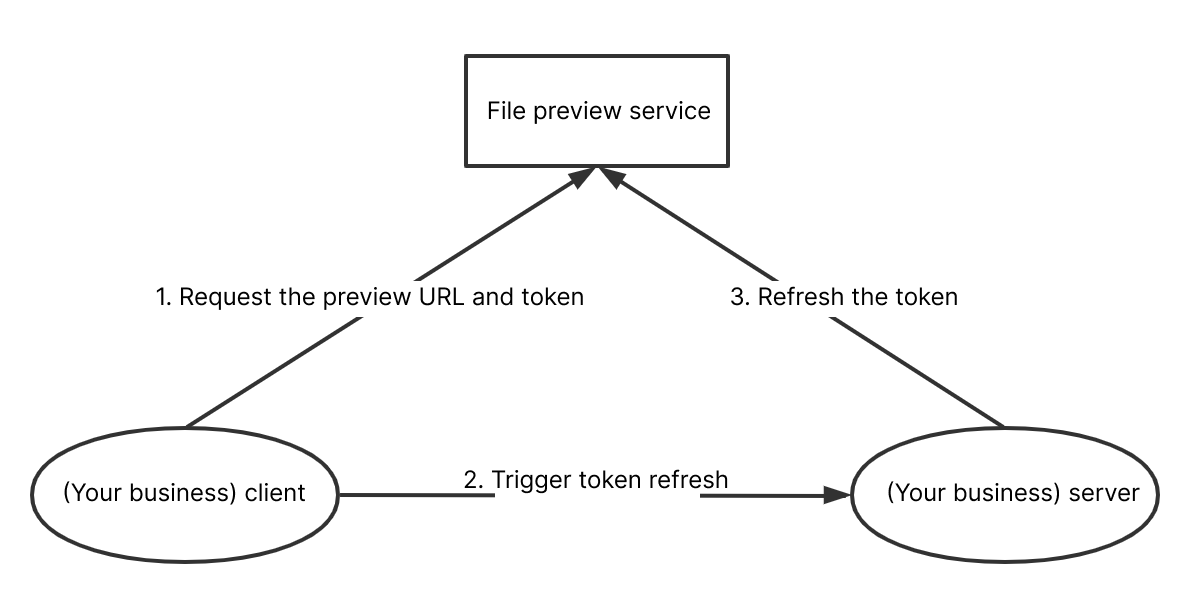
refreshToken method to automatically refresh the token upon timeout.
The refreshToken method needs to request the token refresh method encapsulated on your server. The server can encapsulate the above token acquisition method (for more information, see Get the token).http://your.server.com/refreshToken as an example, configure refreshToken as follows:// Get the tokenconst refreshToken = () => {// Call the method encapsulated on the server to get the token informationconst tokenInfo = await $.get('http://your.server.com/refreshToken')// `Promise` or `return { token, timeout }` can be returned.return {token: tokenInfo.token, // The token to be set, which is required.timeout: 10 * 60 * 1000, // The token timeout period in milliseconds, which is required.};};var demo = COSDocPreviewSDK.config({url: 'Online file preview URL',refreshToken // Automatic token refresh method})// Set the tokendemo.setToken({token: 'yourToken', // Enter the obtained tokentimeout: 10 * 60 * 1000 // Token timeout period in milliseconds});
Was this page helpful?
You can also Contact sales or Submit a Ticket for help.
Help us improve! Rate your documentation experience in 5 mins.
Feedback