Fraudulent Activity Detection
Focus Mode
Font Size
Overview
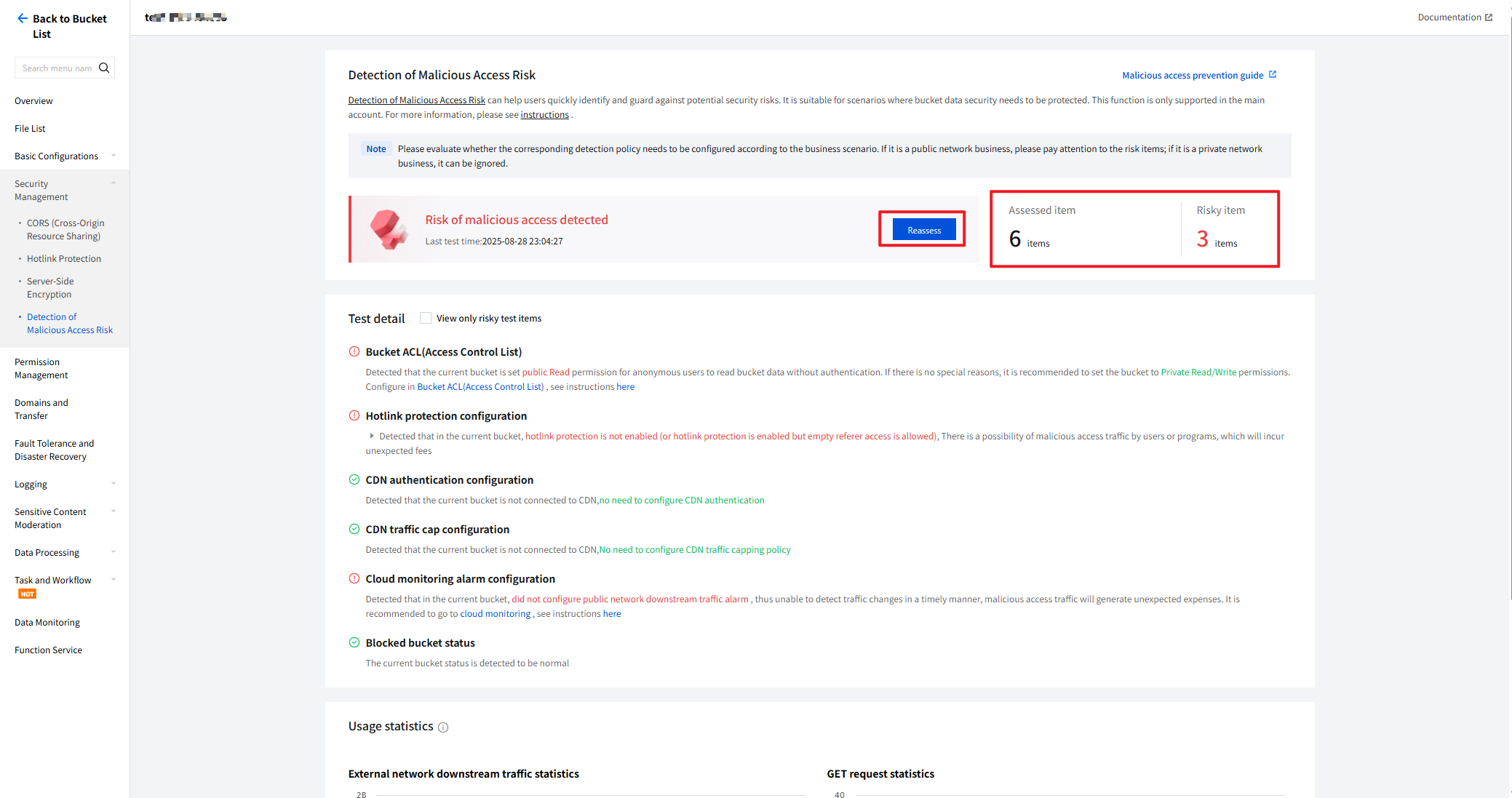
Cloud Object Storage (COS) supports bucket hotlink risk detection, which can be quickly set up. This feature includes 3 modules, namely Risk Detection and Overview, Test Detail, and Usage Statistics. For more hotlink protection measures, refer to Hotlink Protection Guide.
Note:
Currently, hotlink risk detection is supported only for the root account.
If the detection results indicate a suspected hotlink risk, you can assess whether to configure the relevant detection policy based on the business scenario. For public network services, pay attention to risk items; for private network services, they can be ignored.
Directions
Risk Detection and Overview
1. Log in to the Cloud Object Storage console.
2. In the left sidebar, click Bucket List.
3. Find the bucket that requires hotlink risk detection and click the bucket name.
4. On the bucket configuration page, click Security Management > Detection of Malicious Access Risk, to enter the hotlink risk detection page, where the overall detection status is displayed on the right.
5. Click Reassess to initiate a hotlink risk detection for the selected item.
Note:
After entering the page, the system will automatically initiate a hotlink risk detection for you.
Test Detail
In the Detection Details module, you can view the risk result of each detection item and filter out items with risks. Additionally, the system will provide relevant optimization suggestions for each risk item, allowing you to quickly configure them.
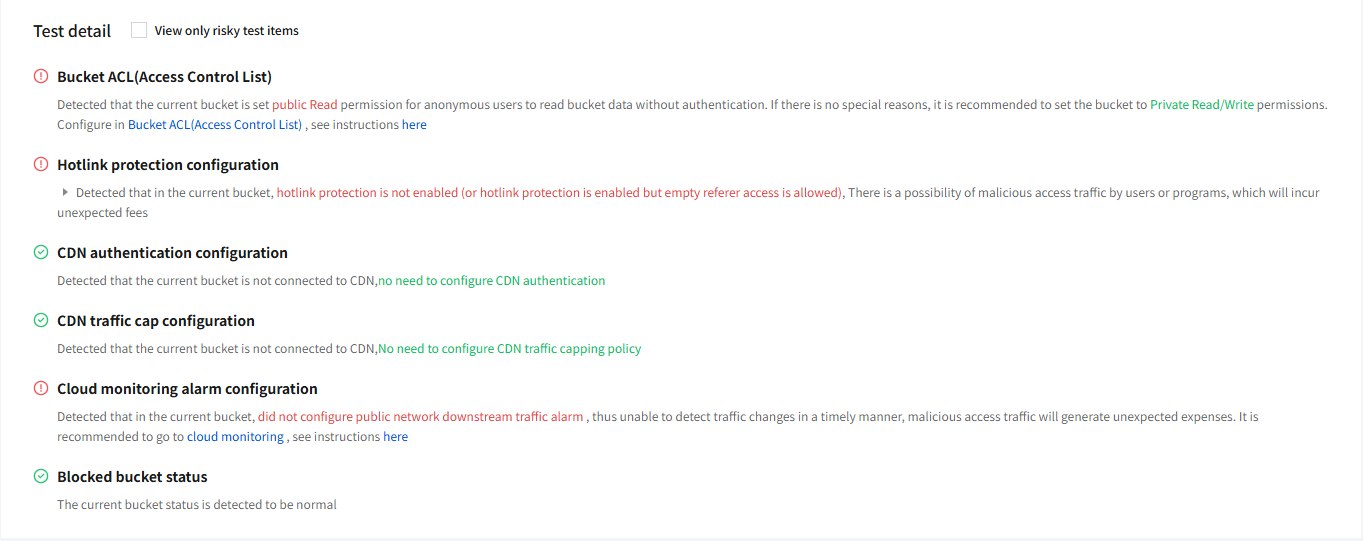
Hotlink risk detection includes 6 detection items, namely Bucket ACL (Access Control List), hotlink protection configuration, CDN authentication configuration, CDN traffic cap configuration, Cloud monitoring alarm configuration, and blocked bucket status.
The detection items are described as follows:
Bucket ACL (Access Control List): Checks the access permission of the COS bucket.
If the current bucket permission is set to Public Read, anonymous users can read the bucket data without authentication, posing a high security risk. This configuration is not recommended.
Unless there are special business scenarios, it is recommended to set the bucket permission to Private Read/Write. For operating instructions, refer to Hotlink Protection Guide - Modify Bucket Access Permissions.
Hotlink protection configuration: Checks the hotlink protection settings of the COS bucket.
If the current bucket has not enabled Hotlink Protection or allows empty Referer access after enabling Hotlink Protection, it may be subject to hotlink by malicious users or programs, resulting in unexpected fees.
Unless there are special business scenarios, it is recommended to enable Hotlink Protection and deny empty Referer access. For operating instructions, refer to Hotlink Protection Guide - Enable Bucket Hotlink Protection.
CDN authentication configuration: Checks the CDN authentication settings for the COS bucket domain name.
If the current bucket is a private bucket already connected to CDN, but has some domain names not configured with CDN authentication, malicious users may exploit your content for profit.
Unless there are special business scenarios, it is recommended to configure CDN authentication for your domain names. For operating instructions, refer to CDN Authentication Configuration Overview.
CDN traffic cap configuration: Checks the CDN traffic cap settings for the COS bucket domain name.
If the current bucket has some domain names not configured with a CDN traffic cap policy, malicious users may steal your traffic, thereby resulting in losses.
Unless there are special business scenarios, it is recommended to configure CDN traffic cap policies for your domain names. For operating instructions, refer to CDN Usage Limit Configuration.
Cloud monitoring alarm configuration: Checks the Cloud Monitor (TCOP) alarm policies for the COS bucket.
If downlink traffic alarm policies for the public network are not configured, traffic changes cannot be detected timely, thereby posing a hotlink risk and possibly incurring unexpected fees.
Unless there are special business scenarios, it is recommended to configure downlink traffic alarm policies for the public network. For operating instructions, refer to Hotlink Protection Guide - Configure Cloud Monitor Alarms.
Blocked bucket status: Checks the blocking status of the COS bucket.
If the current bucket is in abnormal status, it may be blocked due to hotlink by malicious users. If the traffic increase is anticipated, please contact us to request unblocking.
Usage Statistics
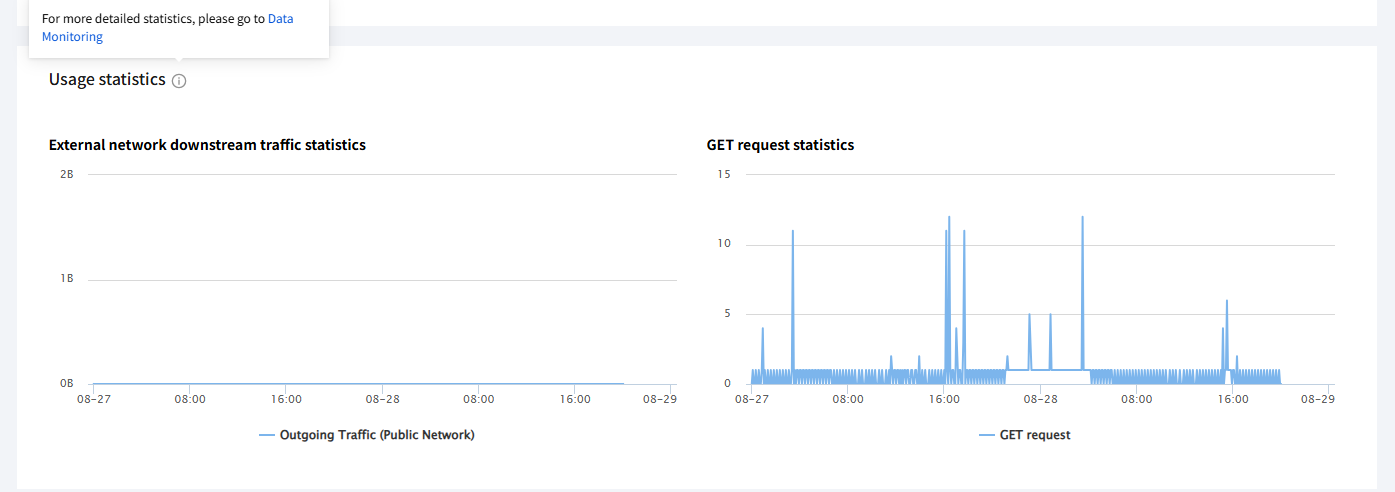
In the Usage Statistics module, you can view the statistics of the public network downlink traffic and the GET requests for the current bucket over the recent 2 days. For more detailed data, click Data Monitoring or enter the data monitoring page from the bucket configuration page.
Help and Support
Was this page helpful?
You can also Contact sales or Submit a Ticket for help.
Help us improve! Rate your documentation experience in 5 mins.
Feedback