Introduction
Multi-AZ Cold Storage (MAZ_COLD) and Cold Storage (COLD) are object storage services provided by COS (Cloud Object Storage) suitable for storing rarely accessed data that requires instant retrieval. These storage types offer users high reliability, low storage costs, and minimal access latency.
Cold storage offers low storage costs, but data retrieval incurs higher pay-as-you-go fees based on volume. The minimum storage unit for cold storage is 64KB, with a minimum storage duration of 90 days.
Feature Strengths
Similar to ARCHIVE, cold storage offers relatively low storage costs and is suitable for storing rarely accessed, long-term archived data. Unlike ARCHIVE, however, cold storage allows users to access data immediately without retrieval wait time. This makes it ideal for scenarios involving archival data that is almost never accessed but requires immediate availability when needed.
Compared to STANDARD_IA, cold storage incurs higher data retrieval fees, making it only suitable for storing rarely accessed data that occasionally requires immediate access. If the stored data is accessed frequently, cold storage is not recommended as it may incur extremely high data retrieval costs. For objects requiring frequent or repeated access, we recommend using STANDARD or STANDARD_IA storage.
Use Limits
Supported regions: Cold storage currently supports only the Beijing, Beijing Zone 1, Nanjing, Shanghai, Guangzhou, Chengdu, and Chongqing regions. If you need to use the cold storage type, please contact us to enable the allowlist. Minimum Storage Unit Limitation: The minimum storage unit is 64KB. Objects smaller than 64KB are calculated as 64KB for storage capacity.
Minimum Storage Duration Limitation: The minimum storage duration is 90 days. If the storage duration is less than 90 days, it will be charged as 90 days.
Data Retrieval Fees: Cold storage objects support direct downloads, but each download incurs data retrieval fees on a pay-as-you-go basis.
Usage Method
Option 1: Via the Console
1. PUT Object
1.2 Click Bucket List to select the bucket where you want to upload objects.
1.3 On the File List page, select Upload Files.
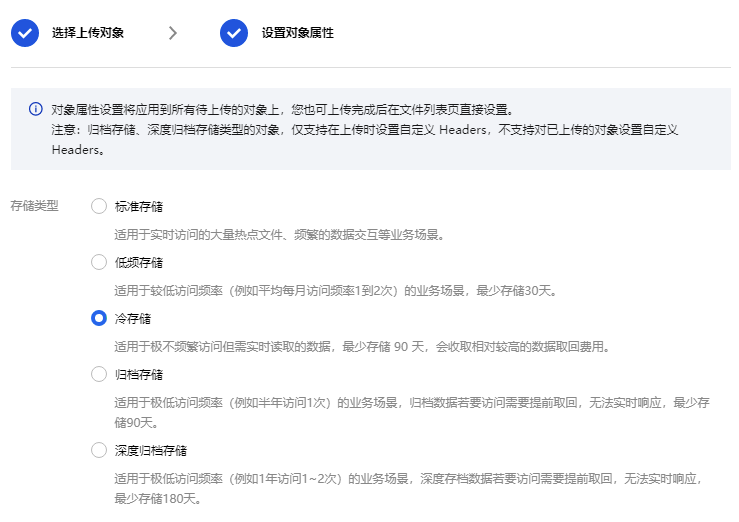
1.4 Select local files to upload, and set the storage type to COLD in the object properties.
2. Downloading an Object
2.1 Go to the File List and select the object you want to download.
2.2 Cold storage objects do not need to wait for retrieval and can be directly downloaded by clicking Download.
Usage Method 2: API Call
1. Uploading Objects and Copying Objects
By setting the request header or form field x-cos-storage-class to COLD or MAZ_COLD in the PUT Object, POST Object, and Initiate Multipart Upload interfaces, you can achieve direct upload to cold storage. Similarly, by setting the request header x-cos-storage-class to COLD or MAZ_COLD in the PUT Object - Copy interface, you can copy the object as cold storage type. 2. Downloading an Object
Call the GET Object interface to directly download cold storage objects. Usage Method Three: SDK Call
1. Uploading Objects or Copying Objects
When using the SDK to upload or copy files, set the StorageClass parameter to COLD or MAZ_COLD to achieve direct upload to cold storage or copy as cold storage type.
2. Downloading an Object
When the SDK is used to download cold storage objects, they do not need to be retrieved. Simply call the download method directly.
Associated Feature
Lifecycle
The execution of the lifecycle follows a unidirectional transition, always moving toward colder storage tiers. Through lifecycle policies, COS supports transitioning objects from STANDARD, STANDARD_IA, and INTELLIGENT_TIERING to cold storage types. Objects in cold storage can be transitioned to ARCHIVE or DEEP_ARCHIVE storage.
In summary, the transition sequence for the lifecycle is: STANDARD > STANDARD_IA > INTELLIGENT_TIERING > cold storage > ARCHIVE > DEEP_ARCHIVE.
Intelligent Tiering
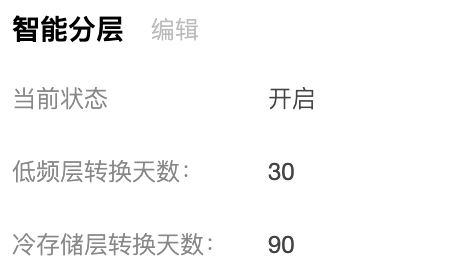
INTELLIGENT_TIERING adds a cold storage tier based on the standard and infrequent access tiers. After an object has not been accessed for 90 consecutive days, it will automatically transition to the cold storage tier. After an object enters the cold storage tier, storage fees will be charged at the cold storage rate. Objects in the cold storage tier will return to the standard tier when accessed.
Note:
Before use, please log in to the console to confirm that the cold storage tier is enabled in your Intelligent Tiering configuration. If Intelligent Tiering is enabled but the transition days to the cold storage tier are not displayed as 90 days, please contact us. FAQs
What Is the Data Reliability and Availability of the Cold Storage Type?
|
Cold Storage | COLD
| 99.999999999% (11 nines) | 99.0% |
Cold Storage (Multi-AZ) | MAZ_COLD
| 99.9999999999% (12 nines) | 99.5% |
How Is Cold Storage Billed?
Cold Storage includes storage capacity fees, request fees, data retrieval fees, and management feature retrieval fees. Although no prior retrieval is required, each download of a Cold Storage object incurs data retrieval fees charged based on usage.
The list prices are as shown in the table below.
|
Cold Storage | Storage capacity fee | Cold Storage Storage capacity fee (USD/GB/month) | 0.033 | Guangzhou, Shanghai, Beijing, Chengdu, Chongqing, Nanjing, Beijing Zone 1 |
|
|
| 0.0045 | Singapore, Virginia, Silicon Valley, Frankfurt, São Paulo, Jakarta, Tokyo, Bangkok, Seoul, Hong Kong (China) |
| Request fee | Cold Storage Read request fee (USD/10,000 requests) | 0.01 | Guangzhou, Shanghai, Beijing, Chengdu, Chongqing, Nanjing, Beijing Zone 1, Singapore, Virginia, Silicon Valley, Frankfurt, São Paulo, Jakarta, Tokyo, Bangkok, Seoul, Hong Kong (China) |
|
| Cold Storage Write request fee (USD/10,000 requests) | 0.01 |
|
| Data retrieval fee | Cold Storage Data retrieval fee (USD/GB) | 0.03 | Guangzhou, Shanghai, Beijing, Chengdu, Chongqing, Nanjing, Beijing Zone 1, Singapore, Virginia, Silicon Valley, Frankfurt, São Paulo, Jakarta, Tokyo, Bangkok, Seoul, Hong Kong (China) |
| Management feature fee | Cold Storage search feature fee (USD/GB) | 0.0022 | Guangzhou, Shanghai, Beijing, Chengdu, Chongqing, Nanjing, Beijing Zone 1, Singapore, Virginia, Silicon Valley, Frankfurt, São Paulo, Jakarta, Tokyo, Bangkok, Seoul, Hong Kong (China) |
Cold Storage (Multi-AZ) | Storage capacity fee | Cold Storage (Multi-AZ) Storage capacity fee (USD/GB/month) | 0.0068 | Guangzhou, Shanghai, Beijing, Chengdu, Chongqing, Nanjing, Beijing Zone 1 |
|
|
| 0.0076 | Singapore, Virginia, Silicon Valley, Frankfurt, São Paulo, Jakarta, Tokyo, Bangkok, Seoul, Hong Kong (China) |
| Request fee | Cold Storage (Multi-AZ) Read request fee (USD/10,000 requests) | 0.01 | Guangzhou, Shanghai, Beijing, Chengdu, Chongqing, Nanjing, Beijing Zone 1, Singapore, Virginia, Silicon Valley, Frankfurt, São Paulo, Jakarta, Tokyo, Bangkok, Seoul, Hong Kong (China) |
|
| Cold Storage (Multi-AZ) Write request fee (USD/10,000 requests) | 0.01 |
|
| Data retrieval fee | Cold Storage (Multi-AZ) Data retrieval fee (USD/GB) | 0.03 | Guangzhou, Shanghai, Beijing, Chengdu, Chongqing, Nanjing, Beijing Zone 1, Singapore, Virginia, Silicon Valley, Frankfurt, São Paulo, Jakarta, Tokyo, Bangkok, Seoul, Hong Kong (China) |
| Management feature fee | Cold Storage (Multi-AZ) Search feature fee (USD/GB) | None for now. | Guangzhou, Shanghai, Beijing, Chengdu, Chongqing, Nanjing, Beijing Zone 1, Singapore, Virginia, Silicon Valley, Frankfurt, São Paulo, Jakarta, Tokyo, Bangkok, Seoul, Hong Kong (China) |
Does the Cold Storage Type Support Direct Download?
Cold storage supports direct download without retrieval waiting time.
Does cold storage type support COS Select feature?
Cold storage type supports the COS Select feature.