tencent cloud

Cluster Auditing
Last updated: 2024-12-23 15:06:31
Cluster Auditing
Last updated: 2024-12-23 15:06:31
This document describes how to ship audit logs of a registered cluster to CLS.

Overview

Cluster audit is a feature based on Kubernetes Audit that can store and search the records of JSON logs with configurable policies generated by kube-apiserver. This feature records the access events of kube-apiserver and records the activities of each user, admin, or system component that has an impact on the cluster in sequence.

Notes

You have created a registered cluster, and it is in Running status.
Currently, audit logs of a registered cluster can be shipped to only CLS but not other log consumers.
To enable the auditing feature of a registered cluster, you need to log in to all master nodes of the cluster to configure relevant audit policies and API server parameters.
If the cluster auditing feature is enabled, cluster log collection will also be enabled automatically at the same time by default.
To use the cluster auditing feature, check whether nodes in the Kubernetes cluster can access the log consumer. Here, logs can be shipped over the public and private networks. You can select one option based on your business needs.
Shipping over public network: Cluster auditing logs will be shipped to CLS over the public network. This requires that the cluster nodes can access the public network.
Shipping over private network: Cluster auditing logs will be shipped to CLS over the private network. This requires that the cluster nodes are interconnected with CLS over the private network. Before choosing this option, submit a ticket for confirmation.

Directions

Configuring audit policies on master nodes in the cluster

Log in to all master nodes in the cluster one by one and configure the audit policy file /etc/kubernetes/audit-policy.yaml based on your actual business conditions.
apiVersion: audit.k8s.io/v1beta1
kind: Policy
omitStages:
- "RequestReceived"
rules:
- level: None
users: ["system:kube-proxy"]
verbs: ["watch"]
resources:
- group: ""
resources: ["endpoints", "services"]
- level: None
users: ["system:unsecured"]
namespaces: ["kube-system"]
verbs: ["get"]
resources:
- group: ""
resources: ["configmaps"]
- level: None
users: ["kubelet"]
verbs: ["get"]
resources:
- group: ""
resources: ["nodes"]
- level: None
userGroups: ["system:nodes"]
verbs: ["get"]
resources:
- group: ""
resources: ["nodes"]
- level: None
users:
- system:kube-controller-manager
- system:kube-scheduler
- system:serviceaccount:kube-system:endpoint-controller
verbs: ["get", "update"]
namespaces: ["kube-system"]
resources:
- group: ""
resources: ["endpoints"]
- level: None
users: ["system:apiserver"]
verbs: ["get"]
resources:
- group: ""
resources: ["namespaces"]
- level: None
nonResourceURLs:
- /healthz*
- /version
- /swagger*
- level: None
resources:
- group: ""
resources: ["events"]
- level: Metadata
resources:
- group: "" # core
resources: ["secrets", "configmaps"]
- group: authentication.k8s.io
resources: ["tokenreviews"]
- level: Request
verbs: ["get", "list", "watch"]
resources:
- group: ""
- group: "admissionregistration.k8s.io"
- group: "apps"
- group: "authentication.k8s.io"
- group: "authorization.k8s.io"
- group: "autoscaling"
- group: "batch"
- group: "certificates.k8s.io"
- group: "extensions"
- group: "networking.k8s.io"
- group: "policy"
- group: "rbac.authorization.k8s.io"
- group: "settings.k8s.io"
- group: "storage.k8s.io"
- level: RequestResponse
resources:
- group: ""
- group: "admissionregistration.k8s.io"
- group: "apps"
- group: "authentication.k8s.io"
- group: "authorization.k8s.io"
- group: "autoscaling"
- group: "batch"
- group: "certificates.k8s.io"
- group: "extensions"
- group: "networking.k8s.io"
- group: "policy"
- group: "rbac.authorization.k8s.io"
- group: "settings.k8s.io"
- group: "storage.k8s.io"
- level: Metadata

Configuring API server parameters on master nodes

Log in to all master nodes in the cluster one by one and modify the /etc/kubernetes/manifests/kube-apiserver.yaml file.
1. Add the following command parameters:
spec:
containers:
- command:
- kube-apiserver
- --audit-log-maxbackup=10
- --audit-log-maxsize=100
- --audit-log-path=/var/log/kubernetes/kubernetes.audit
- --audit-log-maxage=30
- --audit-policy-file=/etc/kubernetes/audit-policy.yaml
2. Add volume parameters to mount /etc/kubernetes/audit-policy.yaml to the API server Pod.
spec:
containers:
- command:
- kube-apiserver
- --audit-log-maxbackup=10
- --audit-log-maxsize=100
- --audit-log-path=/var/log/kubernetes/kubernetes.audit
- --audit-log-maxage=30
- --audit-policy-file=/etc/kubernetes/audit-policy.yaml
...
...
volumeMounts:
- mountPath: /var/log/kubernetes
name: k8s-audit
- mountPath: /etc/kubernetes/audit-policy.yaml
name: audit-policy
readOnly: true
...
...
volumes:
- hostPath:
path: /var/log/kubernetes
type: DirectoryOrCreate
name: k8s-audit
- hostPath:
path: /etc/kubernetes/audit-policy.yaml
type: FileOrCreate
name: audit-policy
...


Enabling cluster auditing

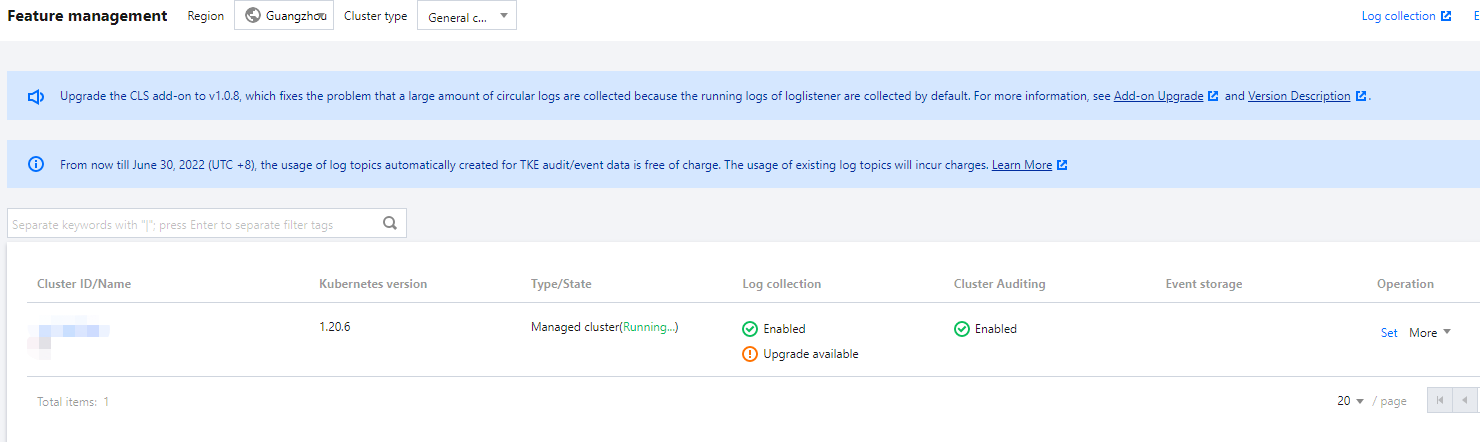
1. Log in to the TKE console and select Ops Feature Management on the left sidebar.
2. At the top of the Feature Management page, select the Region and Registered Cluster. Then, click Set on the right of the target cluster.

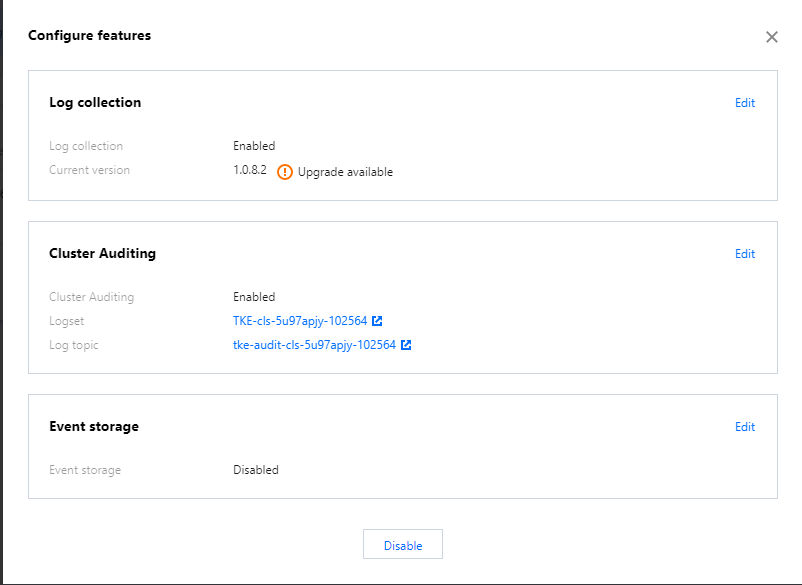
3. In the Configure features pop-up window, click Edit on the right of the Cluster Auditing feature.

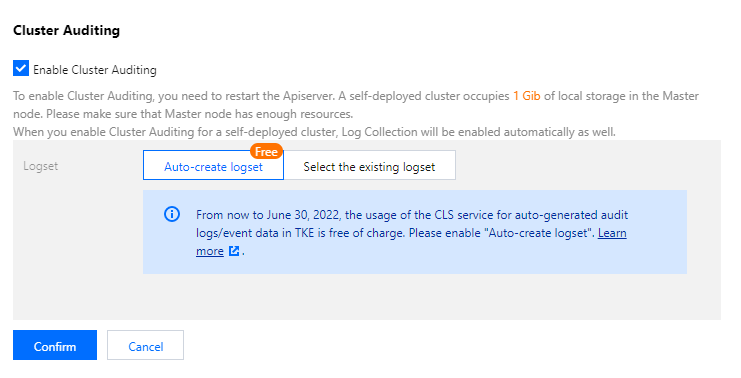
4. Select Enable Cluster Auditing and select the shipping method and the logset and log topic for audit log storage. We recommend you select Auto-create Log Topic.

5. Click Confirm.

Audit Dashboard

TKE provides out-of-the-box audit dashboards and can automatically configure dashboards of audit overview, node operation overview, K8s object operation overview, and aggregated search for the clusters with cluster auditing enabled. With user-defined filters and built-in CLS global search, TKE makes it convenient for you to observe and search for cluster operations, so as to promptly find and locate problems. For more information, see Auditing Dashboard.
Was this page helpful?
You can also Contact Sales or Submit a Ticket for help.
Yes
No

Feedback