tencent cloud

Serverless Cloud Function

Release Notes and Announcements
Release Notes
Announcements
User Guide
Product Introduction
Overview
Related Concepts
How It Works
Strengths
Scenarios
Related Products
Purchase Guide
Billing Overview
Billing Mode
Billable Items and Billing Modes
Function Computing Power Support
Free Tier
SCF Pricing
Billing Example
Payment Overdue
Getting Started
Creating Event Function in Console
User Guide
Quota Management
Managing Functions
Web Function Management
Log Management
Concurrence Management
Trigger Management
Function URL
A Custom Domain Name
Version Management
Alias Management
Permission Management
Running Instance Management
Plugin Management
Managing Monitors and Alarms
Network Configuration
Layer Management
Execution Configuration
Extended Storage Management
DNS Caching Configuration
Resource Managed Mode Management
Near-Offline Resource Hosting Model
Workflow
Triggers
Trigger Overview
Trigger Event Message Structure Summary
API Gateway Trigger
COS Trigger
CLS Trigger
Timer Trigger
CKafka Trigger
Apache Kafka Trigger
MQTT Trigger
Trigger Configuration Description
MPS Trigger
CLB Trigger Description
TencentCloud API Trigger
Development Guide
Basic Concepts
Testing a Function
Environment Variables
Dependency Installation
Using Container Image
Error Types and Retry Policies
Dead Letter Queue
Connecting SCF to Database
Automated Deployment
Cloud Function Status Code
Common Errors and Solutions
Developer Tools
Serverless Web IDE
Calling SDK Across Functions
Third-Party Tools
Code Development
Python
Node.js
Golang
PHP
Java
Custom Runtime
Deploying Image as Function
Web Framework Development
Deploying Framework on Command Line
Quickly Deploying Egg Framework
Quickly Deploying Express Framework
Quickly Deploying Flask Framework
Quickly Deploying Koa Framework
Quickly Deploying Laravel Framework
Quickly Deploying Nest.js Framework
Quickly Deploying Next.js Framework
Quickly Deploying Nuxt.js Framework
Quickly Deploying Django Framework
Use Cases
Overview
Solutions with Tencent Cloud Services
Business Development
TRTC Practices
COS Practices
CKafka Practice
CLS
CLB Practice
MPS
CDN
CDWPG
VOD
SMS
ES
Scheduled Task
Video Processing
Success Stories
Tencent Online Education
Online Video Industry
Tencent Online Education
Best Practice of Tencent IEG Going Global
API Documentation
History
Introduction
API Category
Making API Requests
Other APIs
Namespace APIs
Layer Management APIs
Async Event Management APIs
Trigger APIs
Function APIs
Function and Layer Status Description
Data Types
Error Codes
SDK Documentation
FAQs
General
Web Function
Billing FAQs
Network FAQs
Log FAQs
SCF utility class
Event Handling FAQs
API Gateway Trigger FAQs
Related Agreement
Service Level Agreement
Contact Us
Glossary

Status Trace

PDF
Focus Mode
Font Size
Last updated: 2024-12-02 20:11:41

Use Cases

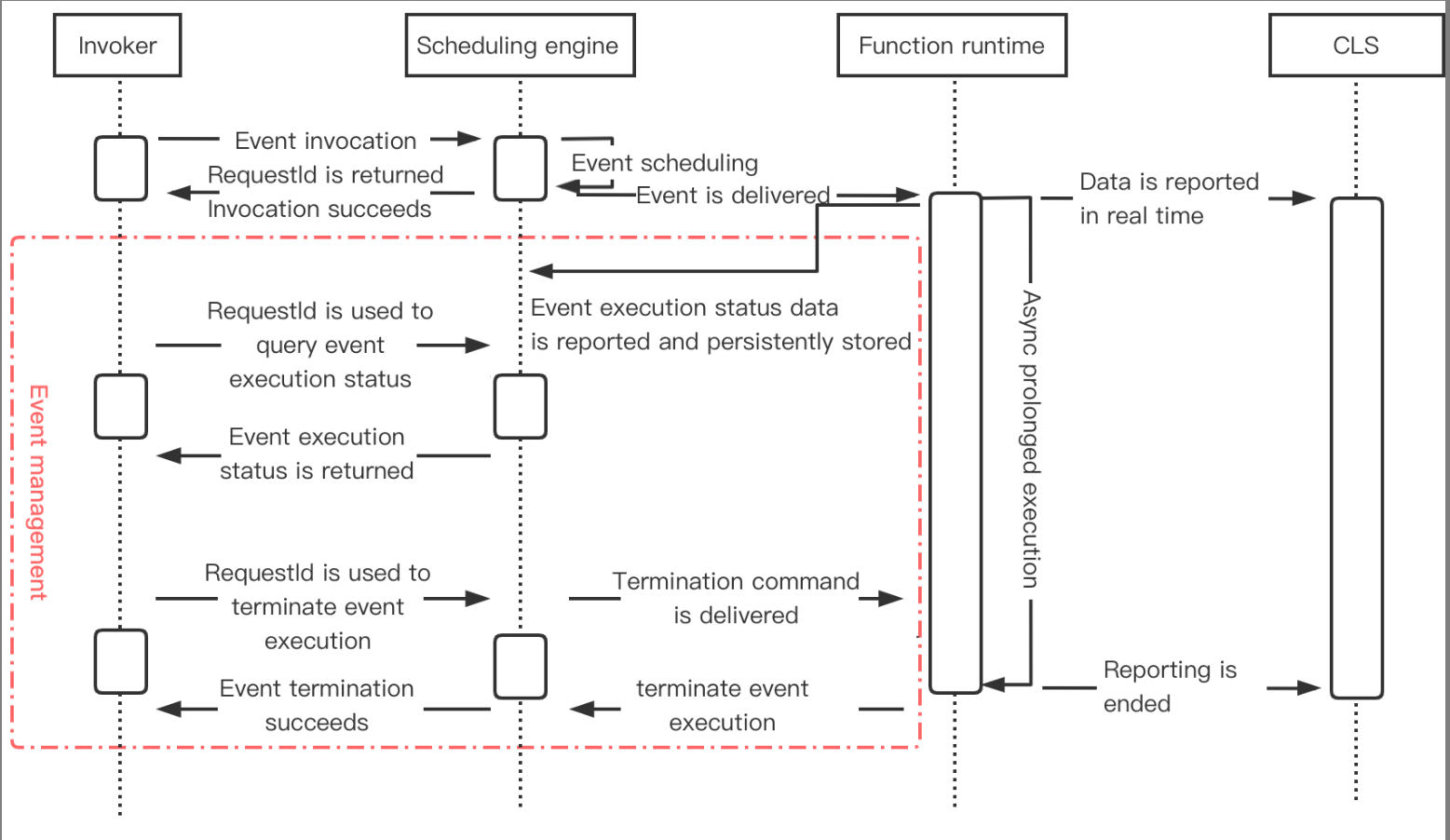
Asynchronously executed functions are usually used to process a large number of async time-consuming tasks. In order to better manage such tasks, SCF provides a status trace feature, which records and reports the real-time status of event responses and provides event management services such as event status statistics collection and query.

Execution Mechanism

How it works

After the status trace feature is enabled for asynchronously executed functions, the platform will start recording and reporting the real-time status of events. It works as shown below:


Must-Knows

The status data of asynchronously executed events is retained for only 3 days and will be cleared on a rolling basis in a time window of 3 days. If you want to keep all records, you need to periodically pull them and save them to your own storage.
After status trace is disabled, event management services such as recording, collecting, and querying asynchronously executed events will no longer be available, and the generated event status data will be cleared in 3 days.
If the limit on QPS is exceeded, or if your account falls into arrears, the corresponding exception will be returned by the scheduling engine directly after you invoke an event, and no event status records will be generated.

Directions

1. Log in to the SCF console and click Functions on the left sidebar.
2. Select the region and namespace where to create a function at the top of the page and click Create to enter the function creation process.
3. Select Template or Create from scratch to create a function.
4. On the Function configuration page, expand Advanced settings and select Async execution > Status trace.
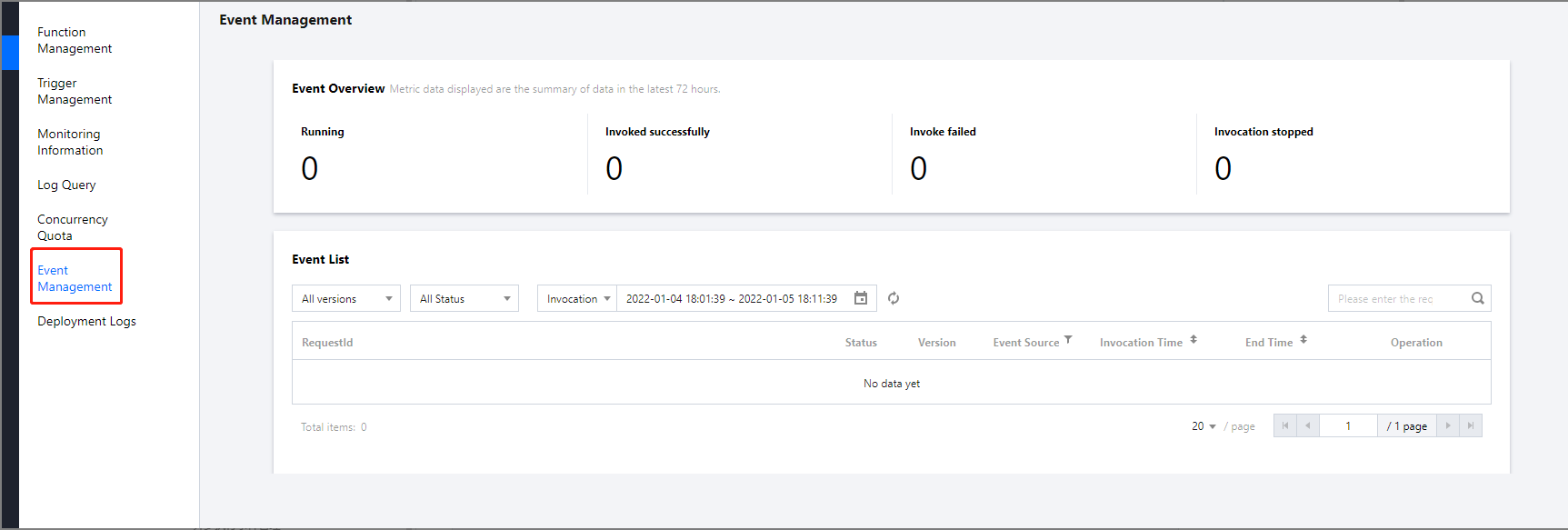
5. Click Complete. After the function is created, you can click Event Management to view the list of async events.


Help and Support

Was this page helpful?

Help us improve! Rate your documentation experience in 5 mins.

Feedback