tencent cloud

Cloud Access Management

Product Introduction
CAM Overview
Features
Scenarios
Basic Concepts
Use Limits
User Types
Purchase Guide
Getting Started
Creating Admin User
Creating and Authorizing Sub-account
Logging In to Console with Sub-account
User Guide
Overview
Users
Access Key
User Groups
Role
Identity Provider
Policies
Permissions Boundary
Troubleshooting
Downloading Security Analysis Report
CAM-Enabled Role
Overview
Compute
Container
Microservice
Essential Storage Service
Data Process and Analysis
Data Migration
Relational Database
Enterprise Distributed DBMS
NoSQL Database
Database SaaS Tool
Database SaaS Service
Networking
CDN and Acceleration
Network Security
Data Security
Application Security
Domains & Websites
Big Data
Middleware
Interactive Video Services
Real-Time Interaction
Media On-Demand
Media Process Services
Media Process
Cloud Real-time Rendering
Game Services
Cloud Resource Management
Management and Audit Tools
Developer Tools
Monitor and Operation
More
CAM-Enabled API
Overview
Compute
Edge Computing
Container
Distributed cloud
Microservice
Serverless
Essential Storage Service
Data Process and Analysis
Data Migration
Relational Database
Enterprise Distributed DBMS
NoSQL Database
Database SaaS Tool
Networking
CDN and Acceleration
Network Security
Endpoint Security
Data Security
Business Security
Application Security
Domains & Websites
Office Collaboration
Big Data
Voice Technology
Image Creation
Tencent Big Model
AI Platform Service
Natural Language Processing
Optical Character Recognition
Middleware
Communication
Interactive Video Services
Real-Time Interaction
Stream Services
Media On-Demand
Media Process Services
Media Process
Cloud Real-time Rendering
Game Services
Education Sevices
Medical Services
Cloud Resource Management
Management and Audit Tools
Developer Tools
Monitor and Operation
More
Use Cases
Security Practical Tutorial
Multi-Identity Personnel Permission Management
Authorizing Certain Operations by Tag
Supporting Isolated Resource Access for Employees
Enterprise Multi-Account Permissions Management
Reviewing Employee Operation Records on Tencent Cloud
Implementing Attribute-Based Access Control for Employee Resource Permissions Management
During tag-based authentication, only tag key matching is supported
Business Use Cases
TencentDB for MySQL
CLB
CMQ
COS
CVM
VPC
VOD
Others
API Documentation
History
Introduction
API Category
Making API Requests
User APIs
Policy APIs
Role APIs
Identity Provider APIs
Data Types
Error Codes
FAQs
Role
Key
Others
CAM Users and Permissions
Glossary

Tencent Cloud Organization

PDF
Focus Mode
Font Size
Last updated: 2024-01-23 17:59:15

Organization Overview

The Organization management is a multi-account management product on Tencent Cloud designed specifically for corporate clients. It empowers organization administrators to implement unified management over the Tencent Cloud root accounts of both the group and its subsidiaries, offering management capabilities of accounts, finance and security. For the detailed instructions, please refer to the Tencent Cloud Organization documentation.
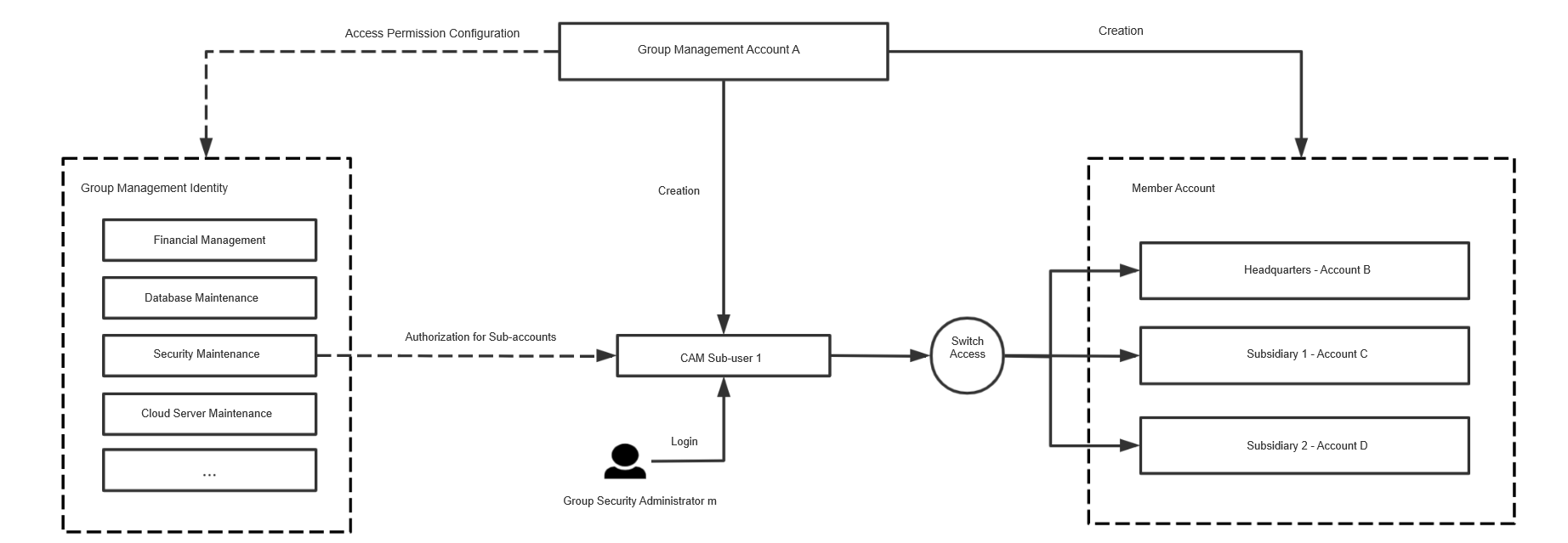
Within the Tencent Cloud Organization, the management account can simultaneously grant management permissions of multiple created member accounts to a CAM sub-account. Once authorized, this CAM sub-account allow a single login, and you can select a member and access various member accounts within CAM.


Operation Scenarios

Suppose that a group has Account A and Account B on Tencent Cloud. It choose Account A as the management account to activate the account management product. There are two subsidiaries in the group, possessing Account C and Account D respectively. There is also a security administrator named M in this group, hoping to simultaneously manage the accounts of the group and its subsidiaries.
In such a scenario, the group management account can create a CAM Sub-user 1 for employee M and grant him security operation permissions of Account B, Account C, and Account D. After logging into the Tencent Cloud console through CAM Sub-user 1, the employee can select different member accounts to perform related security operation tasks with no need to create CAM sub-users under each account.

The steps are as follows:

Adding an Authorization

1. Log in to the Organization console using the administrator account and go to the Login permission settings page.
2. Proceed to establish permission models that manage all members, such as network operations, security operations, CVM operations, and financial administrator, etc. For more information, please refer to Creating Member Login Permission.
3. Navigate to Member Account Management, click Add Member, select Create New Member and choose the needed permissions to manage. For further information, kindly refer to Add Organization Members.
4. Upon successful creation of the member, grant sub-users member login permissions via the Member Account Management list > Login Account. For more detailed instructions, please refer to Authorizing Sub-Users to Log in to Member Accounts.

Logging in with a Sub-User

Log into the Tencent Cloud Organization console > Member Account Management with a CAM sub-user, choose the member and access permissions you need to manage, and click on the Login Account in the operation column. You can log in to the member console with the sub-user and manage operations.

Help and Support

Was this page helpful?

Help us improve! Rate your documentation experience in 5 mins.

Feedback