tencent cloud

Elastic MapReduce

  • Release Notes and Announcements
  • Product Introduction
  • Purchase Guide
    • EMR on CVM Billing Instructions
    • EMR on TKE Billing Instructions
    • EMR Serverless HBase Billing Instructions
    • EMR Serverless TCBase Billing Overview
  • Getting Started
  • EMR on CVM Operation Guide
    • Planning Cluster
    • Administrative rights
    • Configuring Cluster
    • Managing Cluster
    • Managing Service
    • Monitoring and Alarms
    • TCInsight
  • EMR on TKE Operation Guide
  • EMR Serverless HBase Operation Guide
  • EMR Serverless TCBase Operation Guide
  • EMR Development Guide
    • Hadoop Development Guide
    • Spark Development Guide
    • Hbase Development Guide
    • Phoenix on Hbase Development Guide
    • Hive Development Guide
    • Presto Development Guide
    • Sqoop Development Guide
    • Hue Development Guide
    • Oozie Development Guide
    • Flume Development Guide
    • Kerberos Development Guide
    • Knox Development Guide
    • Alluxio Development Guide
    • Kylin Development Guide
    • Livy Development Guide
    • Kyuubi Development Guide
    • Zeppelin Development Guide
    • Hudi Development Guide
    • Superset Development Guide
    • Impala Development Guide
    • Druid Development Guide
    • TensorFlow Development Guide
    • Kudu Development Guide
    • Ranger Development Guide
    • Kafka Development Guide
    • StarRocks Development Guide
    • Flink Development Guide
    • JupyterLab Development Guide
    • MLflow Development Guide
  • Practical Tutorial
    • Practice of EMR on CVM Ops
    • Data Migration
    • Practical Tutorial on Custom Scaling
  • API Documentation
    • History
    • Introduction
    • API Category
    • Making API Requests
    • Cluster Resource Management APIs
    • Cluster Services APIs
    • User Management APIs
    • Information Query APIs
    • Scaling APIs
    • Configuration APIs
    • Other APIs
    • Cluster Lifecycle APIs
    • Serverless HBase APIs
    • YARN Resource Scheduling APIs
    • Data Types
    • Error Codes
  • FAQs
    • EMR on CVM
  • Service Level Agreement
  • Contact Us

Phoenix Practical Tutorial

Download
Mode fokus
Ukuran font
Terakhir diperbarui: 2024-10-21 17:28:12

Using Phoenix Salted Table

HBase sequential write may suffer from region server hotspotting if your row key is monotonically increasing. Phoenix provides a way to transparently salt the row key with a salting byte for a particular table. You need to specify this in table creation time by specifying a table property "SALT_BUCKETS" with a value from 1 to 256. Like this:
0: jdbc:phoenix:>CREATE TABLE table (a_key VARCHAR PRIMARY KEY, a_col VARCHAR) SALT_BUCKETS = 20;
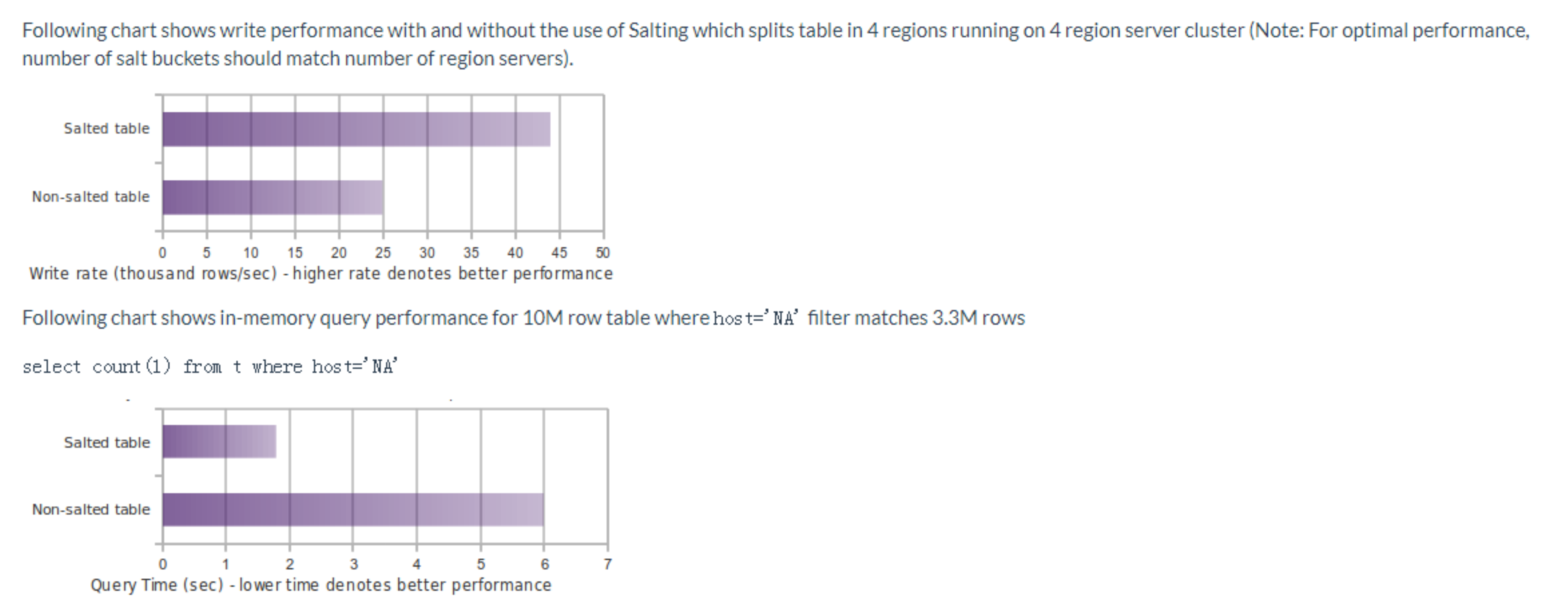
Salting the row key provides a way to mitigate the problem caused by HBase sequential write. With salted tables, you don't need to be knowledgeable about the row key design in HBase. Below is Phoenix's official performance comparison of read and write performance between salted and non-salted tables:

For more information on salting performance or directions, please see the community documentation for salted tables in Phoenix.

Phoenix Secondary Indexing

Secondary indexes are an orthogonal way to access data from its primary access path. In HBase, you have a single index that is lexicographically sorted on the primary row key. Access to records in any way other than through the primary row requires scanning over potentially all the rows in the table to test them against your filter. With secondary indexing, the columns or expressions you index form an alternate row key to allow point lookups and range scans along this new axis.

Configuring Secondary Indexing in Phoenix

Phoenix on EMR supports Phoenix's secondary indexing. If you need to use non-transactional, variable indexing, just follow the steps below to configure it. Go to the component management page in the EMR console, click HBase, select Configuration > Configuration Management, and add three configuration items in hbase-site.xml: hbase.regionserver.wal.codec, hbase.region.server.rpc.scheduler.factory.class, and hbase.rpc.controllerfactory.class. The detailed configuration is as follows:
<property>
<name>hbase.regionserver.wal.codec</name>
<value>org.apache.hadoop.hbase.regionserver.wal.IndexedWALEditCodec</value>
</property>
<property>
<name>hbase.region.server.rpc.scheduler.factory.class</name>
<value>org.apache.hadoop.hbase.ipc.PhoenixRpcSchedulerFactory</value>
<description>Factory to create the Phoenix RPC Scheduler that uses separate queues for index and metadata updates</description>
</property>
<property>
<name>hbase.rpc.controllerfactory.class</name>
<value>org.apache.hadoop.hbase.ipc.controller.ServerRpcControllerFactory</value>
<description>Factory to create the Phoenix RPC Scheduler that uses separate queues for index and metadata updates</description>
</property>

Using Secondary Indexing in Phoenix

To create a secondary index, run the following command:
0: jdbc:phoenix:>CREATE INDEX my_index ON my_table (v1) INCLUDE (v2);
For more information on secondary indexing, please see the community documentation of Phoenix secondary indexing.

Bantuan dan Dukungan

Apakah halaman ini membantu?

masukan