Intelligent Compression automatically adjusts by intelligently judging the subjective quality of images, significantly reducing file size without altering the original format, while maximizing visual similarity to the original images.
Note:
Intelligent Image Compression is a paid service. Specific fees can be viewed at Image Processing fees.
Cloud Infinite (CI) is deeply integrated with Cloud Object Storage (COS). You need to bind or create a new COS Bucket to use the features of Cloud Infinite. You can bind a Bucket via the console or bind a Bucket via API.
When using Intelligent Image Compression, please first confirm the relevant restrictions and Region. For details, see Usage Restrictions.
2. In the left navigation, click Bucket Management to go to the Bucket Management page.
3. Click the Bucket name that needs to enable the Intelligent Image Compression feature, and go to the Bucket.
4. Click Image Processing, locate the Intelligent Image Compression configuration item, and click Edit.
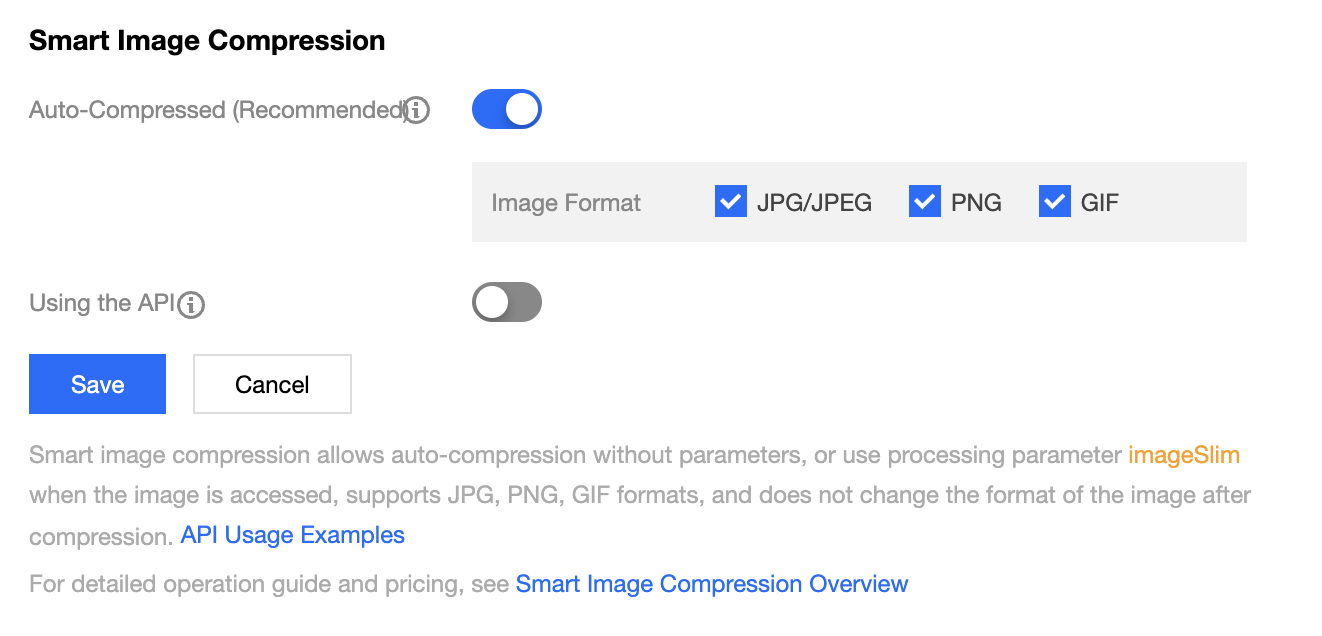
5. In edit mode, you can see two switches for Intelligent Compression:
Automatic Compression (Recommended): Enables the automatic usage of Intelligent Compression. Once enabled, images in the specified format within the Bucket will be intelligently compressed upon access without carrying any parameters.
Usage via API: Enables the API usage of Intelligent Compression. Once enabled, you can compress images during download using the imageSlim parameter.
6. Click Save to use it.
Note:
After Intelligent Image Compression is enabled, real-time compression will be performed by default when you normally access images, significantly reducing access traffic.
When accessing images, you can determine whether the image has been compressed through the X-Slimflag response header. This response header contains the following three values:
0: Indicates compression failure;
1: Indicates successful compression;
2: Indicates returning the original uncompressed image;