tencent cloud

Tencent Cloud Lighthouse

Release Notes and Announcements
Image Release Notes
Announcements
Product Introduction
Overview
Basic Concepts
Strengths
Scenarios
Use Limits
Region and Network Connectivity
Product Comparison
User Guide
Billing
Billing Overview
Instance Package
Pricing Details
Purchase Methods
Configuration Adjustment (for Upgrade Only)
Overdue Payments
Refund
Getting Started
One-Click Application Creation Using Lighthouse
Quick Instance Creation
User Guide
Instances
Cloud Disks
Images
Firewall
Private Network Interconnection
Data Backup and Restoration Using Snapshots
Cloud Access Management
OPS and Monitoring
File Transfer
Use Cases
Website Building
Development Environment Building
Cloud Storage System Building
E-commerce Platform Building
Personal Live Streaming Room Building
FTP Service Building
SSL Certificate Installation
Troubleshooting
Windows Instance: RDP Connection to the Remote Computer Fails
Windows Instance: Offline Password Resetting Fails or Invalid
Linux/Windows Instance: Online Password Resetting Fails or Invalid
API Documentation
History
Introduction
API Category
Making API Requests
Image APIs
Firewall APIs
Key APIs
Instance APIs
Snapshot APIs
CCN APIs
Other APIs
Cloud Disk APIs
Scene APIs
Package APIs
Quota APIs
Region APIs
Data Types
Error Codes
FAQs
Agreements
Privacy Policy
Data Processing And Security Agreement
Contact Us

Viewing Instance Monitoring Data

PDF
Mode fokus
Ukuran font
Terakhir diperbarui: 2022-06-17 11:50:08

Overview

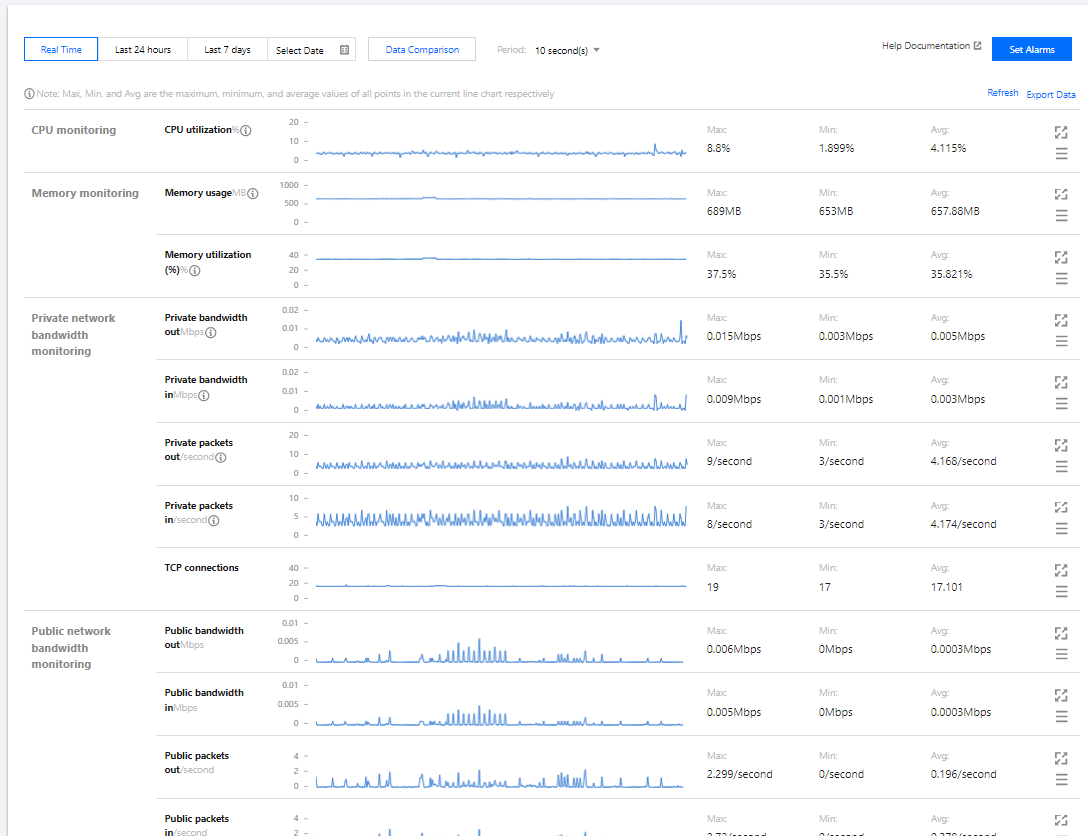
You can log in to the Lighthouse console and enter the instance details page to view the monitoring data of an instance.

Directions

1. Log in to the Lighthouse console.
2. Find the target instance in the instance list and enter its details page.
3. Select the Monitoring tab to enter the monitoring data page, where you can view the instance's monitoring data such as CPU, memory, private network bandwidth, public network bandwidth, and disk (system disk and data disk) usage as shown below:
Note:
If you want to set threshold alarms for the performance metrics of Lighthouse resources supported by Cloud Monitor, so that when an exception occurs, you can promptly receive a notification by WeChat, email, SMS, or phone call and take corresponding actions, you need to click Set alarm to create an alarm policy. For more information, see Creating Alarm Policy.


Getting CloudAudit operation records

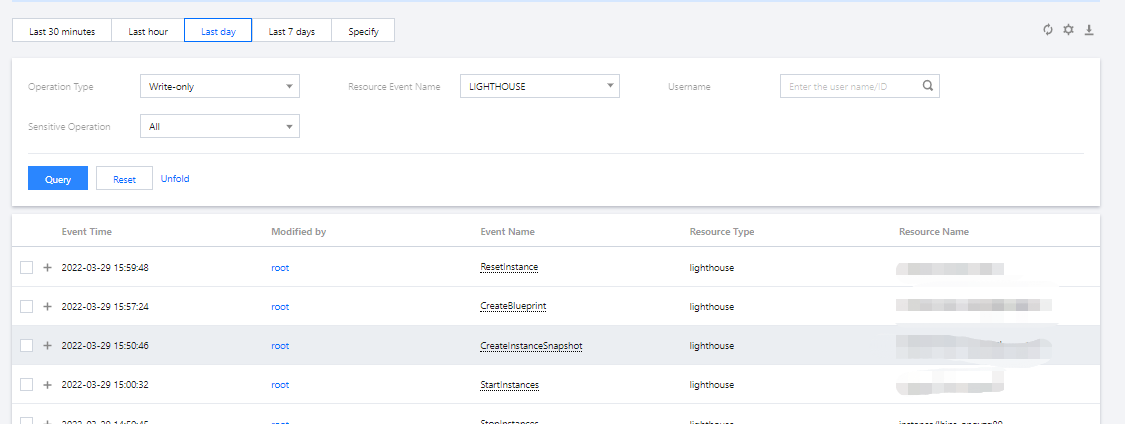
Lighthouse supports CloudAudit. You can get operation records in the CloudAudit console in the following steps. For more information on CloudAudit operation records, see Viewing Event Details in Operation Record.
1. Log in to the CloudAudit console and select Operation Record on the left sidebar.
2. Select LIGHTHOUSE for Resource Event Name and click Query to view the logs as shown below:

Bantuan dan Dukungan

Apakah halaman ini membantu?

masukan