Roles in Tencent Cloud TCHouse-P are used to manage access to databases. A role can be either a user (a specific database user) or a group (a group of database users). Roles can own database objects (such as tables and views) and assign access to these objects to other roles.
When creating a cluster, you will be prompted to set an initial username and password. The initial user will be the "admin user" with permissions to create users, create databases, and log in. After the cluster is created, you can connect to the database as the "admin user". Generally, the admin user has the maximum privileges, which means that this account should be used by as few users as possible. To this end, you can use the admin user to create other users and grant required permissions to them. For authorization directions, see User group and Object permission management. You can also create databases and other objects as instructed in Defining Database. To log in to a database, see Connecting to Database.
Creating User
A role can be either a user or a group. Usually, a user role (referred to as "user" hereinafter) has the permission to log in to Tencent Cloud TCHouse-P databases and initialize sessions. Therefore, when creating a user, you must grant them the LOGIN permission; for example:
CREATE role jsmith with LOGIN;
With the above operation, a user with the LOGIN permission is created, who can connect to databases. In addition to LOGIN, Tencent Cloud TCHouse-P also has the following permissions to manage user access, which can be granted during role creation with the CREATE ROLE statement.
Permission Value
Purpose
Default Value
SUPERUSER Ι NOSUPERUSER
Superuser permission. Only superusers can create other superusers
NOSUPERUSER
CREATEDB Ι NOCREATEDB
Creates databases
NOCREATEDB
CREATEROLE Ι NOCREATEROLE
Creates and manages roles
NOCREATEROLE
INHERIT Ι NOINHERIT
Determines the permissions a user inherits from the group to which the user belongs
INHERIT
LOGIN Ι NOLOGIN
Connects to databases, which is granted to users but not groups
NOLOGIN
CONNECTION LIMIT
Limits the number of concurrent connections to a database. –1 means no limit
–1
CREATEEXTTABLE Ι NOCREATEEXTTABLE
Creates external tables
NOCREATEEXTTABLE
PASSWORD
Sets the password during user creation
None
VALID UNTIL 'timestamp'
Password expiration time
None
RESOURCE QUEUE 'name'
The name of the resource queue to which the created query is scheduled after a user establishes a connection
pg_default
In addition to granting permissions to users when creating them, you can also grant permissions afterwards by using the ALTER ROLE syntax as shown below:
ALTER role jsmith with CREATEROLE;
User group
A group (i.e., user group) is a special role that is not granted the LOGIN permission but a combination of permissions that are frequently used together. In this way, permissions can be granted to or revoked from a user as a whole.
You can create a group that is granted a combination of permissions by using the following statement.
Create role, Create DB, Cannot login;
You can also easily add users to or remove them from the group with the GRANT TO or REVOKE FROM statement respectively. Users added to the group will inherit the group's permissions.
Sample GRANT TO statement:
. The jsmith user belongs to the manager group.
Sample REVOKE FROM statement:
. The jsmith user no longer belongs to the manager group.
Object Permission Management
When an object (database, table, schema, function, etc.) is created, it must belong to an owner, which is usually the user who runs the object creation statement. Initially, only the owner has all the permissions to manipulate the object; for example:
GRANT INSERT ON test TO jsmith;
You can grant the INSERT permission of test to the jsmith user with the above statement and revoke it with REVOKE FROM.
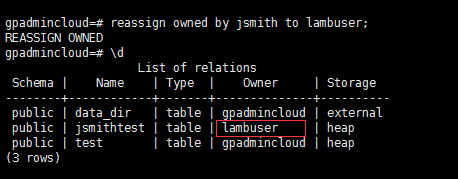
Similarly, you can transfer all the objects owned by a user to another user with the REASSIGN OWNED statement as shown below:
SET ROLE jsmith; // Switch to the `jsmith` user.
CREATE TABLE jsmithtest (age int, id int); // Create a table
SET ROLE gpadmincloud; // Switch back to the superuser
reassign owned by jsmith to lambuser; // Transfer all the objects owned by `jsmith` to `lambuser`
The objects owned by a superuser cannot be transferred to other users, because some of the objects also belong to the system. Therefore, you need to create a table as a non-superuser.
Complete the transfer of object ownership from jsmith to lambuser.