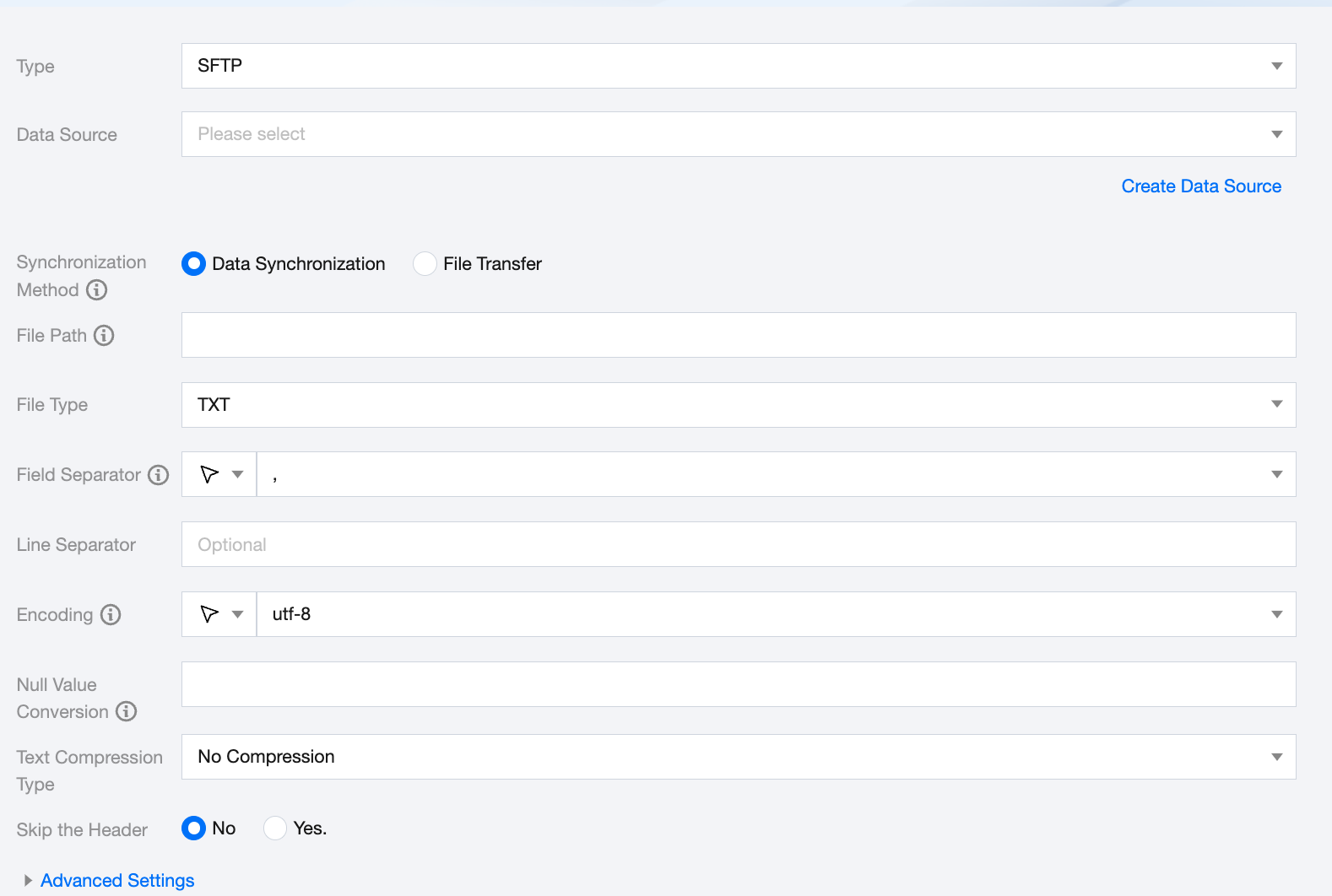
Select the available SFTP data source in the current project.
Synchronization Method
SFTP supports two synchronization methods:
Data Synchronization: Parses structured data content and maps and synchronizes data content according to field relationships.
File Transfer: Transfers the entire file without content parsing. Applicable to unstructured data synchronization.
File Path
For the path and file name information of the SFTP file system, you need to provide the complete file path and file name, including the path and file suffix. Multiple paths can be specified.
When specifying a single remote SFTP file, SFTP can temporarily only use a single thread for data extraction. In the future, multi-threaded concurrent reading for a single non-compressed file will be supported.
When specifying multiple remote SFTP files, SFTP supports using multiple threads for data extraction. The thread concurrency is determined by the number of channels.
When specifying a wildcard, SFTP attempts to enumerate multiple files. For example, specifying / means reading all files in the / directory, and specifying /bazhen/ means reading all files in the bazhen directory. Currently, SFTP only supports the asterisk (*) as a file wildcard and allows using schedule parameters to flexibly configure file names and file paths.
File Type
SFTP supports four file types: txt, orc, parquet, csv.
txt: represents TextFile file format.
orc: represents ORCFile file format.
parquet: represents standard Parquet file format.
csv: represents standard HDFS file format (logical two-dimensional table).
Field Separator
Field separator for reading, SFTP requires a field separator when reading data. If not specified, it will default to a comma (,), and the interface configuration will also default to a comma (,).
Encoding
Configuration for reading file encoding. Supports UTF-8 and GBK encoding.
Null Value Conversion
During reading, convert specified strings to null.
Text Compression Type
Supports uncompressed, zip, gzip, bzip2.
Skip the Header
No: Do not skip the header when reading.
Yes: Skip the header when reading.
Advanced Settings (Optional)
You can configure parameters according to business needs.
SFTP Offline Single Table Write Node Configuration
Parameters
Description
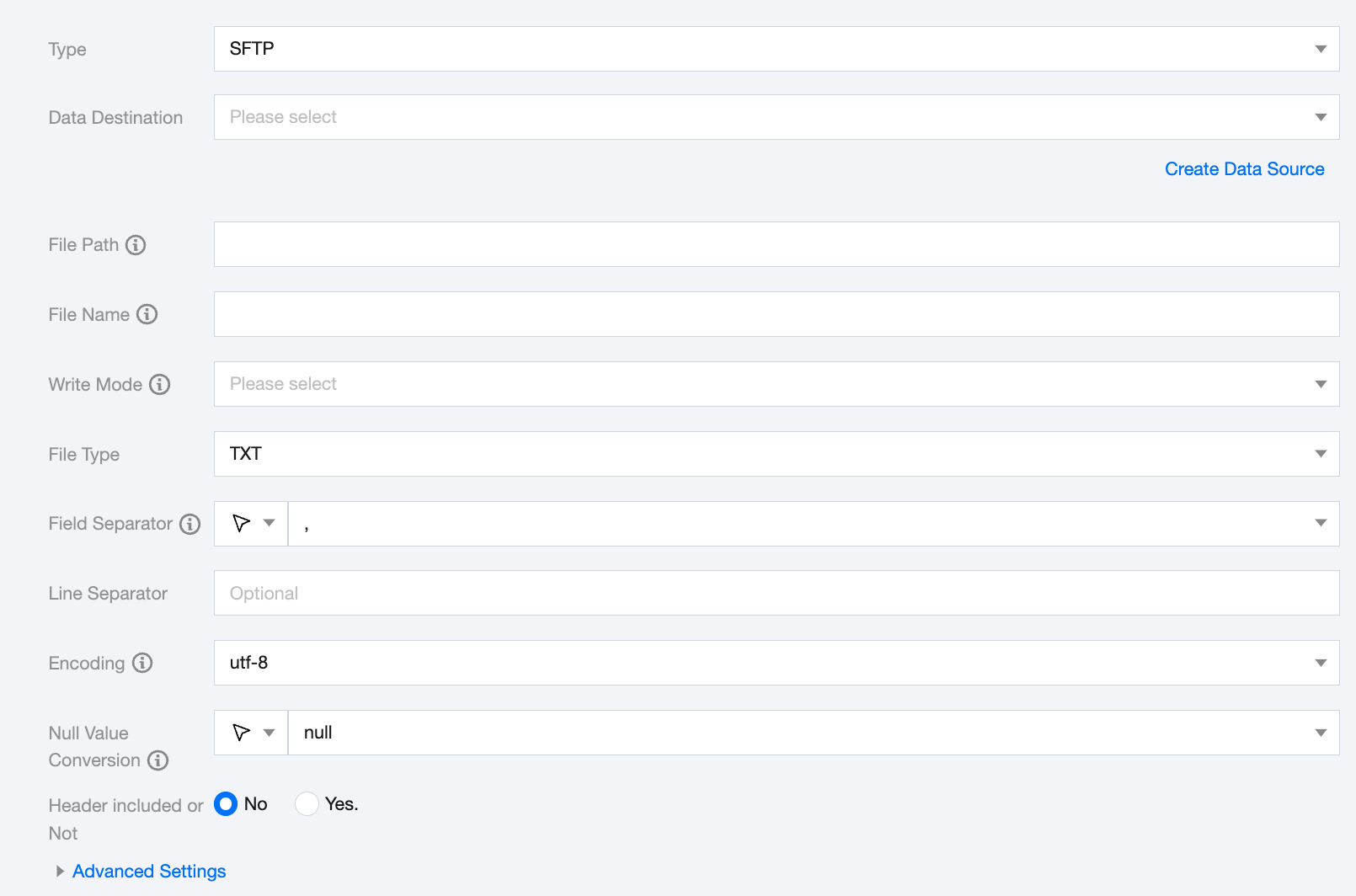
Data Destination
Select the available SFTP data source in the current project.
File Path
Path information of the file system. The path supports using '*' as a wildcard. After specifying the wildcard, multiple file information will be traversed.
File Name
Name of the file to be written. A random suffix will be added to this filename as the actual write name.
Write Mode
SFTP supports three write modes:
append: No processing before writing, ensuring no filename conflicts.
nonConflict: Error when the filename is duplicated.
overwrite: Clean all files with the filename prefix before writing.
Field Separator
Field separator for writing. The field separator for SFTP writing needs to be consistent with the field separator of the created SFTP table; otherwise, data cannot be queried in the SFTP table. Options: ' \\t ', ' \\u001 ', ' | ', ' space ', ' ; ', ' , '.
Encoding
Configuration for file encoding during writing. Supports UTF-8 and GBK encoding.
Null Value Conversion
During writing, convert null to the specified string.
Header included or Not
No: Do not skip the header when writing.
Yes: Skip the header when writing.
Advanced Settings (Optional)
You can configure parameters according to business needs.
Data type conversion support
SFTP implements the feature of reading and writing to SFTP bidirectional channels. The remote SFTP file itself is unstructured data storage. The data processing engine automatically converts it to Bytes type when reading and writing.