The configuration method for Tencent Cloud Mongo Data Source is the same as for Mongo Data Source. Here, the Mongo Data Source is used as an example for explanation.
Supported Editions
Supports MongoDB versions 3.6, 4.x, 5.x, and 6.x.
Use Limits
1. Incremental synchronization WHERE condition syntax: create_time>='${yyyy-MM-dd-1d HH:mm:ss}' and create_time<'${yyyy-MM-dd HH:mm:ss}'
Bound currently supports integer and date functions configuration. Date functions configuration usage method:
// Converts to 13-bit timestamp (milliseconds)
TimestampMillis('yyyy-MM-ddTHH:mm:00+0800')
TimestampMillis('2023-07-10T00:00:00+0800')
TimestampMillis('2023-07-10 00:00:00')
TimestampMillis('2023-07-10')
// Converts to 10-bit timestamp (seconds)
TimestampSeconds('yyyy-MM-ddTHH:mm:00+0800')
TimestampSeconds('2023-07-10T00:00:00+0800')
TimestampSeconds('2023-07-10 00:00:00')
TimestampSeconds('2023-07-10')
2. It supports connecting with the corresponding MongoDB database account. If you are using TencentDB for MongoDB, there will be a default admin account. For security policy considerations, please avoid using admin as the access account when adding a MongoDB Data Source.
3. If MongoDB is a sharding cluster, you need to configure the mongos address when configuring the data source, avoiding mongod/shard node addresses. Otherwise, the sync task may only query data from the specified shard, instead of the entire expected data set. For more details on mongos and mongod, see mongosshards.
4. When the concurrency is greater than 1, the _id field types in all collections configured for the sync task must be consistent (e.g., all _id fields are of type string or ObjectId). Otherwise, some data may fail to synchronize.
Note:
When the concurrency is greater than 1, the task split uses the _id field for partitioning. Therefore, in this scenario, the _id field does not support mixed types. If there are multiple field types for _id, you can use single concurrency for data synchronization without configuring splitFactor or by configuring splitFactor to 1
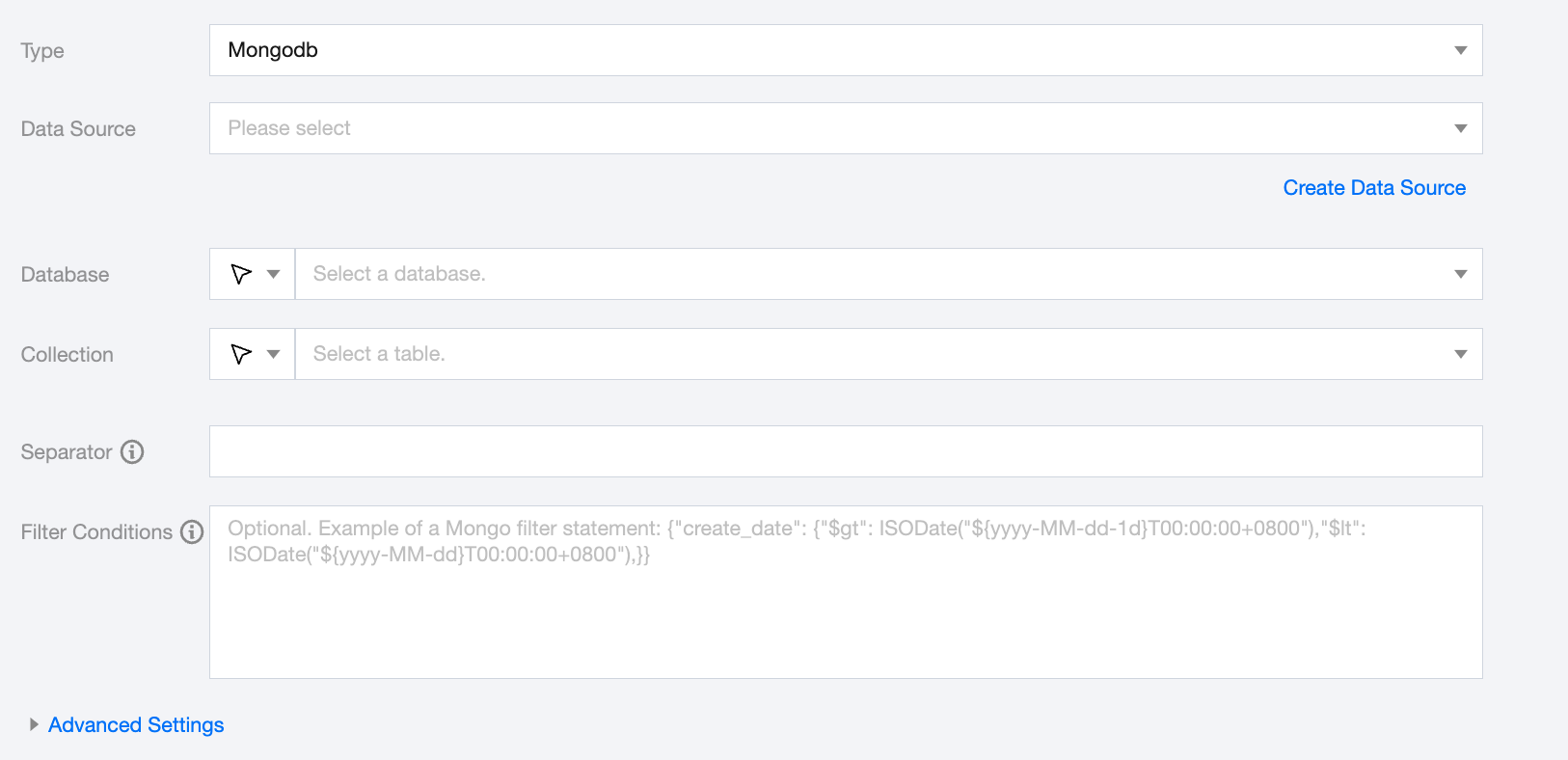
Mongo Offline Single Table Read Node Configuration
Parameters
Description
Data Source
Available Mongo Data Source.
Database
Supports selecting or manually entering the database name to be read
By default, the database bound to the data source is used as the default database. Other databases need to be manually entered.
If the data source network is not connected and the database information cannot be fetched directly, you can manually enter the database name. Data synchronization can still be performed when the Data Integration network is connected.
Collection
Supports selecting or manually entering the collection to be read.
Separator
When the field is of array type, use the delimiter to concatenate array contents.
Filter condition (Optional)
Fill in the corresponding filter statement based on the data type. This statement will serve as the filter condition for the data to be synchronized.
Advanced Settings (Optional)
You can configure parameters according to business needs.
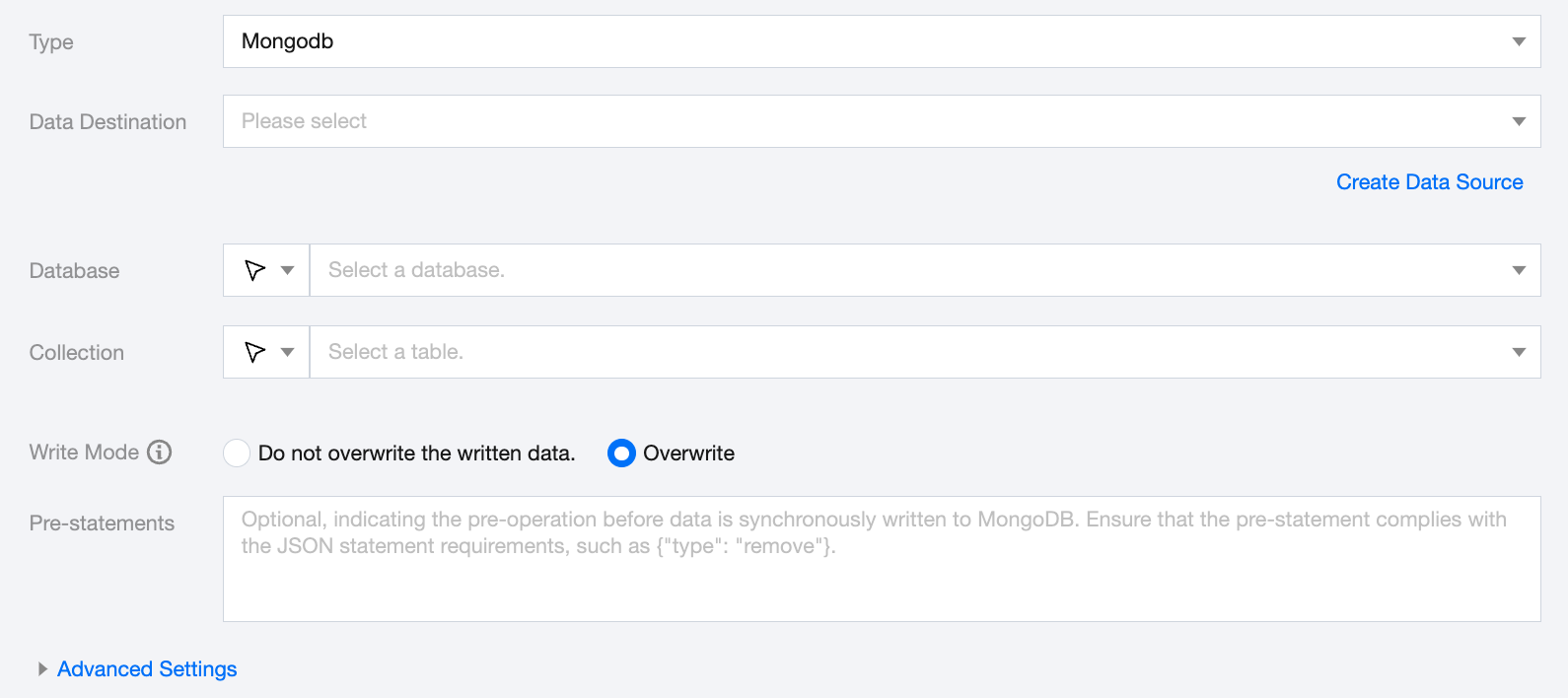
Mongo Offline Single Table Write Node Configuration
Parameters
Description
Data Destination
Select an available MongoDB data source in the current project.
Database
Supports selecting or manually entering the database name to be read
By default, the database bound to the data source is used as the default database. Other databases need to be manually entered.
If the data source network is not connected and the database information cannot be fetched directly, you can manually enter the database name. Data synchronization can still be performed when the Data Integration network is connected.
Collection
Supports selecting or manually entering the collection to be read.
Write Mode
Indicates whether to overwrite when writing data for the same primary key. The default business primary key for each row is _id
Pre-statements
Optional, indicates pre-operations before data synchronization to MongoDB. Ensure the preconditions comply with JSON syntax, such as {"type": "remove"}
Advanced Settings (Optional)
You can configure parameters according to business needs.
Data type conversion support
Read
Supported Mongo Data Types and Corresponding Conversion Relationships (When processing Mongo, the data types of Mongo Data Source and the data types of the data processing engine will be mapped):
Mongo Data Type
Internal Types
int32,int64,bigint
Long
double,decimal
Double
string, array,map,list
String
date,datetime
Date
boolean
Boolean
bytes
Bytes
Write
Supported data types for Mongo writing and their corresponding conversion relationships are as follows: