Dynamic Release Record (2026)
Azure Blob Data Source
Azure Blob Offline Single Table Write Node Configuration
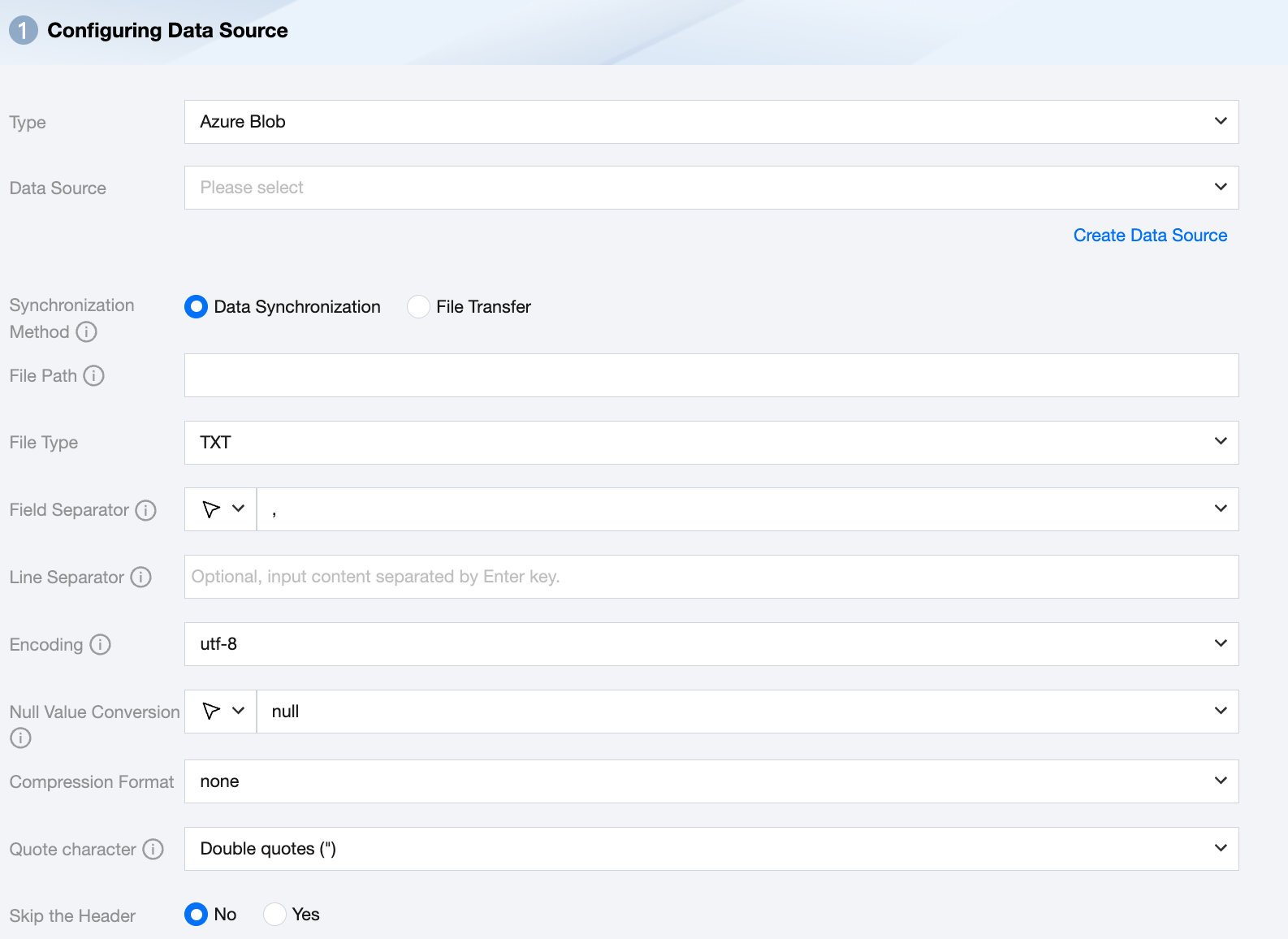
Parameter | Description |
Data Source | Select the available Azure Blob data source in the current project. |
Synchronization Method | Azure Blob supports two synchronization methods: Data synchronization: Parse structured data content, map and sync data content based on field relationships. File transfer: Transmit the entire file without content parsing, applicable to unstructured data synchronization. Note: File transfer only supports data sources where both the source and target are of file types (COS/HDFS/SFTP/FTP/Azure Blob/S3/Http), and the synchronization method for both source and target must be file transfer. |
File Path | Path of the Azure Blob file system, supports the use of * wildcard. Azure Blob file path must include the container name, for example: Container_name/Directory/ |
File Type | Azure Blob supports five file types: TXT, ORC, PARQUET, CSV, JSON. TXT: Refers to the TextFile file format. ORC: Refers to the ORCFile file format. PARQUET: Refers to the ordinary Parquet file format. CSV: Refers to the ordinary HDFS file format (logical two-dimensional table). JSON: Refers to the JSON file format. |
Field Separator | For TXT/CSV file types, the field separator is set when reading in synchronous data mode. The default is (,). Note: Unsupported ${} as a delimiter. ${a} will be recognized as a configured parameter a. |
Line Separator(Optional) | When reading in synchronous data mode for TXT/CSV file types, the set line delimiter is used. A maximum of 3 values can be input, and all multiple input values are treated as line delimiters. If not specified, linux defaults to \\n, and windows defaults to \\r\\n. Note: 1. Setting multiple line delimiters will impact read performance. 2. Unsupported ${} as a delimiter, ${a} will be recognized as a configured parameter a. |
Encode | coding configuration for reading files. Support utf8 and gbk encodings. |
Null Value Conversion | When reading, convert the specified string to NULL. NULL represents an unknown or inapplicable value, which is different from 0, an empty string, or other numeric values. Note: Unsupported ${} as a specified string. ${a} will be recognized as a configured parameter a. |
Compression Format | Currently supports: none, deflate, gzip, bzip2, lz4, snappy. Since snappy currently does not have a unified stream format, Data Integration currently only supports the most widely used: hadoop-snappy (snappy stream format on Hadoop) framing-snappy (google-recommended snappy stream format) |
Quote character | No configuration: The source reads the data as its original content. The source reads the value within double quotation marks (") as data content. Note: If the data format is not standardized, it may cause OOM when reading. The source reads the value within single quotation marks (' ) as data content. Note: If the data format is not standardized, it may cause OOM when reading. |
Skip the Header | No: When reading, do not skip the header. Yes: When reading, skip the header. |
Azure Blob Offline Single Table Write Node Configuration
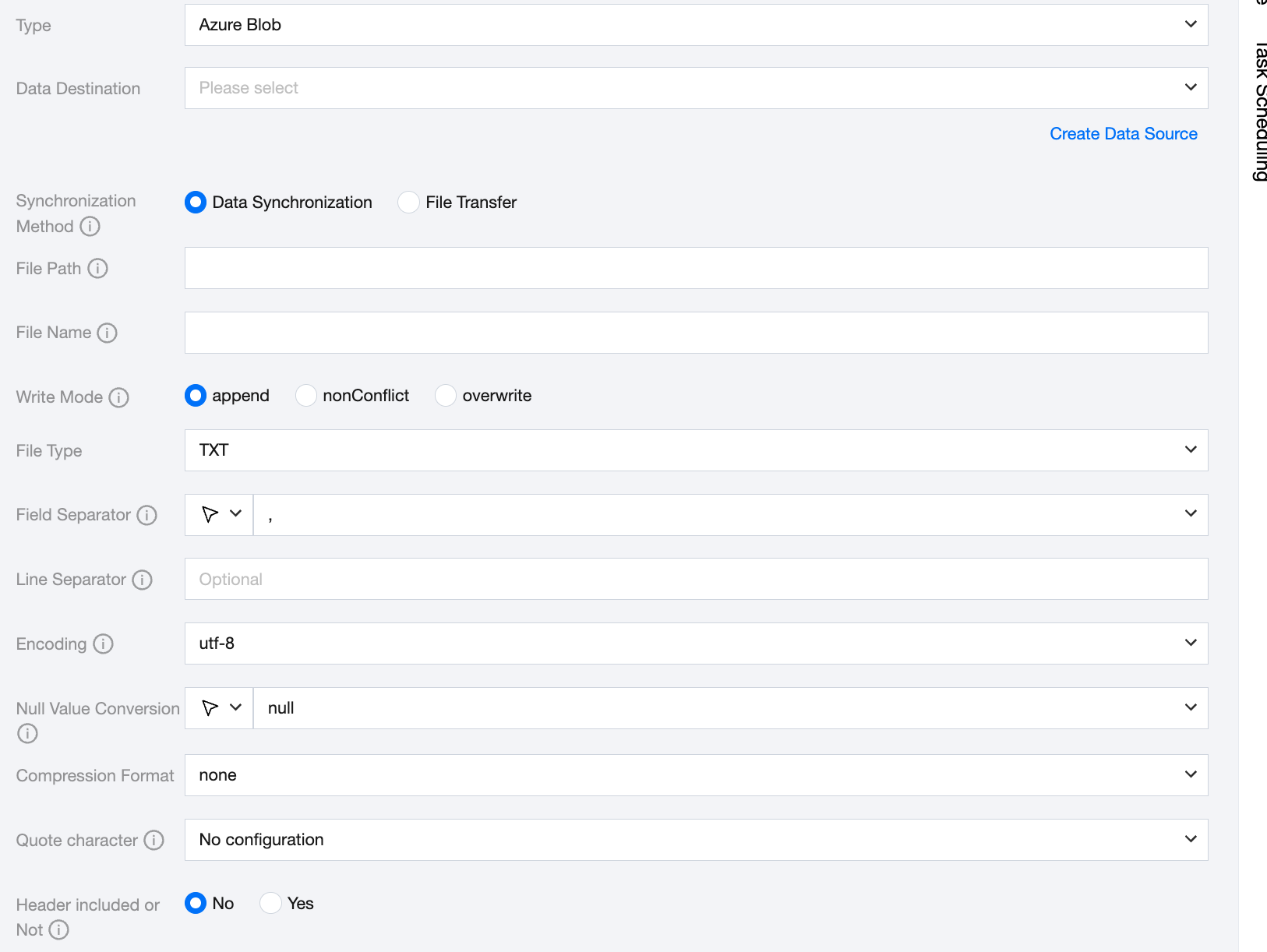
Parameter | Description |
Data Source | Select the available Azure Blob data source in the current project. |
Synchronization Method | Azure Blob supports two synchronization methods: Data synchronization: Parse structured data content, map and sync data content based on field relationships. File transfer: Transmit the entire file without content parsing, applicable to unstructured data synchronization. Note: File transfer only supports data sources where both the source and target are file types (COS/HDFS/SFTP/FTP/Azure Blob/S3/Http), and the synchronization method for both the source and target must be file transfer. |
File Path | Write to the explicit path of the Azure Blob file system. Azure Blob file path must include the container name, for example: Container_name/Directory/. |
File Name | Name of the file to be written. The file name supports using the built-in case conversion function. toLower('<text>'): This function returns a lowercase string. If a character in the string has no corresponding lowercase version, it remains unchanged in the returned string. toUpper('<text>'): This function returns an uppercase string. If a character in the string has no corresponding uppercase version, it remains unchanged in the returned string. |
Write Mode | overwrite: Clean up all files with the file name as the prefix before writing. append: Write without any pre-processing and ensure no file name conflict. nonConflict: Report an error if the file name is duplicated. |
File Type | Azure Blob supports four file types: TXT, ORC, PARQUET, CSV. TXT: Refers to the TextFile file format. ORC: Refers to the ORCFile file format. PARQUET: Refers to the ordinary Parquet file format. CSV: Refers to the ordinary HDFS file format (logical two-dimensional table). |
Field Separator | For TXT/CSV file types, the field separator is set when writing in synchronous data mode. The default is (,). Note: Unsupported ${} as a delimiter. ${a} will be recognized as a configured parameter a. |
Line Separator(Optional) | When writing in synchronous data mode for TXT/CSV file types, the set line delimiter is used. All multiple input values are treated as line delimiters. If not specified, linux defaults to \\n, and windows defaults to \\r\\n. When manually filling in, it supports inputting one value as the target line delimiter for data writing. Note: Unsupported ${} as a delimiter. ${a} will be recognized as a configured parameter a. |
Encode | coding configuration for writing files. Support utf8 and gbk encoding. |
Null Value Conversion | When writing, convert NULL to the specified string. NULL represents an unknown or inapplicable value, which is different from 0, an empty string, or other numeric values. Note: Unsupported ${} as a specified string. ${a} will be recognized as a configured parameter a. |
Compression Format | Currently supports: none, deflate, gzip, bzip2, lz4, snappy. Since snappy currently does not have a unified stream format, Data Integration currently only supports the most widely used: hadoop-snappy (snappy stream format on Hadoop) framing-snappy (google-recommended snappy stream format) |
Quote character | No configuration: The target does not perform the operation of adding quotes when writing data, and the value matches the source. Double quotes ("): Automatically add double quotes to each value when writing data to the target, for example "123". single quotation marks: Automatically add single quotation marks to each value when writing data, for example '123'. |
Header included or Not | No: When writing, exclude the header. When writing, header included. |
Data Type Conversion Support
Read
Data types supported for Azure Blob reading and their corresponding conversion relationships are as follows:
Azure Blob Data Type | Internal Types |
INT | LONG |
DOUBLE | DOUBLE |
STRING,CHAR | STRING |
DECIMAL | DECIMAL |
BOOLEAN | BOOLEAN |
DATE,TIMESTAMP | DATE |
Write
Data types supported for Azure Blob writing and their corresponding conversion relationships are as follows:
Internal Types | Azure Blob Data Type |
LONG | INT |
DOUBLE | DOUBLE |
STRING | STRING,CHAR |
DECIMAL | DECIMAL |
BOOLEAN | BOOLEAN |
DATE | DATE,TIMESTAMP |
Bantuan dan Dukungan
Apakah halaman ini membantu?
Anda juga dapat Menghubungi Penjualan atau Mengirimkan Tiket untuk meminta bantuan.
masukan