tencent cloud

Tencent Cloud WeData

Release Notes
Dynamic Release Record (2026)
Product Introduction
Product Overview
Product Advantages
Product Architecture
Product Features
Application Scenarios
Purchase Guide
Billing Overview
Product Version Purchase Instructions
Execute Resource Purchase Description
Billing Modes
Overdue Policy
Refund
Preparations
Overview of Account and Permission Management
Add allowlist /security groups (Optional)
Sign in to WeData with Microsoft Entra ID (Azure AD) Single Sign-On (SSO)
Operation Guide
Console Operation
Project Management
Data Integration
Studio
Data Development
Data Analysis
Data Science
Data Governance (with Unity Semantics)
API Documentation
History
Introduction
API Category
Making API Requests
Smart Ops Related Interfaces
Project Management APIs
Resource Group APIs
Data Development APIs
Data Asset - Data Dictionary APIs
Data Development APIs
Ops Center APIs
Data Operations Related Interfaces
Data Exploration APIs
Asset APIs
Metadata Related Interfaces
Task Operations APIs
Data Security APIs
Instance Operation and Maintenance Related Interfaces
Data Map and Data Dictionary APIs
Data Quality Related Interfaces
DataInLong APIs
Platform Management APIs
Data Source Management APIs
Data Quality APIs
Platform Management APIs
Asset Data APIs
Data Source Management APIs
Data Types
Error Codes
WeData API 2025-08-06
Service Level Agreements
Related Agreement
Privacy Policy
Data Processing And Security Agreement
Contact Us
Glossary

BigQuery data source

PDF
Mode fokus
Ukuran font
Terakhir diperbarui: 2025-07-25 17:18:59

Use Limits

BigQuery data source is only supported in Hong Kong (China), Singapore, usa (Virginia), and germany (Frankfurt). Other regions are not supported yet.
The split key only supports INT64, FLOAT64, TIMESTAMP, BIGNUMERIC, NUMERIC, DATE, and DATETIME.

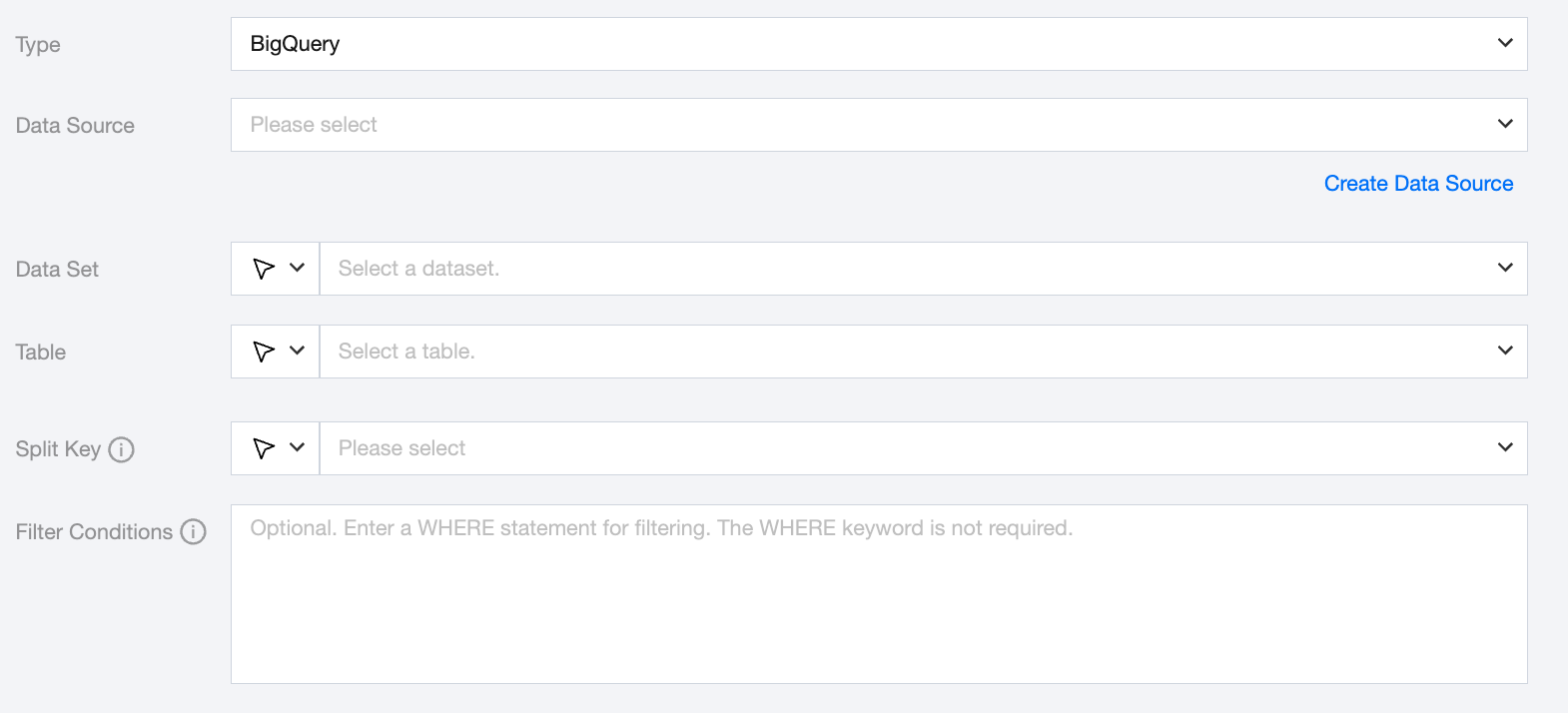
BigQuery offline single table read node configuration


Parameters
Description
Data Source
Select the configured BigQuery data source from the source end.
Dataset
Support selecting or manually entering the dataset name to be read.
The database bound to the data source is set as the default library by default, other databases require manual input of the dataset name.
When the data source network is not connected, causing database information to be unavailable for direct fetching, you can manually enter the dataset name. Data synchronization can still be performed given network connection in DataInLong.
Table
Supports selecting or manually entering the table name to be read.
If the data source network is not connected and table information cannot be fetched directly, you can manually enter the table name. Data synchronization can still be performed when the Data Integration network is connected.
Split Key
Specify the field for data sharding. After specifying, concurrent tasks will be launched for data synchronization. You can use a column in the source data table as the partition key. It is recommended to use the primary key or indexed column as the partition key.
Supported split key types: INT64, FLOAT64, TIMESTAMP, BIGNUMERIC, NUMERIC, DATE, DATETIME.
Filter Conditions (Optional)
Fill in the corresponding filter statement based on the data type. This statement will serve as the filter condition for the data to be synchronized.

Data type conversion support

Read

BigQuery data types.
Internal Types
BOOLEAN
BOOL
INTEGER
LONG
FLOAT、BIGNUMERIC、NUMERIC
DOUBLE
STRING、TIMESTAMP、DATE、TIME、GEOGRAPHY、JSON、INTERVAL、RECORD
STRING

BigQuery script demo

If you configure offline tasks using script mode, you need to write the reader parameters in the task script according to the unified script format requirements.

"databaseName": "source_database", //source database
"credential": { //bigquery data source configuration information
"column": [ //column name
"tableName": "source_table" // Source table
"memory": { // Memory settings
"errorLimit": { // Dirty data threshold
"byte": -1, // No limit on sync speed, positive integer indicates maximum transfer speed in byte/s
"channel": 1 // Concurrency limit


Bantuan dan Dukungan

Apakah halaman ini membantu?

masukan