Using the Personal Asset Image to Create a Stream
Download
Mode fokus
Ukuran font
It is used to create a new video stream and obtain the playback URL for the digital human video.
Calling Protocol
HTTPS + JSON
POST /v2/ivh/sessionmanager/sessionmanagerservice/createsessionbyasset
Header Content-Type: application/json;charset=utf-8
Request Parameters
Parameter Name | Type | Required | Description |
ReqId | String | Yes | Unique identifier for each request, a 32-character UUID. |
SessionId | String | No | Unique identifier for the session. Not allowed to be passed in SaaS environments, assigned by the cloud. Can be passed in private deployment environments. |
AssetVirtualmanKey | String | Yes | Personal asset image ID. Obtain it from the Asset Management section of the Digital Human platform, as shown in the figure: 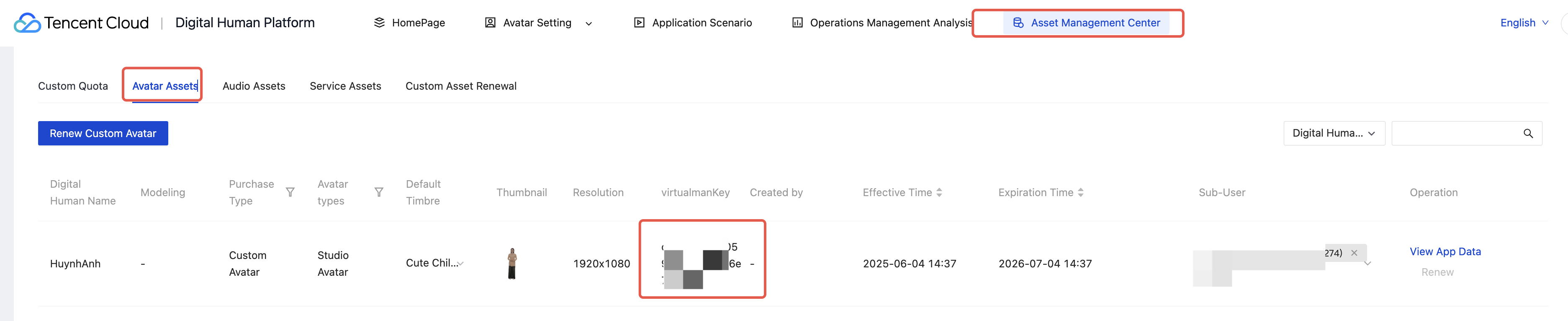 |
UserId | String | Yes | The unique identifier for the user, maintained by the caller. Creating a new stream with the same UserIdentifier will cause the previous stream with that UserIdentifier to close. |
Protocol | String | Yes | Currently supported parameters: rtmp, trtc and webrtc |
DriverType | int | Yes | The driving method for the digital human. 1: text-only driving; 3: audio driving (original voice), which supports both audio and text driving modes in this setting; |
ProtocolOption | No | Protocol-specific custom parameters. Ignore if not using trtc. | |
SpeechParam | No | Parameters related to timbres. | |
ExtraInfo | No | Extended parameters for stream creation. | |
Backgrounds | No | List of background images. The total number of backgrounds and foregrounds cannot exceed 5. Note: This parameter does not take effect for streamers whose shooting background has not been removed. For streamers whose shooting background is removed, the background application priority is: the background set by this parameter > the green screen. | |
Foregrounds | No | List of foreground images. The total number of backgrounds and foregrounds cannot exceed 5. | |
AnchorParam | No | Anchor-related parameters. |
ProtocolOption
Name | Type | Required | Description |
TrtcUseExternalApp | boolean | No | It indicates whether to use an external trtc. If you do not use it, the unified trtc appid of the digital human platform will be used. Notes: When the unified trtc appid of the digital human platform is used, it is limited to the debugging stage and cannot be used in the production stage. |
TrtcAppId | string | No | The trtc appid (required when using an external trtc appid). |
TrtcRoomId | int | No | The trtc room ID (The room ID will be assigned by the cloud if it is not specified.). |
TrtcUserSig | string | No | The trtc AI Digital Human user signature (required when using an external trtc appid). |
TrtcPrivateMapKey | string | No | The trtc AI Digital Human user permission key (required when using an external trtc appid). |
CssCustomPushUrl | string | No | Customize a CSS streaming URL. The streaming protocol is fixed to rtmp. Use rtmp to stream to CSS. You can use various playback protocols supported by CSS to pull and play the stream. The required streaming URL format is: rtmp://xyz.com/cssAppName/streamid?txSecret={0}&txTime={1}For the calculation methods of txSecret and txTime, refer to: https://www.tencentcloud.com/document/product/267/32720?from_cn_redirect=1 |
SpeechParam
Name | Type | Required | Description |
Speed | float | No | Speech speed, with a range of [50, 200]. A value of 50 indicates 50% of the default speed. If the speed is not specified, it is recommended to use the default value of 100. |
TimbreKey | string | No | Timbre key. |
Volume | int | No | Volume level, with a range of [-10, 10]. A value of -10 indicates a decrease of 10 dB relative to the default volume. If the volume is not specified, it is recommended to use the default value of 0. |
TimbreLanguage | string | No | Timbre language. For available languages, refer to the Personal Asset Management API Paginated Query Timbre List interface. When a multilingual timbre is synthesized, you must select the corresponding language. |
VideoLayer
Parameter Name | Type | Required | Description |
URL | String | Yes | URL of the layer resource. Image formats: jpg, jpeg, png, mjpeg, and gif are supported. Image size: It is recommended not to exceed 2 MB. |
X | int | Yes | X-coordinate of the top-left corner for resource placement. |
Y | int | Yes | The Y-coordinate of the top-left corner for resource placement. |
Width | int | Yes | Width of the resource output. |
Height | int | Yes | Height of the resource output. |
ExtraInfo
Name | Type | Required | Description |
AlphaChannelEnable | bool | No | Whether to enable the output of the spliced video stream with alpha channel in raw video splicing. Note: Assuming the original output width is iW, the actual video stream width is: iW + pW + iW. pW is the intermediate pad width: (16 - iW%16) % 16. The starting point of the alpha video width: iW + pW. The alpha video width: iW. This feature is not currently supported for the Avatar (High-Precision) model. |
AnchorParam
Parameter Name | Type | Required | Description |
SilenceActionDisabled | bool | No | Interactive dialogue mode switch (default: False): Applicable to 2D Avatar Digital Humans. If the avatar material meets the interactive scene recording requirements during recording, you can turn on this switch to enable the digital human to have no additional hand movements during silence, making the interaction more realistic and natural. Note: If the avatar itself does not support this feature, this configuration item does not take effect. |
Response Parameter
Name | Type | Required | Description |
ReqId | String | Yes | Unique identifier for a single request. |
SessionId | String | Yes | Unique identifier for the session |
SessionStatus | int | Yes | Status: 1: In progress (ready), the cache hit directly provides the playback URL. 3: In progress (not ready). If the cache is missed, wait for the model to load. Use the Query Session Status API to poll the session status until the stream status changes to 1. This process usually takes no more than 2 minutes. |
PlayStreamAddr | String | No | The playback URL, in the format: rtmp://liveplay.ivh.qq.com/live/m789This field will not be returned if a custom CSS streaming URL is specified through the CssCustomPushUrl parameter. |
Request Sample
{"Header": {},"Payload": {"ReqId": "d7aa08da33dd4a662ad5be508c5b77cf","AssetVirtualmanKey": "d7aa08da33dd4a662ad5be508c5b77cf","DriverType": 1,"UserId": "henry","Protocol": "rtmp"}}
Response Sample
{"Header": {"Code": 0,"Message": "","RequestID": "123"},"Payload": {"ReqId": "d7aa08da33dd4a662ad5be508c5b77cf","SessionId": "m789","SessionStatus": 1,"PlayStreamAddr": "rtmp://live.qq.com/live/m789"}}
Bantuan dan Dukungan
Apakah halaman ini membantu?
Anda juga dapat Menghubungi Penjualan atau Mengirimkan Tiket untuk meminta bantuan.
masukan