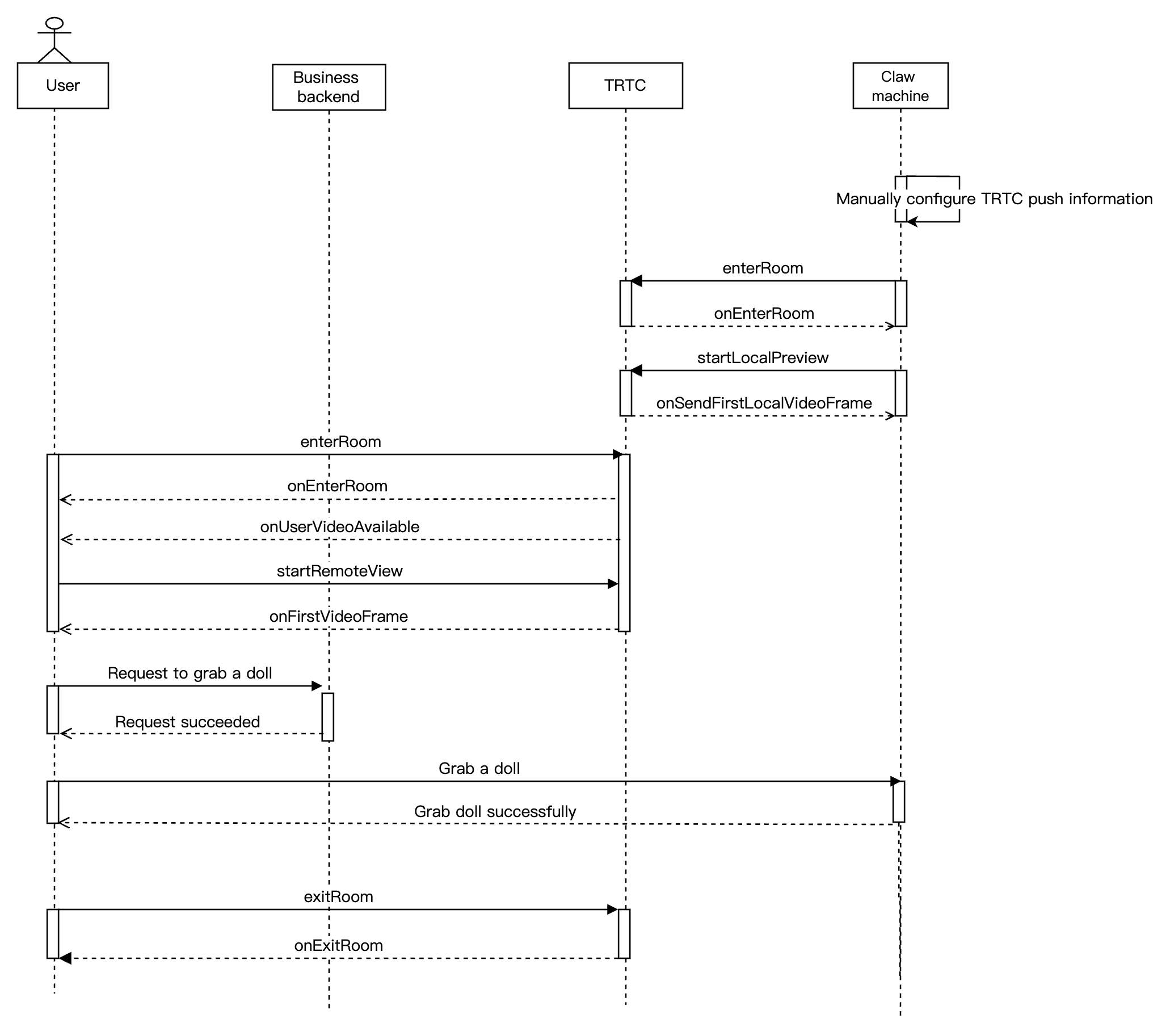
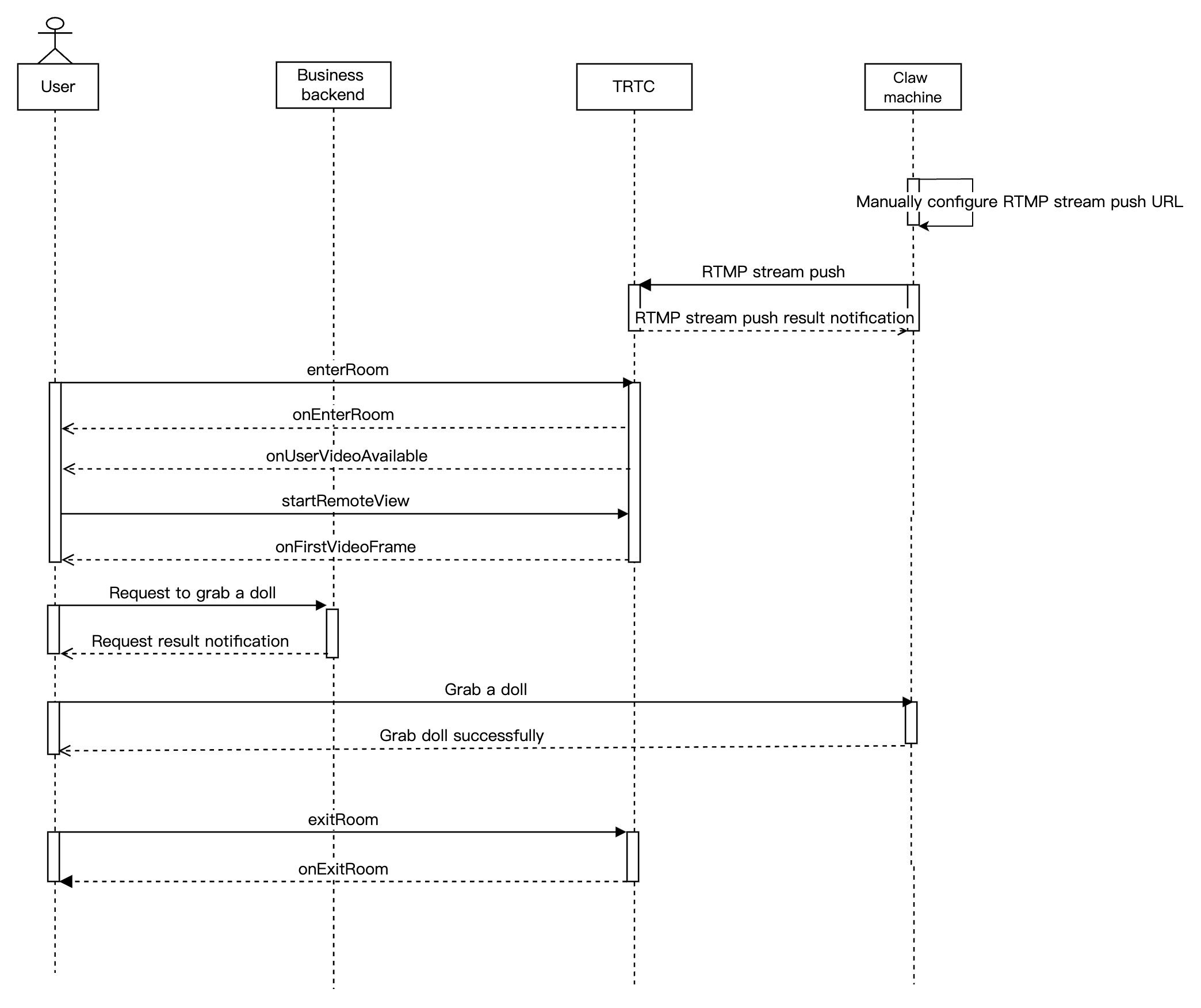
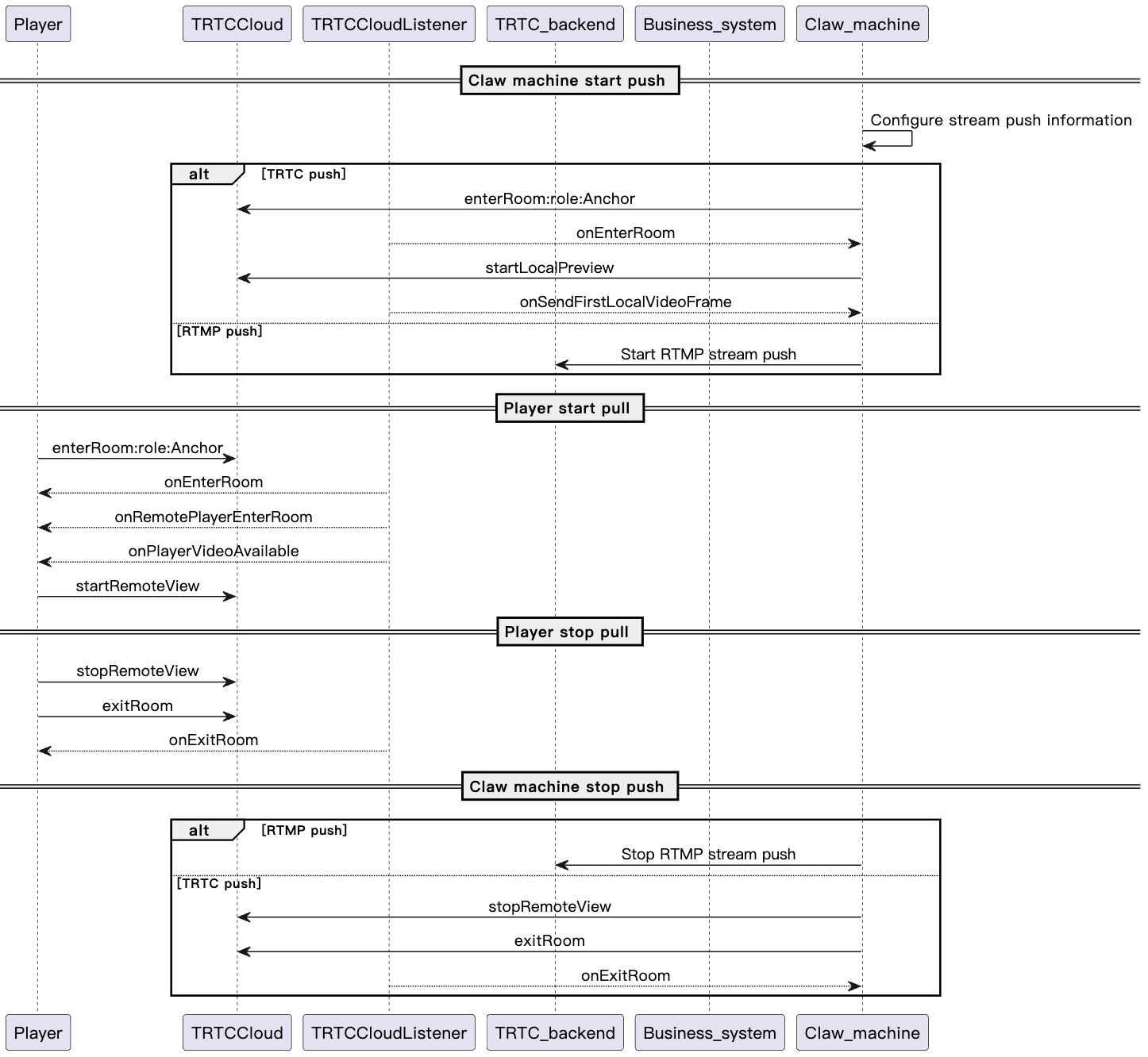
This section summarizes some common business processes in online claw machines to help you better understand the implementation of the entire scenario.
Online Claw Machine TRTC Streaming
Online Claw Machine RTMP Streaming
The diagram below illustrates the sequence of RTC Engine streaming for an online claw machine, including processes such as RTC Engine streaming from a network camera and user-side stream pulling.
The diagram below illustrates the sequence of RTMP streaming for an online claw machine, including processes such as RTMP streaming from a network camera and user streaming pull.
Integration Preparation
Step 1: Activating the Services
The online claw machine scenario typically relies on the paid PaaS service of Tencent Cloud RTC Engine for implementation. RTC Engine provides real-time audio and video interaction capabilities. You can choose to activate the above services based on your specific business requirements.
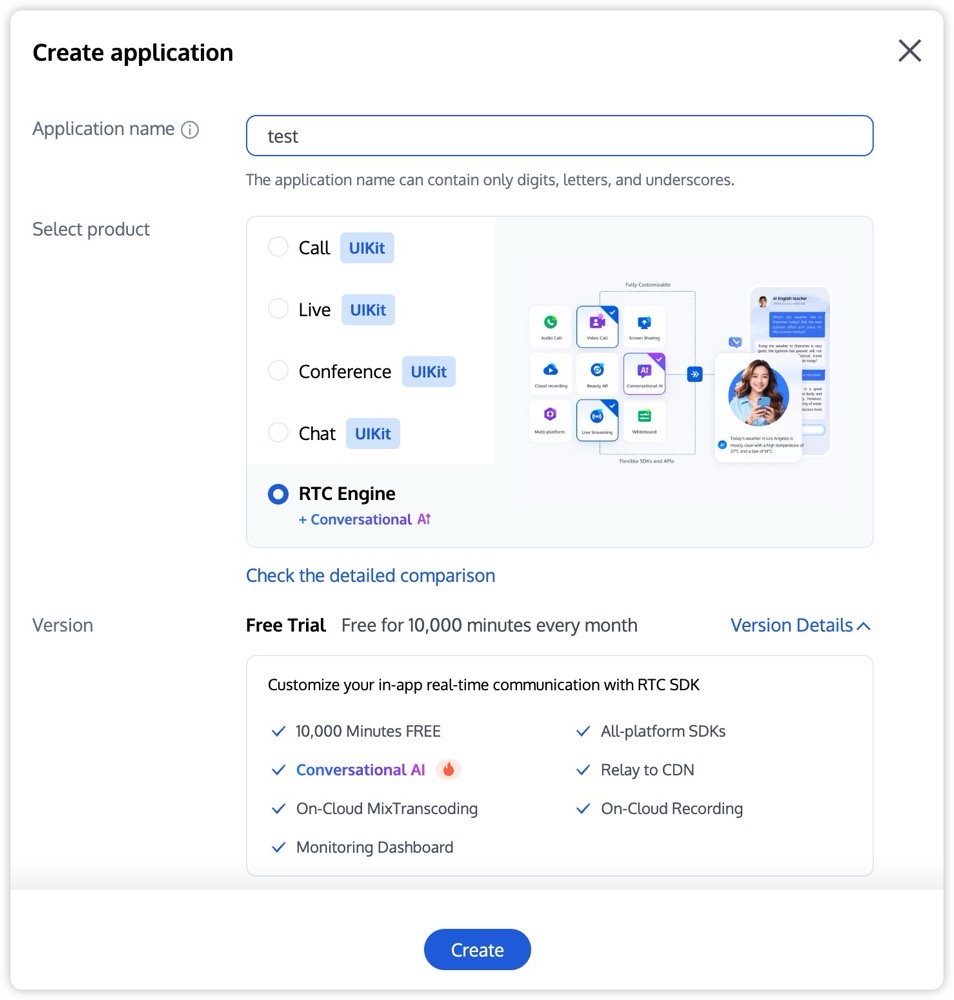
1. Log in to the RTC Engine console, then click Create application on the Applications page. You can choose to upgrade the RTC Engine application edition as needed. For example, upgrading to the Flagship Edition unlocks more value-added feature services.
Note:
It is recommended to create two separate applications for the test environment and the production environment, respectively. When activating the RTC Engine service for the first time, you will receive a free trial duration package of 10,000 minutes.
The RTC Engine monthly packages (Free Trial, Lite, Standard, and Pro packages) can unlock different value-added feature services. For details, see RTC Engine Monthly Packages.
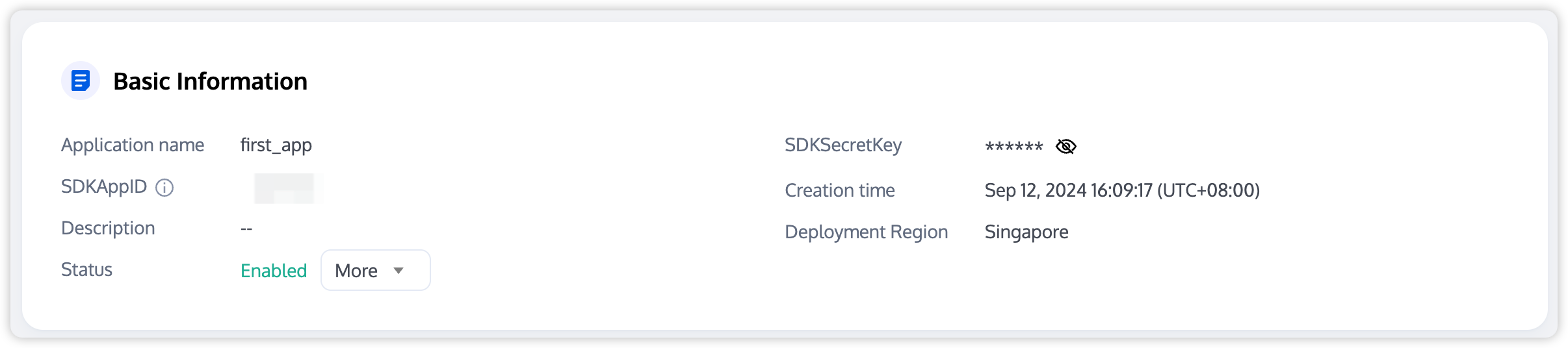
2. After the application is created, you can view its basic information under Application Management > Application Overview. Keep the SDKAppID and SDKSecretKey secure for future use, and take precautions to prevent key leakage that may result in unauthorized traffic usage.
Step 2: Importing the SDK
The RTC Engine SDK has been released to the mavenCentral repository. You can configure Gradle to automatically download and update the SDK.
1. Add the dependency for the appropriate version of the SDK in dependencies.
// RTC Engine SDK for the Lite Edition, including two features, that is, RTC and live streaming playback.
Do not set android:hardwareAccelerated="false". Disabling hardware acceleration will result in failure to render the other party's video stream.
LiteAVSDK does not have built-in permission request logic, so you need to declare the corresponding permissions yourself. Some permissions (such as storage, recording and camera) also require runtime dynamic requests.
If the Android project’s targetSdkVersion is 31 or the target device runs Android 12 or later, it is mandatory to dynamically request the android.permission.BLUETOOTH_CONNECT permission in the code to ensure proper Bluetooth feature. For more details, see Android Official Documentation.
2. Configure the obfuscation.
Since we use Java's reflection features inside the SDK, you need to add the relevant SDK classes to the non-obfuscation list in the proguard-rules.pro file:
-keep class com.tencent.**{*;}
Step 4: Performing Authentication and Licensing
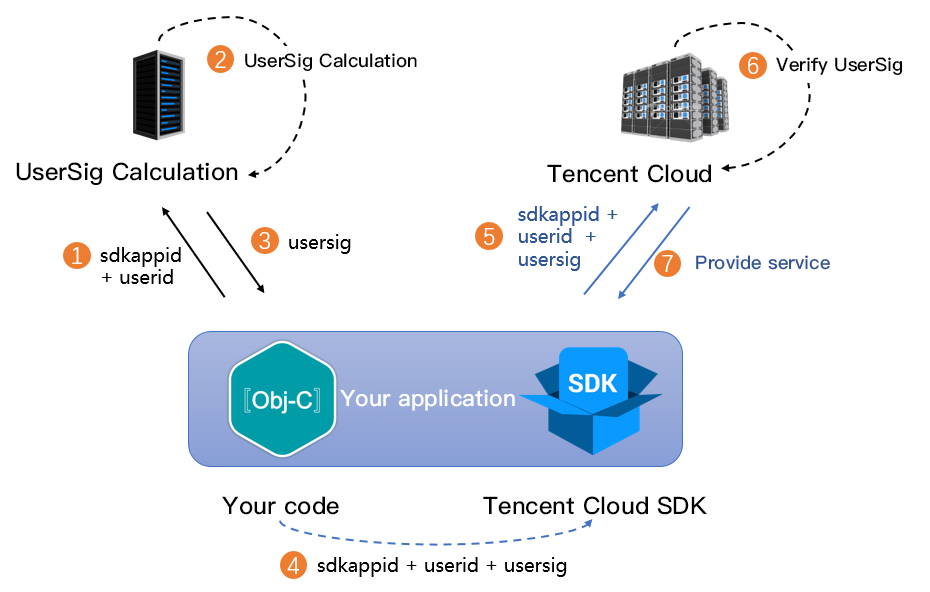
UserSig is a security protection signature designed by Tencent Cloud to prevent malicious attackers from misappropriating your cloud service usage rights. RTC Engine validates this authentication credential when entering a room.
During the debugging phase, you can generate the UserSig using either the Client Sample Code or the Console Access. This method is intended solely for debugging and testing purposes.
Production stage: It is recommended to use the server computing UserSig solution, which has a higher security level and helps prevent the client from being decompiled and reversed, to avoid the risk of key leakage.
The specific implementation process is as follows:
1. Before calling the initialization API of the SDK, have your app request UserSig from your server first.
2. Your server generates the UserSig based on the SDKAppID and UserID.
3. The server returns the generated UserSig to your app.
4. Your app sends the obtained UserSig to the SDK through a specific API.
5. The SDK submits the SDKAppID + UserID + UserSig to the cloud server for verification.
6. Tencent Cloud verifies the validity of the UserSig.
7. After the verification is passed, the RTC Engine SDK will be provided with real-time audio and video services.
Note:
The method of generating UserSig locally during the debugging and testing stage is not recommended for the online environment because it may be easily decompiled and reversed, causing key leakage.
We provide UserSig server generation source code in multiple languages (Java/GO/PHP/Nodejs/Python/C#/C++). For details, see UserSig Generation Source Code.
Step 5: Initializing the SDK
// Create an RTC Engine SDK instance (singleton mode).
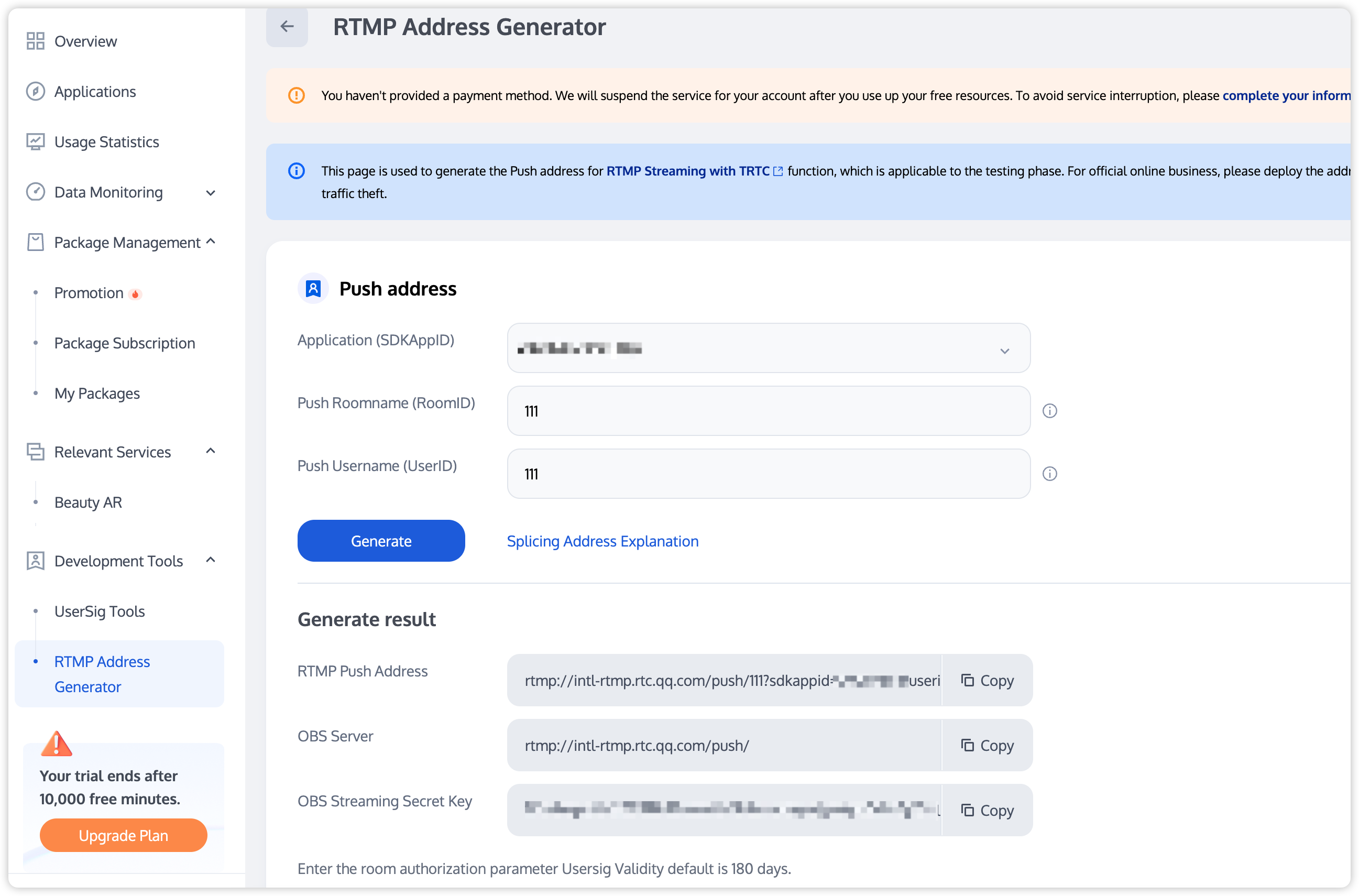
The primary domain name is intl-rtmp.rtc.qq.com, and the secondary domain name is rtmp.rtc-web.com. If there are issues with the primary domain name parsing, you can use the secondary domain name.
The RTMP appName is push.
The room ID, application, username, and signature in the address need to be replaced with your business-specific values.
To simplify parameters, only string room IDs are supported. The room number should not exceed 64 characters and can only contain numbers, letters, and underscores.
Note:
If other RTC Engine endpoints need to watch the RTMP stream, use a string room ID for room entry.
For the UserSig generation rules, see UserSig (Please note that the signature should be within its validity period).
2. Configure the SdkAppid, UserId, UserSig, RoomId, and other information on the RTC Engine network camera or streaming box to start streaming.
Note:
RTC Engine room IDs are divided into numeric type roomId and string type strRoomId. The rooms of these two types are not interconnected. It is recommended to unify the room ID type.
RTC Engine user roles are divided into anchors and audiences. Only anchors have streaming permissions. The user role should be specified upon room entry. If the user role is not specified, the default role is anchor.
For the online claw machine scenario, it is recommended to use the TRTC_APP_SCENE_VIDEOCALL mode for entering a room, as it ensures lower latency.
Log.d(TAG,"Actively call exitRoom to exit the room.");
}elseif(reason ==1){
Log.d(TAG,"Removed from the current room by the server.");
}elseif(reason ==2){
Log.d(TAG,"The current room has been dissolved.");
}
}
Note:
After all resources occupied by the SDK are released, the SDK will throw the onExitRoom callback notification to inform you.
If you wish to call enterRoom again or switch to another audio and video SDK, wait for the onExitRoom callback before proceeding. Otherwise, you may encounter various exceptional issues such as the camera, microphone device being forcibly occupied.
2. Dissolve the room.
Server dissolves the room.
RTC Engine provides the server-side API DismissRoom for dissolving rooms with numeric types and the API DismissRoomByStrRoomId for dissolving rooms with string types. You can use these server-side APIs to remove all users from the room and dissolve the room.
Client dissolves the room.
The client does not provide an API for directly dissolving a room. Each client should call exitRoom to exit the room. Once all anchors and audiences have exited the room, the room will be automatically dissolved according to the RTC Engine room lifecycle rules. For details, see RTC Engine Exit the Room.
Exception Handling
Exception Handling
When the RTC Engine SDK encounters an unrecoverable error, the error is thrown in the onError callback. For details, see RTC Engine Error Codes.
1. UserSig related errors.
A UserSig verification failure will result in a failure to enter the room. you can see UserSig tool for verification.
Error Example
Value
Description
ERR_TRTC_INVALID_USER_SIG
-3320
The room entry parameter UserSig is incorrect. Check whether TRTCParams.userSig is empty.
ERR_TRTC_USER_SIG_CHECK_FAILED
-100018
UserSig verification failed. Check if the parameter TRTCParams.userSig is filled in correctly or has expired.
2. Room entry or exit related errors.
If entering room is failed, you should first verify the correctness of the room entry parameters. It is essential that the room entry and exit APIs are called in a paired manner. This means that, even in the event of a failed room entry, the room exit API must still be called.
Error Example
Value
Description
ERR_TRTC_CONNECT_SERVER_TIMEOUT
-3308
The room entry request timed out. Check whether your Internet connection is lost or if a VPN is enabled. You may also attempt to switch to 4G for testing.
ERR_TRTC_INVALID_SDK_APPID
-3317
The room entry parameter sdkAppId is incorrect. Check whether TRTCParams.sdkAppId is empty
ERR_TRTC_INVALID_ROOM_ID
-3318
The room entry parameter roomId is incorrect.Check whether TRTCParams.roomId or TRTCParams.strRoomId is empty. Note that roomId and strRoomId cannot be used interchangeably.
ERR_TRTC_INVALID_USER_ID
-3319
The room entry parameter userId is incorrect. Check whether TRTCParams.userId is empty.
ERR_TRTC_ENTER_ROOM_REFUSED
-3340
The room entry request was denied. Check whether enterRoom is called consecutively to enter rooms with the same ID.
3. Devices related errors.
Exceptions for related monitoring devices. Users are prompted via UI in case of relevant errors.
Error Example
Value
Description
ERR_CAMERA_START_FAIL
-1301
Failed to turn the camera on. For example, if there is an exception for the camera's configuration program (driver) on a Windows or Mac device, you should try disabling then re-enabling the device, restarting the machine, or updating the configuration program.
ERR_MIC_START_FAIL
-1302
Failed to turn the microphone on. For example, if there is an exception for the microphone's configuration program (driver) on a Windows or Mac device, you should try disabling and then re-enabling the device, restarting the machine, or updating the configuration program.
ERR_CAMERA_NOT_AUTHORIZED
-1314
The camera is unauthorized. This typically occurs on mobile devices, probably because the user denied the permission.
ERR_MIC_NOT_AUTHORIZED
-1317
The microphone is unauthorized. This typically occurs on mobile devices, probably because the user denied the permission.
ERR_CAMERA_OCCUPY
-1316
The camera is occupied. Try a different camera.
ERR_MIC_OCCUPY
-1319
The microphone is occupied. For example, when the user is currently having a call on a mobile device, the microphone cannot be turned on.
Black Screen During Audience Stream Pulling
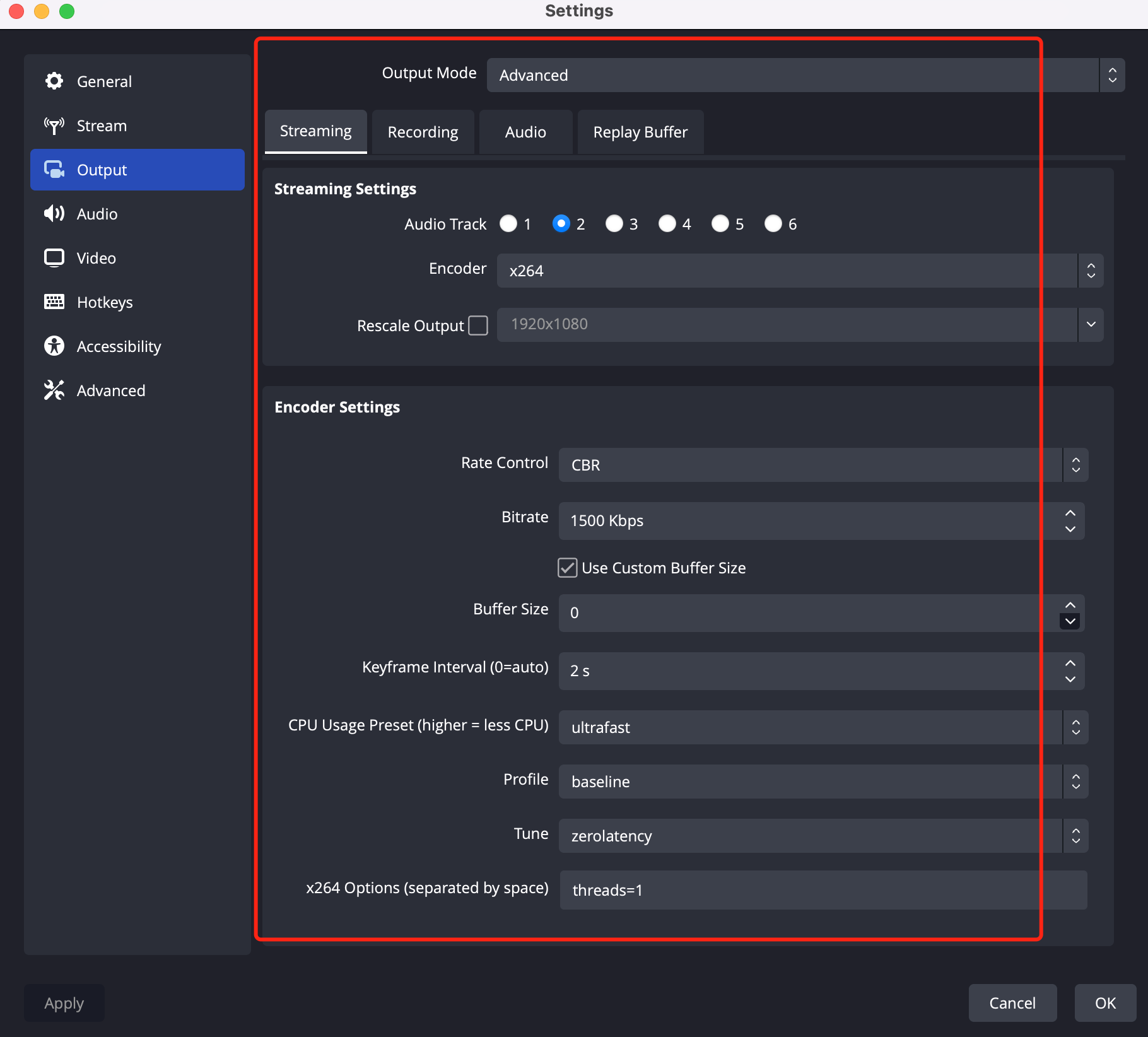
In the claw machine scenario involving RTMP streaming, the RTMP streaming feature was used to enter an RTC Engine room, and the streaming operation succeeded. However, the stream could not be pulled normally in the RTC Engine room. After problem localization, it was found that the streaming configurations included B-frames, and the RTC Engine room does not support scenarios with B-frames. As a result, the attempt to pull the RTMP stream failed. The reference streaming configurations are as follows:
Image Freeze During Audience Stream Pulling or Third-Party Images Appear During Stream Pulling
In the claw machine scenario, after an RTC Engine audience enters the room and pulls the stream for a period of time, they will automatically encounter an issue where the stream pull gets stuck. This is especially likely to happen after multiple triggers of the peer-join or onUserVideoAvailable callbacks, causing the audience's pulling stream to freeze on the last frame. When this happens, you can first access the dashboard to view detailed call information. If the features displayed on the dashboard indicate that the anchor has entered and exited the room multiple times, it can be basically confirmed that the issue was caused by mutual removal.
Solution: You can try disabling the streaming on the current machine to resolve the issue. If the problem remains unresolved, then check whether 2 identical streaming addresses are configured on the same machine.