Fast Import Mode for Bulk Load
Download
Mode fokus
Ukuran font
Overview
TDSQL Boundless supports fast data import into databases via bulk load. Compared to executing traditional SQL transactions, the fast import mode for bulk load typically delivers 5 to 10 times faster performance. It is suitable for migrating existing large-scale databases to new TDSQL Boundless clusters during business deployment phases.
Currently supports using
INSERT INTO / REPLACE INTO statements for data import via bulk load.Working Principles
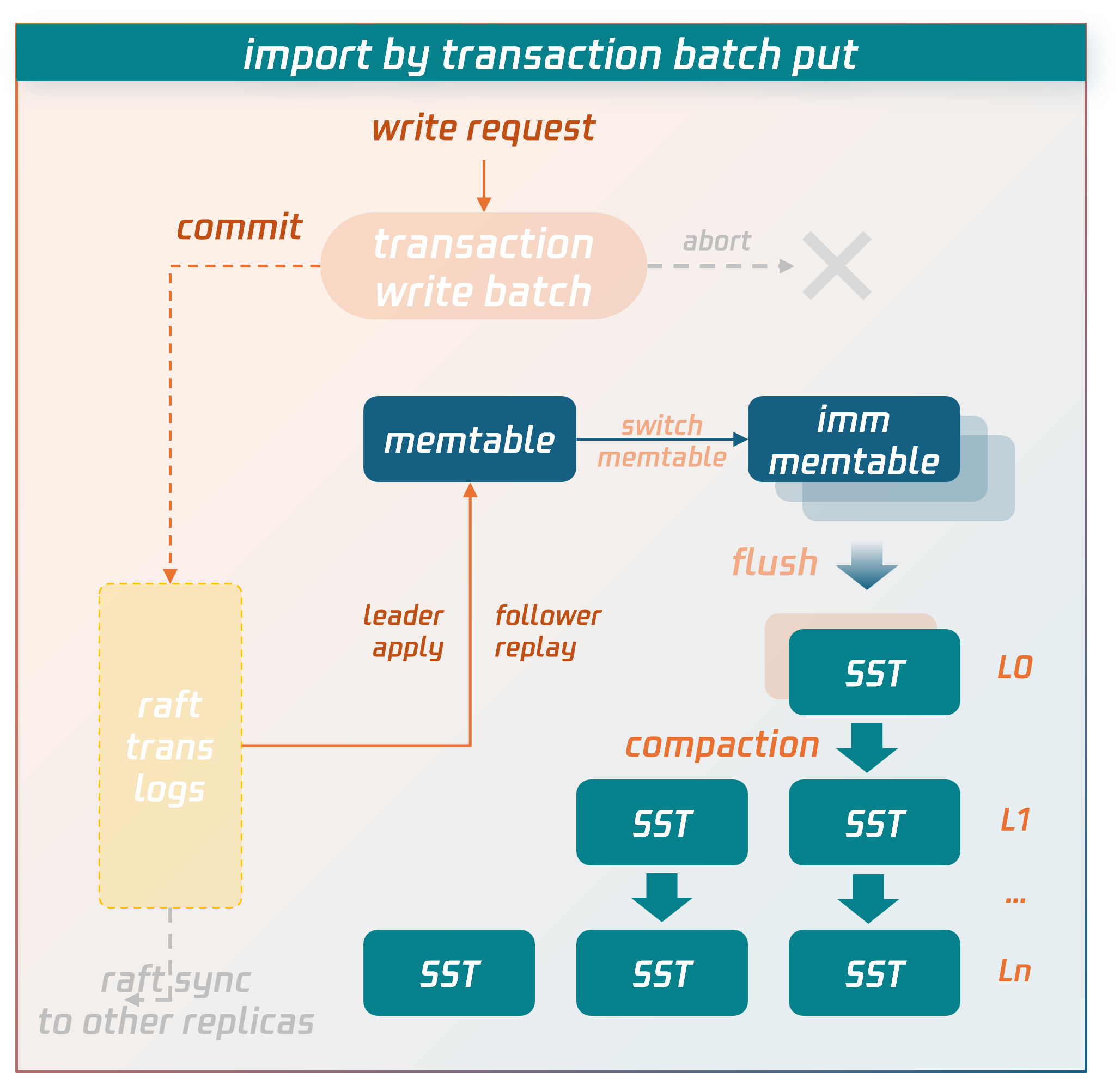
Regular Transaction Writing Process
Data is temporarily stored in the write batch of the transaction context before commit. When the commit phase is entered, the data in the write batch is first persisted to disk as transaction logs and synchronized to replica nodes via the raft protocol. After a majority consensus is achieved, the data is written into the memtable structure in memory. When the memtable fills up, it flushes to disk to form SST data files. SST files are organized into levels using an LSM-tree structure. Asynchronous background threads perform compaction operations to merge and clean the data.
Bulk Load Writing Process
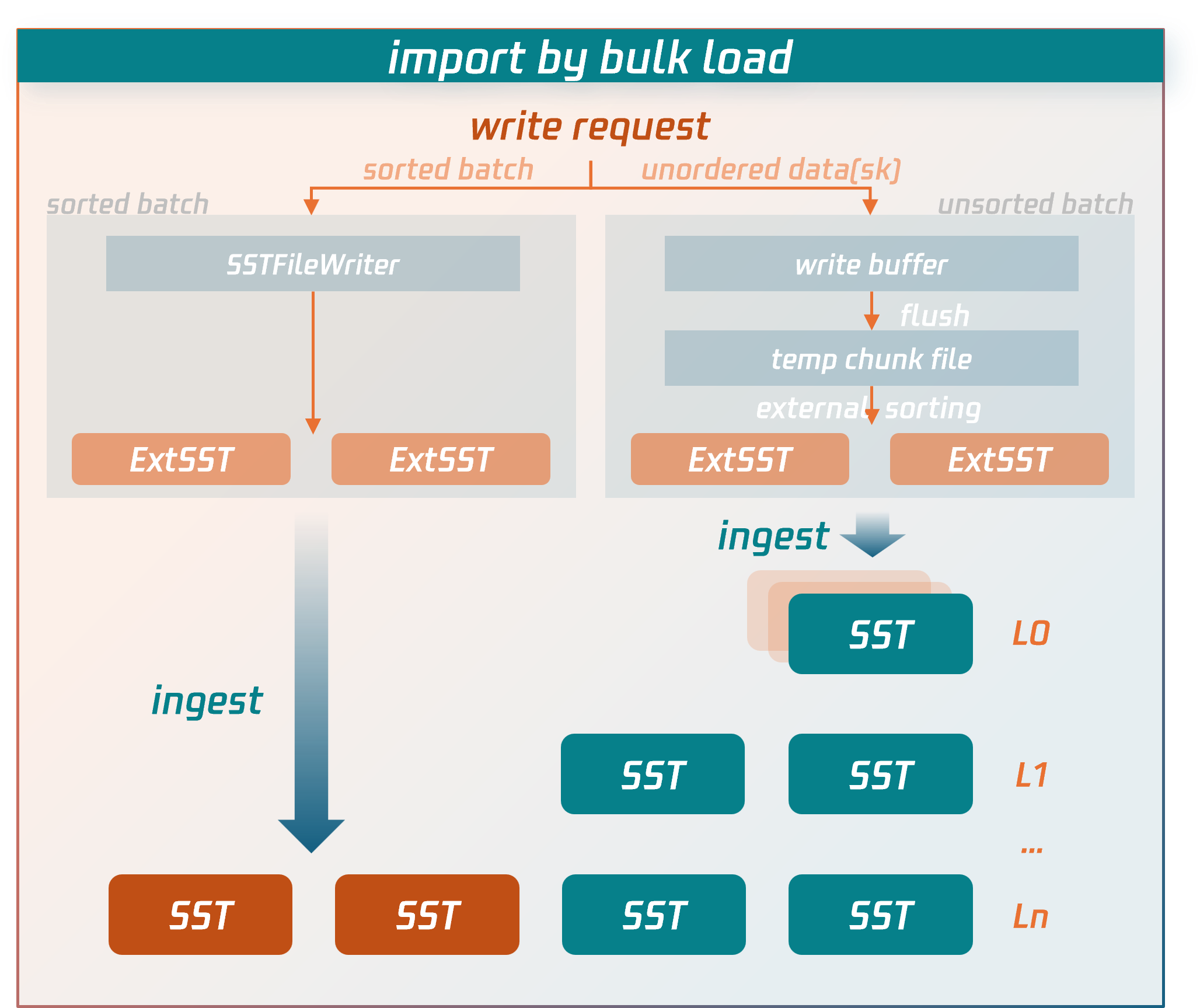
The import process for Bulk load bypasses the lengthy write paths of regular transactions and directly writes data to compressed data files.
Specific procedures:
1. The node receiving the write request for the bulk load transaction (source node) will first parse and encode the SQL statements into key-value (KV) pairs.
For sorted data: it is written directly to external SST files.
For unsorted data: it is first written to temporary data files, then undergoes an external merge sort to generate external SST files.
2. After the bulk load transaction enters the commit phase, the source node fetches the latest routing information of the replication group (RG) from the MC control node to determine the target RG and replica locations for the external SST files.
3. Based on the RG routing information, the source node sends the external SST files to the nodes (data nodes) where the RG replicas reside.
4. After confirming that all external SST files are received and validated by the data nodes, the source node sends a commit request for the bulk load transaction to the RG leader data node. The RG leader data node then synchronizes a commit log for bulk load (raft log). Once the log achieves majority consensus, the data nodes hosting RG replicas directly insert the external SST files into the appropriate level of the LSM-tree by executing or replaying this log. At this point, the data is successfully written to the database.
Key performance optimization points of the writing process for bulk load compared to regular transaction writing processes:
It does not perform detection of transaction conflicts.
Instead of temporarily storing data in write batches in memory, it directly persists to SST data files on disk.
Unlike regular transactions, bulk load does not require writing data to transaction logs and synchronizing them first (Note: Although bulk load transactions also write a commit log to maintain consistency between primary and secondary data writes, they do not serialize transaction data into the log, only synchronizing essential metadata).
Instead of entering the LSM-tree through flush and compaction operations at the top level, external SST files are directly inserted into the lowest possible level of the LSM-tree.
These targeted optimizations implemented by bulk load significantly reduce consumption of CPU, memory, and I/O resources, serving as the key factors for import performance enhancement.
Usage Instructions and Limitations
The following section introduces the parameters, usage limitations, and performance-related best practices for bulk load imports.
Relevant parameters
Session Variables
Parameter Name | Default Value | Description |
tdsql_bulk_load | false | Enabling bulk load mode allows eligible SQL statements to directly write data in bulk load fashion. |
tdsql_bulk_load_allow_unsorted | false | Whether bulk load imports support out-of-order primary key data. When `tdsql_bulk_load_allow_unsorted` is enabled, it performs additional sorting on the data to be imported, resulting in reduced import speed. |
tdsql_bulk_load_allow_sk | true | Whether it supports importing secondary index data. If the table being imported already has secondary indexes, this variable must be set to true; otherwise, the bulk load optimization cannot be triggered (falling back to regular transaction logic or batch put optimization). When this variable is enabled, the data source must guarantee uniqueness—ensuring no primary key conflicts exist. For unique secondary indexes, the data source must also ensure the uniqueness of secondary index data. Failure to do so may cause inconsistencies between primary keys and secondary indexes or violate the uniqueness constraint of secondary index data. |
tdsql_bulk_load_allow_insert_ignore | true | Whether to allow SQL statements with the IGNORE syntax ( INSERT IGNORE) to use bulk load optimization. Note: When bulk load optimization is enabled, the data source must guarantee uniqueness—ensuring no primary key conflicts exist. This is because bulk load mode does not perform conflict checks. Even with the IGNORE keyword, new data will silently overwrite existing data rather than following the IGNORE syntax (which discards new data and preserves old data). |
tdsql_bulk_load_allow_auto_organize_txn | false | Whether to enable auto-batching and committing for bulk load transactions, allowing the database to automatically accumulate transaction data to an optimal scale before initiating commits. Note: When this option is enabled, data corresponding to a client's successful commit request may still be in the batching phase and not yet reached the threshold for the auto-commit data volume, thus potentially not immediately visible. This is typically used for large-scale data migration imports with higher performance requirements, where there are no read requests during the migration phase and no real-time visibility requirement for the data at this stage. The system only needs to reach a state of eventual consistency after the import is completed. |
Use Limits
bulk load is not a "Silver Bullet" (No Silver Bullet) for data import into TDSQL Boundless. Overall, the bulk load import mode trades off certain ACID properties of transactions to achieve higher import performance. For example, bulk load transactions do not perform conflict detection, requiring users to resolve data conflicts in the source data or understand bulk load's conflict handling logic. Additionally, when a bulk load transaction fails to commit, partial commits may occur if multiple RGs are involved—where data in some RGs succeeds while others fail—violating transaction atomicity. In such cases, retrying until successful achieves eventual data consistency.
Additionally, using bulk load mode entails the following specific scenarios and limitations.
Syntax Level:
SET SESSION tdsql_bulk_load = ON, meaning the bulk load mode needs to be turned on.Only optimizes
INSERT INTO/REPLACE INTO statements, while other statements do not support bulk load mode.INSERT INTO/REPLACE INTO statements must contain multiple VALUES. bulk load mode is not supported for inserts of single-row data.SQL statements in the form of
INSERT INTO SET/REPLACE INTO SET can only write a single row of data and do not support bulk load mode.INSERT INTO ... ON DUPLICATE KEY UPDATE is not optimized. Since the bulk load mode does not check for existing primary keys, UPDATE operations cannot be performed.For
INSERT INTO, it actually executes the REPLACE INTO syntax. This means that when primary key conflicts occur between imported new data and existing data, no error is reported; instead, the new data silently overwrites the old data.For SQL statements containing the
IGNORE syntax (INSERT IGNORE INTO), it is necessary to set SET SESSION tdsql_bulk_load_allow_insert_ignore = ON beforehand; otherwise, bulk load import cannot be performed.For SQL statements containing the
IGNORE syntax (INSERT IGNORE INTO), during bulk load import, the source data must ensure uniqueness. This means there should be no primary key conflicts between the new data being imported and existing data, nor conflicts within the new data itself. Otherwise, since primary key data will be silently overwritten in bulk load mode (retaining only one row), it would violate the IGNORE syntax (which discards new data and preserves old data).Secondary Index:
When a table has a secondary index,
SET SESSION tdsql_bulk_load_allow_sk = ON needs to be enabled beforehand; otherwise, the bulk load optimization cannot be applied.When a table has a secondary index, the bulk load mode requires the source data to ensure uniqueness—meaning no primary key conflicts between new and existing data, nor within the new data itself. Otherwise, in bulk load mode, primary key data will be silently overwritten (retaining only one row). However, since the encoded keys of secondary index data lack uniqueness, both old and new records of the secondary index may persist, resulting in inconsistencies between the primary key and secondary index.
For tables requiring a secondary index, in versions 21.x or later, when data is imported via bulk load, it is recommended to create the table without the secondary index first. After the import is complete, create the secondary index. The creation process can be optimized by enabling fast online DDL (requires manual activation), which offers better performance and bypasses the limitation of source data uniqueness.
When a table has a unique secondary index, the source data must ensure uniqueness—meaning no primary key conflicts and no violations of the uniqueness constraint for the secondary index data. Otherwise, inconsistencies between the primary key and secondary index may occur, or the uniqueness constraint of the secondary index data may be broken.
Other Limitations:
System tables do not support bulk load mode. Since system tables should not undergo large-scale writes, and any issues with them could prevent the cluster from starting, they use a more robust write path.
Tables with triggers do not support imports in bulk load mode.
bulk load mode is currently mutually exclusive with DDL operations. That is, if there is an ongoing DDL operation on the table, bulk load mode is not supported; if data is being imported in bulk load mode, new DDL requests will be rejected.
Data imported via bulk load mode does not generate binlogs and will not be synchronized to secondary instances in clusters for disaster recovery.
Performance Tuning
To achieve optimal performance for bulk import mode and maximize the utilization of system resources, we have summarized the tuning experience accumulated during practice below for your reference.
Sequential Import
Ordered data import refers to importing data in ascending order of the primary key, allowing the database to process the data more efficiently. Compared with disordered data import, ordered import improves performance by 20%~300%.
Here, the order is divided into two levels of order.
bulk load transactions are internally ordered: Within a bulk load transaction, data must be arranged in ascending order of the primary key.
Orderable bulk load transactions: Taking the minimum and maximum primary keys of the data written by a transaction as its range, if the ranges of transactions do not overlap, they are considered orderable. In other words, when the data written by two transactions can be sorted in ascending order of the primary key without any interleaving, these two transactions are orderable.
When both of the above ordering conditions are met simultaneously, the data import is considered fully ordered, achieving optimal performance.
If the first condition is not met, meaning the individual records within a transaction are not sorted by primary key, the parameter tdsql_bulk_load_allow_unsorted must be enabled before import; otherwise, the operation will fail with an error. When tdsql_bulk_load_allow_unsorted is enabled, data within each transaction is first staged in temporary files. During the commit phase, an external merge sort is performed before sequentially writing to external SST files. If the data within a transaction is already ordered, this step is skipped, and data is written directly to external SST files. Consequently, unordered transactions consume more CPU and I/O resources than ordered ones.
If the second condition is not met, the external SST files generated between transactions will have overlapping ranges. When the external SST files are inserted into the LSM-tree, this overlap prevents finding suitable insertion positions in lower levels, causing more SST files to be ultimately inserted into the top level (level-0). This triggers compaction operations to lower levels, consuming additional I/O resources during data import of bulk load and adversely affecting overall performance.
Concurrent Import
When disk performance is good (such as NVMe disks), the bottleneck for performance of bulk load is more likely to be CPU-bound rather than I/O-bound. You can try appropriately increasing the concurrency of import threads (50~100) to improve import efficiency.
The system supports configuration via
tdstore_bulk_load_sorted_data_sst_compression, tdstore_bulk_load_unsorted_data_sst_compression,The
tdstore_bulk_load_temp_file_compression parameter (requires super administrator privileges) adjusts the compression algorithm used for external SST files and temporary data files generated during the import process of bulk load to balance CPU and I/O resources with disk space utilization.SET GLOBAL tdstore_bulk_load_sorted_data_sst_compression=zstd,snappy,lz4,auto,nocompression,...;
Control Transaction Size
Unlike regular transactions that temporarily store uncommitted data in an in-memory write batch, bulk load transactions directly write uncommitted data to external SST files. This approach prevents large transactions from causing excessive memory consumption and OOM (Out Of Memory) issues.
Conversely, bulk load transactions should not be too small in scale. Otherwise, they would generate smaller SST files on one hand, and frequent bulk load transaction commits would also result in suboptimal import performance on the other.
Typically, a bulk load transaction with a data volume of 200MB or more delivers optimal performance. Note that compression is enabled by default for external SST files. Taking ZSTD as an example, compression ratios can reach 10:1 or higher compared to raw data. Therefore, it is recommended to have a bulk load transaction write volumes of raw data exceeding 2GB.
Automatic Transaction Batching and Committing
For large-scale data migration imports with higher performance requirements and no read requests during the migration phase, consider enabling auto-batching and committing for bulk load transactions:
SET GLOBAL tdsql_bulk_load_allow_auto_organize_txn = ON; This allows the database to automatically accumulate bulk load transaction data to an optimal scale before initiating commits, maintaining high import performance. Note that when this option is enabled, data corresponding to a client's successful commit request may still be in the batching phase and not yet reached the auto-commit threshold, thus potentially not immediately visible. It is recommended to perform number of rows verification after the import is completed.Secondary index
For tables with secondary indexes, performance of bulk load degrades as the number of secondary indexes increases. This occurs because secondary index data is inherently unordered, requiring additional sorting operations that introduce computational overhead during the import process. To optimize scenarios involving secondary indexes, it is recommended to appropriately increase the size of bulk load transactions.
In versions 21.x or later, a more recommended approach is: when data is imported via bulk load, create tables without secondary indexes initially. After the import is completed, create secondary indexes with optimization for fast online DDL enabled (requires manual activation), which delivers better overall performance.
Partition Table
From the computational layer perspective, each partitioned table is assigned a unique t_index_id. The actual processing logic is essentially similar to handling a regular table. It is necessary to consider scenarios where a bulk load transaction spans multiple partitioned tables.
For range partitioning with sequential data import, the data within a bulk load transaction typically concentrates within a single range partition or a small number of adjacent range partitions. In such cases, a bulk load transaction generally does not involve too many partitioned tables, similar to scenarios with regular tables, and therefore no additional processing is required.
For hash partitioning with sequential data import, the data within a bulk load transaction is evenly distributed across all hash partitions. In this scenario, a single bulk load transaction will involve nearly all partitioned tables. It is necessary to further increase the size of bulk load transactions to ensure that the data volume allocated to each hash partition within a transaction is not too small. Assuming there are N hash partitions, it is recommended to scale the bulk load transaction size by a factor of N compared to regular table scenarios. Currently, in scenarios with 16 hash partitions, performance experiences an approximately 15% reduction compared to non-partitioned tables (regular tables).
If sub-partitions exist, it is necessary to consider how many sub-partitions the data within a bulk load transaction will involve, ensuring that the data volume allocated to each sub-partition is not too small.
In summary, as the number of partitions involved in a bulk load transaction increases, performance gradually degrades. From the storage layer perspective, this occurs because a single bulk load transaction engages too many RGs as transaction participants. Similar to regular transactions, performance deteriorates as more partitions are involved, since a greater number of participants at the RG level negatively impacts efficiency.
Bantuan dan Dukungan
Apakah halaman ini membantu?
Anda juga dapat Menghubungi Penjualan atau Mengirimkan Tiket untuk meminta bantuan.
masukan