tencent cloud

Virtual Private Cloud

Catatan dan Pengumuman Rilis
Catatan Rilis
Announcements
Deskripsi Produk
Ikhtisar
Kekuatan
Kasus Penggunaan
Konsep
Batas Kuota
Mulai Cepat
Perencanaan Jaringan
VPC Connection
Membangun VPC IPv4
Panduan Operasi
Topologi Jaringan
Virtual Private Cloud (VPC)
Subnet
Tabel Rute
IP Elastis
HAVIP
ENI
Paket Bandwidth
Koneksi Jaringan
Manajemen Keamanan
Alat Diagnostik
Peringatan Alarm dan Pemantauan
Tutorial Praktis
Memigrasi dari Jaringan Klasik ke VPC
Mengonfigurasi Gateway CVM Publik
Membangun Kluster Primer/Sekunder HA dengan HAVIP + Keepalived
Komunikasi Primer/Sekunder Cloud Hibrida (DC dan VPN)
Komunikasi Primer/Sekunder Cloud Hibrida (CCN dan VPN)
Pertanyaan Umum
Umum
Koneksi
Keamanan
Hubungi Kami
Glosarium
DokumentasiVirtual Private Cloud

Releasing a Secondary Private IP Address

Mode fokus
Ukuran font
Terakhir diperbarui: 2026-03-30 10:50:34
This document describes how to release a secondary private IP address.
Note:
Elastic Network Interface (ENI) only supports releasing secondary IP addresses and does not support releasing the primary IP address.
After a private IP address is unbound, its associated Elastic IP (EIP) will be automatically unbound as well.

Prerequisites

A secondary private IP address has been applied for.

Operation Steps

1. Log in to the ENI console.
2. On the ENI list page, click the ID of the instance that you want to view to go to the ENI details page.
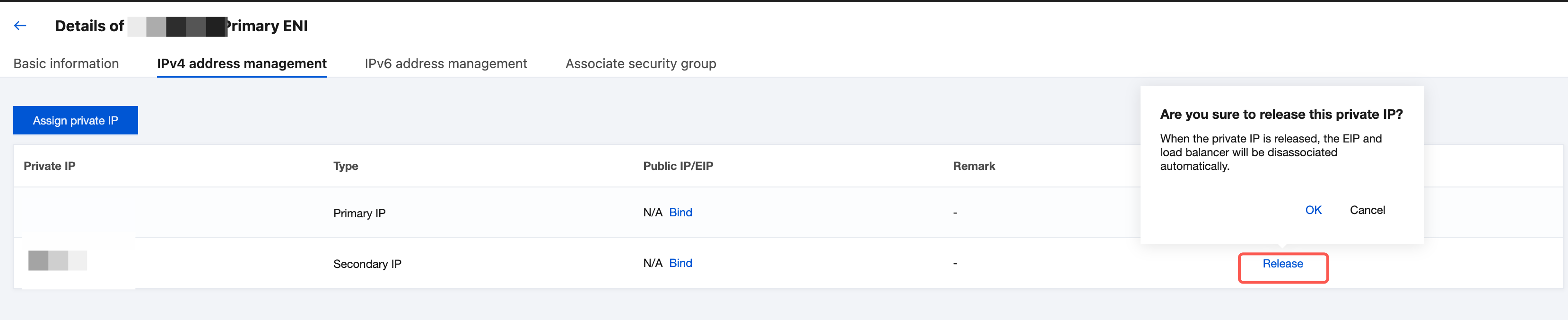
3. Click the IPv4 Address Management tab to view the bound private IP addresses and EIPs.

4. Locate the row of the private IP address that you want to release and click Release in the Operation column.
5. In the displayed dialog box, click OK.
Note:
After a private IP address is released, this IP address will no longer provide network services for the Cloud Virtual Machine (CVM). Before releasing, confirm whether this operation meets your business expectations.


Bantuan dan Dukungan

Apakah halaman ini membantu?

masukan