tencent cloud

Tencent Cloud Observability Platform

Release Notes and Announcements
Release Notes
Product Introduction
Overview
Strengths
Basic Features
Basic Concepts
Use Cases
Use Limits
Purchase Guide
Tencent Cloud Product Monitoring
Application Performance Management
Mobile App Performance Monitoring
Real User Monitoring
Cloud Automated Testing
Prometheus Monitoring
Grafana
EventBridge
PTS
Quick Start
Monitoring Overview
Instance Group
Tencent Cloud Product Monitoring
Application Performance Management
Real User Monitoring
Cloud Automated Testing
Performance Testing Service
Prometheus Getting Started
Grafana
Dashboard Creation
EventBridge
Alarm Service
Cloud Product Monitoring
Tencent Cloud Service Metrics
Operation Guide
CVM Agents
Cloud Product Monitoring Integration with Grafana
Troubleshooting
Practical Tutorial
Application Performance Management
Product Introduction
Access Guide
Operation Guide
Practical Tutorial
Parameter Information
FAQs
Mobile App Performance Monitoring
Overview
Operation Guide
Access Guide
Practical Tutorial
Tencent Cloud Real User Monitoring
Product Introduction
Operation Guide
Connection Guide
FAQs
Cloud Automated Testing
Product Introduction
Operation Guide
FAQs
Performance Testing Service
Overview
Operation Guide
Practice Tutorial
JavaScript API List
FAQs
Prometheus Monitoring
Product Introduction
Access Guide
Operation Guide
Practical Tutorial
Terraform
FAQs
Grafana
Product Introduction
Operation Guide
Guide on Grafana Common Features
FAQs
Dashboard
Overview
Operation Guide
Alarm Management
Console Operation Guide
Troubleshooting
FAQs
EventBridge
Product Introduction
Operation Guide
Practical Tutorial
FAQs
Report Management
FAQs
General
Alarm Service
Concepts
Monitoring Charts
CVM Agents
Dynamic Alarm Threshold
CM Connection to Grafana
Documentation Guide
Related Agreements
Application Performance Management Service Level Agreement
APM Privacy Policy
APM Data Processing And Security Agreement
RUM Service Level Agreement
Mobile Performance Monitoring Service Level Agreement
Cloud Automated Testing Service Level Agreement
Prometheus Service Level Agreement
TCMG Service Level Agreements
PTS Service Level Agreement
PTS Use Limits
Cloud Monitor Service Level Agreement
API Documentation
History
Introduction
API Category
Making API Requests
Monitoring Data Query APIs
Alarm APIs
Legacy Alert APIs
Notification Template APIs
TMP APIs
Grafana Service APIs
Event Center APIs
TencentCloud Managed Service for Prometheus APIs
Monitoring APIs
Data Types
Error Codes
Glossary

Network Monitoring

PDF
Mode fokus
Ukuran font
Terakhir diperbarui: 2024-05-14 12:36:06

Enabling Feature

Network monitoring requires the use of the qapm-plugin for instrumentation and is by default inserted at various entry and exit points of the network layer.

Prerequisites

A user allowlist or device allowlist, which is used to initialize the SDK, has been added through the Mobile App Performance Monitoring > Application Management > Allowlist Management page.
The qapm-plugin has been configured in the app-level build.gradle. See Integration and Initialization.
Currently, only okhttp3 monitoring is supported. The okhttp3 also requires okio version 1.14.0 or later.

Configuration Process

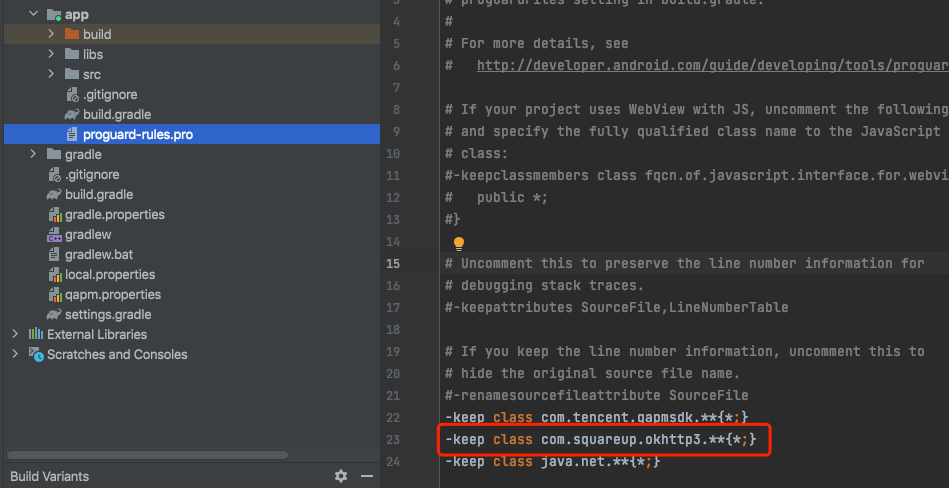
Add obfuscation rules in the proguard-rules.pro file in the app directory to prevent okttp3 code from being obfuscated.
-keep class com.squareup.okhttp3.**{*;}


Verifying Whether the Feature Is Working Properly

Retrieval tag:QAPM_manager_QAPMPluginManager
The log message that appears one minute after each network request indicates successful reporting of network data:


Retrieval tag: [plugin::142]


Note:
It requires the use of the qapm-plugin for instrumentation. Otherwise, it will not work.
The SDK is only responsible for capturing information related to network requests. The backend analyzes issue data, such as slow requests (with the request time being greater than xxs) and network errors (with the request response code being greater than 400).
If the correct allowlist is not configured, the SDK will not enable network monitoring.

Bantuan dan Dukungan

Apakah halaman ini membantu?

masukan

