Overview
You can set Cross Origin Resource Sharing (CORS) for objects in buckets through the Cloud Object Storage (COS) console. COS supports configuring multiple rules to respond to OPTIONS requests. CORS is a mechanism that allows resources at one origin to be requested from another origin through HTTP requests. Origins are deemed different from each other as long as their protocols, domain names, or ports are different.
COS supports response to OPTIONS requests for CORS, and returns specific rules set by developers to browsers, but the server does not verify whether subsequent cross-origin requests conform to the rules. For more information, please see Cross-Origin Resource Sharing and Setting Cross-Origin Access. Directions
2. Click Bucket List on the left sidebar.
3. Locate the bucket for which you want to set CORS and click the bucket name to enter the bucket details page.
4. Select Security Management > CORS (Cross-Origin Resource Sharing) on the left sidebar and click Add a Rule.
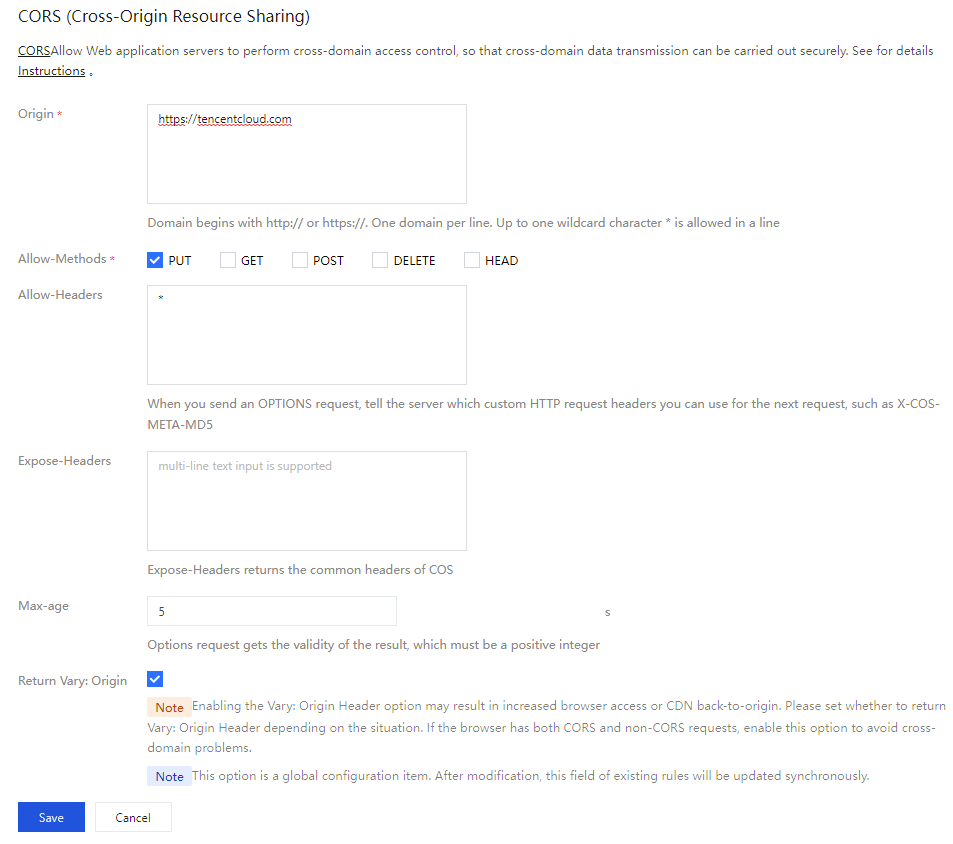
5. Add rule information (Fields with * are required). Configuration items are as follows:
Origin: The sources from which cross-origin requests are allowed. Add your own domain name. Supports adding domain names (including Chinese domain names) and IP addresses.
The domain name does not need to end with a slash (/).
More than one domain name can be specified, with one domain name per line.
You can set a *, indicating that all domains and IPs are supported, which is not recommended.
Note:
If the user has enabled xhr.withCredentials = true for the AJAX request (indicating that the request needs to carry domain cookies), then in this scenario, configuring Access-Control-Allow-Origin: * is not allowed; a specific domain must be configured. However, COS domains are generally used for static websites and do not require cookies, so it is recommended not to enable xhr.withCredentials = true.
A single specific domain name is supported, such as http://www.abc.com.
Second-level wildcard domain names, for example, http://*.abc.com, are supported. Note that each line can contain only one asterisk (*). If configured as http://*.example.com, it allows sources such as http://a.b.example.com and http://a.example.com.
Be careful not to omit the protocol name (http or https). If the port is not the default port 80, you need to add a port. An example IP address is http://10.10.10.10.
Chinese domain name is recommended to add both Chinese domain name and punycode domain name. For exampleChinese.cn and https://xn--fiq228c.cn.
Allow-Methods: GET, PUT, POST, DELETE, and HEAD are supported. Enumeration of one or more methods is allowed for a cross-origin request.
Allow-Headers: notifies the server about which custom HTTP request headers are allowed for subsequent requests when an OPTIONS request is sent, such as x-cos-meta-md5.
More than one header can be specified, with one header per line, for example, Content-Type.
Header is easy to omit. Therefore, if there is no special requirement, you are advised to set this field to *, meaning that all headers are allowed.
Uppercase and lowercase letters [a-z, A-Z] are supported.
Each header specified in Access-Control-Request-Headers must correspond to a value in Allow-Headers.
Expose-Headers: Request headers commonly used in COS. For more information, please see Common Request Headers. Set this parameter according to the specific application requirements. ETag is recommended. Headers do not allow wildcards and are case insensitive. You can set multiple headers, with one header per line. Max-age: validity period (in seconds) of the results obtained by OPTIONS. The value must be a positive integer, such as 600.
Return Vary: Origin: Set whether to return the Vary: Origin header. Enable this option if the browser has both CORS and non-CORS requests; otherwise, cross-origin access issues will occur.
Note:
Enabling the Vary: Origin configuration may increase browser cache or CDN origin fetches.
Vary: Origin This is a global configuration item. After modification, the status of this field in all cross-origin rules will be updated as well.
6. After configuration, click Save and you will see the CORS rule added. To modify it, click Edit.