Object Tag Overview

Terakhir diperbarui:2025-09-24 17:45:28
Overview
Object tagging is designed to help you group and manage objects in your bucket by adding a key-value pair as an object tag. An object tag consists of a
tagKey, a =, and a tagValue, such as group = IT. You can set, query, and delete tags on the specified object.Note:
Specifications and Restrictions
Tag key restrictions
Supports characters such as
Chinese, a-z, A-Z, 0-9, +, -, _, =, /, ., :, @, and distinguishes between uppercase and lowercase letters in English.A tag key can contain 1–127 UTF-8 characters.
Tag keys are case-sensitive.
Tag value restrictions
Supports characters such as
Chinese, a-z, A-Z, 0-9, +, -, _, =, /, ., :, @, and distinguishes between uppercase and lowercase letters in English.A tag value can contain 1–255 UTF-8 characters.
Tag values are case-sensitive.
Tag quantity restrictions
Object dimension: Up to ten unique tags per object.
Tag dimension: Unlimited.
Usage
Using the COS Console
Adding tag during object upload
1. Add object tags when uploading object, as shown below:
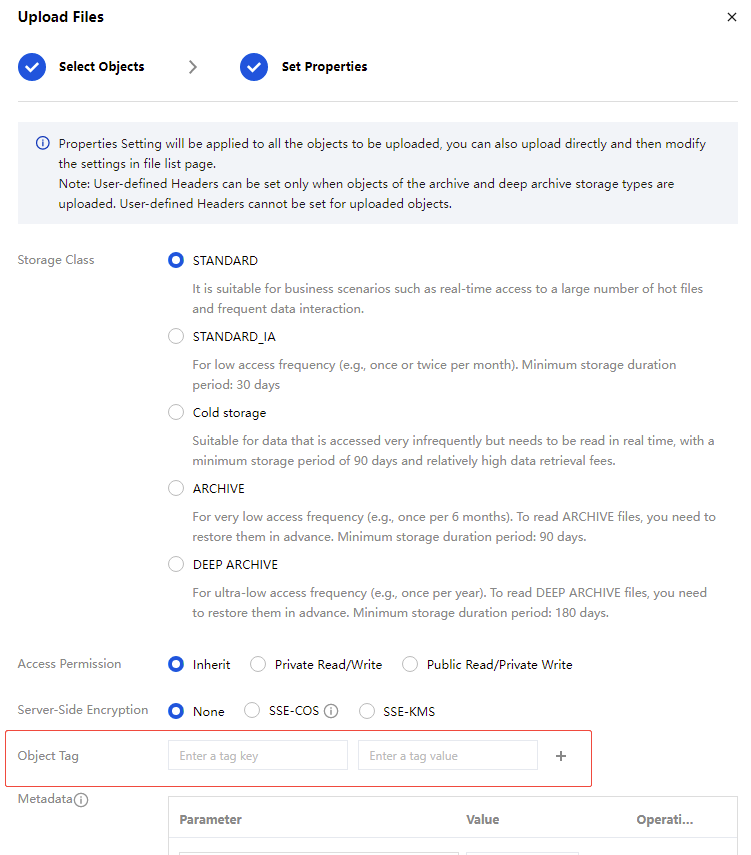
2. After a successful upload, object tags can be added. You can go to the bucket's file list page, find the object with added tags, click More > Add tag to view, edit or delete the added tags.
Adding tag uploaded object
If you did not add tags when you uploaded the object, you can add tags to the object by following the steps below.
1. See view object information and go to the file list page.
2. On the file list page, find the object to be operated, click More > Add tag.
3. In the pop-up window, click Add tag, manually input the tag key and value, then save.
If you need to modify or delete a tag, herein in a window, click Edit or Delete.
Using REST API/SDK
You can manage object tags via the following APIs:
You can call the management object tag method in the SDK. For details, see the following language SDK documents:
Tools
FAQs
How to Use Object Tags
After setting up object tags, you can quickly set lifecycle rules for objects with the same tags. For details, see Setting the Bucket Lifecycle.
Apakah halaman ini membantu?
Anda juga dapat Menghubungi Penjualan atau Mengirimkan Tiket untuk meminta bantuan.
Ya
Tidak
masukan