tencent cloud

Serverless Cloud Function

Release Notes and Announcements
Release Notes
Announcements
User Guide
Product Introduction
Overview
Related Concepts
How It Works
Strengths
Scenarios
Related Products
Purchase Guide
Billing Overview
Billing Mode
Billable Items and Billing Modes
Function Computing Power Support
Free Tier
SCF Pricing
Billing Example
Payment Overdue
Getting Started
Creating Event Function in Console
User Guide
Quota Management
Managing Functions
Web Function Management
Log Management
Concurrence Management
Trigger Management
Function URL
A Custom Domain Name
Version Management
Alias Management
Permission Management
Running Instance Management
Plugin Management
Managing Monitors and Alarms
Network Configuration
Layer Management
Execution Configuration
Extended Storage Management
DNS Caching Configuration
Resource Managed Mode Management
Near-Offline Resource Hosting Model
Workflow
Triggers
Trigger Overview
Trigger Event Message Structure Summary
API Gateway Trigger
COS Trigger
CLS Trigger
Timer Trigger
CKafka Trigger
Apache Kafka Trigger
MQTT Trigger
Trigger Configuration Description
MPS Trigger
CLB Trigger Description
TencentCloud API Trigger
Development Guide
Basic Concepts
Testing a Function
Environment Variables
Dependency Installation
Using Container Image
Error Types and Retry Policies
Dead Letter Queue
Connecting SCF to Database
Automated Deployment
Cloud Function Status Code
Common Errors and Solutions
Developer Tools
Serverless Web IDE
Calling SDK Across Functions
Third-Party Tools
Code Development
Python
Node.js
Golang
PHP
Java
Custom Runtime
Deploying Image as Function
Web Framework Development
Deploying Framework on Command Line
Quickly Deploying Egg Framework
Quickly Deploying Express Framework
Quickly Deploying Flask Framework
Quickly Deploying Koa Framework
Quickly Deploying Laravel Framework
Quickly Deploying Nest.js Framework
Quickly Deploying Next.js Framework
Quickly Deploying Nuxt.js Framework
Quickly Deploying Django Framework
Use Cases
Overview
Solutions with Tencent Cloud Services
Business Development
TRTC Practices
COS Practices
CKafka Practice
CLS
CLB Practice
MPS
CDN
CDWPG
VOD
SMS
ES
Scheduled Task
Video Processing
Success Stories
Tencent Online Education
Online Video Industry
Tencent Online Education
Best Practice of Tencent IEG Going Global
API Documentation
History
Introduction
API Category
Making API Requests
Other APIs
Namespace APIs
Layer Management APIs
Async Event Management APIs
Trigger APIs
Function APIs
Function and Layer Status Description
Data Types
Error Codes
SDK Documentation
FAQs
General
Web Function
Billing FAQs
Network FAQs
Log FAQs
SCF utility class
Event Handling FAQs
API Gateway Trigger FAQs
Related Agreement
Service Level Agreement
Contact Us
Glossary

Releasing a Version

PDF
Mode fokus
Ukuran font
Terakhir diperbarui: 2025-02-12 11:10:43

Operation Scenarios

After configuring the function, submitting the code, and passing the online test, you can fix the version of the function by publishing the version to avoid errors or execution failures of your online business caused by subsequent modification and testing of the code. You can publish a version at any time, and in all releases, the $LATEST version is always the latest version.

Directions

Note:
A function has the $LATEST version attribute upon its creation. The $LATEST version points to the currently editable version and is always present and editable.
1. Log in to the SCF Console and select Function Service on the left sidebar.
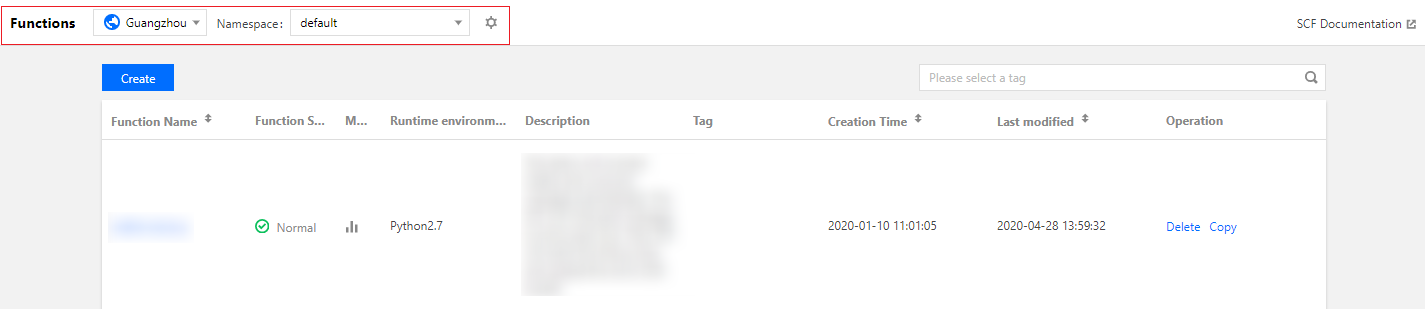
2. At the top of the "Function Service" page, select the region and namespace where the function to be viewed resides as shown below:

3. Click the function name to enter the function information page.
4. Select Operation > Publish New Version in the top-right corner of the function information page as shown below:

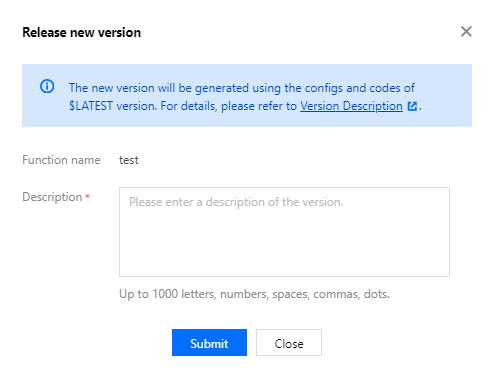
5. In the pop-up "Publish New Version" window, enter the version description and click Submit to publish the version as shown below:

Note:
When the release is submitted, the SCF platform will generate a copy of the configuration and code content of the current $LATEST version of the function and save it as version content.
After a version is published, the version number of the release will be generated, which starts from 1 and increases progressively with each release. The version number has no upper limit.
The published version only records and fixes the configuration and code of the current $LATEST version of the function but not the trigger configuration of the function. A newly published function version does not have any triggers.

Bantuan dan Dukungan

Apakah halaman ini membantu?

masukan