tencent cloud

Game Multimedia Engine

Product Introduction
Overview
Strengths
Features
Scenarios
Compliance
Console Guide
Usage Querying
Activating Services
Getting Started
Quick Integration of SDK
Quick Integration of Sample Project
Basic Feature Development Guide
Authentication Key
Voice Chat Role Configuration
Sound Quality
Client API
SDK for Unity
SDK for Unreal Engine
Cocos2D SDK
SDK for Windows
SDK for iOS
SDK for Android
SDK for macOS
H5 SDK
Electron SDK
SDK for Flutter
SDK Version Upgrade Guide
Error Codes
Toolchain
Server APIs
History
Introduction
API Category
Usage APIs
Recording APIs
Making API Requests
Voice Chat APIs
Application APIs
Data Types
Error Codes
FAQ
Product Features
Troubleshooting Guide
Billing
Sample Project Usage
General
Authentication
Voice Chat Room Entry Failure
Sound and Audio
Network
Speech-to-text Conversion
Program Export
Service Agreement
Service Level Agreement
Kebijakan GME
Perjanjian Privasi dan Keamanan Data
Kebijakan Privasi

Sound Quality

PDF
Mode fokus
Ukuran font
Terakhir diperbarui: 2024-01-18 11:58:24
This document describes how to choose sound quality in the GME SDK.

Overview of Sound Quality Types

Sound Quality Type
Description
Parameter
Bitrate
Sample Rate
Volume Type
Applicable Scenario
ITMG_ROOM_TYPE_FLUENCY
Smooth
1
30 Kbps
16 kHz
Speaker: Call volume
Headset: Media volume
Bluetooth headset: Headset audio capturing over the HFP protocol
Smooth sound quality and ultra-low delay, which is suitable for group chat in games like FPS and MOBA games.
ITMG_ROOM_TYPE_STANDARD
Standard
2
64 Kbps
48 kHz
Speaker: Call volume
Headset: Media volume
Bluetooth headset: Headset audio capturing over the HFP protocol
Good sound quality with a moderate latency, which is suitable for voice chat in casual games such as Werewolves and board games.
ITMG_ROOM_TYPE_HIGHQUALITY
HD
3
64 Kbps
48 kHz
Speaker: Media volume
Headset: Media volume
Bluetooth headset: Mobile phone audio capturing over the A2DP protocol
HD sound quality with a relatively high latency, which is suitable for music and dancing games that require high sound quality such as music playback and online karaoke.
Note:
Currently, only the ITMG_ROOM_TYPE_FLUENCY audio quality type is provided by default. To use other audio quality types, submit a ticket.

Concepts

Media volume and call volume

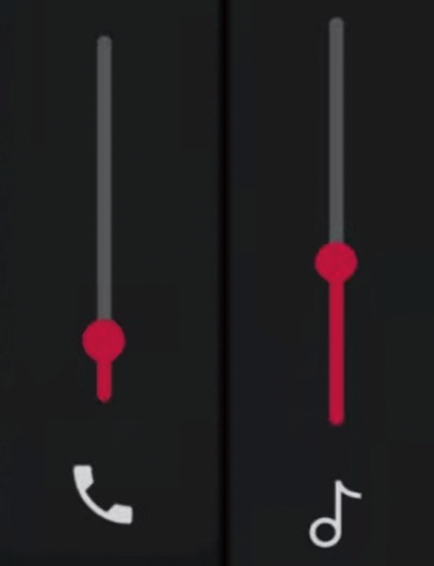
Two volume modes are configured in a mobile phone: Media volume and call volume. Media volume is generally used to playback media files, and call volume is used in phone calls and communications.
For an Android mobile phone, the current volume mode is displayed on the screen when you press the volume key. As shown below, the call volume is on the left and the media volume is on the right.


Bluetooth headset protocols

There are two Bluetooth headset protocols with different audio performance:
Protocol
Playback Performance
Capturing Performance
HFP
The headset audio is mono only.
The headset audio can be captured.
A2DP
The headset audio is stereo and has a better audio quality.
The headset audio cannot be directly captured through this channel, and you need to use the phone or the PC mic to capture the audio.

Traffic consumption

The traffic is subject to the bitrate and number of users speaking in the room. The specific calculation formula is: bitrate * number of users / 8 = number of bytes.

Audio processing effect

The audio signal is collected by the capturing module on the mobile device, and is encoded by an audio encoder after audio preprocessing processes such as mixing cancellation, noise reduction, and automatic gain control. The methods used in the preprocessing processes, acoustic echo canceling (AEC), automatic gain control (AGC), and automatic noise suppression (ANS, also known as noise cancellation and noise suppression), are commonly known as 3A.
The difference between smooth sound quality and the other two sound qualities is ANS (noise reduction). ANS is enabled for the smooth sound quality, and is disabled for the standard and HD sound quality.

Bantuan dan Dukungan

Apakah halaman ini membantu?

masukan