tencent cloud

Tag

Product Introduction
Overview
Features
Scenarios
Use Limits
Resource Types Supporting Tag APIs
Purchase Guide
Getting Started
Creating Tags and Binding Resources
Querying Resources by Tag
Operation Guide
Creating Tags
Tagging Resources
Unbinding Tags
Unbinding or Modifying Tags in Batches
Deleting Tags
Viewing Tagged Resources
Querying and Editing Resource Tags
Setting Tag Quotas
Exporting Resource Tags
Query Tag Modification Record
CreatedBy
Tag Policy
Exporting a Tag List
API Documentation
History
Introduction
API Category
Making API Requests
Write APIs
Read APIs
Project APIs
Data Types
Error Codes
FAQs
Glossary
DokumentasiTagOperation GuideQuery Tag Modification Record

Query Tag Modification Record

PDF
Mode fokus
Ukuran font
Terakhir diperbarui: 2024-05-21 17:44:42

Overview

This document introduces how to view tag modification record event details through the operation audit console.

Directions

1. Log in to the Cloud Audit console, and choose Operation Records in the left sidebar.
2. Under Event Name drop-down, choose TAG, and choose the corresponding date range and conditions to query detailed records.
3. Click on the specific Event, and the details of the event is displayed on the right.

The operator refers to the event operator. They are divided into the following types:
Root Account Operation: Username is displayed as root.
Sub-user Operation: Username is displayed as the sub-user name. If the sub-user has been deleted, the sub-user ID is displayed.
Role Operation: Username is displayed as the role name. If the role has been deleted, the role ID is displayed.
You can click on the operator to go to the User List page to view more information about the user.
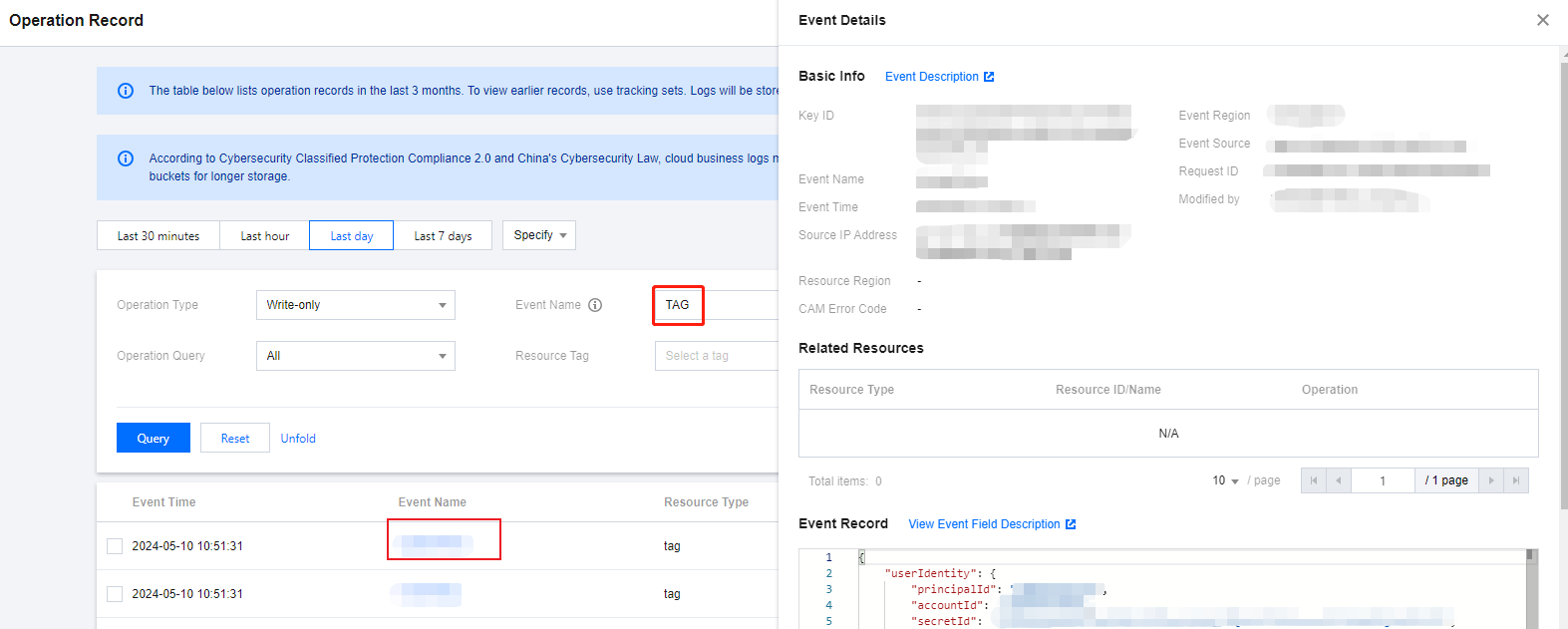
4. To view operation record event details through operation audit, see Viewing Event Details in Operation Record.


Bantuan dan Dukungan

Apakah halaman ini membantu?

masukan