tencent cloud

Elastic MapReduce

Release Notes and Announcements
Release Notes
Announcements
Security Announcements
Product Introduction
Overview
Strengths
Architecture
Features
Use Cases
Constraints and Limits
Technical Support Scope
Product release
Purchase Guide
EMR on CVM Billing Instructions
EMR on TKE Billing Instructions
EMR Serverless HBase Billing Instructions
Getting Started
EMR on CVM Quick Start
EMR on TKE Quick Start
EMR on CVM Operation Guide
Planning Cluster
Administrative rights
Configuring Cluster
Managing Cluster
Managing Service
Monitoring and Alarms
TCInsight
EMR on TKE Operation Guide
Introduction to EMR on TKE
Configuring Cluster
Cluster Management
Service Management
Monitoring and Ops
Application Analysis
EMR Serverless HBase Operation Guide
EMR Serverless HBase Product Introduction
Quotas and Limits
Planning an Instance
Managing an Instance
Monitoring and Alarms
Development Guide
EMR Development Guide
Hadoop Development Guide
Spark Development Guide
Hbase Development Guide
Phoenix on Hbase Development Guide
Hive Development Guide
Presto Development Guide
Sqoop Development Guide
Hue Development Guide
Oozie Development Guide
Flume Development Guide
Kerberos Development Guide
Knox Development Guide
Alluxio Development Guide
Kylin Development Guide
Livy Development Guide
Kyuubi Development Guide
Zeppelin Development Guide
Hudi Development Guide
Superset Development Guide
Impala Development Guide
Druid Development Guide
TensorFlow Development Guide
Kudu Development Guide
Ranger Development Guide
Kafka Development Guide
Iceberg Development Guide
StarRocks Development Guide
Flink Development Guide
JupyterLab Development Guide
MLflow Development Guide
Practical Tutorial
Practice of EMR on CVM Ops
Data Migration
Practical Tutorial on Custom Scaling
API Documentation
History
Introduction
API Category
Cluster Resource Management APIs
Cluster Services APIs
User Management APIs
Data Inquiry APIs
Scaling APIs
Configuration APIs
Other APIs
Serverless HBase APIs
YARN Resource Scheduling APIs
Making API Requests
Data Types
Error Codes
FAQs
EMR on CVM
Service Level Agreement
Contact Us

Support for COS Transparent-URI

PDF
フォーカスモード
フォントサイズ
最終更新日: 2025-01-03 14:56:32
Alluxio users often have existing applications accessing their existing storage systems (Under-FileSystem). Alluxio can be added to existing ecosystems, but one thing that must always be changed is the URI used by the application. The Transparent-URI feature allows users to access their existing storage systems without changing URIs at the application level.

Supported Versions and URI Configuration

1. Supported service component version: Alluxio 2.8.0.
2. Product version: Hadoop 3.x Standard EMR 3.4.0.
3. In order to use Alluxio Transparent-URI, a new Hadoop compatible file system client implementation should be configured. This new ShimFileSystem will replace existing FileSystem whenever the client is configured for receiving foreign URIs. The APIs of Hadoop FileSystem (a Hadoop compatible compute framework) define the mapping from FileSystem scheme to FileSystem implementation. To configure ShimFileSystem, make sure that the following items are configured in the core-site.xml file:
Configuration Item
Value
fs.cosn.impl
alluxio.hadoop.ShimFileSystem
4. In order to be compatible with the Transparent-URI schema, Alluxio needs to perform schema conversion. Therefore, make sure that the following items are configured in the alluxio-site.properties file:
Configuration Item
Value
alluxio.master.uri.translator.impl
alluxio.master.file.uritranslator.AutoMountUriTranslator
alluxio.user.shimfs.bypass.ufs.impl.list
fs.cosn.impl:org.apache.hadoop.fs.cosnative.NativeCosFileSystem
Note
You need to restart the Alluxio service after modifying the configuration in alluxio-site.properties.
Once ShimFileSystem is configured, master will need to route URIs that are native to external storage system, to Alluxio namespace. This requires COSN to have been mounted to Alluxio namespace.
To disable the Transparent-URI feature, roll back the fs.cosn.impl configuration item in core-site.xml.

Mounting

The mount command is one of Alluxio's most distinctive commands. It is similar to Linux's mount command, through which users can load disks, SSDs and other storage devices to the local file system of Linux. In Alluxio, the concept of mounting is further extended to the distributed system level, that is, users can mount one or more other storage systems/cloud storage services (such as HDFS and COS) to the Alluxio distributed file system using the mount command. So they can run distributed applications on Alluxio, such as Spark, Presto, and MapReduce, without any adaptation or even knowledge of the specific data access protocol and path. Users only need to know the path corresponding to the data in the Alluxio file system. It greatly facilitates application development and maintenance.
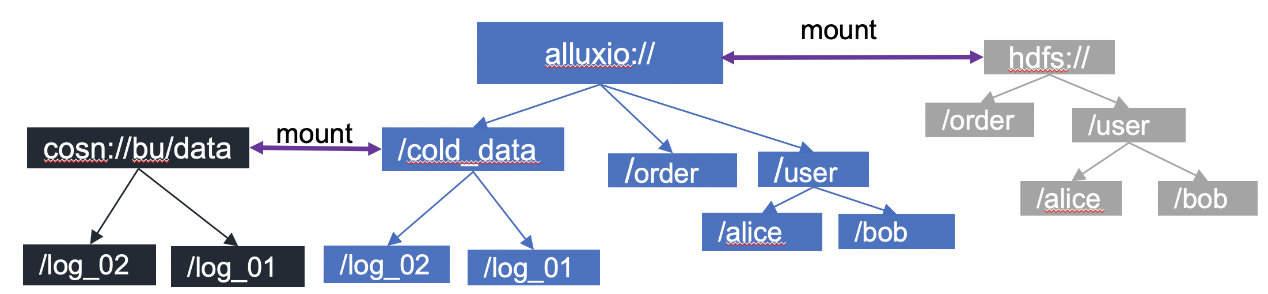

EMR-Alluxio uses HDFS as the root directory mount point by default

Beginning from EMR-Alluxio v2.5.1, Alluxio's UFS supports the COSN protocol. COS UFS has relatively poor read/write performance and is unstable. In order to solve this issue, the community provides the underlying COSN UFS. Both COS UFS and COSN UFS are used to access Tencent Cloud COS. COSN UFS is a great improvement compared with COS UFS. Its read/write performance are twice as good as that of COS UFS, and it has better stability. Therefore, COSN UFS is strongly recommended. The maintenance for COS UFS will stop after EMR-Alluxio v2.6.0. Example of mounting COSN:
alluxio fs mount --option fs.cosn.userinfo.secretId=xx \\
--option fs.cosn.userinfo.secretKey=xx \\
--option fs.cosn.bucket.region=ap-xx \\
--option fs.cosn.impl=org.apache.hadoop.fs.cosnative.NativeCosFileSystem \\
--option fs.AbstractFileSystem.cosn.impl=org.apache.hadoop.fs.CosN \\
--option fs.cosn.userinfo.appid=xx \\
/cosn cosn://COS_BUCKET/path
Configure the COS information in each --option.
Configuration Item
Description
fs.cosn.userinfo.secretId
COS secret ID
fs.cosn.userinfo.secretKey
COS secret key
fs.cosn.impl
Fixed value: org.apache.hadoop.fs.CosFileSystem.
fs.AbstractFileSystem.cosn.impl
Fixed value: org.apache.hadoop.fs.CosN.
fs.cosn.bucket.region cos region
Region name such as ap-beijing
fs.cosn.userinfo.appid
The AppID of root account
COS_BUCKET COS BUCKET
Bucket name without the AppID suffix

ヘルプとサポート

この記事はお役に立ちましたか?

フィードバック