The cloud-native gateway provides a health check mechanism. By configuring relevant health check policies, the gateway performs "liveness" and "readiness" probes on service nodes. When a service node fails, the gateway can proxy requests to healthy nodes, thereby enhancing the continuity of the gateway service.
Note:
The cloud-native gateway health check mechanism is designed only for services of the IP list type. For K8S services, it is recommended to use the container health check mechanism.
Health Check Methods
The cloud-native gateway provides two health check methods: active checks and passive checks.
Active Checks
Active checks indicate that the gateway actively detects the liveness of service nodes through the preset probe type. After the active health check is enabled, the gateway sends HTTP or HTTPS requests to the configured path of each service node based on the preset detection interval. Based on the detection results, the gateway automatically enables healthy nodes and disables unhealthy nodes.
Passive Checks
Passive checks are also called the circuit breaker mode. In this mode, the gateway checks the health status of backend nodes based on forwarded user requests (HTTP/HTTPS/TCP requests) and does not actively send detection requests. When a node does not respond, the gateway enables the passive health check, detects the node, and marks it as unhealthy.
Note:
In this mode, unhealthy nodes cannot receive requests. Even if a node recovers, the gateway cannot detect its recovery and mark it as healthy again. To mark the node as healthy, you need to call the management API provided by the gateway and inform the health checker to enable the node again. Therefore, it typically needs to be used together with the active health check policy.
Configuring Health Check
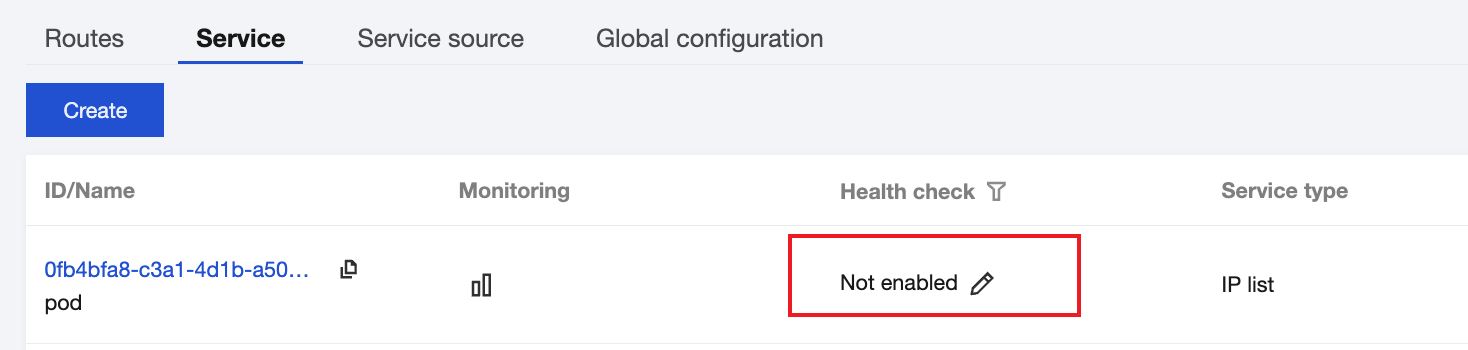
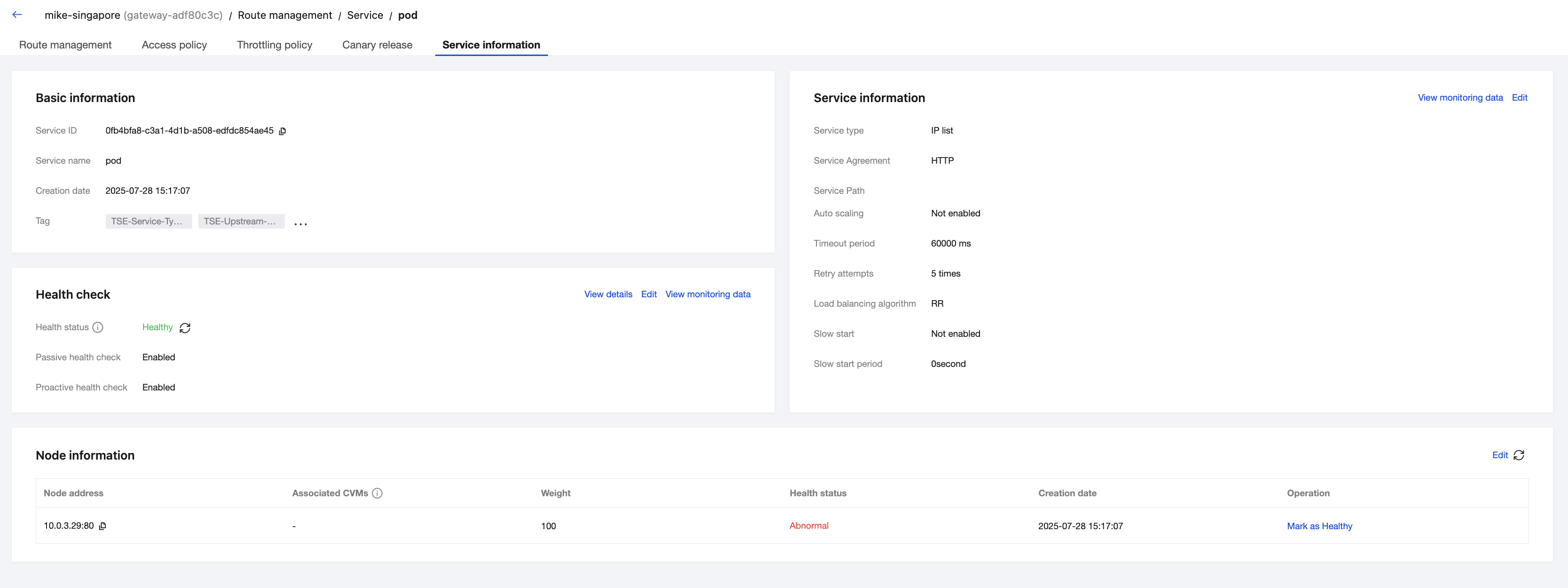
For newly created gateway services of the IP list type, health check can be configured on the service list page or service details page.
Configuring Active Health Check
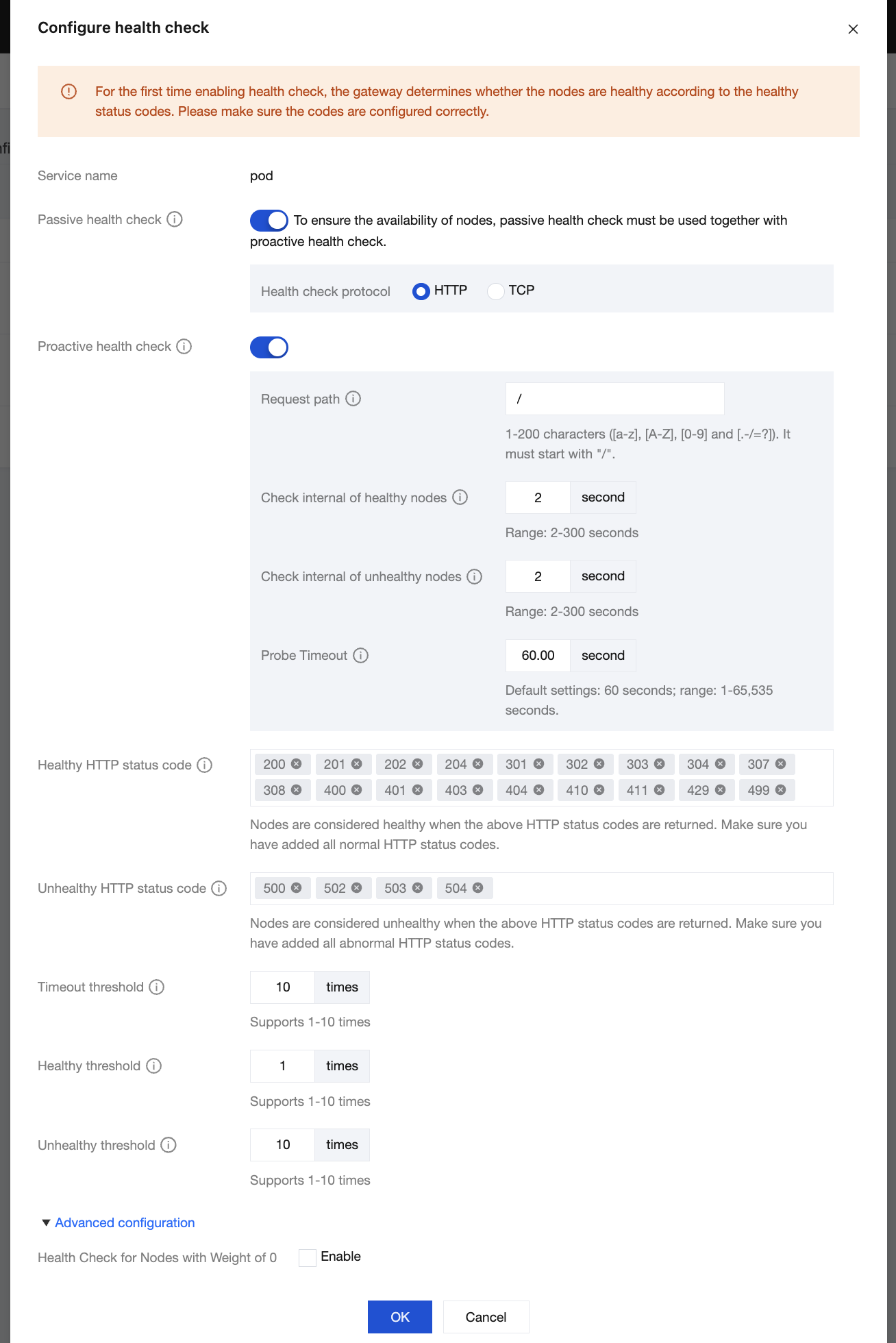
On the gateway service list page, click the edit icon in the Health Check column to configure health check.
Passive Health Check: The health status of a node is determined based on the response status of the upstream node.
Active Health Check: The gateway actively detects the liveness of service nodes based on the preset detection interval.
Request Path: path used by the gateway to send active detection requests to the target node, which is "/" by default.
Health Check Interval: interval between two proactive health checks for a healthy node, ranging from 2 to 300 seconds.
Exception Check Interval: interval between two proactive health checks for an abnormal node, ranging from 2 to 300 seconds.
HTTP Status Code for Normal Health Checks: HTTP status code used to determine that a health check is normal. When the following HTTP status codes are returned, a node is marked as healthy. HTTP Status Code for Normal Health Checks is automatically specified to the following HTTP status codes.
2xx: 200, 201, 202, and 204
3xx: 301, 302, 303, 304, 307, and 308
4xx: 400, 401, 403, 404, 410, 411, 429, and 499
HTTP Status Code for Exceptions: HTTP status code used to determine that a health check is abnormal. When the following HTTP status codes are returned, a node is marked as unhealthy. HTTP Status Code for Exceptions is automatically specified to the following HTTP status codes.
5xx: 500, 502, 503, and 504
Timeout Threshold: number of consecutive health checks timed out. A node is marked as unhealthy when the number of consecutive health checks timed out exceeds the value. The default value is 10 times, and the value range is 1 to 10 times.
Consecutive Health Check Threshold: number of consecutive successful health checks. A node is marked as healthy when the number of consecutive successful health checks exceeds the value. The default value is 1 time, and the value range is 1 to 10 times.
Consecutive Exception Threshold: number of consecutive failed health checks. A node is marked as unhealthy when the number of consecutive failed health checks exceeds the value. The default value is 10 times, and the value range is 1 to 10 times.
Note:
When health check is enabled for the first time, the gateway marks the health statuses of nodes based on the value range of HTTP Status Code for Normal Health Checks. Ensure that the HTTP status code is configured correctly.
Monitoring the Health Check Status
After health check is configured, select Data observation in the left sidebar, and choose Producet monitoring > Service source at the top of the page.
Select a service to view the health statuses of nodes under the service.
Select an instance to view the health statuses of nodes under all services in the instance.
You can configure alarms for health check metrics.
Viewing the Node Status
In the Node Information module on the service details page, you can view the health status of each node under the service and manually modify the health status of a node in the node list through the Operation column.