TRTC Plug-In Integration
Download
フォーカスモード
フォントサイズ
Configuring Dependencies
First, introduce TRTCSDK. See TRTC documentation (SOCKS5 acceleration is only supported in TRTC 11.6 and later).
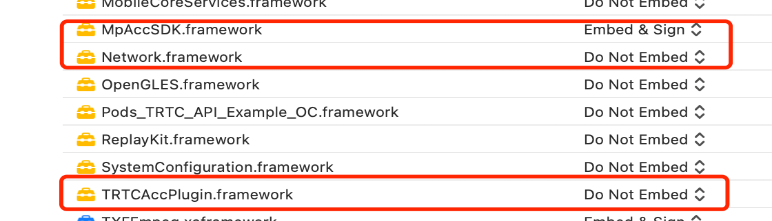
Then, configure acceleration and the TRTC plug-in SDK: MpAccSDK and TRTCAccPlugin. Among them, Network.framework is the system database.
Example Code
class TRTCPluginDemoViewController: UIViewController {private let accClient: MpAccClient = MpAccClient.sharedoverride func viewDidLoad() {super.viewDidLoad()AccPluginManager.shared.setAccProxyPlugin(TRTCAccPlugin())accClient.setupDatakey("xxxx", deviceId: "xxxx")}deinit {AccPluginManager.shared.setAccProxyPlugin(nil)accClient.stop()}// Enable TRTCfunc startTRTCSDK() { /*enable VPN*/ }}extension TRTCPluginDemoViewController: TRTCCloudDelegate {func onEnterRoom(_ result: Int) {guard result > 0 else { return }accClient.registerAccCallback(self)let config = AccConfig()config.accMode = .FastSwitching //1: Aggregation acceleration 2: Dual transmission acceleration 3: Fast switching accelerationconfig.pingInterval = 3accClient.start(config: config)}func onExitRoom(_ reason: Int) {accClient.stop()accClient.unRegisterAccCallback(self)}}extension TRTCPluginDemoViewController: AccCallback {configure callback}
フィードバック