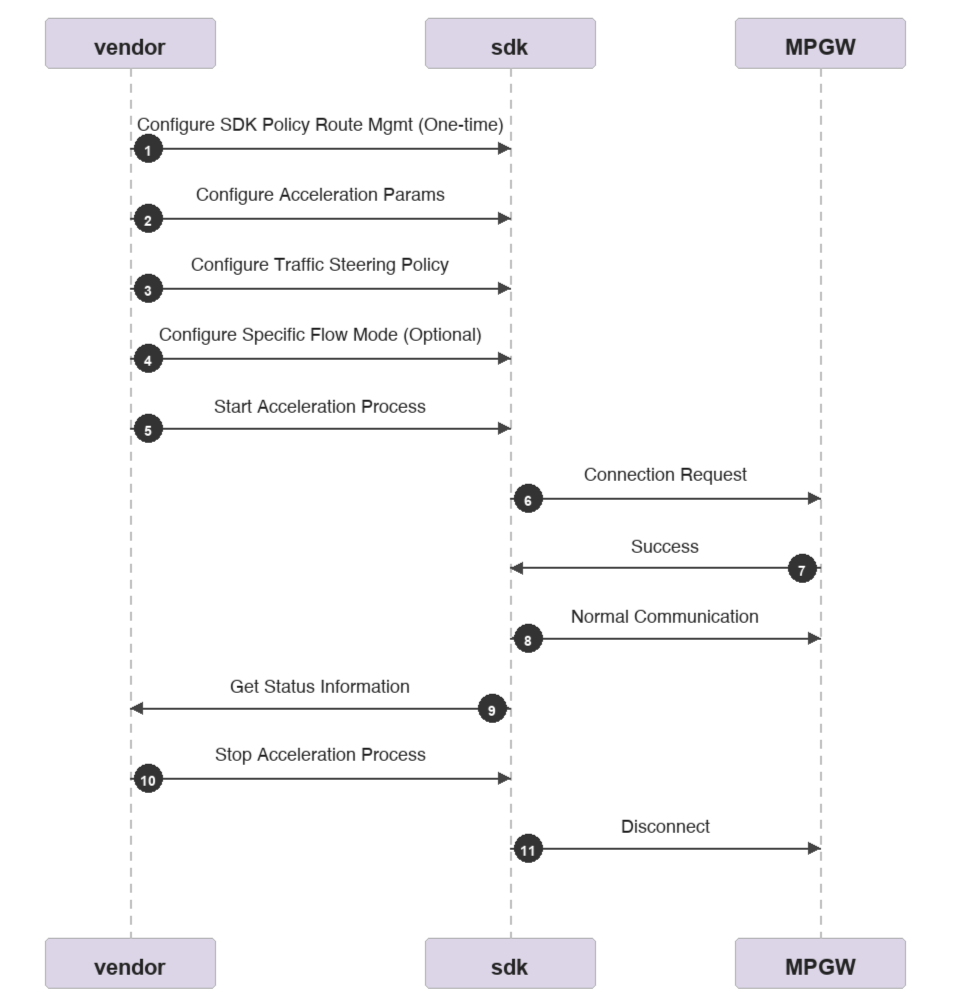
The steps for integrating the Cloud Jutong Linux SDK are as follows:
1. Determine whether to enable the SDK's built-in policy routing management module (It is recommended to enable it, as configuration is required only once).
3. Configure the business traffic diversion policy to determine which traffic requires acceleration.
4. Configure flow-based multi-mode rules to direct segmented traffic to specific modes (optional).
5. Start up the acceleration process.
6. Check the status of various SDKs.
7. Stop the acceleration process.
Note:
Business traffic diversion policy: It determines which traffic can be accelerated. Typically, it is a five-tuple rule (all or specific).
Multi-mode rule: It determines the acceleration mode for traffic entering the acceleration process. The rule can be configured as bonding / redundant / rtc mode, corresponding to different business scenarios. For example: services with high latency requirements can use redundant mode, while audio/video services can use rtc or bonding mode.
Relationship between the multi-mode rule and the mode in acceleration parameter configuration:
If no multi-mode rule is configured, all services are accelerated uniformly using the mode specified in the acceleration parameters. This may not be the optimal choice for certain specific business scenarios.
If a multi-mode rule is configured, it takes precedence.
SDK Built-In Policy Routing Management
Multiple Network Acceleration SDK includes a built-in policy routing management module. The feature is selectable. Please let the vendor manufacturer determine whether to enable it based on their own situation. Generally, we recommend using it.
Module overview of the built-in policy-based routing in the SDK
The policy routing management module built into the Multiple Network Acceleration SDK implements policy-based routing using the source IP addresses of WAN interfaces. This ensures that packets with a specified source IP address are sent out through the interface corresponding to that IP address. Without such policy routing, all packets are sent via the default route, which prevents the SDK from sending and receiving packets through multiple network interface cards.
For example, if a device has two WAN interfaces, ath0 and rmnet_mhi0.1, with IP addresses 192.168.81.80 and 10.221.7.233 respectively, and next-hop gateways 192.168.81.1 and 10.21.5.17, the SDK will generate such policy-based routing based on changes in the interface IP and default route:
/tmp # ip rule
0: from all lookup 128
1: from all lookup local
79: from 198.18.0.1 lookup 180
79: from all fwmark 0x1/0xf lookup 180
80: from 192.168.81.80 lookup 100
81: from 10.221.7.233 lookup 101
The SDK adds the policy with a priority of 79 and a routing table ID of 180 by default. This addition occurs regardless of whether the SDK's policy routing management feature is enabled.
Here, 198.18.0.1 is the IP address configured by the SDK for the mp_tun0 network interface. The firewall mark 0x1/0xf is a tag applied to the traffic that requires acceleration. The default egress for routing table 180 is the mp_tun0 interface, which ultimately directs the traffic to the mp_tun0 network card. The SDK's multi-network protocol then accelerates all traffic originating from the mp_tun0 network card.
The SDK's policy routing management adds two rules with priorities 80 and 81. Simultaneously, it adds the corresponding default routes to the routing tables with IDs 100 and 101, as follows:
/tmp # ip route ls table 100
default via 192.168.81.1 dev ath0
unreachable default metric 50000
/tmp # ip route ls table 101
default via 10.21.5.17 dev rmnet_mhi0.1
unreachable default metric 50000
Therefore, the manufacturer can determine whether to enable the built-in policy-based routing module in the SDK based on its OS circumstances. If the built-in policy-based routing module in the SDK is not enabled, the above work requirement needs to be implemented by the vendor itself.
Enable SDK policy-based routing management
curl -X POST 'http://127.0.0.1:9801/api/v2/route/policyRouteManagment' --header 'enable:true'
Note:
This configuration is automatically saved with persistent storage. It is recommended to execute it only once when installing the SDK. Enabling and disabling it again every start may lead to route exceptions.
Disable SDK policy-based routing management
curl -X POST 'http://127.0.0.1:9801/api/v2/route/policyRouteManagment' --header 'enable:false'
Accelerating Process Control
Configuring Acceleration Parameters
Before starting the acceleration process, the vendor manufacturer needs to collect the required parameters, which must be carried as parameters when launching the SDK acceleration.
Required parameter
1. Activate either of the two parameters:
vendor and sn: vendor is the device vendor model, sn is the serial number provided by the device vendor.
dataKey: device License key.
2. Interfaces: List of WAN physical interfaces for equipment participating in multi-network aggregation.
3. scheduleMode: Default work modes: bonding, redundant, rtc.
Note:
Multiple Network Acceleration feature activation has two methods. The vendor can determine which one to select based on their own situation:
1. vendor+sn: Activate with the device serial number. The device to be activated must be created in the Tencent Cloud console in advance.
2. dataKey: Activated by a License key. Contact Tencent Cloud sales or business to obtain it.
scheduleMode Mode Description:
Mode
Scenario
Description
bonding
Live streaming, high bandwidth
Distributes service traffic across multiple links to fully utilize the bandwidth of all links.
Benefits: high bandwidth, reliable transmission, and weak network resistance.
redundant
Gaming, control signaling
Copies and sends service packets over all links, and the receiver forwards the packet that arrives first.
Effect: consumes extra bandwidth to guarantee the lowest latency.
rtc
Real-time audio and video communication
Prioritizes transmitting service traffic over the link with the lowest latency, while utilizing other links as backups.
Effect: consumes no extra bandwidth, ensures smooth and non-lagging service, and provides strong weak network resistance.
Call the following API to configure acceleration parameters (only configure parameters without starting acceleration):
"dataKey":"get this devicekey from tencent and replace it here",
"interfaces": ["usb0","usb1","eth0"],
"registerEnv": -2,
"scheduleMode":"bonding"
}'
This interface imports a Client entity, defined as follows:
name
type
Description
dataKey
string
Required: Choose either vendor+sn or dataKey. The device dataKey.
vendor
string
Required: Choose either vendor+sn or dataKey. The device vendor and model.
sn
string
Required: Choose either vendor+sn or dataKey. The unique device serial number provided by the device vendor.
interfaces
[string]
Required. The list of interfaces participating in multi-network aggregation. Supports specifying a priority, ranging from 0 to 255. A smaller value indicates a higher priority. The priority is separated from the network interface card by a colon. If no priority is provided, it defaults to 64. Note: Priority specification is not supported in redundant mode. ["eth1:100", "eth2"].
scheduleMode
string
Required. The default acceleration mode. "bonding", "redundant", "rtc".
accGateway
string
Optional. Specify the acceleration gateway IP address. Multiple IP addresses should be separated by commas. If this parameter is not specified, the SDK will automatically connect to the nearest gateway. Otherwise, it will forcibly connect to the specified acceleration gateway, for example: "120.30.39.129".
gwPort
string
Optional. The gateway port. Default: "443".
UUID
string
Optional. The hardware fingerprint. If this parameter is not specified, the SDK will automatically generate it based on the hardware.
disableCrypto
integer
Optional. Allows the customer to choose whether to enable encryption when acceleration is started. Traffic encryption is enabled by default. Disabling encryption can reduce traffic consumption.
0: Enable traffic encryption (default).
1: Disable traffic encryption.
flowStatisticsInterval
integer
Optional. The link acceleration traffic statistics frequency. Default: 3 seconds.
maxRttDisableAggregation
integer
Optional. The latency threshold for link participation in aggregation. Default: 460 ms.
maxRttThreshold
integer
Optional. The latency for initiating link failure detection. Default: 460 ms.
minSwitchRTT
integer
Optional. The sensitivity for fast link switching. Default: 20 ms.
maxDelayUntilFailed
integer
Optional. The latency threshold for link participation in switching. Default: 460 ms.
registerEnv
integer
Optional. The cloud acceleration gateway cluster environment to which the SDK connects. (For testing only.)
0: Production environment (default).
1: Production environment (International site).
-2: Customer experience environment (POC test environment).
enableRecreatePathPconn
bool
Whether to enable path recreation.
Note:
The `registerEnv` parameter is optional and is used only during testing. It is not required for commercial equipment.
The above configuration requires restarting the acceleration process to make the configuration take effect.
Before the first acceleration, identify a network card whose mac address will not change, and write the network card name into the /usr/local/etc/mp-speeder/mp_client_ifname.conf file.
You must configure this file; otherwise, acceleration will not work. Configuration command example:
Call the following API to start acceleration. The SDK will then create a virtual network interface named mp_tun0. Business traffic will be guided to this virtual interface for acceleration based on the traffic diversion policy. (Before calling this API, ensure the acceleration parameters are configured.)
After starting acceleration, you need to call the "Query Acceleration Status API" to determine whether acceleration has started successfully.
Stopping Acceleration (Asynchronous)
After multi-network acceleration is stopped, all traffic will not be accelerated, acceleration is terminated, and the mp_tun0 virtual network interface is terminated.
After acceleration is restarted, you need to call the "Query Acceleration Status API".
Query Acceleration Status
This API will return a Status entity containing SDK status info.
curl -X GET "http://127.0.0.1:9801/api/v2/client/mp-speeder" -H "accept: */*" -H "Content-Type: application/json"
Status definition
name
type
Description
ready
boolean
Whether the acceleration process is started normally.
UUID
string
The hardware fingerprint of the device.
dataKey
string
The device dataKey.
swVersion
string
The SDK software version.
accGateway
string
The IP address of the acceleration gateway.
gatewayPort
string
The port of the acceleration gateway.
interfaces
[string]
The list of interfaces participating in multi-link aggregation.
scheduleMode
string
The default acceleration mode. "bonding", "redundant", "rtc".
registerEnv
integer
The cloud acceleration gateway cluster environment to which the SDK connects.
0: Production environment (default).
1: Production environment (International site).
-2: Customer experience environment (POC test environment).
Query Acceleration Traffic Information
This API will return a Statistics entity, containing the cumulative accelerated traffic consumption based on the network interface card and the real-time speed of the acceleration channel. The statistical information is periodically refreshed at 10-second intervals.
Cumulative accelerated traffic in the receive direction, in Bytes.
totalSendBytes
integer
Cumulative accelerated traffic in the send direction, in Bytes.
receivedRate
float
Receive rate of the current NIC acceleration channel, in bit/s.
sendRate
float
Send rate of the current NIC acceleration channel, in bit/s.
loss
float
Packet loss rate of the current NIC acceleration channel. The packet loss rate is expressed as a decimal, for example, 0.1 indicates a packet loss rate of 10%, and 1 indicates a packet loss rate of 100%.
rtt
integer
rtt of the current NIC acceleration channel, in ms.
Note: -1 indicates that the current link is unavailable.
Business Traffic Diversion
The primary function of traffic diversion is to guide traffic of interest into the mp_tun virtual interface for acceleration. It works by tagging the configured five-tuple traffic, performing policy-based routing, and directing the traffic through the mp_tun interface to the SDK for processing. The diverted traffic will use the default acceleration mode (configured in the "Required Acceleration Parameters").
Note:
Once you perform the traffic diversion config operation, you must restart the acceleration process to make the configuration take effect.
Intercept all TCP/UDP traffic from local machine-attached devices accessing the Internet. This traffic will be diverted into the SDK.
Note:
1. Full traffic diversion rules only apply to devices connected to the local machine and do not support traffic from the machine itself. To speed up local machine traffic, configure specific diversion rules with the source IP set to 0.0.0.0.
2. Full traffic diversion is configured on the lan (or LAN) interface. Ensure that the network interface card name contains the string "lan".
3. If you configure full traffic diversion without a lan (or LAN) interface, SSH traffic may be diverted, which can prevent remote access to the device.
This feature is optional. It is primarily used to meet the requirement for directing targeted, specific traffic flows to different modes.
Typical case: Suppose in a robot scenario, control signaling needs to use redundant mode to ensure ultra-low latency, while the onboard camera uses RTC mode to ensure smooth video without consuming double the traffic. Therefore, this feature can be leveraged to configure match rules, accurately identify control flow and video stream based on IP quintuple, and then set different running modes for the two streams.
After the match rules are configured, traffic will be processed according to the following logic:
1. First, match traffic based on the IP quintuple. If a match is found, the traffic follows the configured rule and uses the specified acceleration mode.
2. If no rule is configured in the system or no rule is matched, traffic will use the default acceleration mode. The default acceleration mode is configured in the "required parameter for acceleration".
3. Multi-mode rules support priority configuration. A lower number indicates a higher priority. The default priority is 255.
Note:
Once you perform the traffic subdivision config operation, you must restart the acceleration process to make the configuration take effect.
This feature is selectable and mainly used for product operation and maintenance.
Log Path
The default output path for SDK logs is: /var/log, which includes mp-sdk.log and mp-speeder.log.
If needed, you can specify the log output path. The modification method is as follows:
Manually modify the logDir field in the /usr/local/etc/mp-speeder/log_config.json file, ensuring the format remains consistent with the file.
{
"logLevel":"info",
"autoUpload": false,
"uploadInterval": 10,
"logDir":"/var/log"
}
Note:
1. If the specified logDir path does not exist, it is created by default.
2. After making modifications, you must restart the SDK.
Log Reporting
Log reporting is selectable for problem localization. There are two methods for log reporting.
Manual reporting: Execute once command to report multi-network logs saved locally on the device to the backend.
Automatic reporting: After you set the reporting interval and enable the switch, logs are periodically reported to the backend. You can disable the switch at any time to stop reporting logs.
Note:
Local logs occupy up to 50MB of storage space. After they are reported, locally stored logs are automatically cleaned up.
Modify log collection parameters, the SDK must be restarted for the changes to take effect.
"reason":"Acc RTT 496.634µs over Master 447.855µs * 1 in 5m0s"
}
Field description:
Field
Type
Meaning
acc_mode
string
Acceleration mode.
Acceleration mode.
1: Aggregation mode;
2: Dual-send mode;
3: Fast-switch mode.
mandatory
bool
Notifies the SDK whether to actively disable acceleration. When false, the notification event is only a suggestion.
code
int
Error code for disabling acceleration.
Return value for the code field:
-6: ACC link sustained packet loss anomaly;
-7: ACC link maximum delay anomaly, where the ACC link delay continuously exceeds the specified threshold while the primary link remains normal;
-8: ACC link average delay exceeds the primary link average delay within the time window;
-9: ACC link average delay exceeds the configured threshold;
-100: A link anomaly may exist, applicable only to aggregation mode;
2: Acceleration is ineffective; it is recommended to disable acceleration.
reason
string
Specific reason for disabling acceleration.
Note:
After the configuration is complete, you need to restart acceleration for it to take effect.
Speed Test Configuration
Note: This feature requires manual configuration of the speed test configuration file. The file location is /usr/local/etc/mp-speeder/metric.json. You can use default configuration or customize it.
Configure according to the necessary acceleration mode. Here is an example for aggregation mode:
"bonding":{
"probeCfg":{
"fastProbeInterval": 200,
"normalProbeInterval": 1000,
"minTimeForSelectProbePoint": 3000
},
"checkCfg":{
"quicDetectTime": 10000,
"primaryDetectTime":60000,
"secondaryDetectTime":300000,
"iQRAlpha": 0.75,
"minDetectCount": 4,
"maxDetectRTT": 400,
"detectTimeout": 1000
},
"enableAcc":{
"lossRate": 5,
"quicRTT": 100,
"avgRTT": 110,
"jitterRTT": 20,
"mdevRTT": 20,
"maxRTT": 300,
"disableQuicWndDetect": true,
"disableAvgRTTDetect": false,
"disableJitterDetect": false,
"disableLossDetect": false
},
"disableAcc":{
"lossCount":4,
"maxRTTCount": 4,
"avgRTT": 130,
"toleranceRate": 1.1,
"minAvgRTT": 66,
"SecondaryToleranceRate":1.0,
"SecondaryJitterRate":0.8,
// Escape: ${lossCount}consecutive packet losses and no consecutive packet loss on the primary link
"EnableLossDetect": true,
// Escape: ${maxRTTCount}consecutive RTTs above ${checkCfg.maxDetectRTT}and normal primary link
"EnableMaxRTTDetect": false,
// Escape: The avgRTT of the acc link exceeds ${disableAcc.avgRTT}within the ${checkCfg.primaryDetectTime}time window
"EnablePrimaryAvgRTTDetect": false,
// Escape: The avgRTT of the acc link exceeds that of the primary link within the ${checkCfg.primaryDetectTime}time window
"EnablePrimaryDetect": false,
// Recommended to disable: The avgRTT of the acc link exceeds that of the primary link within the ${checkCfg.secondaryDetectTime}time window
"EnableSecondaryDetect": false,
// Recommended to disable: ALL secondary links with packet loss in the time window ${checkCfg.primaryDetectTime}
"EnableSlaveLossDetect": false
}
}
Note:
After the configuration is complete, you need to restart acceleration for it to take effect.